Kubernetes: It's Not Complicated, It's Arcane Magic
Why is this Containerization meme funny?
Level 1: Tech Magic for Mortals
Imagine you have a big chore to do, like cleaning up a hundred toys spread all over your room. You could pick them up one by one yourself, which is like running an app on one computer. Now, picture instead that you have ten little robots (like mini helpers) to help you clean, but you need to tell each robot what to do. You write down a very detailed plan so all the robots work together to get every toy put away – maybe one robot picks up Lego, another gathers the dolls, and so on. When you read this plan out loud, all the robots start cleaning in unison. If one robot breaks, another robot sees it and finishes its job. From the outside, it looks like your room cleaned itself by magic, right? But really, it’s because you set up a smart system and clear instructions. Kubernetes is kind of like that: it’s the smart system that lets lots of machines (robots) run apps (clean up tasks) together without you having to touch each one. It feels like magic because you just say what you want – “clean the room” – and somehow it happens. The funny picture with the wizard is joking that using Kubernetes can feel like being a wizard casting a cleanup spell. In reality, there’s no magic wand – just a very complex machine following the rules you give it. The joke is that sometimes those rules are so complicated that you feel like you must be at a magic school to understand them! But don’t worry, it’s still just people and computers making it all work, not real sorcery. It’s the kind of “magic” that comes from technology – impressive, a bit mysterious at first, but not supernatural at all.
Level 2: Conductor of Containers
Let’s break down the magic trick: Kubernetes is a technology for managing application containers across many computers, and “orchestration” is the key idea. Think of container orchestration like a conductor leading an orchestra. Instead of musicians, Kubernetes coordinates containers – these are like little packaged apps (similar to Docker containers) that include everything needed to run a piece of software. Containerization is the practice of bundling an application with its environment and dependencies into one neat package (a container), so it can run reliably anywhere. Now, one container by itself is like a single musician playing a tune. Kubernetes comes in when you have an entire band or even a full symphony of containers that need to play together in harmony. It makes sure each container (or group of containers) starts correctly, finds the right resources (CPU, memory), connects to the right network, and keeps running. If one container forgets its lines and crashes, Kubernetes (the conductor) notices and cues a replacement to start playing again. This is what they mean by Kubernetes being a self-healing, automated system – much less mystical when you realize it’s just a super diligent stage manager for apps.
So why do people joke that it’s black magic? Well, Kubernetes introduces a lot of new concepts and configuration files that can feel really complex when you’re new. For example, to deploy even a simple web app, you don’t just click “run.” You often create several YAML files (YAML is a text format, kind of like writing a recipe for your app) describing what you want: one file might define a Deployment (how many copies of your app to run), another might define a Service (how those app copies get a single accessible network endpoint), maybe another for an Ingress (rules for external traffic), etc. YAML stands for “YAML Ain’t Markup Language,” and it’s used because it’s human-readable (in theory!), but it’s very picky about formatting. Writing these files feels like composing spells because if you get an indent wrong or miss a keyword, nothing works and the error messages can be hard to decipher at first. Early-career developers often find themselves thinking, “I did exactly what the tutorial said, why isn’t it working?!” – that’s the frustration and mystery that leads to the tongue-in-cheek idea that Kubernetes is some kind of arcane art.
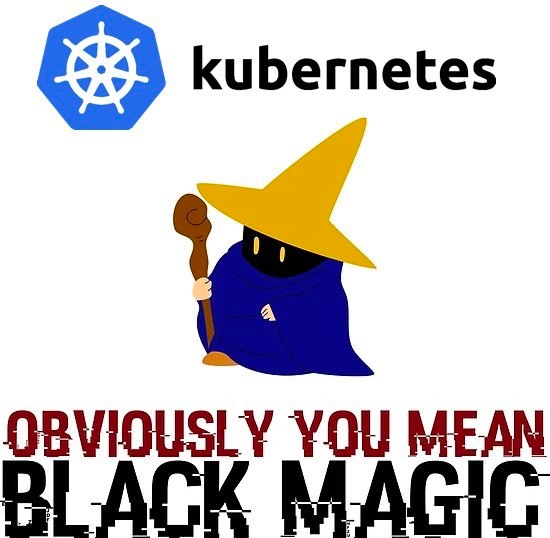
To clarify some terms from the meme: Kubernetes is the system doing the “orchestration.” Its logo (the hexagonal ship wheel at the top of the meme) hints at steering ships – in fact, “Kubernetes” comes from a Greek word meaning helmsman or pilot, since it’s guiding containers like ships in a fleet. A wizard (like the cartoon in the meme) is someone who uses magic, and here it represents an engineer using Kubernetes seemingly like magic. The Final Fantasy Black Mage character was chosen because it’s an iconic video game wizard known for powerful spells – a playful way to depict a developer who has mastered K8s. The phrase “Obviously you mean black magic” in glitchy letters is just the meme’s way of saying: “You call this complicated system ‘orchestration’? Hah, it feels more like sorcery to me!” It’s exaggeration for comedic effect – nobody actually thinks K8s is supernatural, but it does seem unbelievably intricate at times.
Now, DevOps and SRE get mentioned because those are the folks who work with Kubernetes daily. DevOps is a culture/practice that blends Development and Operations – meaning developers and IT operations collaborate closely, often automating deployments and infrastructure. Kubernetes is a popular tool in DevOps because it automates a lot of operations tasks. SRE stands for Site Reliability Engineering, which is a role Google popularized where you apply software engineering to operations – essentially keeping complex systems like Kubernetes-based platforms reliable and scalable. For a junior developer, it’s enough to know that DevOps engineers/SREs often set up and maintain Kubernetes clusters and help developers use them correctly. They’re like the caretakers of this big, complex machine. So when new developers encounter Kubernetes, they often rely on these “wizardly” experts for guidance, which reinforces the idea that some special knowledge (or magic) is required.
DistributedSystems is another term from the categories: a distributed system means you have a bunch of computers (nodes) working together over a network to achieve a common goal. Kubernetes is a prime example – instead of one big server, you might have dozens of smaller ones, and Kubernetes makes them act like one cohesive unit for running your containers. Distributed systems are powerful (you can do more work with 10 machines than with 1) but tricky (what if one machine fails? how do they coordinate? how to handle network delays?). Kubernetes handles a lot of these challenges for you behind the scenes: it has mechanisms to detect node failures, reschedule work, balance load – all automatically. It’s like having an army of robotic helpers vs. doing everything on a single robot; coordination is harder, but you get more done. To a newcomer, though, all that behind-the-scenes coordination is invisible – you just see that you deployed your app and somehow it’s running on Machine A and Machine B, and traffic is splitting between them. It feels like magic if you don’t yet grasp that there’s a controller manager, a scheduler, and other components relentlessly doing that work.
One concrete example: Let’s say you want to update your application to a new version. With Kubernetes, you’d update your Deployment config (maybe just change the container image version in the YAML) and apply it. Kubernetes will perform a rolling update – gradually launching new containers with the new version and shutting down the old ones, so there’s no downtime. The first time you witness this, it’s jaw-dropping – “I changed one line in a config and the system magically updated 10 instances of my app one by one without going down!” But under the hood, that’s just Kubernetes doing what it’s programmed to do: a Deployment controller watching for changes, and when it sees the version update it orchestrates the replacement of pods in a controlled way. No human had to manually restart each instance – the automation took care of it. When you learn that, it’s less mystical and more “wow, great automation!” but until then, it absolutely seems like the system has a mind of its own.
So, in simpler terms: Kubernetes is like a master organizer for running software containers across many computers. People joke it’s “black magic” because it’s complex and can be confusing, not because it’s actually supernatural. The meme uses a wizard and the phrase “black magic” to humorously capture that feeling of mystery. But as you study Kubernetes (and maybe cast a few “help me” spells in Google), the magic fades into understanding. You realize it’s just lots of computers, instructions, and rules working together. The wizard theme is a fun way to say “Hey, it’s okay if this stuff seems confusing – even experienced engineers find it tricky!” Over time, those engineers have learned the spells (commands and best practices) and turned the black magic into just another technology in their toolkit. And with a bit of learning, you will too – no actual witchcraft required. 🔮
Level 3: YAML Spellcasting
For seasoned DevOps engineers and SREs, this meme hits home because working with Kubernetes often feels like thumbing through a spellbook of YAML incantations. The image of a wizard in a cloak – specifically the classic Final Fantasy Black Mage – perfectly encapsulates how a harried DevOps person might look and feel after hours of tweaking deployment files and arcane configs. Kubernetes advertises itself as “container orchestration,” but when you’re deep in the trenches, it’s more like conducting a complex ritual. You don’t just press a button to deploy; you write a YAML manifest (or ten), each with indentations and keywords so particular that one wrong space can summon wholly unintended results. It’s common DevOps humor to joke that we’re “writing YAML spells” to appease the cluster gods. In fact, many of us have experienced that trial-and-error phase of copying some mysterious block of config from StackOverflow, running kubectl apply -f mystic_deployment.yaml, and crossing fingers like we just uttered “wingardium leviosa” hoping the pods levitate into running state.
The caption “OBVIOUSLY YOU MEAN BLACK MAGIC” is exactly the snark a weary engineer might respond with when someone innocently calls Kubernetes an orchestration tool. Sure, it orchestrates containers... the way summoning circles organize demons. 😜 The humor is in the over-engineering: Kubernetes is powerful, but it’s also notorious for its steep learning curve and complexity. Industry veterans nod knowingly because they remember the first time they tried to deploy a simple “Hello World” app to a K8s cluster and ended up wrangling dozens of unfamiliar concepts – Pods, ReplicaSets, Services, Ingress, ConfigMaps – each defined by more YAML. What was supposed to simplify deployment introduced a whole new vocabulary and a lot of “Wait, why isn’t this working?!” moments. It’s a rite of passage in modern cloud-native development: feeling completely lost, then gradually learning the secret spells (commands and configs) to tame the beast.
In practice, using Kubernetes can involve a litany of arcane rituals that senior folks know all too well. Need to debug a failing container? Better chant kubectl logs <podName> and kubectl describe pod <podName> to read the tea leaves of error logs and events. Networking issue in the cluster? Seasoned SREs might half-jokingly suggest sacrificing a chicken yaml to the DNS gods, because “It’s always DNS” – yes, even inside Kubernetes, a misconfigured cluster DNS (CoreDNS) will make the whole system feel cursed. And how about those times when a Deployment is stuck in CrashLoopBackOff? To newcomers that status might as well be ancient runes; experienced operators know it’s code for “the app keeps crashing and Kubernetes keeps resurrecting it.” The meme resonates because even when you do know what’s happening, the sheer number of moving parts can make you empathize with the “black magic” metaphor. We joke that cloud-native devs are basically wizards: we wear hoodies instead of robes and write YAML instead of Latin, but we’re still murmuring incantations (CLI commands) hoping for the desired outcome in our distributed systems.
Real-world stories feed this joke. You’ll hear tales of someone updating a YAML in Git, triggering a CI/CD pipeline that applies it, and suddenly the website goes down – oops, wrong field in a ConfigMap, and now the spell backfired. At 3 AM, groggy on-call engineers might feel like apprentice sorcerers frantically paging through grimoires (documentation) to break a production curse (outage). The ContainerOrchestrationWars of the mid-2010s (Kubernetes vs Docker Swarm vs Mesos) ended with Kubernetes reigning supreme, but not because it was the simplest – rather because it was the most flexible and powerful (the “all-powerful wizard” of the lot). We essentially chose the tool with the most features and extensibility, accepting that with great power comes great complexity. The meme wryly implies that we’ve all become conjurers of containers, performing cloud-native magic whether we like it or not.
Even the Kubernetes logo – that ship’s wheel – suggests steering a mighty vessel, but in day-to-day use it can feel like you’re consulting a Necronomicon. We write things like:
# A typical Kubernetes Deployment manifest (excerpt) - looks like a spell, acts like config
apiVersion: apps/v1
kind: Deployment
metadata:
name: my-app
spec:
replicas: 3 # "replicate this pod 3 times" – a simple spell for scaling
selector:
matchLabels: { app: my-app } # target pods with this label
template:
metadata: { labels: { app: my-app } }
spec:
containers:
- name: my-app-container
image: myapp:1.0 # the container image to run (our magic potion)
ports: [{ containerPort: 80 }]
To the uninitiated, this blob of text might as well be an ancient scroll. But to a K8s practitioner, it’s a straightforward recipe: “run 3 copies of my-app container, and expose port 80.” The humor is that it doesn’t look straightforward at all when you first encounter it! There’s a shared memory among developers of bewilderment the first time they saw a Kubernetes config file – all those brackets, indents, and strange keys like matchLabels – and thought, “Am I configuring software or casting a spell?” The wizard_meme nails this feeling: the robed mage declares “OBVIOUSLY YOU MEAN BLACK MAGIC,” which is exactly how a lot of us jokingly feel when we finally get a complex Kubernetes deployment working. We half-believe it wasn’t our skill but some dark container deity that made it succeed.
In truth, as you gain experience, the “magic” becomes more like science and steady engineering. You learn that lots of the weirdness has logical explanations. Those seemingly mystical failures often come down to small misconfigurations: a missing environment variable here, a mis-indented line there, an unfulfilled dependency. But seeing a robed figure claiming ownership of Kubernetes’ complexity is cathartic – it’s an acknowledgment that yes, this system is complex, and yes, even pros feel like wizards or witches sometimes, channeling power they can’t completely tame. It’s a humorous solidarity: whether you’re a grizzled SRE or a curious junior dev, everyone has felt the kubernetes learning curve and thought, “This is nuts, am I doing DevOps or dark arts?” The meme simply says out loud what we all experience in our DevOps journey: Kubernetes can be overwhelming, but if you manage to harness it, you earn your wizard hat. 🧙♂️
Level 4: Sorcery at Scale
At the deepest level, what feels like black magic in Kubernetes is actually a convergence of advanced distributed systems algorithms and careful design. Kubernetes (often stylized K8s) transforms a fleet of machines into one giant computer through a sophisticated control plane. Its brain is an etcd cluster – a consistent distributed key-value store using the Raft consensus algorithm to agree on the cluster’s state. This is serious computer science: Raft ensures that even if some nodes fail or messages arrive out-of-order, all healthy parts eventually share one consistent truth about your containers. That means when you declare “run 5 copies of this app,” every part of the cluster (through etcd’s consensus) will eventually agree and make it so. No mysticism – just the CAP theorem in action: Kubernetes leans towards consistency over availability, pausing updates rather than risking split-brain chaos.
Beneath the hood, Kubernetes runs a constellation of controllers and agents working like enchanted control loops. Each component (the scheduler, deployment controller, etc.) continuously observes the desired state you’ve described (in those infamous YAML scrolls) and the actual state of the cluster reported via etcd. This is akin to classical feedback control theory applied to cloud infrastructure – honestly more math and automation than magical incantation. For example, the scheduler solves a complex bin-packing problem: given many containers (pods) and many servers, it must decide which pod goes to which server, respecting resource limits and affinities. This problem is NP-hard in theory, but Kubernetes uses clever heuristics and priorities to approximate a good solution in milliseconds. What seems like instant sorcery (“abracadabra, your app is running on Node42!”) is really a fast graph search through resource pools.
The “orchestration” part of Kubernetes is where a lot of the spooky mystique comes from. Orchestration means coordinating many independent parts – much like a conductor leading a distributed symphony. Kubernetes employs declarative configuration: you declare what you want (e.g., 3 replicas of a web service) without specifying how to do it. Then a swarm of specialized controllers (Deployment controllers, ReplicaSet controllers, etc.) figures out the how, automatically. These controllers behave almost like little autonomous agents or daemons, each watching a subset of resources and making adjustments. This design is rooted in decades of distributed computing research: from the concept of state reconciliation (bringing the current state in line with the desired state) to leveraging patterns from earlier cluster managers (Google’s internal Borg/Omega systems). It’s not black magic at all – it’s automation layered on robust theory. But when you’re new to it, the way Kubernetes self-heals (restarts failing pods, reschedules work when nodes die) does feel supernatural. A node crashes, and poof pods respawn elsewhere – in reality, a flurry of heartbeats failed and a controller issued new scheduling commands, but to an onlooker it’s like the system cast a teleportation spell for your app.
Even the networking, which can seem otherworldly, is built on concrete tech: every pod gets a virtual IP and there are overlay networks (like Flannel, Calico) making containers on different machines talk as if by teleportation. Under the covers, packet encapsulation and routing rules are doing the work – basically networking arcana forged by human engineers. And those mysterious Service discovery mechanisms? Kubernetes uses endpoints and proxy logic (via kube-proxy or newer Service Mesh proxies) to route traffic reliably, a pragmatic implementation of consistent hashing or iptables rules, not literal wizardry. In sum, Kubernetes feels arcane because it bundles a pandora’s box of distributed consensus, scheduling theory, and networking tricks; but each piece is grounded in technology and research. The magic is just abstraction: the platform hides insane complexity behind declarative yamls, so when it “just works,” it feels like a miracle – even though it’s really thousands of engineer-hours and academic papers worth of engineering casting the “spell.”
Description
The image features the official Kubernetes logo, a blue heptagon with a ship's wheel inside, and the word 'kubernetes' in black text at the top. Below it is a cartoon illustration of a Black Mage character from the video game series Final Fantasy, recognizable by its iconic yellow pointy hat, blue robes, and shadowed face with glowing yellow eyes, holding a wooden staff. At the bottom of the image, the text 'OBVIOUSLY YOU MEAN BLACK MAGIC' is displayed in a heavily distorted, glitchy font, with red and black letters that appear fragmented. The overall image is set against a plain white background, creating a stark contrast that highlights the elements. The meme humorously captures the sentiment within the developer community that Kubernetes is so complex and abstract that it feels like magic. For senior engineers, this resonates because while they understand the underlying principles, the sheer number of layers - from networking to storage to scheduling - can make troubleshooting feel like deciphering ancient runes. The 'black magic' reference is particularly apt for moments when a simple YAML change fixes a catastrophic failure for reasons that aren't immediately obvious, or vice-versa

Comments
8Comment deleted
They call Kubernetes 'black magic' because you spend hours chanting YAML incantations just to find out the production outage was caused by a typo in a label selector
Kubernetes is the only “orchestrator” where the runbook basically reads: chant kubectl apply, appease the etcd quorum, and pray the sidecar spirits don’t resurrect last week’s pods
After 15 years in this industry, I've realized Kubernetes is just a distributed system for turning "it works on my machine" into "it doesn't work on anyone's cluster, but at least the YAML is version controlled."
Kubernetes is just black magic with a control loop: you chant YAML, sacrifice a sprint, and the cluster decides whether your offering reconciles
Kubernetes: where 'it works on my cluster' becomes the new 'it works on my machine,' and your YAML indentation errors are just the universe's way of testing whether you've truly achieved enlightenment. Senior engineers know that mastering K8s isn't about understanding containers - it's about accepting that you'll spend more time debugging networking policies and resource quotas than actually deploying applications, all while pretending the 47 CRDs you just installed are 'simplifying' your infrastructure
Kubernetes: where one indented YAML rune too many summons OOMKilled pods from the void, proving etcd holds more power than any mortal CRD
Senior K8s debugging: outage caused by RBAC default plus CNI chain order; resolved by kubectl apply -f the same manifest - apparently the reconciler responds to a fresh incantation
Kubernetes is the only stack where 800 lines of Helm-templated YAML summon a pod, RBAC decides if you can look at it, CNI binds an IP, and a misconfigured liveness probe resurrects it every 30 seconds