Saying yes to Kubernetes, then meeting the endless CNCF toolbox and inevitable burnout
Why is this Containerization meme funny?
Level 1: From Pet to Zoo
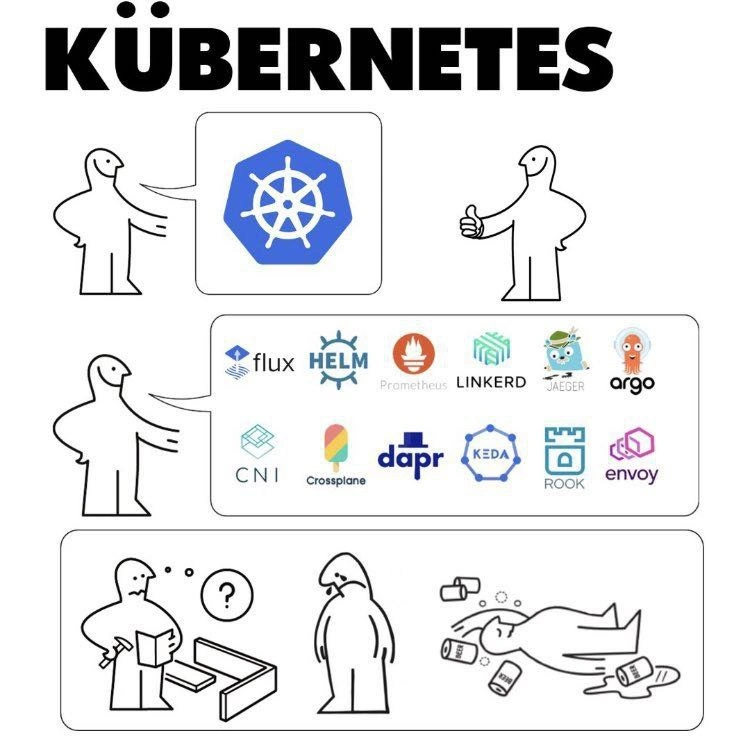
This meme is funny because it’s like someone asked for one pet and ended up with a whole zoo to take care of. Imagine you tell your parents you want a puppy. They agree (yay!), and a truck shows up at your house. But instead of just a cute puppy, out comes a puppy and a cat, and a bird, and a lizard, and even more animals – until your yard is full of different critters. You thought it would be easy to have one new friend, but now you have to feed, clean, and look after a dozen different animals, each with its own needs. In the beginning you were excited, giving a thumbs up for the puppy (just like the person in the first panel saying yes to Kubernetes). But when all those other animals arrived, you stared in surprise, not sure what to do (just like the person in the second panel seeing all those tool logos). Taking care of so many pets becomes really hard – you’re running around trying to build cages, fill water bowls, and keep everyone safe. After a while, you’re so tired that you just flop onto the ground face-first, surrounded by spilled water and food bowls, completely exhausted. That’s the third panel’s joke: the person is lying on the floor with coffee cups (imagine those are like the water bowls) all around, totally worn out.
So the whole comic is an everyday analogy for getting overwhelmed. Saying “yes” to Kubernetes is portrayed as saying yes to something that seems simple but actually comes with a lot of hidden chores. It’s funny in the way that a cartoon is funny when the character opens a closet door and a mountain of stuff falls on them. You don’t need to know anything about Kubernetes to get the joke: it’s about expectations vs. reality. The person expected an easy win (just one new thing to handle), but reality delivered an army of tasks. In the end, they’re frazzled and sprawled out from burnout – kind of like when we overcommit to too many things in life. The humor makes a gentle point: be careful what you agree to, because you might get a lot more than you bargained for!
Level 2: Welcome to the Jungle
Imagine you’re new to the world of containers and DevOps. Kubernetes is introduced to you as this great solution: it can run applications in containers across lots of computers, handle scaling, and make sure everything stays up. That sounds awesome, right? This is the first panel: a happy person presenting the Kubernetes logo (the blue wheel with ship’s helm) and another person eagerly giving a thumbs-up. At this point, Kubernetes seems like a simple, single product you just turn on to magically solve deployment problems.
Now, welcome to the CNCF jungle. CNCF stands for Cloud Native Computing Foundation, which is like an umbrella organization that hosts a huge number of open-source tools related to cloud and containers. In the second panel of the comic, the first person opens a big box filled with logos of many of these tools. The recipient’s expression goes from excited to 😶 blank. Here’s what’s happening: when you adopt Kubernetes, you quickly find out that Kubernetes by itself doesn’t do everything you need. Container orchestration (what K8s does: scheduling containers on machines, restarting them if they fail) is just one piece of running applications in production. You also need things like monitoring, logging, networking, security, and so on. Each logo in that box is a tool for one of those needs:
- Kubernetes (K8s): The starting point – it keeps your apps running in containers, balances them across servers, and deals with scaling and restarting them. Think of K8s as the engine of a car. But a car isn’t just an engine…
- Helm: Often called “the package manager for Kubernetes.” It’s like an app store or installer for K8s applications. Instead of writing 100 configuration files yourself to deploy something like a database, you can use a Helm chart (a pre-made template) to deploy it with one command.
- Prometheus: This is a monitoring system. Once your app is running, you need to watch metrics (CPU usage, memory, requests per second, errors, etc.) to know if it’s healthy. Prometheus collects all those numbers from your services. It’s like the thermometer and heart-rate monitor for your infrastructure – crucial for observability and monitoring.
- Flux: Flux is a tool for GitOps, which means it automatically applies config changes to your cluster based on what’s in a Git repository. Instead of manually configuring your cluster, you push changes to Git and Flux makes the cluster match. It’s a way to keep configurations versioned and consistent.
- Linkerd: This is a service mesh. When you have lots of little services talking to each other on a network, you want reliable communication, encryption, retries, etc. Linkerd can insert itself between services (as a sidecar proxy) to handle those network concerns automatically. It’s like a translator/facilitator for conversations between your apps, making sure messages get delivered safely.
- Jaeger: A tracing system. If a user request goes through 10 different services (which is common in microservice apps), Jaeger helps track that request’s path. It’s like leaving breadcrumbs through each service so later you can see “ah, the request slowed down at service #7, that’s where the problem is.” This is another key part of observability.
- Argo: The logo likely refers to Argo CD (Continuous Delivery) or Argo Workflows. Argo CD automatically deploys your app updates to K8s (often also using GitOps principles). Argo Workflows let you run complex jobs (think data processing pipelines) on K8s easily. Either way, Argo helps with automating processes on Kubernetes.
- CNI (Container Network Interface): Kubernetes doesn’t come with a default way to implement networking. CNI is a standard that different networking solutions implement to plug into K8s. So when you set up a cluster, you have to pick a CNI plugin (like Calico or Flannel) to make pod-to-pod networking work. It’s essentially “choose your networking driver.” The comic just shows “CNI” to represent “hey, figure out networking too!”
- Crossplane: This tool allows you to manage cloud resources through K8s. For example, you could create a database or storage bucket by applying a K8s config file, and Crossplane will talk to your cloud provider (AWS, GCP, Azure) to actually create those resources. It extends Kubernetes to be not just about containers, but about all your infrastructure.
- Dapr: This stands for Distributed Application Runtime. It’s like a toolbox for developers building microservices – offering pre-built solutions for things like service discovery, pub/sub messaging, secret management, etc. If a developer doesn’t want to learn all the nitty-gritty of cloud services, they can use Dapr’s APIs and it abstracts away a lot of that. But of course, running Dapr itself adds complexity (you run a Dapr sidecar with each service).
- KEDA: Kubernetes Event-Driven Autoscaling. It extends K8s’s scaling ability by letting it react to more than just CPU or memory. For instance, KEDA can monitor a length of a queue (like number of messages waiting to be processed) and scale up workers if the queue grows. This is useful for event-driven architectures where load isn’t just constant, but comes in bursts triggered by events.
- Rook: A tool that helps run storage systems in K8s. By default, if a container needs to store data permanently, Kubernetes alone can’t do that – you need to provision storage volumes. Rook steps in by managing a storage cluster (like Ceph) inside K8s, so you can have your databases or stateful apps store data reliably. It abstracts some heavy lifting of storage management.
- Envoy: A high-performance network proxy. It often works with service meshes (Linkerd, Istio) or on its own as an API gateway. Envoy’s job is to handle network traffic smartly: it can do load balancing, traffic routing, retries, and enforce policies. Many modern systems use Envoy under the hood to manage all those incoming and outgoing requests between services.
Whew! So basically, each of those items is another tool you need to learn and integrate after you “say yes” to Kubernetes. The second panel is overwhelming by design – it mirrors how a newbie feels when they see the sprawling cloud-native landscape. The person’s blank stare says, “I thought I was just getting Kubernetes… what are all these?!” This is a rite of passage in modern DevOps: discovering that adopting Kubernetes is not just running kubectl apply and calling it a day, but also assembling a whole platform around it for things like monitoring, security, and deployment pipelines.
Now the third panel: it’s split into a mini-story of its own. In the first part, the character is holding a hammer and looking at an unassembled box or piece of furniture with a question mark overhead. This represents confusion and frustration in assembly. A real-life parallel: you have all these tools (flux, Helm, Prometheus…) like pieces of a complex IKEA kit, and you’re not sure how to piece them together into a working, reliable platform. It’s a lot of trial-and-error at this stage, reading documentation, watching tutorial videos, maybe copy-pasting commands and YAML configs and hoping it works.
Next part, the person is visibly slumped or hunched. This indicates discouragement. Perhaps at this point, our intrepid DevOps engineer spent days or weeks wrestling with configurations. Maybe the cluster broke after an update, or Prometheus isn’t scraping metrics correctly and you can’t figure out why, or Helm deployments keep failing due to some version mismatch. The initial enthusiasm has drained. Many who have been on a small team adopting Kubernetes can relate: it’s that period where you wonder “Was this a mistake? Why is this so hard?”
Finally, the third part shows the person collapsed face-down on the ground with spilled coffee cups around – a universal cartoon sign of exhaustion and burnout. They likely pulled some late nights (hence the coffee) trying to get everything working. This is the endgame the meme jokes about: Kubernetes was supposed to help, but setting it up with all these moving parts became so stressful and tiring that it defeated the person. In tech terms, this is about burnout – the very real outcome when maintaining complex systems overwhelms the people responsible for them.
The sequence is funny because it’s true to life in an exaggerated way. The emotional core here is overwhelm: biting off more than you can chew. When you say “yes” to a fancy new technology without fully understanding the scope, you might end up in over your head. New developers or junior engineers might not know this at first – they see everyone using Kubernetes and think they should too. This comic is a lighthearted way to say, “Be careful, it’s a jungle out there. Kubernetes is powerful, but you’ll be juggling a lot of tools and you might end up like this tired, face-planted person if you’re not prepared.” It’s categorized under Containerization and DevOps/SRE because it specifically speaks to challenges those folks face: running containerized apps (that’s Kubernetes’s domain) and the operational burden (that’s the DevOps/SRE life). The tags like ToolingOverload, OverEngineering, and LearningCurve all point to the same idea shown in the meme: using Kubernetes can lead to an overload of tools, sometimes an overly complex setup (over-engineering), and it requires climbing a steep learning curve for each component.
In simpler terms, the second panel could have been a giant to-do list rather than logos: “Set up monitoring, configure networking, handle logs, create CI/CD pipelines, ensure security…” The comic chooses to show logos because developers recognize them, but even if you don’t, you get the idea that it’s “a bunch of extra stuff.” And the joke lands when that “extra stuff” causes the poor operator to literally keel over. It’s a cautionary tale wrapped in humor, frequently shared among tech folks who’ve been through it. They’ll tag it #DevOpsHumor or #MicroserviceArchitecture and share it with a knowing laugh, often while sipping coffee that’s hopefully not spilled all over the floor.
Level 3: Batteries Not Included
For those of us with some battle scars in DevOps/SRE, this meme hits like a PTSD flashback. It starts innocently: someone thumbs-ups the decision to use Kubernetes – the de facto container orchestrator that promises to simplify deployment of microservices. Kubernetes itself, represented by its familiar blue helm-wheel logo, is powerful but notably batteries not included. The humor arises when that thumbs-up “yes” to Kubernetes unexpectedly dumps an entire CNCF toolbox on your desk. In the second panel, the once-cheerful presenter unveils a big box plastered with dozens of project logos: Flux, Helm, Prometheus, Linkerd, Jaeger, Argo, CNI, Crossplane, Dapr, KEDA, Rook, Envoy… at this point the other figure’s expression turns blank. This panel encapsulates the classic tooling overload that any team faces when they go “cloud-native.” Each logo is another piece of the Cloud Native puzzle that you’re now responsible for:
- Flux – a GitOps operator to keep cluster config in sync, because manual
kubectl applydoesn’t scale past a certain number of YAML files. - Helm – the package manager for Kubernetes (charts!) to template and bundle those sprawling YAML configs, otherwise you’ll lose your mind duplicating them.
- Prometheus – the monitoring system scraping metrics from every service, because without observability, your distributed app is a black box (and when things break, they will, you need to know where).
- Linkerd – a lightweight service mesh (think of it as an automatic network traffic cop inserted between services to handle retries, encryption, etc.), since Kubernetes by itself doesn’t have a built-in way to do smart inter-service communication beyond basic load balancing.
- Jaeger – a distributed tracing system to follow the path of a single request through dozens of microservices. When a user’s transaction fails, Jaeger lets you find which service (or which link in the chain) sneezed. Without it, debugging in a microservice architecture is needle-in-haystack hard.
- Argo – which likely stands for Argo CD (for continuous deployment) or Argo Workflows. Either way, it automates deployments and complex job orchestration on Kubernetes. Because once you containerize everything, you’ll want Git-based deployment pipelines or workflow engines to actually get apps running continuously.
- CNI – short for Container Network Interface. This isn’t a product but a standard. Kubernetes expects a CNI plugin to handle pod networking, so you have to choose one (Calico? Flannel? Weave? There’s a mini-ecosystem just within networking). The meme just throws “CNI” in there to represent yet another riddle for the adopter: “Figure out networking, because Kubernetes doesn’t come with that out-of-the-box either.”
- Crossplane – a newer entrant which uses Kubernetes concepts (like Custom Resources) to manage cloud infrastructure (databases, buckets, queues) as if they were Kubernetes objects. Because oh yes, now folks want to control everything through Kubernetes APIs. Powerful? Yes. More things to learn? Also yes.
- Dapr – a microservice runtime aimed to abstract common patterns (service discovery, pub/sub, secret management) so developers don’t have to reinvent those wheels with each app. Sounds great, until you realize adopting Dapr means running sidecar containers alongside each service and learning its APIs. More moving parts!
- KEDA – Kubernetes-based Event Driven Autoscaling. This little guy watches event streams or message queues and tells Kubernetes to scale certain deployments up or down in response. It’s an addon to complement Kubernetes’ built-in autoscaling (which usually only watches CPU/memory). Another niche filled – via another component running on your cluster.
- Rook – an operator to manage storage systems (like Ceph) inside Kubernetes. Because stateful storage in Kubernetes is its own beast. To store data across container restarts, you need Persistent Volumes, which might be backed by network storage. Rook helps run a whole storage cluster inside K8s. So yes, by saying “let’s use containers for everything” you may end up effectively running your own mini cloud storage service internally.
- Envoy – a high-performance proxy that underpins many service mesh implementations (Linkerd’s older versions, or Istio which isn’t explicitly shown but often lurking). It routes and filters network traffic, often as a sidecar in each pod. It’s rock solid, battle-tested tech (invented at Lyft), but it’s another heavyweight piece of infrastructure you now have to tune and trust.
So panel 2’s joke is basically: “Oh, you wanted Kubernetes? Sure! But Kubernetes is just the core. To actually do anything useful in production, you’ll need ALL of this too.” It’s like ordering a car and getting a kit of thousands of parts and a note: assembly required. The once-excited adopter now has the classic thousand-yard stare 😐. Seasoned DevOps folks know this feeling well. We’ve been sold on a magic bullet (microservices! containers! orchestration!) only to discover we’ve inherited a Rube Goldberg machine of interconnected agents, sidecars, controllers, and CRDs (Custom Resource Definitions that extend the Kubernetes API).
By the third panel, reality fully sets in. It’s drawn as three sub-scenes: First, our poor protagonist holds a hammer next to some unassembled piece of furniture with a big question mark overhead. This is a perfect metaphor for a DevOps engineer on Day 2 of the Kubernetes journey, surrounded by config files and scripts, thinking “How do all these pieces fit together?” (We’ve all Googled “Installing Prometheus on Kubernetes” at 2 AM with that same confused posture.) Next, the figure is slumped over, the universal body language for dejection – maybe after fighting Helm chart dependencies or debugging why the CNI plugin crashed the cluster networking. Finally, the last scene: face-down on the floor, coffee cups spilled everywhere, utterly burned out. That’s the punchline: the innocent “yes” to using Kubernetes has led this person down the path of DevOps burnout. It’s funny in a dark way because it’s relatable humor for anyone who has been the “platform guy/gal” in their team. You start full of optimism automating deployments, and end up drowning in alert logs, YAML errors, and a tissue of interconnected microservices that won’t behave. This meme is tagged DevOpsHumor and DevOpsPainPoints for a reason – it satirizes the over-engineering that often accompanies a MicroserviceArchitecture. In real life, companies adopting Kubernetes often underestimate the learning curve. The Cloud Native landscape has so many options that it feels like drinking from a firehose. The term “Kubernetes complexity” is well known: yes, it gives you flexibility and power, but the trade-off is you now must maintain a whole ecosystem. There’s a common joke in SRE circles: “Kubernetes is a platform for building platforms. Some assembly required.” Not every team is ready to become a platform engineering team, but once you say yes to K8s, guess what – you are the platform team now! The meme’s final collapse scene is basically every ops engineer after wrestling with an on-prem cluster upgrade or a particularly gnarly CI/CD pipeline failure triggered by some Helm chart mis-config. It captures that exhausted yet comical despair when you realize you’ve spent weeks setting up what a simple PaaS (Platform-as-a-Service) might have given you out-of-the-box. In short, why is this funny? Because it’s true. It’s exaggerating a very real scenario: the path from naive enthusiasm to tool fatigue and burnout. Every experienced Kubernetes user has that moment of “What did I get myself into?” – and the meme just illustrates it literally and succinctly. It’s a cautionary chuckle at the expense of our industry’s penchant for complicating things in the name of progress.
Level 4: The Hydra Effect
At the deep architectural level, Kubernetes unleashes a combinatorial explosion of complexity. The initial decision to adopt Kubernetes (the container orchestration platform) is like inviting a single benign creature into your system design, only to discover it's a Hydra with many heads. Kubernetes itself is built on solid distributed systems concepts – a tightly orchestrated cluster manager coordinating containers across nodes. Under the hood, it relies on a distributed key-value store (etcd) for state, using a consensus algorithm (Raft) to ensure cluster consistency. This design embraces the Unix philosophy of modularity: each concern (networking, storage, monitoring, etc.) is handled by a separate component or add-on. In theory, this is elegant: a microkernel approach to cloud infrastructure where Kubernetes is the kernel and everything else is pluggable. In practice, that means for every feature Kubernetes omits by design, an external tool steps in. Each added tool – for ingress routing, logging, metrics, tracing, continuous delivery – introduces its own configurations, failure modes, and learning curves. This is the Hydra effect: cut off one head of complexity (e.g., "let's not bake monitoring into the core") and two more tools sprout up to handle what was left out (Prometheus for metrics, Jaeger for traces, to name a couple). The result is an ecosystem with an overwhelming number of moving parts all loosely coupled through Kubernetes’ APIs. The humor in the meme taps into a fundamental truth of systems theory: complexity is conserved. By saying "yes" to Kubernetes’ minimalist core, you implicitly say yes to solving an entire graph of related problems, each with its own CNCF project. Seasoned engineers recognize this as a form of metastatic complexity: once you containerize and distribute everything, you’re forced to embrace the realities of distributed computing (network partitions, service discovery, replica state, etc.). Every logo in that big box (Flux, Helm, Prometheus, Linkerd, and so on) represents a point solution to one of the Fallacies of Distributed Computing or a necessary subsystem to keep the whole thing reliable and observable. It’s all wonderfully advanced technology – service meshes for traffic control, operators for automating infra, sidecars for proxying – the stuff of academic papers and cutting-edge engineering. But as the meme bleakly jokes, that fancy theory quickly turns into an operational nightmare: a black-and-white realization that our beautiful distributed system obeys the laws of physics and computation (latency, throughput, fault tolerance) and dealing with those realities is exhausting. Kubernetes doesn’t magically solve complexity; it shifts it around – and someone (guess who?) has to manage it. The final panel’s collapse into burnout is practically a systemic inevitability if one individual tries to hold all those hydra heads at bay without a strategy. In summary, the meme hides a deep lesson: in distributed systems, there’s no free lunch – you either pay in upfront design and integration of dozens of tools, or later in outages at 3 AM when the Hydra comes for payback.
Description
A three-panel black-and-white comic titled “KÜBERNETES” shows the escalating complexity of adopting Kubernetes. Panel 1: a cheerful stick-figure presents the blue Kubernetes helm-wheel logo to another figure who responds with a thumbs-up. Panel 2: the presenter now gestures toward a big box packed with logos - “flux”, “HELM”, “Prometheus”, “LINKERD”, “JAEGER”, “argo”, “CNI”, “Crossplane”, “dapr”, “KEDA”, “ROOK”, “envoy” - while the recipient stares blankly. Panel 3 spans three scenes of decline: a confused character with a hammer and unassembled parts, a slumped figure in despair, and finally someone collapsed face-down amid spilled coffee cups. The progression humorously illustrates how a simple container-orchestration decision drags teams into a sprawling CNCF ecosystem, introducing tool sprawl, steep learning curves, and classic DevOps burnout

Comments
8Comment deleted
Kubernetes: where you deploy Helm to install Flux to apply Kustomize to run an operator that finally teaches you why existential dread should be modeled as a CustomResource
We started with container orchestration and somehow ended up with a distributed system where the observability stack needs its own observability stack, and the only thing that scales linearly is the number of YAML files you'll never fully understand
Kubernetes: where 'just orchestrate some containers' somehow requires mastering a dozen CNCF projects, three GitOps tools, two service meshes, and a philosophy degree to understand why your pod is in CrashLoopBackOff. The real production incident isn't the outage - it's explaining to your CTO why the 'simple container platform' now has a tool dependency graph that looks like a neural network
Kubernetes is the IKEA of infra: you ask for a shelf, get Helm, Argo/Flux, Linkerd, Jaeger, Dapr - kubectl is the Allen key, CRDs are the screws, and the instructions are YAML spread across six repos
Kubernetes: the orchestration tool where 'lift and shift' means lifting 47 operators just to shift a hello world pod
Proposal: “Just use Kubernetes.” Reality: Flux, Helm, Prometheus, Linkerd, Jaeger, Argo, CNI, Crossplane, Dapr, KEDA, Rook and Envoy - plus a platform team to debug which YAML indentation broke your SLOs
LOL IKEA guide Comment deleted
this pic goes hard Comment deleted