Skip to content
DevMeme
3119 of 7435
Kubernetes and the Dark Arts of Orchestration
Containerization Post #3438, on Jul 20, 2021 in TG

Kubernetes and the Dark Arts of Orchestration

Why is this Containerization meme funny?

Level 1: It’s Like Magic

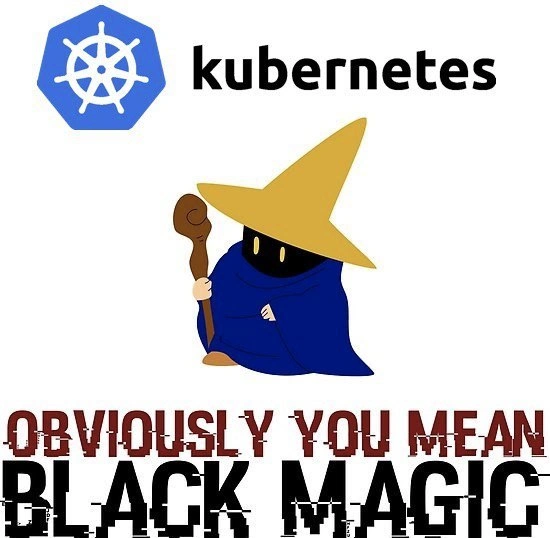
Imagine you have a big playroom full of toys that need to clean themselves up and organize perfectly whenever you say so. You shout, “Toys, pack up!” and somehow, without you touching each one, they all start moving into their boxes and shelves at night. Wouldn’t that seem like magic? That’s what using Kubernetes can feel like for someone who doesn’t know how it works. Kubernetes is a tool that helps lots of little programs (kind of like active toys or robots) work together across many computers. People joke that it’s “black magic” because you just give instructions, and suddenly everything happens on its own. The funny picture shows a wizard in a robe and a pointy hat, as if a wizard is in charge of the computers. It’s saying that controlling a Kubernetes system is so tricky, it’s almost like only a wizard could do it. In simple terms: Kubernetes lets engineers be a bit like magicians – they set things up, and poof, apps run all over the place. When you don’t see all the gears and logic inside, it absolutely looks like a magic trick, and that’s why this meme makes tech folks grin.

Level 2: Spellbook of Orchestration

For a newcomer or junior developer, understanding Kubernetes can feel like opening a huge spellbook written in a foreign language. Let’s demystify some of it. Kubernetes (often abbreviated “k8s”) is essentially a system that helps manage containerized applications across a group of machines. Containerization means packing an app and its environment into a lightweight package (a container, like Docker) so it runs the same everywhere. Kubernetes is a powerful container orchestration tool – that is, it automatically handles deploying, connecting, and scaling those containers so you don’t have to start and stop them by hand on each server. It’s like having an automated conductor for your software, making sure each part is running in the right place and at the right time. Sounds great, right? The catch is that this conductor (Kubernetes) has a lot of knobs and settings.

When people say Kubernetes feels like black magic, it’s because there’s a steep learning curve and tons of new concepts to absorb. You don’t just run your app; you create YAML files full of configurations (somewhat like writing down a magic spell) to tell Kubernetes what you want. For example, you define a Deployment to say “run N copies of my app container at all times,” and Kubernetes will ensure exactly that many are up, restarting or moving them if needed. You make a Service to get a stable network address for those app copies, and Kubernetes will magically (well, programmatically) route traffic to any healthy instance behind the scenes. There are many moving parts, so here’s a quick spellbook glossary of common Kubernetes terms:

  • Cluster: a collection of computers (physical or virtual) that Kubernetes uses as one big pool of resources. Think of it as all the ingredients in your kitchen that the system can draw on.
  • Node: one computer in the cluster (could be a real server or a VM). It’s like a workstation where Kubernetes can schedule work; nodes run a small agent (kubelet) that takes orders from the Kubernetes control plane.
  • Pod: the basic unit of work in Kubernetes. A pod usually holds one main container (like your app) and maybe some helper containers. If a container is a little ship, a pod is a tiny fleet or lifeboat – usually one ship, sometimes a buddy system of two – that’s the thing Kubernetes actually moves around and manages.
  • Deployment: a recipe for managing a set of pods. You specify how many you want, what container image to use, and Kubernetes will create or destroy pods to match that state. If a pod dies, the deployment’s controller creates a new one automatically. It’s like a caretaker ensuring a certain number of workers are always on duty.
  • Service: a stable address (IP and DNS name) to reach a group of pods. Since pods can come and go (and have ephemeral IPs), a Service is the magic portal that stays fixed so others can always find your app. Behind that portal, Kubernetes dynamically links it to whichever pods are currently alive.

These are just a few ingredients; Kubernetes has many more (ConfigMaps, Ingress controllers for HTTP routing, Volume claims for storage, etc.), which is why it can feel overwhelming. Each component solves a real problem in managing large-scale systems, but to a newcomer it’s a lot to take in at once. The meme’s wizard imagery – the cartoon sorcerer in a robe and pointy hat – brilliantly captures how a newbie might view a Kubernetes expert. That expert can seemingly type some arcane commands and set up a whole ecosystem of containers talking to each other, self-healing on failures, and scaling under load. If you’ve ever watched a demo where someone deploys a complex app with a single kubectl apply -f everything.yaml, it does look like sorcery!

The humor here comes from relatability: many developers remember their first exposure to Kubernetes as confusing and magical. There’s even a popular joke that “Kubernetes is a fancy term for when you accidentally deploy your project on someone else’s computer.” In other words, it abstracts away so much infrastructure detail that you don’t initially understand where your code is running – it’s just somewhere in the cluster, and you trust Kubernetes to keep it running. It can be disorienting. And when things go wrong, the error messages and debugging process can feel like deciphering a spell gone awry. (Ever seen an error like Back-off restarting failed container or ImagePullBackOff? It’s not exactly obvious to a newcomer what those mean – kind of like reading a sorcerer’s prophecy in gibberish.)

But fear not, Kubernetes isn’t actual magic, and with time you learn the logic behind those spells. The Final Fantasy Black Mage character in the meme is a nod for the gaming nerds: it’s a classic representation of a wizard. By showing that image with the Kubernetes logo, the meme is saying, “Running Kubernetes requires wizard-level skills.” And the big text “OBVIOUSLY YOU MEAN BLACK MAGIC” is a tongue-in-cheek way to correct anyone who calls Kubernetes easy or straightforward. In summary, the meme humorously conveys that container orchestration with Kubernetes, while powerful, can feel mystifyingly complex to the point of seeming supernatural – especially when you’re new to it.

Level 3: Production Wizardry

For those of us deploying and maintaining it, Kubernetes often feels less like straightforward engineering and more like practicing the dark arts of DevOps. In theory, it’s “container orchestration” – a conductor directing microservices in harmony – but in practice many engineers have experienced moments where an inexplicable issue left them muttering debugging spells at 3 AM. We joke about needing a ritual for a redeploy: sacrifice a YAML file under a full moon and maybe the pods come up green. The meme nails this sentiment by shouting “OBVIOUSLY YOU MEAN BLACK MAGIC.” It’s the seasoned SRE’s tongue-in-cheek response when someone innocently calls Kubernetes an orchestration tool, glossing over the tribal knowledge and hacks required to tame it.

DevOps pain points are all over this image. The Kubernetes logo (the ship’s wheel) promises control and stability, but the robed wizard below tells the real story: running a cluster can feel like being an apprentice at Hogwarts. You write a 300-line deployment YAML (your spell) to deploy a simple web app, only for a tiny indent mistake or missing quote to break the whole incantation. A senior engineer might quip, “there’s a missing space on line 42 – that’s why the summoning circle failed.” Everyone in the room chuckles (or groans) because they’ve been there. The overengineering aspect is comically real: sometimes we introduce Kubernetes to manage just a few services, and suddenly a simple task has exploded into managing a whole mystical ecosystem of pods, services, ingress controllers, and volume claims. It’s like using a giant spellbook to heat up a cup of coffee – sure, it works, but did it need to be that elaborate?

Real-world war stories feed this meme’s humor. Imagine a production outage where 50% of your app’s pods vanished – a panicked shout, “Is the cluster cursed?!” Actually, the cluster autoscaler decided to remove what it thought were idle nodes, taking your pods with them. Oops. Or the classic “it works on my machine, but not on the cluster” scenario, where a container runs fine locally but once in Kubernetes, it crashes repeatedly in a CrashLoopBackOff. Why? Perhaps a missing ConfigMap or a slight mismatch in environment variables – details you only discover by poring over logs like reading tea leaves. In those tense moments, the team’s natural reaction is to summon the “Kubernetes guru” – every org has one – who steps in like Gandalf to decipher cryptic error runes and calm the system. This dynamic is so common that the person might actually wear a wizard hat as an inside joke.

Even Kubernetes terminology sounds like D&D lore at times. Nodes can be marked with taints (actual term!) that repel workloads like curses, unless pods have matching tolerations to overcome them. There are DaemonSets ensuring a “daemon” pod runs on each node (one admin joked these are little imps deployed everywhere). And don’t forget Helm charts – a package manager for K8s named after a ship’s helm, but invoking one feels like reading from an ancient scroll of templates. Helm even popularized the term “chart museum” for storing those charts, as if we’re curating magical artifacts. The community leans into the magic analogy because it captures the feeling: mastering Kubernetes is like studying arcane lore. You accumulate experience (and scars) over many deployments. Each outage and post-mortem adds another spell to your book (a bash script here, a new monitoring alert there) to prevent that particular catastrophe from happening again. Over time, you become the “cluster mage” who just knows that setting maxUnavailable: 0 during a rolling update prevents the scary downtime demon from appearing.

From an organizational angle, this meme’s subtext is also about steep learning curves. When a company adopts Kubernetes, there’s often an initial period of chaos. Developers used to simpler setups are suddenly dealing with kubectl commands, container logs, and strange new failure modes. It’s a baptism by fire (or dragon flame). Onboarding documents start looking like spellbooks themselves – full of instructions to set up Ingress objects, TLS secrets, and network policies that read like potion recipes. No surprise that there are entire training programs and certificates (CKA/CKAD) which, jokingly, feel like Wizard Academy diplomas. The shared experience across the industry is that once you finally get it, you wear that accomplishment with pride. And you laugh at memes like this because you remember being that confused newcomer convinced that Kubernetes was powered by black magic. Now you’re the one chuckling “obviously, you mean black magic” when a colleague mutters that our deployment process is acting strange again. It’s funny because it’s true: even in high-tech, sometimes our sophisticated systems are so complex that “magic” is just the easiest explanation.

Level 4: Arcane Orchestration

At its core, Kubernetes isn’t actually witchcraft – it’s an elaborate distributed system solving hard computer science problems under the hood. The Kubernetes control plane behaves like the master spellcaster: it uses a strongly-consistent data store (etcd) and the Raft consensus algorithm to agree on the “desired state” of your cluster. This means every time you kubectl apply a new configuration, the cluster’s brains reach agreement on what should happen, despite network delays or node failures. It’s rigorous math (think CAP theorem trade-offs and distributed state machines), yet when etcd performs leader election or recovers from a network partition, it can feel like an incantation was cast – things eventually fix themselves, somehow.

Behind the scenes, Kubernetes continuously runs reconciliation loops – control processes that watch actual state and converge it towards the declared state. This pattern, rooted in control theory, is like a self-correcting charm: if a pod (container group) dies, a controller notices the discrepancy and summons a replacement as if by enchantment. It’s actually event-driven automation, but the non-deterministic timing (due to asynchronous events and eventual consistency) can make outcomes seem mystifying. One moment your app is down, the next moment – poof – a new pod appears on another node. The system is following codified rules, yet to humans it’s as if the cluster healed itself with mystical resilience.

Even scheduling in Kubernetes delves into algorithmic sorcery. Deciding which node should run a new Pod is a combinatorial optimization (a variant of the bin-packing problem, which is NP-hard). The kube-scheduler uses heuristics and priority algorithms to place workloads, balancing resource usage and constraints. The result is efficient… most of the time. But when resources become scarce or scheduling rules conflict, the scheduler’s decisions can seem capricious – pods evicting, rescheduling, or staying in Pending limbo for reasons that feel opaque. It’s actually logic crunching through CPU, memory, and affinity rules, yet to an onlooker it’s like the scheduler is selectively casting "rise" and "fall" spells on pods.

Networking is another layer of infrastructure wizardry. Every pod gets its own IP address inside a virtual network, and services conjure stable endpoints that magically route to the right pods. Kubernetes sets up low-level IP tables or uses fancy proxies (like kube-proxy managing iptables or IPVS rules) so that when you call my-service, traffic finds one of many pod instances seamlessly. To the uninitiated, this service discovery is baffling: "I deployed 5 container instances and now requests just find them? Must be magic!" In truth, it’s a maze of networking rules and CNI plugins weaving an invisible network fabric across machines. The cluster is effectively performing teleportation tricks with packets – pure software-defined networking, but it might as well be black magic if you’ve never seen how the trick is done.

All these components – the controller-manager, scheduler, etcd, kubelet on each node, and more – orchestrate in concert, much like a coven of cooperating sorcerers. They adhere to well-defined APIs and algorithms drawn from distributed systems research (Kubernetes descended from Google’s internal Borg system, absorbing years of academic and practical knowledge). But from the outside, when a lone DevOps engineer in a dark hoodie seemingly waves a wand (kubectl) and a hundred containers dance across a dozen servers, it’s easy to see why the meme portrays a Final Fantasy style Black Mage. Kubernetes demands mastery of many deep concepts, so to the average developer, its successful operation can look indistinguishable from magic.

Description

A meme humorously equating the complexity of Kubernetes with magic. At the top, the official blue, eight-spoked wheel logo for Kubernetes is shown next to the word 'kubernetes' in black text. In the center is a cartoon character resembling a Black Mage from the Final Fantasy video game series, with a shadowed face, glowing yellow eyes, a pointy yellow hat, a blue robe, and holding a wooden staff. At the bottom, the phrase 'OBVIOUSLY YOU MEAN BLACK MAGIC' is written in a heavily distorted, glitch-art style font in red and black. The joke resonates with developers and DevOps engineers who have grappled with Kubernetes' steep learning curve and intricate architecture. Its powerful capabilities for container orchestration, auto-scaling, and self-healing can often feel opaque and mysterious, as if powered by an arcane force rather than understandable code and configuration, making 'black magic' a fittingly comical description


Comments

7
Anonymous ★ Top Pick A junior asked me how the Kubernetes scheduler works. I told him to sacrifice a goat to the etcd gods and pray the pod lands on the right node. It's just easier that way
  1. Anonymous ★ Top Pick

    A junior asked me how the Kubernetes scheduler works. I told him to sacrifice a goat to the etcd gods and pray the pod lands on the right node. It's just easier that way

  2. Anonymous

    Kubernetes: where senior engineers spend less time writing code and more time maintaining 500-line YAML grimoires, praying the etcd spirits accept tonight’s deployment sacrifice

  3. Anonymous

    After 15 years in the industry, you realize Kubernetes isn't complex because it solves hard problems - it's complex because we collectively decided that YAML indentation errors at 3am are character-building exercises for SREs

  4. Anonymous

    Kubernetes: where 'it works on my machine' evolves into 'it works in my namespace, but production has 47 CrashLoopBackOffs, the ingress controller is possessed, and somehow we're being billed for pods in a dimension that doesn't exist.' Senior engineers know that mastering K8s means accepting you'll spend more time debugging YAML indentation than actual application logic - truly, any sufficiently advanced orchestration is indistinguishable from sorcery

  5. Anonymous

    Kubernetes: where 'kubectl apply -f everything.yaml' is the incantation that either scales your app to infinity or summons outages from the void

  6. Anonymous

    Kubernetes: declare YAML, run helm upgrade --install, the reconciliation loop makes reality comply - and we call it self-healing instead of black magic

  7. Anonymous

    Declarative, sure - just keep chanting kubectl until RBAC relents and the CrashLoopBackOff demon departs

Use J and K for navigation