Skip to content
DevMeme
6375 of 7435
A Literal and Figurative Representation of 'Data Loss'
Hardware Post #6989, on Aug 4, 2025 in TG

A Literal and Figurative Representation of 'Data Loss'

Why is this Hardware meme funny?

Level 1: All Eggs, One Basket

Imagine you have a very special toy or a favorite drawing, and you only have one of it. If something bad happens to that one – say you drop the toy in a puddle or spill juice on the drawing – it’s gone forever and you’d be super sad. This meme is joking about the same idea but with computer stuff. It’s like keeping all your eggs in one basket. If you have only one basket and it falls, all the eggs break at once. In the picture, the “eggs” are important data, and the “basket” is a single hard drive holding that data. One picture shows the drive standing (everything seems fine), and the next shows it fallen over (uh-oh, it broke!). The lesson is simple: if you don’t want to lose all your “eggs,” use more than one basket. In real life that means make a copy of your important files and keep it somewhere else safe. So even if one hard drive breaks (one basket drops), your stuff isn’t lost – you still have another copy, and you can smile instead of cry over spilled milk (or broken drives).

Level 2: When Disks Die

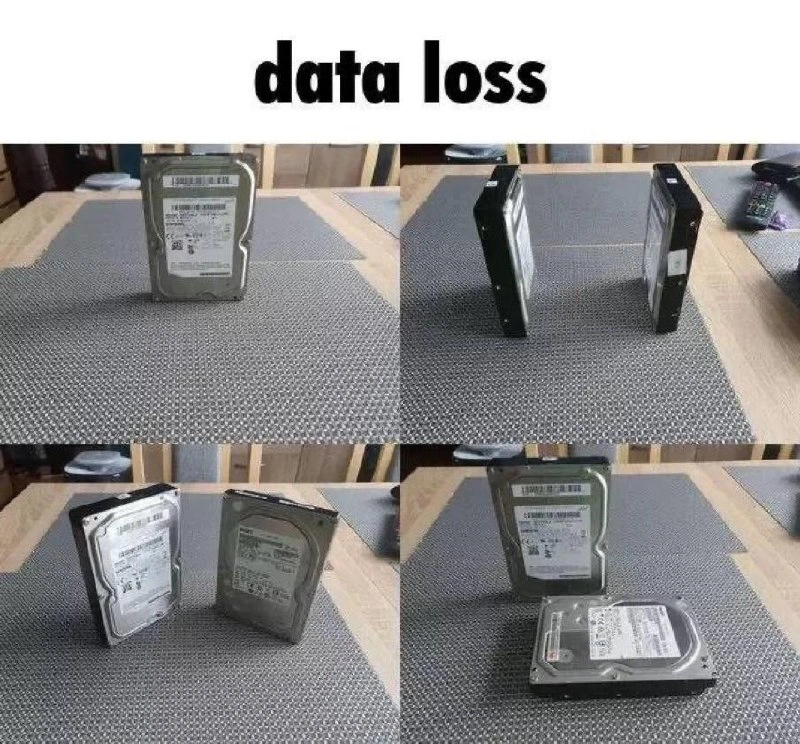
So what’s going on in this meme? It’s showing two actual hard drives (the kind of physical Hardware that stores all your files) acting out a famous comic scene. The bold title says “data loss,” which is a big clue. Data loss means important information is gone for good – like if your only copy of a project gets deleted or the disk holding it breaks. The four pictures of the hard drives mimic the positions of characters in a well-known internet comic called “Loss”. In that original 2008 comic (from a series named Ctrl+Alt+Del), a guy rushes into a hospital, then there’s a sad scene of him kneeling by a bed after a miscarriage. It became an iconic template that people parody by arranging simple shapes (or anything, really) into the same four-panel layout. Here, the loss_meme_format is recreated with hard drives: first panel has one drive standing (like one person), second panel has two drives standing (two people talking), third has one drive kind of leaning toward an upright one (like someone kneeling next to another), and fourth has one drive flat on the ground while the other stands beside it (one person collapsed while another stands by). It’s the exact arrangement from the comic, but using gadgets instead of people. If you’ve been on tech forums or Reddit, you’ve probably seen people sneakily reference this format and ask “Is this loss?” whenever four objects are arranged in that pattern. Here the answer is literally yes – it even says “data loss.”

The meme is basically a cautionary tale for anyone dealing with Storage: don’t let this happen to you. The hard drives are used because they’re the typical storage device where data lives. Those shown are 3.5-inch spinning hard disks – often jokingly called “spinny rust” by tech folks because inside there are spinning metal platters that data is written to (metal can oxidize like rust, and these are old-school compared to newer solid-state drives). These drives fail in real life somewhat regularly – they can overheat, the motor can stop, the read/write head can crash onto the platter, or electronics can fry. That’s what we mean by hard_drive_failure or physical_storage_failure: the device that holds your data stops working. When that happens, anything stored only on that device becomes inaccessible. If you don’t have the information anywhere else, you’ve lost it – hence data loss. The meme creator chose hard drives to get this concept across visually (and also because it’s ironic to use storage devices to spell out “loss” – a bit like using your firefighters to start a fire as a joke).

Now, what could have prevented data loss in such a scenario? The key is having backups or redundancy. A DataBackup means you have an extra copy of your files somewhere safe. For example, if Drive A dies, but last night you copied everything to Drive B, you still have your stuff. We commonly use strategies like keeping copies on multiple drives or uploading important data to the cloud or an external server. There’s even a guideline called the 3-2-1 backup rule: keep 3 copies of your data (like the original plus two backups), on 2 different types of storage media (maybe a local disk and another on the cloud, or one on an external USB and one on an online drive), and 1 of those copies should be offsite (in a different physical location, e.g., cloud or a drive you store at a friend’s house). The idea is to protect against different kinds of failures. If you only had backups in the same computer, a single electrical surge or virus could wipe them all at once. Offsite protects against things like theft or natural disasters at your place.

In the second panel of the meme, we see two drives standing side by side – that looks like a hint at a cloned drive or a RAID1 mirror (two drives containing identical data). RAID stands for Redundant Array of Independent Disks. It’s a setup used in servers where multiple drives work together to improve reliability or performance. In a simple mirror (RAID1), every piece of data is written to two drives, so if one fails, the other still has it. That is redundancy and helps with hardware failure. However – and this is important – having redundancy like RAID is not the same as having a true backup. raid_is_not_a_backup is a common saying in IT. Why? Because a backup usually means a separate copy that you can use to restore historical data or recover from human mistakes, not just hardware failure. For instance, if you accidentally delete a folder, a RAID mirror will dutifully delete it on both drives (since it’s mirroring changes). Or if the computer itself gets stolen or a fire destroys the whole machine, all mirrored drives go with it. A backup, on the other hand, could be a drive that wasn’t connected at the time of the accident, or a cloud copy from yesterday that still has the folder you deleted. That’s why in the meme’s final panel, even though one drive is still upright (still working), the other is flat (failed) – if that upright drive wasn’t an actual backup copy of the data, then the data on the dead drive is gone. The system had a single point of failure – one failure-prone situation that can bring everything down. In this case the single point of failure was the lack of an independent backup.

The phrase single_point_of_failure means any one part (point) of a system which, if it fails, causes the entire system to stop working. Having all your critical data on one hard disk is a classic single point of failure. Good system design tries to eliminate those. We use backups, redundant disks, uninterruptible power supplies, multiple servers, etc., so that no one failure can collapse everything. If you’re an architect or just building your own PC, you should identify these weak links. For storage, it almost always comes down to: don’t trust a single device with the only copy of important data. Hard drives are sometimes nicknamed "HDD" (Hard Disk Drive), and they have finite lifespans (often a certain number of read/write cycles or hours of use). The older mechanical ones (like in the photo) might start failing after 5+ years on average, but some die much sooner (and a few champs last a decade – it’s a bit of luck and use conditions). Newer SSD drives (solid-state drives) have no moving parts, which removes mechanical failure modes, but they have their own issues (they wear out after writing a certain amount of data, and can also fail electronically without warning). So any storage medium can fail.

When a hard_drive_failure happens, if you have a backup, it’s annoying but not catastrophic: you replace the drive and restore the data from backup. Without a backup, you’ve got a big problem. Sometimes people try DataRecovery services – these are specialists who can open up a failed drive in a clean lab and attempt to salvage the data from the platters or chips. This can be very expensive (hundreds or thousands of dollars) and not guaranteed to work, especially if the damage is severe. It’s basically the last resort. That’s why the meme is reminding everyone in a tongue-in-cheek way that backups are the cheaper, reliable solution compared to praying over a dead drive.

In summary, the meme uses an old comic reference to deliver a PSA: always have backups for your data. The hard drives acting out “Loss” are a funny way to say “Don’t let your data become a loss.” For those newer to IT, it’s a visual lesson about backup strategy: if you keep everything on one hard drive and it fails, you could lose it all. Better to keep copies (and maybe use RAID or other redundancy) so that a failed disk won’t mean lost data. This image might be lighthearted, but the issue it points to is very real in the world of computer Storage and Hardware.

Level 3: Is This Data Loss?

For the seasoned engineer, this meme hits on multiple levels of Storage irony. At first glance, we recognize the infamous four-panel arrangement from the 2008 “Loss” webcomic (by Ctrl+Alt+Del). It’s an old internet in-joke: four minimalist frames that usually make people ask, “Is this loss?” Here, instead of cartoon characters in distress, we have two 3.5-inch hard drives acting out the scene. It’s a brilliant geeky visual pun. The caption reads “data loss” – lowercase and matter-of-fact – which is exactly what those drives are hinting at. The meme creator is basically laughing and screaming: “This is what happens when you don’t have backups!”

Let’s decode the tableau: In panel one, a lone hard drive stands upright on the table mat, like a solitary figure. This is our single-copy system: one drive containing the only copy of some crucial data. Panel two has two drives standing side by side – perhaps representing a mirrored pair or just two separate drives (maybe the system and a backup drive?). By panel three, one drive tilts toward the other, as if one disk is collapsing or leaning in dire need – a clever nod to a failure in progress (the way a person might keel over or kneel in crisis). By panel four, the tragedy is visible: one drive is flat on its back (you can almost hear the click of death from here), and the other stands over it, upright but impotent. This final scene is a perfect recreation of the Loss meme’s somber last frame, but it’s also the literal scenario of data loss: one drive has figuratively died, and if that drive was your only data, well… game over. The second drive standing could symbolize the shocked onlooker – or if we interpret it another way, it might hint “Hey, if this upright drive was a backup, your data could have survived.” But given the caption and the cheeky warning, the point is clear: un-replicated storage leads straight to the land of loss.

Every senior developer or architect has learned (often the hard way) about single points of failure. A single hard disk containing production data with no backups or replicas is a ticking time bomb – a single point of failure that can take down an entire application or business if it goes. And trust us, these ticking bombs tend to blow at the worst possible times (Murphy’s Law of hardware is real – that critical disk will fail at 3 AM on a holiday weekend, right when you’re on call). The meme’s dark humor is that it uses the Loss format – normally a reference to a personal tragedy – to dramatize a very IT-specific tragedy: DataLoss. The emotion in the original comic (grief, shock) maps uncannily well to the feeling a dev team has when they realize the only database disk is toast and there’s no backup. You could say the guy kneeling in despair in the original Loss is reincarnated here as an sysadmin hunched over a dead hard drive, whispering “please no…” while the rest of the team stands by in silent horror. It’s funny because it’s true – many of us have either experienced this nightmare or have the “there but for the grace of backups go I” reaction. It’s a shared trauma in IT: someone didn’t implement a proper BackupStrategy, and now there’s nothing but tears (and maybe an expensive call to a DataRecovery service).

From an architectural perspective, the meme is a cheeky reminder to architects and tech leads: design for failure before failure happens. That means backups, backups, backups. Relying on a single spinning piece of metal (often affectionately called “spinny rust” in contrast to modern SSDs) to safeguard your production data is absurdly risky. Spinning hard drives have motors, magnetic heads flying micrometers above platters at 7200 RPM – mechanical parts that wear out and can crash spectacularly. (If you’ve never heard a dying HDD, it’s a mix between grinding gears and a sad little clicking – basically the sound of your DataBackup plan failing.) Even in the best case, drives have finite lifespans; manufacturers publish MTBF (Mean Time Between Failures) and annual failure rates, and large-scale studies (like Backblaze’s famous hard drive stats reports) show that around 1–2% of drives die per year under constant use. Those odds catch up with you fast if you don’t have a contingency.

The meme also silently points to a common misunderstanding: people often think RAID is a backup. Experienced folks love to correct this: “RAID is not a backup.” RAID can give you redundancy – for example, with two drives in RAID 1 (mirror), if one drive fails, the other still has all the data and the system keeps running. Great, you avoided immediate data loss from hardware failure. But RAID won’t save you from all forms of loss. If a human error or software bug deletes data (rm -rf / on the wrong path, anyone?), the deletion is instantly mirrored to all disks in the RAID – poof, data gone regardless of how many drives you had. RAID also doesn’t protect against disasters like fire, theft, or a power surge frying your whole server chassis. So a BackupStrategy goes beyond just a mirrored disk. You need separate copies, preferably offline or offsite. The meme’s scenario looks like a simple two-disk setup – perhaps slyly mocking those who think “I have two drives, so I’m safe.” Two drives won’t help if they’re in the same machine and that machine catches fire, or if the data wasn’t actually being copied to the second drive at all. Truly robust backup means having snapshots or copies of data in multiple places. Remember the 3-2-1 backup rule often quoted by IT old-timers: keep 3 copies of your data, on at least 2 different media, with at least 1 copy offsite (away from the primary location). Following that rule, a production database might be on an SSD RAID in the server (fast and redundant), backed up nightly to a second storage system (maybe an external disk or network storage), and also archived to an offsite location or cloud storage. If one drive dies (like in our meme), you recover from the local backup or the cloud copy; no harm, no foul, no meme-worthy drama.

Yet, despite all this wisdom being readily available, teams still sometimes cut corners. Maybe budgets are tight, maybe someone thought “the new drive won’t fail for years,” or backups were set up but never tested (another classic mistake: untested backups are just schrodinger’s backups – you don’t know if they actually work until you try a restore). These complacencies are exactly what this meme is ribbing. The drives posing in the Loss formation are effectively saying, “If you ignore best practices, Loss is coming for your data.” It’s a wry, slightly morbid joke that speaks to developers’ collective memory: we’ve all heard a horror story of data that wasn’t backed up and vanished forever. And each time, someone learns the hard way that next time, they’ll implement proper DataBackup procedures.

In essence, data loss turned into a meme is cathartic. It lets us laugh at a scenario that in real life would be a crisis. The humor works because it’s so on-the-nose: the meme format literally spells “LOSS”, and that’s exactly what you get without backups. Storage hardware fails, period. DataRecovery services can sometimes salvage a crashed disk (if you’re willing to pay a small fortune and pray to the bits-gods), but hoping on that is like driving without a seatbelt because you know a good hospital. A seasoned dev looks at this image and chuckles, possibly with a pained look, because it’s a cheeky reminder: Don’t be the guy in this meme. Use redundancy, make backups, verify them. Otherwise, you’ll be reenacting Loss for real, mourning over a lifeless drive and lost data, while your team watches in regret.

Level 4: Entropy Always Wins

At the most fundamental level, data storage is battling the inexorable march of entropy. A single hard drive – one lonely copy of your data on a magnetic platter – is subject to the laws of physics and probability. Over enough time, bit rot (the gradual decay of stored bits), cosmic rays flipping memory bits, or plain old mechanical wear will corrupt or destroy data. Hard drive failure isn’t a matter of “if,” it’s when. Modern drives boast features like internal error-correcting codes and checksums to fight off random corruption, but these just delay the inevitable. The drive in panel one of this meme might look sturdy standing upright, but as any reliability engineer knows, it carries within it the certainty of eventual breakdown.

In information theory terms, if you have only one copy of some information, losing that medium means losing the information irretrievably. Claude Shannon would remind us that without redundancy or error correction, lost data cannot be magically regenerated – it’s gone beyond any algorithm’s reach. This is why serious storage systems employ redundancy at multiple levels. RAID (Redundant Array of Independent Disks) and distributed storage clusters use parity bits, checksums, and erasure coding to encode data across multiple devices. For example, a RAID 5 array might use an XOR parity scheme: if any one drive fails, the missing bits can be reconstructed from parity on the others. More advanced erasure codes (like Reed-Solomon in RAID 6 or in cloud object storage) can tolerate multiple drives failing by storing data pieces and parity across many disks with mathematical rigor. These techniques are built on deep mathematics – Galois fields and polynomial arithmetic – ensuring that even if one or two disks kick the bucket, the original data can be solved like a system of equations. It’s the same principle as error-correcting codes in networking, just applied to disk storage.

However, even fancy algorithms have limits. Redundancy factors (the N+1, N+2 etc. in “RAID N”) are finite. If too many components fail or data gets corrupted beyond the code’s ability to reconstruct, you hit an unrecoverable state. In cloud storage design, architects talk about durability (e.g. “11 nines” durability means $99.999999999%$ chance your data is intact yearly). Achieving that means multiple independent copies or parity blocks, often spread across data centers. Why so many? Because any single device, no matter how pro, has a non-zero failure rate. If you have N copies of data, the probability of total loss is drastically reduced (roughly the product of each failing independently, assuming failures are uncorrelated). But with 1 copy (N=1), the probability of complete data loss eventually reaches 100% given enough time. That’s the grim truth: one copy = no copy (eventually).

So entropy always wins if you do nothing – the trick is to keep moving the fight to new ground. That means making backups, refreshing storage media, using replication and parity – essentially expending energy and effort to create order (extra copies, integrity checks) to counter chaos. The meme’s four panels of hard drives wordlessly enact this thermodynamic fable. We see an upright drive initially (order, a single source of truth), and by the final panel one drive lies flat (disorder, failure) while another stands by (perhaps a surviving copy, perhaps just an observer to the tragedy). In a theoretical sense, those hard drives are performing a darkly comic proof of a theorem: without redundancy, a single point of failure will eventually fail, and then “Loss” – both the meme and the actual data loss – is inevitable.

Description

A four-panel comic strip meme with the title 'data loss' in bold, black text centered at the top. The meme uses 3.5-inch internal hard drives placed on a grey placemat on a wooden table to visually represent the abstract 'Loss' meme format. The first panel shows one hard drive standing vertically. The second panel shows two hard drives standing vertically next to each other. The third panel also shows two vertical hard drives. The fourth and final panel displays one hard drive standing vertically and another lying horizontally in front of it. The humor is a clever pun, combining the serious technical concept of 'data loss' (the failure or corruption of data on storage devices) with a visual recreation of 'Loss,' an infamous and widely parodied webcomic strip from 'Ctrl+Alt+Del.' Recognizing this pattern is a hallmark of being deeply engaged in internet and tech culture, making the joke land particularly well with a seasoned developer audience who appreciates both the technical term and the obscure meme reference
Comments

36
Anonymous ★ Top Pick This is the only kind of data loss that gets funnier the more you stare at it. It's also the only one that can be fixed by simply explaining the joke
  1. Anonymous ★ Top Pick

    This is the only kind of data loss that gets funnier the more you stare at it. It's also the only one that can be fixed by simply explaining the joke

  2. Anonymous

    If your DR plan is just two drives standing around like this, congrats - you’ve implemented RAID-L for "Loss."

  3. Anonymous

    When the CTO says 'we need to split our data across multiple drives' and the new intern takes it literally - at least now you can honestly tell the auditors that your data retention policy includes physical sharding at the platter level

  4. Anonymous

    This is what happens when you implement RAID 0 in the physical world - no redundancy, maximum performance until gravity decides to run a destructive write operation. At least with SSDs, they fail silently without the dramatic visual flair of spinning rust taking a nosedive. Remember: the 'S' in 'single disk' stands for 'sorry, your data's gone.'

  5. Anonymous

    RAID1 mirror? Cute, until physics enforces the 'no free lunch' theorem on your platters

  6. Anonymous

    If your DR plan is “RAID1 + nightly snapshots on the same array,” congratulations - you just implemented the Loss meme in production

  7. Anonymous

    RAID isn’t backup; it’s two disks negotiating who gets to ruin tonight’s RPO

  8. Deleted Account 11mo

    didnt get it

    1. @mihanizzm 11mo

      yeah me too D:

    2. @ihnore_ihor 11mo

      Based on play on words as data loss — literally loosing data and popular “loss meme” as comics pattern https://en.wikipedia.org/wiki/Loss_(Ctrl%2BAlt%2BDel)

    3. @affirvega 11mo

      | || || |_

      1. @Danich 11mo

        ,' ,|,'_'

      2. @SamsonovAnton 11mo

        Is this some poorely drawn ascii-art swastika? 🤔

        1. Deleted Account 11mo

          No.

        2. @affirvega 11mo

          IT'S LOSS

          1. @SamsonovAnton 11mo

            FOSS? LESS? 🤓

            1. @affirvega 11mo

              Good job autocorrect, but add new word to dictionary 🤓

  9. @patsany_horosh_mne_v_dm_pisat 11mo

    Are y'all on rn?

    1. @linuxhasan 11mo

      On what?

      1. @Art3m_1502 11mo

        On crack

  10. @kitbot256 11mo

    The lying drive should be different. Maybe 2 1/2” or SSD…

    1. @SamsonovAnton 11mo

      This is the first time I see someone referring to 2.5″ drives as "2½". 😳

      1. @ZgGPuo8dZef58K6hxxGVj3Z2 11mo

        European thing

        1. @SamsonovAnton 11mo

          — And you know what they call a 2.5-inch drive in Europe? A 70-millimeter storage device! — Ah, the metric system!

          1. @ZgGPuo8dZef58K6hxxGVj3Z2 11mo

            Is that true? Cant belive I ever heard that. In europe we use inch for screen diameters even tho we have no idea how much a fucking inch is

            1. @SamsonovAnton 11mo

              No, just kidding. My guess is that very few people actually know that "a 2.5-inch drive" actually measures 2.75 inches (70 mm) in width, as well as "a 3.5-inch drive" actually measures 4.0 inches (102 mm) in width.

              1. @ZgGPuo8dZef58K6hxxGVj3Z2 11mo

                Wait what?

                1. @SamsonovAnton 11mo

                  2.5″, 3.5″ and 5.25″ are the diameters of magnetic discs themselves (be it a floppy or a hard drive), while the enclosure adds some space.

                  1. @ZgGPuo8dZef58K6hxxGVj3Z2 11mo

                    Lol didn't knew I thought it was either length of the case or diagonal of the case

                  2. @RiedleroD 11mo

                    I always assumed so. aren't the cases not even perfectly square?

            2. @RiedleroD 11mo

              talk for yourself, I never use inches to measure screens

              1. @ZgGPuo8dZef58K6hxxGVj3Z2 11mo

                What did you use inches for? 🤨

                1. @RiedleroD 11mo

                  …nothing really

  11. @eyadmoh96 11mo

    😂

  12. @ZgGPuo8dZef58K6hxxGVj3Z2 11mo

    Zwei jäger treffen sich. Beide sind tot.

  13. @RiedleroD 11mo

    16cm

Use J and K for navigation