Skip to content
DevMeme
6354 of 7435
Data 'Theft' via Percussive Maintenance
Hardware Post #6968, on Jul 19, 2025 in TG

Data 'Theft' via Percussive Maintenance

Why is this Hardware meme funny?

Level 1: The Stolen Safe

Think of it like this: you have a treasure chest or a safe where you keep all your important things (let’s say important papers, diaries, maybe money). You lock it with a super strong lock. You’re confident no one can pick this lock because it’s the best lock in the world. But along comes a thief. Instead of trying to pick the lock or break it open right there, the thief just picks up the entire safe and carries it away. Later on, in a secret hideout, they take their time to smash it open and grab everything inside. When you come back, you don’t have your safe anymore – it’s gone – and you can pretty much assume all your stuff in it is gone too. Your fancy lock didn’t help because the thief bypassed it by taking the whole safe. In fact, you might imagine the thief left a little note in the empty space where the safe used to be, saying something nasty like “Ha ha, I got all your stuff!”

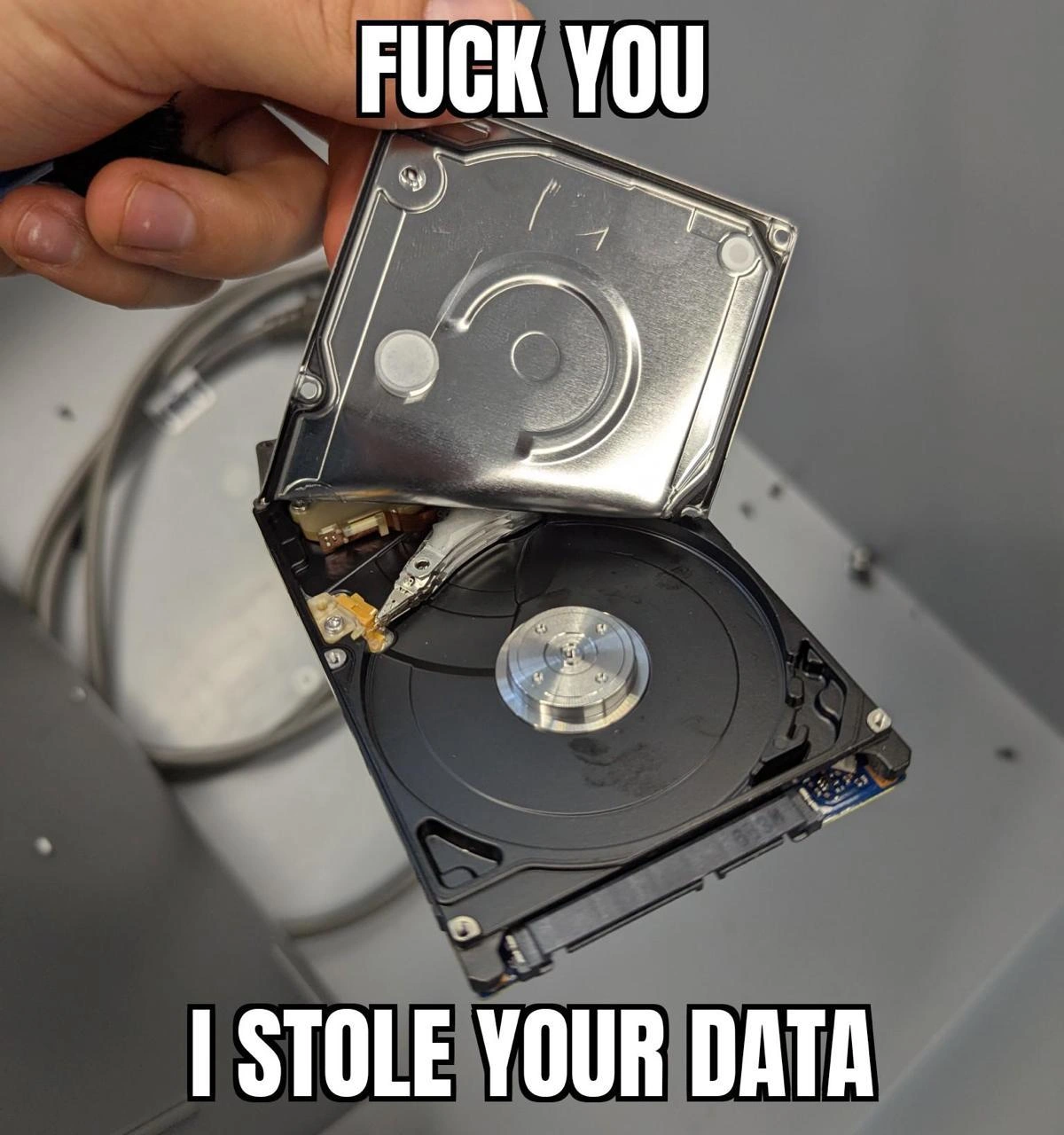
That’s essentially what this meme is showing, but with a computer’s hard drive as the safe. The hard drive holds all the data (the important stuff). Normally you’d secure that data with encryption, which is like the lock. But the meme jokes that someone physically ripped the hard drive open and took the data – like stealing the locked safe and cracking it elsewhere. The hard drive in the picture even has a rude message on it, basically the thief (or the drive) saying “F-you, I stole your data,” which is the rude way of saying “I took it all, and you can’t do anything about it.”

It’s funny in a kind of dark humor way because it’s so over-the-top. Usually we don’t imagine our computers insulting us. Here it’s like the computer’s innards themselves are mocking the person who lost the data. The emotion behind it is the shock and horror of a worst-case scenario, exaggerated to the point of being a joke. It’s like a cartoonish way to say: if you’re not careful, someone can just take your stuff and your own stuff will be laughing at you. On a very simple level, it’s teaching a lesson: keep your valuable things safe, both with locks and by not letting thieves just walk off with the whole thing. Just like you’d be upset (and maybe grimly amused later) if a thief literally stole a safe and left a taunting note, in the tech world you have to prevent people from getting your actual storage devices. Otherwise, it doesn’t matter how good your password is – the bad guys will have the last laugh, as shown in the meme.

Level 2: Platter Crash Course

Let’s break down what’s going on here in simpler terms. The picture is of a hard disk drive (HDD), specifically a small 2.5-inch one that you’d typically find in a laptop or older external hard drive. An HDD is a storage device that holds all your files (pictures, documents, code, etc.) on one or more platters – which are those shiny, disk-shaped pieces of metal. Think of a platter like a CD or DVD, but instead of using light, it stores data magnetically. There’s a little arm inside (the read/write head on an actuator arm) that moves back and forth over the spinning platter to read or write data, kind of like the needle on a vinyl record (but high-tech). Normally, all this is sealed under a metal cover to keep dust out, because these parts are very sensitive. In the image, that metal cover has been forcibly bent open. It’s like someone peeled the lid off a can – except the “can” is a hard drive. This is something you’re never supposed to do if you care about the drive, because once dust or fingerprints get on those platters, the drive can be permanently damaged. So just from that, we can tell: whoever did this wasn’t worried about keeping the drive working; they had some other goal (like maybe already stealing the data, or deliberately destroying the drive).

Now, the text overlaid on the image is classic meme formatting: big bold white letters with a black outline, at the top and bottom. It says: “FUCK YOU” at the top, and “I STOLE YOUR DATA” at the bottom. That’s very strong language – basically the drive (or whoever opened it) is swearing at you and bragging that they took all the information that was on it. It’s blunt, it’s rude, and it’s meant to shock a bit. The humor here comes from the idea of an inanimate object, the hard drive, essentially trash-talking the person who thought their data was safe. It’s a form of personification: the drive is given a voice, and boy, is it a mean voice!

So why is this funny (in a geeky way) and what is it referencing? It’s about data security – specifically, a failure of data security. In tech, we have something called “encryption”, which is like scrambling data so that no one can read it without a secret key or password. There’s a type of encryption for storage called full-disk encryption. When your data is “encrypted at rest” (at rest means stored on disk, not moving), even if someone takes your hard drive, all they’d get is gibberish unless they have the key. One common method is using AES-XTS encryption (AES is Advanced Encryption Standard, and XTS is a mode that’s well-suited for disks). This meme specifically hints at that, because in the description it mentions “AES-XTS at rest is useless once someone literally walks off with the platters”. What does that mean? It’s saying that if someone physically steals your drive’s platters (like you see in the picture), then your encryption doesn’t help… implying perhaps that the encryption wasn’t actually working or the thief also got the keys.

In simpler terms: normally, encryption is like locking your data with a code. But here, either there was no lock, or the thief somehow also got the code. The meme is basically a worst-case scenario for a computer security person: all the digital locks are bypassed because someone just grabbed the physical object that held the data. It’s like if you have a super secure password on your computer, but I literally snatch the hard drive out of it – if that data isn’t encrypted, I can plug that drive into another computer and read all your files. And if the data is encrypted but I somehow obtain your password (or the computer was on and unlocked when I grabbed it), then I can also read everything.

Let’s connect this to real life scenarios, especially ones a junior developer or IT person might encounter:

  • Imagine you have a laptop with important code or customer data. If that laptop’s drive isn’t encrypted and someone steals the laptop, they don’t even need your login password to get the data. They can remove the drive, connect it to another machine, and everything will be there: all your documents, code, even saved passwords possibly. That’s why DiskEncryption (like using BitLocker on Windows or FileVault on Mac, or LUKS on Linux) is so important. It ensures that if the physical device is stolen, the thief can’t read the contents without the encryption key.
  • Now imagine in a company setting: old hardware gets replaced. What do you do with the old hard drives? If you just throw them away or sell them without properly wiping them (using something like a secure erase or physically destroying them), someone could literally pick up your trash and recover sensitive data. There are famous cases where researchers bought random used drives and found things like people’s bank info, company confidential files, etc., because those drives weren’t wiped. Companies have asset disposal policies to prevent this, often involving shredding the drives or at least doing a thorough wipe.

The context tags mention tamper_evidence. That term refers to any mechanism that shows if a device has been opened or altered. For example, some drives have stickers or seals that say “warranty void if removed” – that’s one way to know if someone messed with it. In the image, it’s pretty obvious the drive was tampered with (the cover is literally bent open). In a secure environment, if you saw a drive like that, alarms would be ringing (“someone physically tampered with our hardware!”). There’s also a tag secure_erase_fail – that hints at the scenario where someone intended to wipe or destroy the data on the drive but failed to do it properly. If a secure erase failed or wasn’t done, data might still be readable on those platters, ripe for the taking.

Let’s decode the background: we see some cables and a workstation. The cables look like SATA data and power cables. SATA is the standard connector inside PCs that attaches storage drives to the motherboard. It’s how data travels from the drive to the computer. If you’ve ever opened a desktop PC, these are the thin usually red (or various colors) cables that connect hard drives or SSDs. The presence of loose SATA cables suggests this drive was taken out from that workstation or server (the cables might have been unplugged to yank the drive out). The post’s phrase “Happy Sataday!” is a wordplay: the meme was posted on a Saturday, and “SATA-day” sounds like SATA, the drive interface. It’s a little geeky joke thrown in by the poster – basically saying hello to storage nerds on a Saturday with a storage disaster picture.

For a junior dev or someone new to IT, the takeaway of this meme is: no matter how strong your software security, if you ignore physical security, you’re in trouble. It’s a reminder to always encrypt sensitive data on disk and to guard hardware. If a bad guy can physically get your hard drive, you want to make sure they can’t read it. This is why, for instance, your phone encrypts its storage and requires a PIN – so if it’s stolen, the thief can’t easily get your personal info. Same idea with laptops and servers: use strong disk encryption and keep the keys/passwords safe. And when hardware is decommissioned, don’t just assume deleting files is enough – use proper tools to wipe it or destroy it. Otherwise, someone might literally do what’s in the image: take the drive, tear it open (or just plug it in), and steal all your data, then laugh about it.

Level 3: No Patch for Physical

From a senior engineer’s perspective, the humor here is a mix of “I can’t believe we let that happen” and “yep, seen this horror show before.” The image shows an HDD with its cover bent open and a not-so-subtle message essentially saying: “All your base are belong to us”, but in plain English (and with F-bombs). Why is this funny to the seasoned developer? Because it’s absurdly direct and true. We spend our careers implementing sophisticated security: firewalls, VPNs, two-factor auth, intrusion detection systems, and DiskEncryption like BitLocker or LUKS. Yet, as the meme mocks, if someone can just pull the drive out of your machine, walk out the door, and plug it in elsewhere, all those defenses are bypassed as easily as prying a lid. It’s the ultimate facepalm: all that time configuring DataLossPrevention software to catch sneaky data exfiltration over the network, and meanwhile the real data breach happened with a simple screwdriver and physical access. As one might say, there’s no firewall for a pair of bolt cutters.

The top caption “FUCK YOU” and bottom “I STOLE YOUR DATA” read like the hard drive itself is delivering a victory speech. It’s as if the hardware is saying, “I don’t care about your infosec policies or encryption, I’m outta here with all your secrets.” That bold, insulting phrasing resonates with veterans because it captures the attitude of a breach — breaches often feel personal, like the attacker is mocking you. This is HardwareHumor crossed with gallows humor: laughing because otherwise you’d cry at how easy it was for the attacker. It reminds experienced folks of those post-mortem meetings where you awkwardly admit, “Yeah, we had AES-256 encryption, but… turns out the drive wasn’t encrypted after all because someone forgot to enable it (or the keys were stored on the same server), and the thief just took it.” The meme spares no ego: it’s basically the drive dropping a mic and saying “you screwed up.”

We can practically reconstruct the failure scenario that led to this. Likely mistakes that senior engineers have seen in real life:

  • No Full-Disk Encryption: Perhaps the data on the drive wasn’t encrypted at rest, or the encryption wasn’t properly implemented (e.g., the encryption key was sitting unprotected on the disk or the system was left unlocked). This is mistake number one – not using the tools available like BitLocker, LUKS, or hardware SED (Self-Encrypting Drive) features.
  • Poor Physical Security: The attacker got physical access to the drive. Maybe a server wasn’t locked down, a rogue person wandered into the data center, or an insider just yanked the drive. It’s the classic “server room left unlocked” or laptop left unattended scenario. As the saying goes, once an attacker has physical access, game over. This image is that axiom made literal.
  • No Tamper Detection or Response: Nobody noticed the drive was gone until it was too late. High-end systems sometimes have chassis intrusion alarms or drives with tamper-evident seals, but many setups don’t. Here the only evidence is the drive’s mangled cover – a pretty obvious sign something is wrong, but only after the fact.
  • Lax Asset Disposal/Handling: It could also represent an end-of-life scenario: perhaps this drive was retired and somebody thought just deleting files was enough. Then the drive got tossed or sold without proper wiping. An enterprising hacker (or even a random buyer) could crack it open or just plug it in and retrieve all the “deleted” data. Many of us have heard horror stories of hard drives from corporations ending up on eBay with confidential data still on them. This is why companies have strict asset disposal policies – or if they don’t, they learn the hard way.

In essence, the meme highlights a DataBreach via physical_data_breach — an attack not through malware or some 1337 hack, but through literally taking the hardware. It’s making fun of the scenario where someone bypasses all your software defenses by doing something very analog: unscrewing stuff. Senior engineers laugh (perhaps nervously) because it’s a known Achilles’ heel. It’s like building an unpickable lock on your door, but leaving the door itself hinged on cardboard. The text “I stole your data” is precisely the phrase no engineer or infosec professional ever wants to hear. Seeing it plastered on a broken drive is a tongue-in-cheek way of saying “your worst nightmare just came true.”

We also see the background in the image: some loose SATA and power cables, a blurred workstation – it looks like the drive was ripped out of a machine hastily. The post’s caption “Happy Sataday!” is a playful nod: SATA (Serial ATA) is the interface those cables belong to, and posting this on a Saturday = “SATA-day”. It’s a pun only a hardware nerd could love. The humor is that it’s anything but a happy day if this happens to you. “Happy SATAday, your data’s gone!” — the juxtaposition of a cheery greeting with a catastrophic breach is the kind of dark irony senior devs smirk at.

A seasoned dev might recall multiple war stories on seeing this. One might be the time a database server’s drives got stolen from a colocation facility – after that, the company finally enabled encryption and bolted the server racks. Or the time a disgruntled employee literally took a hard drive home as blackmail. It’s a reminder of why DiskEncryption isn’t just a checkbox compliance item but a real necessity. If this scenario were real and the drive had been encrypted with a strong key that wasn’t stored on the drive, the message might instead be “F**K YOU, I HAVE your data… but it’s all gibberish.” But the meme implies the thief got the goods in plain form, so somewhere someone messed up operational security.

For those in Security and operations, the meme’s dark joke underscores how DataLossPrevention isn’t just about monitoring digital channels – you also have to think about the physical chain of custody for data. A comprehensive security plan includes locks on server racks, keycard access to server rooms, BIOS passwords, drive encryption, and yes, making sure old drives are properly wiped or destroyed. The text “I STOLE YOUR DATA” might trigger a bit of PTSD in anyone who’s had to announce a breach to their boss or the public. It’s the ultimate failure state. But in good meme spirit, exaggerating it as the drive literally saying “F U” to you is a way to laugh at the absurdity. After all, sometimes humor is the only coping mechanism in IT. As the Cynical Veteran would say with a smirk: we invest in 1024-bit encryption and multi-factor auth, but Bob from maintenance walking out with a drive on Friday – apparently that’s our data loss strategy. Brilliant. In other words, there truly is no patch for physical access.

To drive the point home (pun intended), imagine the attacker’s experience versus the company’s:

# Attacker plugs the stolen drive into their own machine (easy peasy if unencrypted):
sudo mount /dev/sdb1 /mnt/stolen_drive

# Now the attacker lists out the files on the drive (no passwords needed, oops):
ls /mnt/stolen_drive
customer_database.xlsx
hr_records.xlsx
secret_plans.pdf
vault/credentials.txt
...
# (All your sensitive files are right there. Victory for the attacker, facepalm for the infosec team.)

That shell snippet is essentially “I STOLE YOUR DATA” in action. No exploits, no zero-days – just mount and browse. It’s a nightmare scenario, but one that every experienced engineer knows could happen if the basics aren’t covered. And that’s why we find a grim chuckle in this meme: it dramatises a cautionary tale we all preach, in the most blunt, meme-able way possible.

Level 4: The $5 Wrench Protocol

At the deepest technical level, this meme pokes fun at a fundamental truth of security: physical access trumps cryptography. In cryptographic theory, algorithms like AES-XTS (Advanced Encryption Standard in XTS mode) are rock solid – a 256-bit key is effectively uncrackable by brute force with today’s computing power. But all that math and theory might as well evaporate if an attacker can physically get to the storage medium. The hard disk platter exposed in the image is a brutal reminder that even the best encryption at rest relies on something very non-mathematical: keeping the keys out of enemy hands and the hardware out of enemy reach. This scenario is the embodiment of the famous XKCD comic about the $5 wrench attack: why spend billions on supercomputers to decrypt AES when you can spend $5 on a wrench (or in this case, a screwdriver and brute force) to beat the password out of someone or pry the drive open?

In infosec design, we talk about threat models and the CIA triad (Confidentiality, Integrity, Availability). This meme is basically saying “forget your fancy CIA triad – I physically grabbed your C (data confidentiality) by the platters.” The academic principles of trusted computing hinge on hardware roots of trust (like a TPM chip to store keys) and tamper-resistant modules. But once the actual storage device is under an attacker’s control, many of those assurances crumble. For example, consider an “evil maid” attack: an intruder gets brief physical access (like a maid in a hotel room sneaking a peek at a laptop) and can install a hardware keylogger or malicious bootloader. Later, when you enter your encryption password, they steal it and thus your encrypted drive yields all its secrets. There’s also the chilling cold boot attack: even if your laptop is locked, an attacker who physically accesses it can freeze the RAM chips with coolant, reboot the machine, and quickly read residual data from memory – including encryption keys – before they fade. These aren’t sci-fi; they’re real-world techniques that security research has demonstrated. The meme’s humor (tinged with horror) comes from how low-tech the depicted breach is compared to those exotic attacks: someone literally peeled open the drive itself. It’s a reminder that even without sophisticated attacks on AES, simply walking off with the storage can render encryption moot if the system was unlocked or if the keys were stored insecurely.

Speaking of the drive, the photo shows a 2.5-inch HDD (common in laptops) with its metal cover pried up, revealing a shiny circular platter. Normally, hard drives are assembled in cleanrooms because a single speck of dust on a platter can cause a head crash (the read/write head colliding with the platter, destroying data). By tearing it open in normal conditions, the attacker is effectively sacrificing the drive’s future usability – but likely they don’t care, because they’ve already imaged all the data off it. This is the “I STOLE your data” part; after copying the bits, the physical drive can be trashed or left as a taunting trophy. In practice, an attacker wouldn’t even need to literally open the drive’s casing to steal data – they could just plug the whole drive into their own machine or a disk duplicator and read everything if it wasn’t encrypted. Opening the case is more of a dramatic flourish, or perhaps an attempt to wreck the drive after stealing the data (so the owner can’t get it back, or to make a point). It’s like ripping the door off a safe after emptying it, then leaving the door on the victim’s desk as a grim calling card.

The caption text on the meme — “FUCK YOU” at the top and “I STOLE YOUR DATA” at the bottom — anthropomorphizes the hard drive as if it’s shouting obscenities at the security team. It’s jarring and darkly funny because it’s every security engineer’s nightmare distilled: the inanimate hardware itself is mocking you for your failure. On a theoretical level, it underlines the concept that no software patch or firewall rule can prevent a breach when the attacker can literally grab the hard drive. Security researchers often emphasize defense in depth: even if one layer fails, others might catch the breach. But here, all layers are bypassed in one fell swoop. Unless you’ve implemented something like self-encrypting drives with the keys stored off the device (and the device is powered down, so keys aren’t in memory), a physical breach turns your carefully encrypted data into plain text. It’s a brutal application of Kerckhoffs’ Principle in reverse: normally we say a cipher should be secure even if everything about it is known except the key – but if the key (or the device containing it) is obtained, all bets are off. And if you didn’t encrypt at all, well... you just handed the keys to the kingdom to the thief, no cryptanalysis needed.

Historically, this scenario has played out for real. Data breaches via stolen drives or tapes are infamous. In one case, backup tapes containing millions of customer records fell off a truck (literally) and were fished out by someone; they weren’t encrypted, which led to a massive breach. Another classic: a researcher found tons of sensitive data by buying used hard drives on eBay — the previous owners thought deleting files or formatting was enough, not realizing that data can be forensically recovered if not properly wiped (magnets and residual magnetic domains can be read with advanced techniques; this is related to the concept of data remanence). That’s why industry standards like NIST 800-88 recommend physical destruction or multiple overwrite passes for drives that held confidential info. If you’ve ever seen those heavy-duty shredders that chew up hard drives into confetti, or a degausser that wipes them with a strong magnetic field, that’s the response to this exact threat. Tech history is full of hard lessons where Hardware security (locks, guards, tamper sensors) was the forgotten piece of the puzzle, and attackers exploited that oversight. The fundamental laws of computer security haven’t changed since the mainframe era: if an adversary gains unrestricted physical access to your machine, it is not your machine anymore. This meme just expresses that law in a very visceral, profanity-laced image.

Description

The image displays a person's hand holding a 2.5-inch hard disk drive (HDD) that has been crudely forced open. The drive's metal cover is bent sharply upwards, revealing the delicate internal components. The shiny black platter is exposed, and the read/write head on the actuator arm is visibly resting directly on the platter's surface - a condition known as a head crash, which is catastrophic for data integrity. Bold, white text in the 'Impact' font is overlaid at the top and bottom of the image. The top text reads 'FUCK YOU', and the bottom text reads 'I STOLE YOUR DATA'. The humor is deeply ironic, as this action doesn't steal data but rather physically destroys it, making recovery nearly impossible. It's a joke for a technical audience who understands that exposing a drive's internals to open air and causing a head crash is the epitome of data destruction, not theft


Comments

12
Anonymous ★ Top Pick Ah, the new 'air-gapped' data exfiltration technique. It's so secure that not even the owner can access the data anymore
  1. Anonymous ★ Top Pick

    Ah, the new 'air-gapped' data exfiltration technique. It's so secure that not even the owner can access the data anymore

  2. Anonymous

    Sure, your SOC champions zero-trust networking, but the intern with a screwdriver just shipped zero-platter trust straight to prod

  3. Anonymous

    After 20 years in the industry, you learn that hard drives don't fail - they just wait for the perfect moment between your last backup and the most critical deadline to teach you about the importance of RAID configurations and the 3-2-1 backup strategy you've been meaning to implement

  4. Anonymous

    This HDD perfectly captures the relationship between developers and their storage: it smiles at you during writes, then flips you off during reads. At least it's honest about data theft - unlike that 'RAID is a backup' advice from your sysadmin. The real joke? This drive probably has better uptime than your production database, and it's literally being held together by hope and four screws

  5. Anonymous

    We threat-modeled mTLS and KMS rotations, but forgot the T8 attack vector - the person with a screwdriver; without FDE, encryption at rest is just resting in pieces

  6. Anonymous

    Your AES-XTS threat model looked great until the attacker brought a Torx - physical access is root, and the only DLP that works during asset disposal is a drill press

  7. Anonymous

    Physical access is root: the colocation axiom that no zero-trust policy can audit

  8. @SamsonovAnton 11mo

    🤷‍♂

  9. @Johnny_bit 11mo

    Great news!

    1. dev_meme 11mo

      One can only hope 😭

    2. @ZgGPuo8dZef58K6hxxGVj3Z2 11mo

      Unironically OneDrive was peak on Windows 8.1

  10. @kbulygin 11mo

    Happy SunOracleday now!

Use J and K for navigation