
Git's Idea of Branch Protection: A Useless Gate
Why is this VersionControl meme funny?
Level 1: Walking Around the Rule
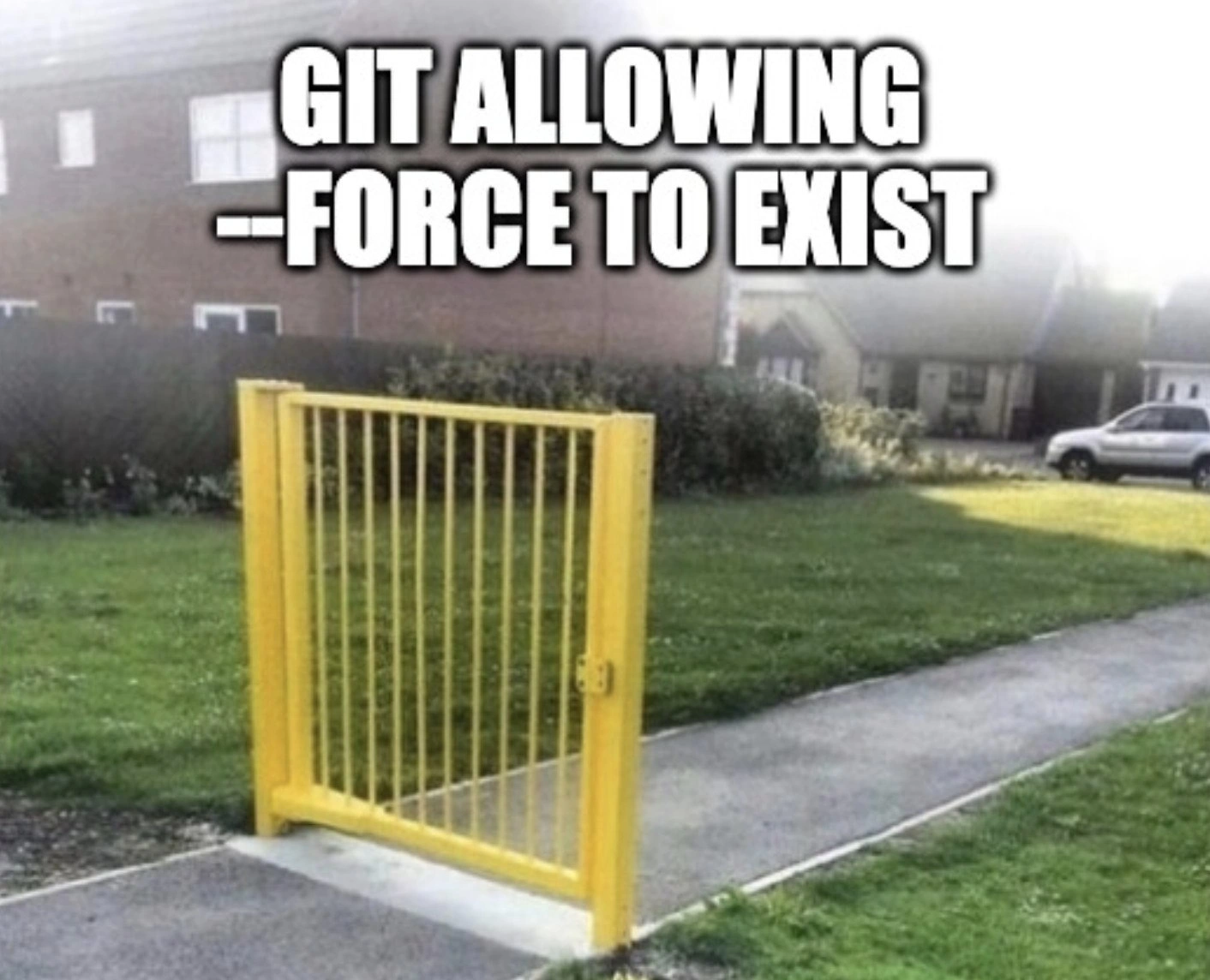
Imagine you have a rule at home that you’re not supposed to eat cookies before dinner. But then your parent adds, “...unless you really, really want to.” Well, that basically cancels out the rule, right? You’d think, “Why have the rule at all if I can just say I really want a cookie and get one?” It’s a silly situation. The meme is showing a similar silly situation with a gate and a path. There’s a big yellow gate standing in the middle of a sidewalk, but there’s no fence attached to it on either side. In real life, a gate is usually part of a fence – you have to open it to go through. But in this picture, you can simply walk on the grass around the gate. The gate doesn’t stop anyone; it’s basically useless! This makes us laugh because it’s obviously absurd to build a gate that doesn’t actually block the path.
Now, how is that like Git and this thing called --force? Git is a tool programmers use to protect their work and share code without messing each other up. It normally has rules to keep everything safe (like the fence and gate were supposed to do). One rule might be “don’t overwrite someone else’s changes.” But Git also has a special switch, --force, which is like saying “I really, really want to do it anyway.” It lets you break the rule if you insist. That’s as goofy as the gate with no fence: the safety rule exists, but it can be ignored as easily as walking around that open gate. The feeling behind the meme is a mix of frustration (because this can cause problems) and amusement (because it’s so ridiculous). In simple terms, the joke means: “Why have a safety gate if you’re just going to leave a big gap for people to walk around?!”
Level 2: Gate With No Fence (Git for Newbies)
Let’s break this down in simpler terms. Git is a popular system that developers use to keep track of code changes (version control). Think of it as a timeline of snapshots of a project. When multiple people work on the same code, Git helps merge everyone’s contributions and prevents stepping on each other’s toes. One common action is git push – this sends your new changes from your computer up to a shared remote repository (like uploading your part of the project to GitHub so others can see it). Normally, Git has a rule: you can push new changes only if your copy of the project is up-to-date with the remote. If someone else updated the project while you weren’t looking, Git will stop you with an error. This is a safety mechanism so you don’t accidentally erase someone else’s work. It’s as if Git puts a gate on the path, saying “wait, you need to catch up with others before you go through.”
Now enter the --force flag (often used as git push --force). This is an option you can add to the push command to bypass that safety check. Using --force is like telling Git: “I know my copy is old or different, but push it anyway and make it the official version.” In other words, force push will overwrite the remote history with what you have locally, even if that means wiping out changes that are currently on the remote. Why does Git even allow this? Sometimes a developer intentionally changes the project history (for example, by fixing up commit messages or reorganizing commits with a command like git rebase). In those cases, the history on their machine looks different from the server’s history, and a normal push would be rejected. The --force flag lets them say, “Yes, I changed the history on purpose, now replace the old history with this new one.” It’s a powerful tool – and with power comes danger if misused.
The meme’s image (a bright-yellow gate on a sidewalk with no fence around it) is a perfect metaphor for Git’s --force option. A gate is supposed to control passage, right? But if there’s no fence connected to it, anyone can just walk around the gate. It makes the gate pretty pointless as a safety device. In Git, we have branch protections (the default rules that stop you from overwriting history by accident, akin to a fence + gate). But --force is like leaving a big gap in that fence. It means the protection exists in name, but you can ignore it completely by just using the flag. The large white text “GIT ALLOWING --FORCE TO EXIST” is calling out this irony: Git permits the very thing that can undo its own protections. For a newcomer, it might be puzzling – why include a dangerous command at all? The answer is that Git was designed to be very flexible for users who know what they’re doing, letting them override defaults when necessary. Unfortunately, that means it’s also easy for less experienced folks to invoke --force without fully grasping the consequences.
Let’s illustrate the typical scenario step by step: imagine you and a teammate are both working on the same branch (say the main branch).
- Your teammate pushes a commit (call it Commit A) to the remote
main. Now the server’s version ofmainhas Commit A at the top of its history. - You didn’t get those changes yet. You’re still working off an earlier state of
mainon your computer. You make your own changes and commit (Commit B). Your history doesn’t include your teammate’s Commit A. - You try
git push origin main. Git smartly detects that the remote has something (Commit A) that you don’t have. It rejects your push with an error saying essentially, “rejected – remote contains work that you do not have locally.” This is Git’s way of waving the caution flag: “Hey, your history is behind, pulling in your teammate’s commit first would be safer.” - At this point, the safe move is to
git pull(fetch and merge or rebase) to incorporate Commit A into your history, then push. But if you instead decide “I just want my version up there, overwrite whatever is there” – that’s when you usegit push --force. - If you run
git push --force, Git says “Alright, you asked for it…” and it updates the remote so thatmainnow ends with Commit B (yours), effectively deleting Commit A from the visible history. It’s not truly gone (Git doesn’t completely wipe unreachable commits immediately; they hang around in the repo for a bit), but it’s no longer where everyone can see it on the main branch. From the team’s perspective, your force push just erased your teammate’s contribution! 😱
Using --force on a shared branch is thus very risky. It’s often considered a bad practice unless you really know what you’re doing and have coordinated with your team. The meme is funny to developers because it dramatises this bad practice: it’s as if Git put a security gate in place (to stop you from overwriting others’ work) but also said “oh by the way, here’s a key to remove the gate whenever.” It highlights a bit of absurdity in developer experience (DX): the tool tries to protect you by default, yet the dangerous escape hatch is right there. And indeed, many newcomers, when they see that error on push, search the web and find advice like “just do git push --force to fix it.” They might not realize they’ve just walked around the fence and potentially knocked down someone else’s sandcastle on the other side.
To be fair, there are legitimate uses for --force. For example, on your personal branch that no one else is using, it’s actually common to force push after cleaning up commits. Or if you screwed up a commit on a feature branch and want to undo it, you might rewrite history locally and then force push the corrected history. In those isolated cases, you’re only impacting your own work. The danger is when people apply the same approach on shared branches (like main or a team feature branch) without communication. It’s like using an eraser on a shared whiteboard: fine if no one else has written anything, but chaotic if they have. This is why teams often protect important branches – they essentially disable --force on those, requiring extra steps or admin privileges so one person can’t unilaterally rewrite common history. In our gate analogy, that’s like finally putting up a fence so the gate actually matters. Platforms like GitHub let you set “branch protection rules” to reject force pushes (and even require reviews or tests before code can be merged) no matter what Git’s client allows.
To sum up at this level: the meme uses a silly image to convey a simple tech joke about Git commands. git push --force is depicted as a pointless gate on a path – an option that nullifies Git’s usual safety. Developers who see this will immediately recall the warnings from senior team members: “Don’t force push to shared branches!”. It’s both a laugh and a lesson. If you’re a junior dev, take it as a cautionary tale: the --force flag in Git is powerful, but with great power comes great responsibility (and potential for big mistakes). Just like you wouldn’t walk around a safety gate at a railroad crossing, you shouldn’t bypass Git’s safety unless you really know what you’re doing. The meme’s comedy is that Git even lets you try.
Level 3: The Footgun Flag
Git’s infamous --force flag is the equivalent of a bright-yellow gate planted in the middle of an open sidewalk. In theory, a gate should control access – in theory, git push should protect shared history. But here comes git push --force, which says “forget the fence, I’ll just walk around”. The meme text "GIT ALLOWING --FORCE TO EXIST" telegraphs a seasoned dev’s mix of horror and dark humor: why would a version control system even permit a flag that bypasses all the usual safety checks? It’s pointing out the absurdity that Git provides branch protection by default (rejecting divergent pushes) and then hands you a bolt cutter with --force. Because what could possibly go wrong?
In real projects, we set up guardrails: no direct pushes to main, require PRs, enable branch protections. These are our fences meant to keep history linear and safe. A non-fast-forward push (where your local branch doesn’t have the latest commits from remote) is normally rejected for safety. That’s Git being responsible, saying “Hold up, you might overwrite someone’s work – fetch first or merge.” It’s the software equivalent of a locked gate. But the --force flag is an override that says “Nah, I know better. Open the gate.” The humor here is that allowing this override in the first place feels like installing a gate with no fence: one can trivially circumvent the protection. Seasoned devs chuckle (or cringe) because they’ve seen how easily this footgun can shoot a team in the foot.
Why is this funny to an experienced developer? Because it’s painfully real. We’ve all witnessed (or committed) the “force push fiasco”: one moment you’re happily rewriting git history locally (maybe an interactive rebase to clean up commits), the next you push with --force and poof – the shared repository’s history rewinds or diverges. Suddenly, that bug fix John pushed yesterday? Gone (at least from the main branch’s visible history). The stand-alone gate image is basically every senior engineer’s mental image of Git’s default stance on --force: “Sure, I’ll lock the gate... but I left the side wide open.” It’s equal parts hilarious and horrifying how one flag can undermine weeks of careful commit discipline.
Let’s talk real-world horror stories. Picture a frantic 3 AM on-call incident: production is down, confusion reigns. Finally you discover the root cause – a panicked junior developer encountered a git push error and ran git push --force to main before leaving for the day. The deploy pulled the new main, missing critical migrations that were present in the overwritten commits. Cue chaos. You sift through reflogs and backups like a digital archaeologist, resurrecting lost commits from oblivion. The meme hits home because we’ve been there. It’s always a sickening feeling to realize crucial code vanished because Git cheerfully obeyed a --force command. That yellow gate isn’t stopping anyone; likewise, Git’s trust in the user can border on naïveté. The developer experience (DX) here can be downright traumatic: branch protections and collaborative safety practices rendered moot by one poorly thought-out command.
But hey, Git didn’t add --force just to troll us. It exists because sometimes history should be rewritten (on purpose). Maybe you’re cleaning up commit history in a feature branch or undoing a bad merge. Advanced users wield --force carefully to curate a clean project history or fix mistakes before anyone else pulls them. In Linus Torvalds’ distributed version control philosophy, the tool gives you power and expects you not to cut your own limbs off. Freedom over safety, for better or worse. The meme exaggerates to make a point: Git effectively says “I’ll protect you from messing up... unless you explicitly really want to.” It’s like a chainsaw with a safety lock that also comes with a big red “OVERRIDE” button. Experienced devs laugh (and groan) because they know that button gets pressed more often than it should. We’ve learned (sometimes the hard way) that with great power comes great responsibility – and an obligatory alias git=echo "Nope" in the company handbook for anyone tempted to force push to main.
Modern tooling has tried to mend this open-fence design. Hosting platforms like GitHub or GitLab offer branch protection rules that outright disable force pushes on important branches. Essentially, they build an actual fence next to Git’s gate, so even if the gate can swing open, you still can’t walk around it on critical branches. And Git itself introduced --force-with-lease as a slightly more polite version of the flag: it will refuse to overwrite if it detects someone else updated the branch since your last fetch. Think of --force-with-lease as a gate with a guard who says “I’ll only let you through if no one new has gone through since you came.” It’s better than blind force, but still a gap a determined person can slip through with enough negligence. The meme sticks to --force because that’s the blunt instrument we all know – the one that’s caused facepalms in countless stand-up meetings:
Lead: “Why is feature X missing? It was merged yesterday!”
Dev (sheepishly): “…I might have pushed with --force and reset the branch.”
Ultimately, this VersionControl joke lands because it captures a core tension in developer experience: our tools provide safeguards (like preventing accidental history rewrites) yet also hand us the keys to blow past them. The gate-without-fence metaphor nails it visually – literally a useless barrier. Every senior dev remembers the first time they witnessed a reckless force push and thought, “There oughta be a law against that.” It’s a laugh of recognition and relief (“Ha, yes, I know that feel”) mixed with a shudder (“Please, not in my repo!”). Git enabling its own force push is like a car that comes with an “eject brakes” button – absurd that it’s there, but you sort of understand why, and you pray nobody hits it by accident. In short, the meme uses dark humor to underline a key lesson every developer learns: just because you can do something in Git doesn’t mean you should.
Description
The meme displays a photograph of a bright yellow, metal gate installed on a paved walkway in a grassy area. Crucially, there is no fence or any other barrier attached to the gate, making it completely ineffective as anyone can simply walk around it. Overlaid on the top of the image in a bold, white font is the text: 'GIT ALLOWING --FORCE TO EXIST'. The humor is a visual metaphor comparing the pointless gate to the 'git push --force' command. This Git command allows a user to forcibly overwrite the history of a remote branch, which is a powerful but dangerous operation that can easily lead to lost work and chaos in a collaborative project. The meme suggests that having such a command is like having a gate with no fence - it gives a false sense of security while being trivially easy to bypass, highlighting the inherent risks in version control systems

Comments
8Comment deleted
Senior devs see 'git push --force' and have flashbacks to a 'git reflog' session that lasted until 3 AM and required three pots of coffee
Nothing says “enterprise-grade SDLC” like mandatory PR approvals and signed commits, right up until a senior dev jogs past it all with git push --force, vaporizing your audit trail faster than compliance can spell “reflog.”
After 20 years in tech, I've learned that git --force is like production access: everyone swears they'll never abuse it, yet somehow the main branch history looks like a time traveler's paradox and nobody remembers who deployed that 'temporary' hotfix from 2019
Just like this fence that technically 'works' but defeats its own purpose, git --force exists to solve problems it simultaneously creates - sure, you can rewrite that shared branch history at 4 PM on Friday, but unlike this fence, your teammates can't simply walk around the consequences. At least the fence installer only ruined one lawn; force-pushing to main ruins everyone's Monday morning standup
Git's --force: because nothing builds team trust like force-pushing your Friday commits over everyone's Monday rebases
If your pre-receive hook allows --force, you don’t have change control - you have yard art
Git’s notion of safety: protected branches plus --force-with-lease - like a gate on a sidewalk. At 2 a.m. you find the gate opens, and the reflog is your seatbelt
:| Comment deleted

