
No Mercy for Untracked Files
Why is this VersionControl meme funny?
Level 1: Unstoppable Cleaning Robot
Imagine you’re cleaning your room, and you have some drawings and toys lying on the floor that you haven’t put away yet. Now picture a giant robot vacuum that suddenly bursts into your room and starts sucking up everything that’s not in its proper place. 🚀 It doesn’t ask you first, and it won’t stop – it just zooms around under the bed and in the closet, grabbing any toy or paper it finds. You’re sitting in the corner watching in horror as your favorite unfiled drawings get swallowed up. You didn’t put them in your folder (so your mom or the robot didn’t know they were important), and now they’re gone! You’d probably curl up and cry like the cartoon girl in the picture, right?
That’s basically what this meme is showing, but with computer files. The Terminator (a famous movie robot that never stops until it destroys its target) represents a super-strong cleaning command on the computer. The little crying girl represents the files that weren’t saved safely. The joke is that using that command is like unleashing an unstoppable cleaning robot on your computer – it will clean up those unsaved files without mercy. It’s funny in a “be careful what you wish for” kind of way, and any programmer who’s ever lost work by accident can feel exactly like that girl: wishing they could grab their files back, but it’s too late. The meme takes a scary tech moment and makes it cartoonishly silly so we can laugh about the pain (after we’re done crying 😅).
Level 2: Aggressive Cleanup
Let’s break down what’s happening for those newer to Git and the command line. In Git, every file in your project directory falls into one of a few states. Tracked files are files that Git knows about — typically you’ve added them with git add and committed them, so Git is tracking their changes over time. Untracked files are everything else: files in your project folder that Git isn’t monitoring. These could be new files you created and haven’t added yet, or maybe temporary files, build outputs, log files, etc. They’re essentially invisible to Git’s version history until you explicitly add them.
Now, git clean is a command designed to delete untracked files from your working directory. Think of it as tidying up any scraps lying around that you never committed. By default, git clean can be a bit cautious. In fact, if you try to run it without options, Git will refuse, because deleting files can be dangerous. That’s where the -f flag (short for --force) comes in. Running git clean -f tells Git: “Yes, I’m absolutely sure. Remove the untracked stuff now.” With that flag, Git doesn’t ask “Are you sure?” – it just goes ahead and removes every file it finds that’s not tracked.
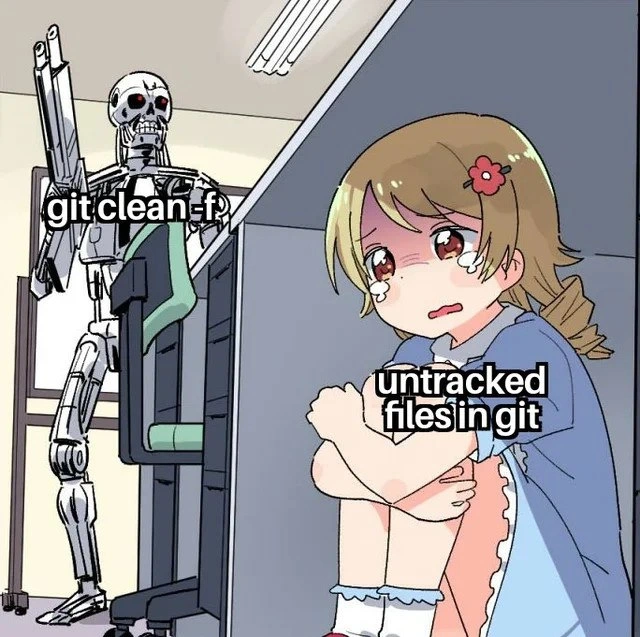
In the meme, the Terminator robot labeled "git clean -f" represents this forceful cleaning action. The robot bursting into the office is a visual metaphor for how aggressive and unstoppable the cleanup is when you use the force flag. There’s even a classic tech joke here: developers often compare running dangerous commands to unleashing a monster or a killer robot. In this case, git clean -f is portrayed literally as a killer robot targeting your files.
On the right, we have the crying anime girl labeled "untracked files in git." That’s illustrating how those poor untracked files have no defense once the Terminator-command is launched. In real life, if you had any important work saved in files that you hadn’t told Git to track yet, this command would delete them permanently. The girl crying under the desk represents the feeling of panic or sorrow a developer experiences after realizing they just deleted something they needed. It’s a humorous exaggeration, of course — but not that much of one! Many of us have felt like curling up and crying after fat-fingering a command that wipes out work.
This scenario is a rite-of-passage in DeveloperHumor folklore. It’s both funny and painful because it’s so relatable. Every developer learns to be careful with powerful commands in the CommandLineInterface (CLI). The CLI is that text-based interface (the terminal or console) where you type commands like git status or git clean. It’s incredibly powerful and efficient, but it will do exactly what you tell it, even if that means erasing files. There’s no playful “Recycle Bin” or undo button in the terminal — once you hit Enter with a force command, it’s game over for those files.
To prevent disasters, experienced devs often do a couple of things before using git clean. One common practice is running git clean -n (a dry-run mode) first, which lists all the untracked files it would delete, without actually deleting them. That’s like seeing the Terminator’s hit list in advance. Another practice is making sure important files are checked in to Git (i.e., tracked) or at least listed in .gitignore if they should be safe from cleaning. But mistakes happen. Maybe you thought a file was already committed, or you ran the command in the wrong directory. Then seeing that “Removing ...” line appear in the terminal can be heart-stopping. The meme exaggerates this feeling with the Terminator reference: it’s overkill, but that’s why it’s funny. The anime crossover style (cute meets deadly) just amplifies the absurdity.
In short, git clean -f is an aggressive cleanup tool in Git’s arsenal. It’s great for deleting clutter like compiled binaries or cache files that aren’t under version control. But if you’re not careful, it’s like bringing a laser cannon to a cleaning job – powerful, yes, but a tiny mis-aim and you’ll scorch something important. The meme captures that split-second of “Oh no… what did I just do?” that every developer dreads. And now you know why the little girl (untracked files) is so scared of the big bad Terminator (the force clean command)!
Level 3: Judgment Day for Untracked
In VersionControl lore, git clean -f is the stuff of nightmares and war stories. This command is basically the Terminator of the Git world: it hunts down and mercilessly deletes every untracked file in your repository’s working directory without asking for confirmation. Seasoned developers recognize the scene immediately. The metallic cyborg labeled git clean -f storms in, representing a forceful cleanup operation. Its target? The “untracked files in git” — portrayed as a terrified anime girl cowering under a desk. The humor (and horror) lies in the extreme contrast: a relentless robot assassin vs. delicate files that haven’t been saved to version control. It’s an exaggerated visualization of how running git clean -f feels, especially when you trigger it unintentionally.
Why is this so relatable in developer culture? Well, any engineer who’s mistakenly invoked a dangerous command can attest to the cold sweat that follows. Git, being a powerful distributed version control system, gives us many safety nets (like branch history, reflogs, stashes), but untracked files are outside of Git’s protection. They’re like orphans wandering outside Skynet’s database – and git clean -f shows them no mercy. The -f stands for force, and it means “I’m sure, just do it.” No second chances, no “are you sure (Y/N)?” prompts. Much like the Terminator, once the command is unleashed, it will methodically wipe out all files Git isn’t actively tracking.
Senior developers chuckle (and cringe) at this meme because we’ve learned — sometimes the hard way — just how destructive git clean -f can be. We’ve seen colleagues run it to quickly nuke build artifacts or cache files, only to realize it also vaporized a precious, uncommitted script or a config file that wasn’t checked in. There’s no undo for this; if it’s not committed, Git can’t bring it back. The meme’s Terminator reference is perfect: in the movie, the Terminator is an unstoppable robot that “will not stop… until you are dead.” In Git terms, git clean -f will not stop until every untracked file is deleted. It’s a dramatic but accurate metaphor for that aggressive_cleanup.
The pastel anime art style adds an ironic, humorous twist. You’ve got a cute crying character labeled “untracked files” – that’s basically how a developer feels inside when they realize they’ve obliterated something important with a blunt command. And the office cubicle setting? That’s the developer’s world – seemingly calm and everyday, until a wrong command turns it into a scene from an action movie. This reflects a common DeveloperExperience_DX: one moment you’re housekeeping your project, the next moment you’re in full panic mode (developer_panic), watching hours of work vanish instantly. It’s dark humor that gets a knowing nod from battle-scarred engineers. Remember the rule: commit early, commit often… or face the Terminator.
To sum up the senior perspective: git clean -f is like calling in an airstrike on your working directory. It’s effective at killing clutter, but it might take out something you love if you’re not careful. This meme nails that feeling with a pop-culture crossover — as if Skynet itself is handling your Git housekeeping. Hasta la vista, untracked files.
# Typical scenario that sends shivers down a dev's spine:
$ git status
On branch main
Untracked files:
(use "git add <file>..." to include in what will be committed)
draft_notes.txt
config/local.yml
$ git clean -f
Removing draft_notes.txt
Removing config/local.yml
# ...and just like that, they're terminated. 🙈
Description
A popular meme format featuring a menacing Terminator T-800 skeleton standing over a terrified, crying anime girl cowering in a corner. The Terminator is labeled 'git clean -f', while the helpless girl is labeled 'untracked files in git'. The image vividly personifies the destructive and unforgiving nature of the 'git clean -f' command. This command is used to forcibly remove all files and directories from the working directory that are not tracked by Git. For developers, these 'untracked files' can often be new source code that hasn't been added to a commit yet, important configuration files, or build artifacts. Running the command by mistake can lead to the irreversible loss of work, making it one of the most feared commands in a developer's toolkit. The meme perfectly captures the sense of imminent doom one feels right after accidentally executing it

Comments
10Comment deleted
The `-f` in `git clean -f` stands for 'find out'. As in, 'run this command and you'll find out exactly what you forgot to commit'
git clean -f: Skynet’s idea of a garbage collector - single pass, no safepoints, and absolutely no undo stack
The same developer who confidently wrote "we'll add proper gitignore patterns in the next sprint" three years ago now treats git clean -f like a production database DELETE without a WHERE clause
Every senior engineer has that one story about 'git clean -f' - usually told with a thousand-yard stare and a reminder to always check 'git status' first. It's the command that teaches you the hard way that Git's safety nets don't extend to files it doesn't know about. Pro tip: 'git clean -n' (dry run) is your friend, and .gitignore is your insurance policy. Because unlike your code, untracked files don't get the luxury of a commit history to resurrect them from
Git clean -f: The only command where --force feels like signing your own commit... to oblivion
Every senior learns to alias git clean to "git clean -ndx" - because "git clean -fdx" is the monorepo’s Terminator: it doesn’t hate you, it just deletes everything you love
git clean -f is zero-trust for your workspace: if it isn’t in version control, it’s treated like malware and erased - usually starting with the only copy of that bespoke .env you swore you’d commit later
Press F to pay respects Comment deleted
Wouldn't they be found in the recycle bin? Comment deleted
F Comment deleted

