Skip to content
DevMeme
2363 of 7435
Malicious Compliance: The JSON-Wrapped HTML
DataFormats Post #2626, on Jan 18, 2021 in TG

Malicious Compliance: The JSON-Wrapped HTML

Why is this DataFormats meme funny?

Level 1: Soup in a Box

Imagine your friend asks you for a recipe so they can cook the meal themselves at home. Instead, you cook the entire meal, put that meal into a box, and hand it to them along with the recipe card. That’s what happened here, but with computers! The boss said, “Please just send the raw ingredients (data) in a box (JSON) so we can cook it on our side (the front-end).” But the developer just took the fully cooked stew (the HTML soup), poured it into a container, and labeled the container “JSON.” It’s silly because the friend really wanted to do the cooking themselves and just needed the ingredients. We end up laughing because the developer technically did what was asked (they used a JSON container), but completely missed the point of why it was asked. It’s like receiving a packed sandwich when you expected bread, meat, and veggies to assemble it yourself – a funny mix-up that shows a big misunderstanding.

Level 2: Data vs Presentation

To understand the joke, let’s break down the technical bits. The two main things here are HTML and JSON, which serve very different purposes in web development:

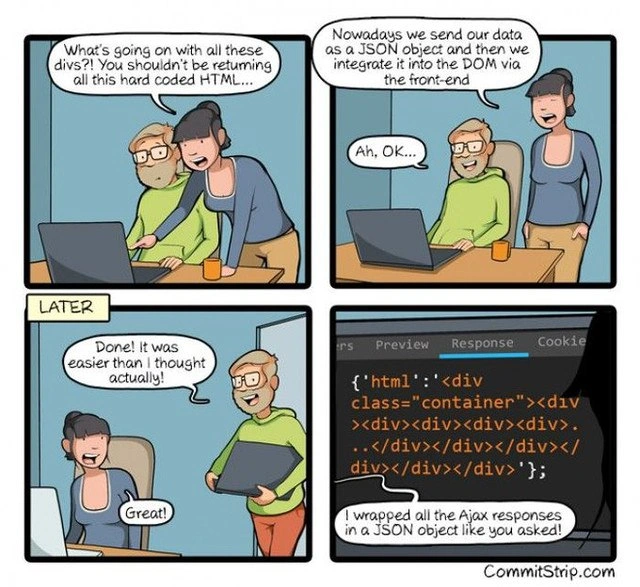
  • HTML (HyperText Markup Language) is the standard language for creating web pages. It uses tags like <div>, <p>, <h1> to structure content and define how things should appear in a browser. For example, <div> is a generic container tag often used to group other elements. When a developer mentions “all these divs” or “div soup,” they mean there’s a ton of nested <div> tags – usually a sign of messy or overly complicated HTML structure. In the comic’s final panel, the HTML shown (<div class="container"><div><div>...) is an example of such deeply nested divs without clear purpose – hence calling it a “soup.” It’s hard to digest and not very nutritious for maintainers!

  • JSON (JavaScript Object Notation) is a lightweight data format used for transmitting data, often between a server and a web application. JSON looks like JavaScript objects: it’s made of keys and values, for example:

    {
      "name": "Alice",
      "age": 30
    }
    

    JSON is great for sending data (like numbers, strings, lists, etc.) in a structured way so that the front-end can use that data in its JavaScript code. When the dev in the comic says “we send our data as a JSON object and then integrate it into the DOM via the front-end,” he’s talking about a common modern practice: the server sends pure data (JSON), and the browser uses JavaScript to turn that data into HTML elements on the page. The DOM (Document Object Model) is essentially the live, interactive structure of the HTML page in the browser. “Integrating data into the DOM” means using JavaScript to create or update HTML elements on the page using the data from JSON.

  • AJAX (Asynchronous JavaScript and XML) is mentioned in the caption. AJAX is a technique for calling the server from the browser without reloading the whole page. Even though the name says "XML" (it was coined back when XML was common for data), nowadays AJAX calls usually fetch JSON data from the server. In modern web development, you might use fetch or other methods to request data from an API endpoint and get a JSON response.

Now, what was the expected proper behavior versus what happened in the comic? Let’s illustrate the difference:

🟢 Expected (Good API Practice): The server should return data only in JSON. For example, if the page needs to display a list of users, an API might return:

{
  "users": [
    { "id": 1, "name": "Alice" },
    { "id": 2, "name": "Bob" }
  ]
}

This JSON has no HTML in it, just raw information. The front-end JavaScript receives this and can do things like: create a new <div> or <li> for each user, fill in the text "Alice" or "Bob", and add it to the webpage. The presentation (HTML structure) is handled by the front-end code.

🔴 What Happened in the Meme (Anti-Pattern): The server returns a JSON object that contains one giant string of HTML. It’s literally HTML code shoved inside a JSON response. It would look something like:

{
  "html": "<div class=\"container\"><div><div><div><div></div></div></div></div></div>"
}

(Notice how the quotes inside the HTML have to be escaped with backslashes \" to fit inside the JSON string.)

On the front-end, the JavaScript would receive this and basically just do:

const response = /* imagine we got the above JSON string from server */ 
const obj = JSON.parse(response);
document.body.innerHTML = obj.html;  // boom, insert that HTML directly

This means the server is still deciding the exact HTML (<div class="container">...) and the browser is just copying it into the page wholesale. The front-end isn’t really doing any data handling; it’s just dumping server-provided HTML into the DOM. We haven’t gained anything from using JSON, except maybe satisfying the requirement on paper. It’s like putting an old thing in a new box.

Why is this separation important? For a junior developer (or anyone new to FrontendDevelopment), the key concept is separation of concerns. The back-end (server) is usually responsible for business logic and data (like getting info from a database), and the front-end (browser) is responsible for displaying that info to the user in a nice way. By sending pure data (JSON), the back-end lets the front-end decide how to display it. This could be as simple as inner text of a <div>, or building a table, or using the data in some interactive graph. The front-end can use frameworks like React, Angular, or just vanilla JavaScript to render the UI. This makes the app more flexible: if we redesign the page or switch frameworks, we don’t need to change the API data format; it’s still just data.

In the comic, the miscommunication happened because the instruction “send JSON only” was interpreted too literally. The newbie dev heard “JSON” and thought, “Oh, the response just needs to be formatted as JSON? I can do that easily — I’ll take my output HTML and put it inside a JSON string!” They didn’t grasp that the goal was to send structured data rather than pre-built UI code. It’s an API contract confusion: the contract (agreement) was that the API will provide data, not UI. The poor developer thought they were doing exactly what was asked (after all, the response is indeed JSON format now), and they even say “It was easier than I thought.” This hints they were expecting a more complex task and were relieved at the simplicity – which is ironically the trap.

This scenario is also a gentle poke at how front-end/back-end miscommunication can lead to absurd outcomes. The front-end developer probably expected to receive JSON like the first example (with user names, etc.), but instead they get a JSON with a giant "html" field. If you opened Chrome DevTools Network tab and looked at the Response (like shown in the last panel), you’d literally see that JSON text with the HTML string. It’s both funny and frustrating: funny because it’s so absurd, and frustrating because it does happen in real projects when requirements aren’t clear.

To a junior dev: lesson learned here is to always clarify what data should be sent, not just how to format it. JSON isn’t magic by itself – it’s useful when you send meaningful data that the client can use. If you just embed one format inside another (HTML inside JSON or vice versa), you’re not leveraging the strengths of either. Think of JSON as the ingredients or raw data, and HTML as the cooked meal. The front-end wants to be the chef with the ingredients, not receive a pre-cooked, pre-plated dish disguised as groceries.

Level 3: The JSON Trojan Horse

At the highest level, this meme skewers a classic WebDev anti-pattern: sneaking presentation markup inside what’s supposed to be pure data. The experienced dev in the first panel is basically saying, “Stop sending a tangled mess of <div> tags from the server. We should be returning JSON (structured data), not raw HTML.” This is a modern best practice in API design and Frontend architecture: separate the data from how it’s displayed. In a proper setup, the back-end sends a clean JSON object (just the data), and the front-end (browser code) takes that data and builds the HTML interface. This separation of concerns makes apps more flexible and maintainable.

But in the comic’s punchline, the newbie developer hilariously misinterprets the instructions. Instead of returning a real data object, they simply wrapped the same old HTML in a JSON object—literally putting the entire "<html": "<div class='...'>...</div>" string inside a JSON field. It’s a JSON Trojan Horse: a payload that looks like data from the outside, but inside it’s carrying a blob of presentation markup. The result? "HTML soup" ladled into a JSON bowl. 🍜 The JSON format is technically present (braces and quotes in all the right places), but the spirit of the change was completely missed. This is a tongue-in-cheek reference to how some devs follow the letter of a guideline without understanding the why behind it.

From a senior developer’s perspective, this is both funny and painfully familiar. We’ve seen well-intentioned fixes go wrong due to front-end/back-end miscommunication. The back-end developer likely thought: “Alright, easy fix! Just wrap my existing HTML string in a JSON object and done.” They delivered exactly what was asked “like you asked!” – technically a JSON response – but it’s a hollow victory. All the hard-coded HTML (the numerous nested <div> tags lovingly called “div soup” in front-end slang) is still in there, now just hiding behind a JSON key. This defeats the whole purpose of using JSON: instead of sending data like { name: "Alice", age: 30 } that the front-end can use to build a UI, the server is still dictating the exact HTML structure. It’s a brittle, old-school solution wearing a modern mask.

Why is this a problem? Seasoned devs will recognize a few issues:

  • No True Separation: By embedding HTML in JSON, the server and client remain tightly coupled. Any change to the UI structure means changing back-end code again, negating the benefits of a dynamic front-end. It’s basically the same as returning HTML directly, just with extra steps.
  • Maintenance Nightmare: The code is harder to maintain. Imagine debugging this: you’d see a JSON blob with a giant quoted string of HTML. All the quotes in the HTML have to be escaped (\" everywhere), making it ugly and error-prone. One stray quote or backslash and the JSON breaks.
  • Performance and Overhead: The server likely spent time generating that HTML string. The client then has to parse JSON just to extract a string and re-render it as HTML. You’ve added JSON parsing overhead without any benefit of structure. It’s like serializing and deserializing for nothing.
  • Missed Opportunities: If the data were sent properly, the front-end could reuse it for different views, combine it with other data, or adapt the presentation for different devices. But a blob of HTML is not reusable data – it’s one specific presentation, frozen and inflexible.
  • Security Concerns: Inserting raw HTML via JSON (innerHTML usage on the front-end) without sanitization can open the door to XSS (cross-site scripting) if that HTML isn’t trusted. One reason to prefer data-only APIs is to reduce such risks by treating data separately from how it’s rendered.

The humor really hits engineers who have lived this. It’s API contract confusion at its finest: the team agrees to “return JSON from now on” as a contract between front-end and back-end, but one side delivers something that technically fits the contract while completely missing its intent. It’s reminiscent of the bad old days of AJAX, when folks might return HTML fragments from the server to slap into the page (a quick jQuery $('#content').load('/snippet') solution). We moved to JSON to avoid “div spaghetti” and tightly coupled client-server rendering. Seeing it come back under the guise of JSON is ironic and exasperating. A battle-scarred senior dev might chuckle and sigh, “Well, we did get JSON... just not the way we hoped.”

In summary, the meme highlights a misguided quick fix. The developer thought they found an easy solution (“it was easier than I thought!” he says, proudly) because they followed instructions superficially. Any experienced engineer recognizes this scenario where someone implements the letter of a requirement while betraying its spirit. It’s both funny and cringeworthy – we laugh because we’ve either made mistakes like this ourselves or had to untangle someone else’s. The comic uses this over-the-top example to remind us: using JSON is about structuring data, not just wrapping your old habits in curly braces.

Description

A four-panel webcomic from 'CommitStrip'. In the first panel, a female developer advises a male colleague, 'What's going on with all these divs?! You shouldn't be returning all this hard coded HTML...'. In the second panel, she explains the modern approach, 'Nowadays we send our data as a JSON object and then we integrate it into the DOM via the front-end.' The colleague seems to understand. The third panel, labeled 'LATER,' shows the male developer returning triumphantly, saying, 'Done! It was easier than I thought actually!' His colleague replies, 'Great!'. The fourth panel reveals the punchline: a screen showing a JSON response where a single key, 'html', contains a massive string of the exact same hardcoded HTML. A speech bubble clarifies his flawed logic: 'I wrapped all the Ajax responses in a JSON object like you asked!'. The comic hilariously captures the classic scenario of a junior or legacy developer following instructions literally while completely missing the underlying architectural principle - the separation of data and presentation

Comments

16
Anonymous ★ Top Pick This isn't an API response; it's a server-side rendered page that's cosplaying as a JSON object for Halloween. The only thing it's decoupling is the developer from the principles of modern web architecture
  1. Anonymous ★ Top Pick

    This isn't an API response; it's a server-side rendered page that's cosplaying as a JSON object for Halloween. The only thing it's decoupling is the developer from the principles of modern web architecture

  2. Anonymous

    Congrats, team - by stuffing raw HTML into a “html” key, we’ve reinvented server-side rendering, SOAP, and an XSS vector, all elegantly wrapped in a single artisanal JSON object

  3. Anonymous

    This is exactly how we ended up with a GraphQL resolver that returns HTML strings wrapped in JSON, which the frontend then parses with regex before injecting into dangerouslySetInnerHTML - and somehow it's still in production because "it works."

  4. Anonymous

    Ah yes, the classic 'JSON as a transport layer for HTML strings' pattern - because why send structured data when you can just wrap your entire DOM in quotes and call it RESTful? This is the architectural equivalent of putting your entire codebase in a single file and calling it 'modular' because you used one export statement. The real tragedy here isn't just the misunderstanding - it's that this will probably work just fine until someone needs to actually parse that data on mobile, or cache it, or do literally anything except innerHTML it back into existence. At least when this hits production and someone opens the Network tab, the 'Preview' vs 'Response' tabs will provide hours of entertainment

  5. Anonymous

    Backend: 'JSON makes frontend easy!' Frontend reality: It's divs all the way down

  6. Anonymous

    Ask for JSON instead of HTML and someone ships { html: '<div...>' } - congrats, you just implemented contract-compliant SSR via innerHTML with a bonus XSS surface

  7. Anonymous

    “Send JSON, not HTML,” they said - so the API returns { html: "<div…>" }. Congrats: same tight coupling, more escaping, and a new MIME type, application/facepalm+json

  8. @lytdev 5y

    When you have recently completed IT-courses and immediately start creating dev memes

    1. @x_Arthur_x 5y

      Great!

  9. @Flam_Su 5y

    Newbie. Profi encodes all to base64

    1. Deleted Account 5y

      Always encrypt your data!! ;)

      1. @qtsmolcat 5y

        Best obfuscation: 1) no comments 2) variable and function names that are gibberish 3) random shit that doesn't do anything

        1. Deleted Account 5y

          No, best obfuscation is a python oneliner

          1. @qtsmolcat 5y

            😮

    2. @ManveVitality 5y

      What about to encode every key and value to base 64, then put encoded data into JSON and encode this JSON to base64? 🌚

  10. @qtsmolcat 5y

    Yas

Use J and K for navigation