
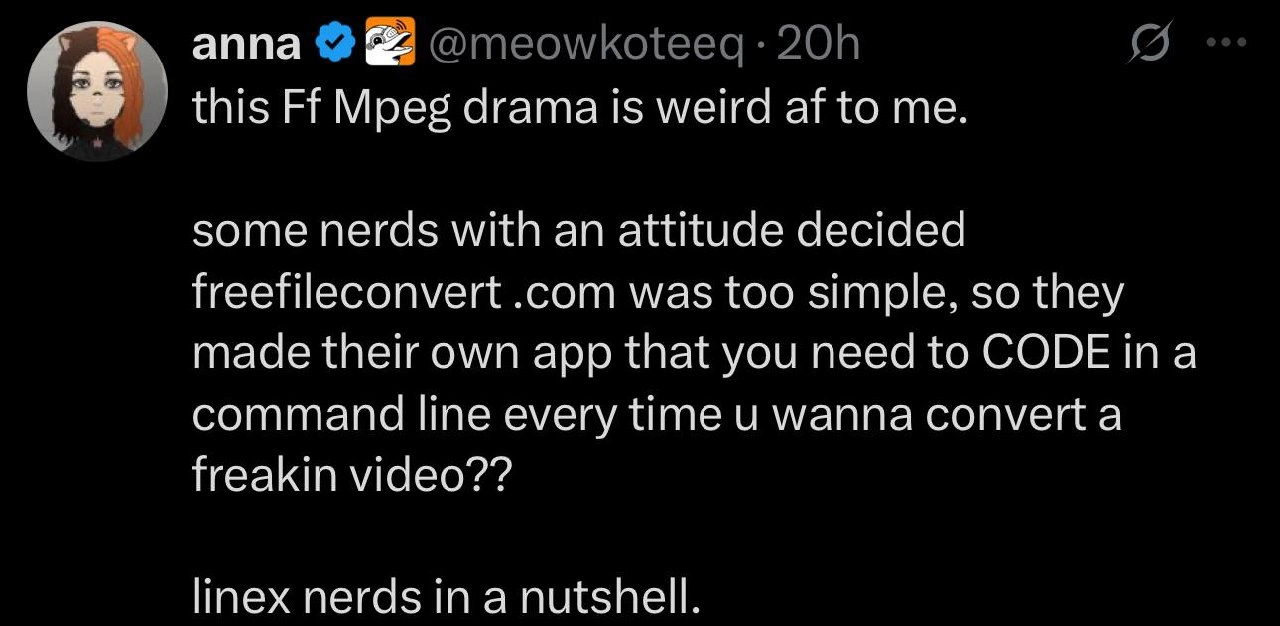
A User's First Encounter with the Power and Terror of FFmpeg
Why is this CLI meme funny?
Level 1: Legos vs Ready Toys
Imagine two kids who want a toy car. One kid decides to build a car out of LEGO pieces, picking the design and colors exactly how they like. The other kid just buys a ready-made toy car from the store that’s already assembled and ready to go. The store-bought car is easy – you open the box and play right away. The LEGO car takes more time and you have to follow instructions (maybe even ask a parent for help), but you get to customize it and learn how it’s built. Now, the kid with the ready-made toy looks at the LEGO-builder and says, “Why are you doing all that work? You could just buy one!” Meanwhile, the LEGO kid is thinking, “Why wouldn’t you want to make it yourself so it’s exactly how you want?” In the end, both kids get a toy car that works, but each one thinks the other’s way is a bit weird. In the same way, some people use the easy ready-made method (an online video converter) while others prefer the DIY method (typing commands into a tool like FFmpeg). Each side finds the other’s choice odd – and that silly misunderstanding is what makes the whole situation funny.
Level 2: Code vs Click 101
This tweet is basically complaining about having to use FFmpeg through a text interface instead of a nice easy website. Let’s break down what that means:
- FFmpeg: A free open-source program for converting or processing video and audio files. It’s like a Swiss Army knife for media. You usually run it by typing commands (there’s no built-in graphical window).
- Command Line Interface (CLI): A way to interact with your computer by typing commands into a text prompt (often called the terminal or console). For example, you might type
ffmpeg -i video.mp4 -o video.avito convert a file. It’s powerful but can look geeky since you have to remember commands or options. - Graphical User Interface (GUI): A click-and-drag way to use software, with buttons, checkboxes, and menus. A website like freefileconvert.com is a GUI – you click “Choose File,” pick a format from a dropdown, and hit a convert button. It’s user-friendly because you don’t need to know any commands.
- Linux: An operating system (like Windows or macOS) popular with developers and on servers. Many Linux users are comfortable with the CLI for tasks. (The tweet saying “linex nerds” is referring to Linux enthusiasts, spelled wrong as a slight dig.)
The tweeter is mixing up using a CLI tool with coding. In reality, when you use FFmpeg, you're not writing a new program – you’re just giving instructions to an existing program by typing what you want it to do. For example, if I want to convert a video to a different format, I might open the terminal and type something like:
# Convert input.mov to output.mp4 using FFmpeg
ffmpeg -i input.mov -c:v libx264 -c:a aac output.mp4
This looks like a foreign language at first, but it's really one command with some options. In plain English, it says: “Hey FFmpeg, take input.mov, encode the video with libx264 (that's a video codec for MP4), use AAC for audio, and save the result as output.mp4.” That’s not coding an app from scratch; it’s more like telling a very smart tool exactly what you want.
Why would someone bother with this CLI approach? Imagine you have 20 videos to convert, or one huge video file that an online service won’t accept. With FFmpeg, a developer can automate the task (write a small script or use a loop) to handle all the files at once. They don’t have to upload files one by one or worry about internet speed limits. It’s all done on their own machine. Open source tools like FFmpeg are also transparent – you can trust that it’s not secretly compressing the quality or asking for money for larger files. The downside is you have to learn the right commands, which can be confusing for beginners.
On the other hand, a GUI-based converter (like an online site or a desktop app with buttons) is straightforward for one-off jobs or for people who don’t convert videos often. You don’t need to read any documentation – you just follow on-screen instructions. The tweet’s author clearly prefers that simplicity and finds it “weird” that anyone would choose the terminal method. From their perspective, typing ffmpeg commands feels like doing extra, unnecessary work (“you need to CODE in a command line every time” sounds exhausting when you could just click a button).
In simpler terms: it’s the difference between a do-it-yourself tool and a ready-made tool. The CLI route asks you to put in a bit of work upfront to get exactly what you want, while the GUI route hides the complexity and gives you a quick, general solution. Both approaches will convert a video in the end, but each has its pros and cons. To a newcomer, the CLI way might seem overly complicated, and to a power-user, the GUI way can feel limiting. It’s a bit like choosing a pro-level tool that requires some skill versus a beginner-friendly tool that might be limited. Both get the job done, but each side thinks the other’s choice is kind of crazy.
Level 3: CLI Cult vs Click Crowd
The meme highlights a classic tech culture clash: command-line power users versus GUI-first users. In the tweet screenshot, someone is bewildered that “some nerds with an attitude” created FFmpeg – a powerful open-source tool you run in a terminal – instead of just using an easy website like freefileconvert.com. They call it “weird af” and claim you need to “CODE in a command line” every time you convert a video. For seasoned devs, this is both hilarious and painfully familiar. It’s the perennial UX vs DX debate: a casual user values a simple point-and-click interface (User Experience), whereas developers value flexibility and automation even if it means a steeper learning curve (Developer Experience).
We can’t help but grin at the tweet’s tone. The poster misspells Linux as “linex” and treats typing a command as if it’s writing an entire program from scratch. There’s an ironic reversal here: to the GUI crowd, using a CLI tool looks like unnecessarily “coding” each time, but to developers, running an ffmpeg command is as routine as using a microwave. The phrase “nerds with an attitude” hints at how proud open-source enthusiasts can appear. Yes, many Linux nerds wear their command-line prowess like a badge of honor (some might even brag about converting videos with a one-liner in Bash). From the outside, that pride can seem like gatekeeping or needless complexity. But there’s a reason these CommandLineTools exist: a site like freefileconvert.com might be too simple for advanced needs. With FFmpeg, you can customize every aspect – format, resolution, bitrate, codecs – without the arbitrary limits of a free web service (no annoying file-size caps or waiting for uploads). The trade-off? You do have to learn a few commands.
The humor here is that each side thinks the other is crazy. Developers reading this feel a mix of relatable humor and second-hand DeveloperFrustration. We’ve all had a non-tech friend or a manager ask, “Why can’t you just use a nice GUI?” when our CLI solution looked “user-hostile.” It highlights how differently power users think: typing out commands or scripting tasks is normal, efficient, and even empowering for us. Meanwhile, newbies see a black terminal window and think “scary hacker stuff.” The tweet exaggerates the situation (“you need to CODE every time”) – and that’s the joke. In reality, once you know the one-liner, converting a video with FFmpeg is quick and repeatable (you can even script it so it’s literally one double-click or a scheduled job – ironically less work in the long run). The FFmpeg drama mentioned likely refers to an online spat where open-source fans defended the CLI approach against folks who just want an easy GUI. Seasoned engineers find it amusing because we know what the tweeter doesn’t: often those “simple” web converters are actually wrappers around open-source engines like FFmpeg itself! In short, this meme pokes fun at the eternal power-user mindset vs ease-of-use divide – a nutty little misunderstanding that every developer has encountered and secretly enjoys seeing from the sidelines.
Description
A screenshot of a tweet from a user named Anna (@meowkoteeq). The tweet, set in white text against a black background, reads: 'this Ff Mpeg drama is weird af to me. some nerds with an attitude decided freefileconvert .com was too simple, so they made their own app that you need to CODE in a command line every time u wanna convert a freakin video?? linex nerds in a nutshell.' The user's profile picture is a cartoon avatar with split black and orange hair. The humor stems from a non-technical user's perspective, expressing bewilderment and frustration at the complexity of FFmpeg, a powerful command-line tool. For experienced developers, this is a relatable scenario showcasing the vast gap between user-friendly web apps and sophisticated, scriptable developer tools. The misspelling of 'Linux' as 'linex' adds another layer of humor, highlighting the user's unfamiliarity with the culture they are criticizing

Comments
26Comment deleted
Complaining that FFmpeg requires coding is like complaining that a compiler requires a source file. It's not a bug, it's the entire point
Sure, typing `ffmpeg -i input.mp4 -vf scale=1280:-2 -c:v libx264 -crf 23 output.mp4` is obnoxious - until the ad-ridden “simple” site rate-limits you and charges per codec flag
Somewhere, a senior engineer is writing a 10-page design doc explaining why their custom FFmpeg wrapper with 47 command-line flags is actually more intuitive than a GUI, while their PM quietly adds 'improve developer experience' to the backlog for the 73rd sprint in a row
Ah yes, FFmpeg - that obscure indie project from 2000 that those pesky 'linex nerds' created just to spite web converters that wouldn't exist for another decade. Clearly, Fabrice Bellard woke up one day and thought, 'You know what would really annoy people? A battle-tested, industry-standard multimedia framework that powers Netflix, YouTube, and literally every video tool they use daily.' The real drama isn't FFmpeg's development - it's that after 20+ years, we still can't decide if powerful CLI tools are gatekeeping or if expecting a GUI for everything is just Stockholm syndrome from decades of vendor lock-in
If your ‘convert video’ step lives on a website, you’re doing CI/CD with a mouse - FFmpeg’s ugly one-liner is version control, repeatability, and idempotence all in one
FFmpeg: where 'simple conversion' means mastering 50 flags, because who needs GUIs when regex hell builds character?
Calling ffmpeg 'coding' is how you discover the line between a one-off conversion and a reproducible, idempotent transcoding pipeline you can rerun at 3am with GNU parallel
truth Comment deleted
what's the ffmpeg drama? Comment deleted
I have been living in a cave. Comment deleted
Afaik they forced xkcd meme where ffmpeg is the most vital thing in internet Comment deleted
what happened next? Comment deleted
Idk, i assume there was a fair amount of people who never heard of ffmpeg Hence we see a tweet that resembles their opinion Comment deleted
Nice bait Comment deleted
Why I have to google to understand a meme? Bad UX Comment deleted
I didn't know vlc was all ffmpeg, but that validates my choice to use other apps with libavcodec-freeworld (which is the path of least resistance on Fedora regarding hevc) Comment deleted
afaik they use avcodec, which is a sister project made by the same people, made to be used programmatically Comment deleted
ffmpeg uses avcodec internally Comment deleted
Which is probably not to be confused with libav which is a fork? Comment deleted
uuuh I thought those are synonymous? Comment deleted
Nevermind apparently On March 13, 2011, a group of FFmpeg developers decided to fork the project under the name Libav.[15][16][17] The group decided to fork the project due to a disagreement with the leadership of FFmpeg.[clarification needed][18][19][20] Libav was declared abandoned in 2020.[21] https://en.m.wikipedia.org/wiki/FFmpeg Comment deleted
🎣 Comment deleted
deutsches twitter deutsches twitter Comment deleted
Oh hello Oh hello Comment deleted
https://youtu.be/9kaIXkImCAM?feature=shared Comment deleted
Ffmpreg Comment deleted

