The Electron Framework's Unbeatable Trade Offer
Why is this Performance meme funny?
Level 1: Not a Fair Trade
Imagine a friend makes you a deal: they will give you a super cool toy that lights up and looks amazing. đ In return, you have to let them use up almost all of your snacks and energy every day, even when youâre not playing with that toy. Youâd end up with a shiny new toy, but youâd be kind of weak and hungry because your friend ate 80% of your lunch and snacks! And whenever you try to play, you feel a bit slow and tired because, well, you didnât get much food. That doesnât sound like a fair trade, does it? You gave away a lot, but didnât get much use out of what you got back, aside from it looking cool.
This meme is funny because itâs showing that kind of bad deal in the computer world. The âcool-looking appâ is like that fancy toy â it has neat colors and style. But to use it, your computer has to give up a huge amount of its âsnacksâ (its memory and processing power). Your computer might start to feel slow or âtiredâ (laggy and hot) because the app is using so much of its resources, even when youâre not doing anything with it. In other words, the app is gobbling up your computerâs power just to run. Itâs as if the computer made a trade: it gave away a lot of its strength so the app can look pretty. And just like youâd laugh and say âno way!â to a friend who proposes such a silly exchange of lunch for a toy, we laugh at the idea of an app that demands so much from your poor computer for so little in return.
The core joke is easy to feel: nobody would trade something big for something small or purely fancy on those terms! Itâs an obviously uneven deal. The meme uses that idea to make us chuckle about certain apps (built with Electron) that do exactly this â they take a ton of your computerâs juice and only give you a slow but nice-looking result. Itâs pointing out the silliness in a way that even if you donât know the tech details, you can understand: âThis doesnât seem worth it!â That simple feeling of a bad trade is why itâs funny.
Level 2: Cool UI, Hot CPU
So what exactly is Electron, and why does this meme talk about it eating up your computerâs RAM and CPU? Electron is a popular software framework that lets developers build desktop applications using the same tools used for websites. Instead of writing separate apps for Windows, macOS, and Linux in each systemâs native language, a developer can create one Electron app using HTML, CSS, and JavaScript (the usual web languages). Electron then wraps this web code in a desktop application shell. Itâs the technology behind many apps you might know, like Slack (chat app), Discord (community chat), and Visual Studio Code (a code editor). The big appeal here is cross-platform convenience and a great developer experience: you write your code once, and it runs on all major operating systems. And because itâs basically built with web tech, you can make a cool-looking user interface with modern visuals, animations, and styles â essentially anything a website can do, your app can do too.
But hereâs the catch (and the joke of the meme): Electron apps are notorious for being heavyweight in terms of system resources. When we say âresourcesâ, we mainly mean memory (RAM) and processor time (CPU). RAM is like the computerâs short-term memory that all running programs share, and CPU is like the computerâs brain that does calculations. A well-optimized or small native app might use only a tiny slice of these. In contrast, Electron apps often use a lot more, even when they're not very busy. The meme humorously claims Electron âreceivesâ 80% of your RAM and 30% of your CPU while idle â which is an exaggeration, but itâs poking fun at real issues.
Why would an Electron app use so much RAM or CPU, even if itâs just sitting there (âidleâ means the app isnât actively doing anything you can see)? The answer lies in how Electron works. An Electron app bundles the Chromium browser engine (the core of Google Chrome) and Node.js runtime into a single package. Essentially, when you start an Electron app, you are starting a cut-down version of the Chrome web browser under the hood. Chrome is pretty hungry when it comes to resources (think of how having many browser tabs open can slow down your machine). Now imagine each Electron-based app is like its own Chrome, dedicated to one website (the appâs code). They donât all share one engine; if you run three Electron apps, thatâs like launching three Chrome browsers! Itâs easy to see how memory usage can stack up. Electron apps often take hundreds of megabytes of RAM even for simple tasks, because a huge chunk of that is the browser infrastructure itself. Thereâs also overhead from running JavaScript and its memory management (automatic garbage collection, etc.), and running any background scripts or timers. This is why sometimes an Electron app might show non-zero CPU utilization in Task Manager even when youâre not clicking anything; the appâs underlying Chrome engine might be housekeeping (like checking for updates, running a script, or just keeping the environment alive).
Letâs break down the memeâs two sides in plain terms:
âI receive: 80% of RAM usage, 30% CPU usage while idle.â This is describing the Electron appâs side of the deal. Itâs saying the app is going to greedily use a large portion of your computerâs memory and keep the CPU working even when youâre not actively using it. Itâs tongue-in-cheek; most apps wouldn't advertise themselves this way! It highlights the feeling that Electron programs are resource hogs (a âhogâ here means it grabs a lot more than its fair share of resources). If youâve ever opened an app like Slack or an Electron-based editor and noticed your machine slowing down or fans spinning, youâve witnessed this in action. Maybe you pressed Ctrl+Shift+Esc to open the Task Manager (on Windows) or the Activity Monitor on Mac and saw a single chat app using 500 MB of RAM or more. That can be shocking if you compare it to, say, a simple native notes app that might use 50 MB. The â30% CPU while idleâ part jokes that even if youâre not actively typing or loading anything in the app, it might still be using a significant chunk of your processorâs capacity doing who-knows-what. Ideally, an idle app should use 0-1% CPU (virtually nothing). Seeing 30% is extreme â your computerâs brain is 1/3 occupied just waiting on this app. In real life, some poorly optimized Electron apps might not literally sit at 30% constantly when idle, but they can spike or hover in the tens of percent at times, which users definitely notice (think battery drain or a warm laptop for no good reason).
âYou receive: Laggy but cool looking app.â This is the user/developer side of the deal. What do we get for giving Electron so much of our systemâs juice? We get an application that looks modern and stylish (because itâs built with slick web UI elements) but can be laggy, meaning it doesnât run as smoothly or as fast as weâd hope. âLaggyâ implies delays in response â maybe clicking a button in the app isnât instant, or typing has a slight delay, or animations arenât perfectly smooth. Itâs the kind of slowness you might experience if your computer is strained for resources. The meme is basically saying: all that RAM and CPU use, and all I get is an app that still doesnât feel super snappy. Itâs a sarcastic way to point out, âWas this a good trade-off?â The appâs appearance is great (maybe it has a cool dark theme with purple LED-style accents, like the memeâs background), but the performance is lacking.
This trade-off is something new developers might not think about at first. If youâre a beginner, Electron can sound amazing: âWait, I can use JavaScript (which I already know from web development) and build a desktop app from it? And itâll look the same on every OS? Sign me up!â Many juniors dive into making projects with Electron for this reason. Itâs friendly to web developers and you can get results quickly. However, the first time you package your Electron app and run it, you might be surprised at the appâs size and resource usage. A simple âHello Worldâ Electron app might be ~150 MB in size just for the installer, because it has to include Chromium and Node. And when running, you might see it using a few hundred MB of RAM. If you only have, say, 4 GB of RAM on your machine, thatâs a noticeable chunk! In contrast, a small program written in C++ or another native language could be just a few MB in size and use maybe 20 MB of RAM. Thatâs the price of the convenience that Electron gives you.
Now, to a junior developer or someone not familiar with Electron, this seems almost magical â âHow is my JavaScript code running as a desktop app?â The answer is that Electron is doing a lot behind the scenes, and all that behind-the-scenes work requires computing resources. The meme is a playful reminder (or warning!) of those hidden costs. It has an element of overengineering humor: it's like using an entire browser just to run one app. Some people quip that Electron apps are âChrome apps in disguise.â For example, if you have Slack open and Chrome open, you essentially have Chrome open twice, but one copy (Slack) is locked to just showing Slackâs interface.
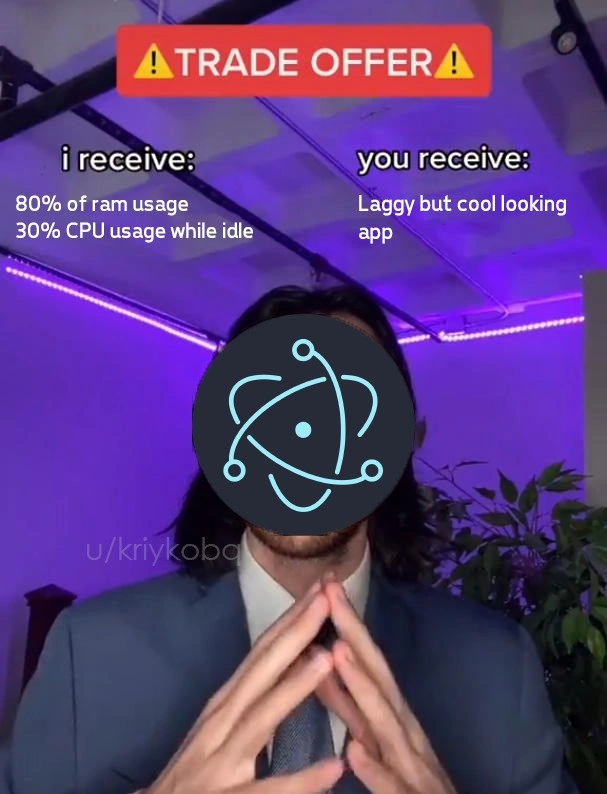
For a bit of context on the meme format: the âTrade Offerâ meme usually shows a person in a suit (often itâs from a TikTok video originally) with text above them that says âI receive: ___ / You receive: ___â. It became an Internet joke format to poke fun at unbalanced deals or ironic exchanges. Here, the Electron logo covering the personâs face means Electron itself is personified as the one making the offer. Itâs saying âHereâs the deal: I (Electron) take a lot of your system resources, you get a pretty app that unfortunately runs slow.â Itâs humorous because normally a trade offer tries to be fair, but this one is obviously skewed in Electronâs favor (taking a lot, giving little). The creator of the meme (watermark âu/kriykobalâ) is essentially making a lighthearted complaint: Electron apps are nice-looking, but man, they use a ton of RAM and CPU for what they are!
In simpler terms, this meme educates and jokes at the same time: if you use Electron to make or use an app, expect it to consume a large chunk of memory and possibly slow things down, even if itâs just sitting open. The flashy design or the fact itâs easy to build is the carrot, and the stick is your computerâs performance. Many new developers learn this the first time they run an Electron app on a low-end laptop and wonder, âWhy is my computer so slow and hot just from this chat program?â Then someone explains, âWell, that app is built on Electron, which means itâs like a whole web browser running.â Suddenly the high memory usage makes sense.
To give a concrete example: letâs say youâre new at a company and they use Slack for communication. You notice your laptopâs fan is always whirring when Slack is open. If you check the resource usage, Slack might be using several hundred MB of RAM and some CPU constantly. You later learn Slack is an Electron app. Thatâs when the joke of this meme would click for you: Slack (Electron) basically said âIâll give you a nice chat app interface (Slackâs UI) but Iâm going to gobble up your RAM/CPU.â You got a cool app, but your machine got a workout. Another example: you might be coding in Visual Studio Code (which, surprise, is also an Electron app) and have multiple projects open. VS Code gives you a fantastic developer environment with lots of features and a slick interface. But if youâve ever wondered, âWhy is VS Code using 1GB of memory after I open a few files and terminals?â, itâs the same story â thatâs Electron under the hood taking its share.
For a junior dev, an important lesson here is the concept of trade-offs in technology. There is rarely a free lunch. If something is easier for the developer or gives you a super polished UI out-of-the-box, thereâs probably some complexity or overhead making it happen. Electronâs overhead is performance. The meme exaggerates it to make the point clear and funny. Itâs basically saying: âElectron makes app development easier (and apps look modern), but boy does it come at a heavy cost in terms of efficiency!â
In summary, at this level we can appreciate the meme as a warning wrapped in humor. ElectronApps can be both wonderful and worrisome: wonderful because they democratize desktop app creation for web developers, worrisome because if every app is an Electron app, our poor computers have to work much harder. The ââ ď¸ Trade Offer â ď¸â format perfectly captures that uneasy compromise. Even if youâre relatively new to coding, you likely understand the idea of a slow app or your computer freezing up. This meme is basically giving a reason for one cause of that: an app built with a heavy framework. Itâs a bit of frontend humor mixed with truth: those pretty interfaces sometimes hide a whole lot of gears turning inside. And once you see the Electron logo in the meme, you learn to nod and think, âAh, I get it â the app is fancy, but itâs going to be a system resource monster.â
Level 3: Electronâs Faustian Bargain
At the highest level, this meme humorously exposes a trade-off at the heart of using the Electron framework for desktop apps. It's styled as a ââ ď¸ TRADE OFFER â ď¸â â a popular meme format â where the Electron logo is the suited negotiator proposing a lopsided deal. On the left it says âI receive: 80% of RAM usage, 30% CPU usage while idleâ and on the right âYou receive: Laggy but cool looking app.â This exaggeration makes seasoned developers smirk because itâs grounded in truth. Electron apps are notorious resource hogs: they often consume huge amounts of memory (RAM) and keep the CPU busy even when doing nothing visible. In return, developers (and users) get a shiny, cross-platform UI that feels like a modern website. Itâs essentially calling out the cost of convenience â a sort of Faustian bargain where you sacrifice system resources for development speed and flashy design.
Why does Electron demand such a steep price? Under the hood, an Electron application packages an entire Chromium browser engine (the same core that powers Google Chrome) along with a Node.js runtime. This means each Electron app is basically a self-contained Chrome browser running your appâs code. Chrome is a powerful, multi-process browser optimized for web compatibility, but it isnât lightweight. Every Electron app spins up:
- A main process (running Node.js)
- One or more rendering processes (essentially browser tabs for your appâs windows)
Those processes eat up memory â often hundreds of megabytes just to start â and can pull a fair share of CPU to handle the browserâs JavaScript engine, garbage collection, rendering, and more. In fact, even a simple "Hello World" Electron app might consume far more RAM than a native app with the same functionality. Itâs not literally â80% of your RAMâ in most cases (that number is a humorous exaggeration), but on an older machine with limited memory, firing up Slack (built on Electron) alongside a few other Electron-based tools can make it feel like 80%! And 30% CPU while idle? That riffs on real observations: poorly optimized Electron apps sometimes keep background timers, update checks, or memory cleanup processes running, so your CPU isnât truly idle. Many of us have heard our laptop fans kick on or felt our battery drain because one more Electron app was left open in the background. The meme nails that shared experience with surgical precision.
This joke lands especially well with developers who remember how efficient native desktop apps used to be. In the meme, Electron is essentially saying, âI get your systemâs resources, you get a pretty app â take it or leave it.â Itâs funny because itâs a terrible deal on paper, yet the industry keeps accepting it. Why? Because from a Developer Experience (DX) standpoint, Electron is incredibly appealing. It lets you write a frontend once using familiar web technologies (HTML, CSS, JavaScript) and deploy it as a desktop application on Windows, macOS, and Linux without rewriting code in C++ or other native languages for each platform. Thatâs huge for productivity and consistency. Developers receive: one codebase, quicker iteration, access to a vast ecosystem of web libraries, and a unified UI across platforms. But the end userâs machine receives the bulk of the punishment: heavy installation sizes, high memory footprints, and often slower, laggier performance compared to lean native apps. As the memeâs Trade Offer format implies, itâs an unequal swap.
This resonates as a form of over-engineering humor too. We have an inside joke in software: using Electron to build, say, a simple To-Do list app can be like using a rocket ship to deliver a pizza â comically overpowered and inefficient. You get the job done with style and advanced tech, but itâs absolute overkill. In real terms, bundling an entire browser for each app is the epitome of a heavyweight JS framework approach. And if you have multiple Electron apps open? They donât share that Chromium engine â your system ends up running several full Chrome instances at once! No wonder 32GB of RAM feels like 8GB these days if youâre running half a dozen Electron-based tools simultaneously. Experienced devs have come to expect this. Theyâll jokingly ask, âIs there an Electron app for that?â as a warning that their RAM might start vanishing. The memeâs deadpan offer â lots of RAM/CPU in exchange for a âcool looking appâ â perfectly captures the shiny UI vs. system resources dilemma.
Historically, this trade-off is also a lesson in software abstraction costs. Weâve seen it before: write in a higher-level, easier language and you often pay with performance (think of early Java or managed runtimes). Here, Electron represents a modern twist: write a desktop app like youâre making a website â more abstraction, more overhead. The communityâs reaction has been a mix of awe and eye-rolling. Awe, because itâs amazing that todayâs machines are powerful enough that we can literally run a mini-browser for every app and mostly get away with it. Eye-rolling, because it feels inefficient and wasteful. This meme wouldnât be as funny if it didnât ring so true; itâs basically a neon-lit sign saying âYes, we know this cool frontend is burning through your laptopâs battery â thatâs the deal we struck!â Seasoned developers laugh (maybe through tears) because theyâve lived this. Theyâve debugged Electron memory leaks, theyâve explained to their IT department why the chat app uses more RAM than an engineering simulation, and theyâve seen âElectronâ become a tongue-in-cheek synonym for bloat. The meme distills all that shared knowledge into a single, cheeky âI receiveâŚ, you receiveâŚâ screenshot.
To put it in perspective, consider this tiny Electron example:
// Minimal Electron app that displays "Hello World"
// The code is tiny, but Electron will launch a full Chromium browser for this!
const { app, BrowserWindow } = require('electron');
app.whenReady().then(() => {
let win = new BrowserWindow({ width: 300, height: 200 });
win.loadURL('data:text/html,<h1>Hello World</h1>');
});
Even this trivial app, just a few lines of JavaScript, quietly starts up the whole Chromium engine in the background. Underneath that BrowserWindow is essentially a Chrome tab showing âHello Worldâ. A native app showing the same text might use a few megabytes of memory and virtually zero CPU when idle. The Electron version will use far, far more â not because âHello Worldâ is hard to render, but because of all the general-purpose web runtime machinery now running. Itâs a clear illustration of Electronâs resource tax. We accept that tax to gain the flexibility and ease of web development. The meme jokes that Electron (as a pseudo-person in the suit) is fully aware of this and almost brazen about it: âI take a hefty chunk of your RAM and CPU; you get a sweet-looking app in return â deal?â Itâs funny because, inside every Electron developer or tech-savvy user, thereâs a tiny voice screaming, âWait, why are we okay with this deal?!â and yet Electron apps continue to thrive.
In summary, at this deep level the meme is poking fun at the framework trade-offs that have become common in modern software development. It highlights the almost absurd extreme of prioritizing developer convenience and flashy UI over performance efficiency. The humor lands with anyone whoâs watched their memory vanish thanks to an Electron app. Itâs a gentle roast of our industryâs penchant for using JavaScript and web tech for everything, even when it means wrapping a relatively simple app in layers of heavy abstraction. The Electron negotiator in the meme is essentially saying what many of us half-jokingly admit: âYes, I know itâs inefficient, but look how cool it is!â â and we begrudgingly shake hands on that deal more often than weâd like to admit.
Description
This meme uses the popular 'Trade Offer' TikTok format to critique the Electron framework. A man in a suit, with the Electron.js logo obscuring his face, presents a deal. A red banner at the top reads 'TRADE OFFER'. The left side, under 'i receive:', lists '80% of ram usage' and '30% CPU usage while idle'. The right side, under 'you receive:', offers a 'Laggy but cool looking app'. The scene is lit with purple neon lights, and a watermark for 'u/kriykoba' is visible. The humor is aimed at developers' common complaint about Electron: it allows for the creation of cross-platform desktop applications using web technologies (HTML, CSS, JavaScript), but at a significant performance cost. Each Electron app bundles a full instance of the Chromium browser, leading to notoriously high memory and CPU consumption, which is the core of this satirical trade-off

Comments
14Comment deleted
The only thing heavier than a node_modules folder is the Electron app it was used to build
Electronâs handshake: I give you single-codebase velocity, you provision every userâs laptop like a one-node Kubernetes cluster - fair trade, right?
After 15 years of optimizing native apps to squeeze every microsecond of performance, we've successfully evolved to shipping entire Chromium instances just to render a todo list. The real trade offer is convincing your PM that 2GB of RAM for a chat app is 'industry standard.'
Ah yes, the classic Electron value proposition: 'We'll give you a beautiful, consistent UI across all platforms - you just need to dedicate a Chrome tab's worth of RAM to each app, even when minimized.' It's the architectural decision that makes your 32GB of RAM feel like 8GB from 2010, where every Slack notification costs you the equivalent of running a small database instance. But hey, at least your settings menu has smooth CSS transitions while consuming more resources than the Apollo Guidance Computer used to land on the moon
Electron is the stack where âHello, Worldâ spawns a renderer, a GPU process, and an updater - then idles at 30% to think about being crossâplatform
80% idle RAM? That's not a leak, it's precomputing the next UI paradigm shift
Electron: RAM-as-a-service - ship a Chromium fleet (main, renderers, GPU, Crashpad); you get cross-platform UI, your users get 30% CPU at idle
Is that react or something else? Comment deleted
React Native / Electron / Proton / Expo One of thoseđ Comment deleted
React Comment deleted
I think thats electron Comment deleted
Another js frameworkđŤ Comment deleted
Itâs electron guys Comment deleted
React is cool, but react dev are silly idiots Comment deleted