Skip to content
DevMeme
217 of 7435
Excel: The Unintended Meme Graphics Editor
DevCommunities Post #262, on Mar 24, 2019 in TG

Excel: The Unintended Meme Graphics Editor

Why is this DevCommunities meme funny?

Level 1: Coloring in the Grid

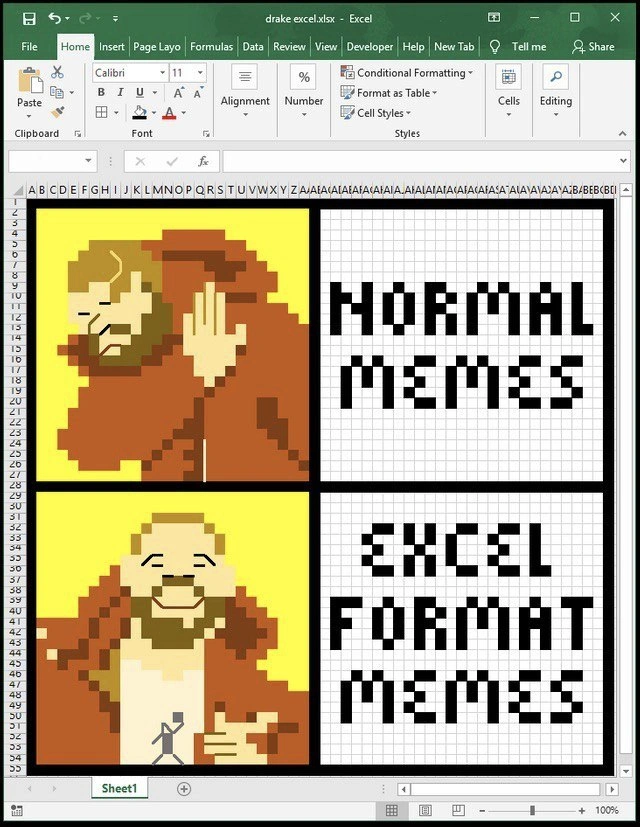
Imagine you have a big sheet made of tiny squares (like graph paper), and you decide to make a drawing by coloring those squares. That’s exactly what happened here, but on a computer. The meme shows a popular picture of Drake (a singer) doing a “no/yes” joke. Instead of drawing it on paper or using a regular painting program, someone used Microsoft Excel, which is usually for math tables and lists. It’s like using your math homework graph paper to draw a funny comic! In the top part of the picture, Drake is saying “no” to normal memes (regular funny pictures). In the bottom part, he’s happy about memes made in Excel.

Why is that funny? Because Excel is a serious tool people use at offices for things like budgets or schedules, not for making art. It’s as if one day you opened a calculator and it started playing a cartoon – totally unexpected. People who work with Excel every day think this is hilarious and awesome because someone took a boring work tool and did something very playful with it. It’s like building a LEGO mosaic of your favorite photo instead of just printing the photo – it’s more work and kind of silly, but that’s what makes it cool. In simple terms, the meme is joking: “Regular memes are okay, but memes made in a spreadsheet are extra special!” It makes us laugh because it’s a very creative and nerdy way to have fun with something usually so ordinary.

Level 2: Meme on a Spreadsheet

Stepping down to a more straightforward view: this meme is basically the famous Drake meme recreated inside an Excel spreadsheet. The Drake meme usually has two panels: in the first, Drake is waving his hand “no” at something he doesn’t like; in the second, he’s smiling and pointing because he likes the alternative. Here the top panel text says “NORMAL MEMES” (with Drake rejecting them), and the bottom panel says “EXCEL FORMAT MEMES” (with Drake approving those). So the joke is that making memes in Excel is better than regular memes.

How was this done? The image is literally a screenshot of Microsoft Excel with a file named drake excel.xlsx open. The person turned the Excel grid into a drawing canvas. They made the columns very narrow and rows short so each cell became a tiny square pixel. Then they filled those cells with colors to draw a pixelated version of Drake in his orange jacket on a yellow background – just like the original Drake meme image, but in a chunky 8-bit style. The right side of the sheet has blocky text spelled out, which they achieved by coloring cells to form letters (like old arcade game text). We can see Excel’s interface around it: the green title bar, the ribbon with tabs like Home, Insert, Formulas, etc., which confirms this isn’t a normal picture; it’s an Excel window.

One clue about the technique is the highlighted “Conditional Formatting” button on the Home tab. Conditional formatting in Excel is a feature that automatically changes a cell’s color or style based on its value. In normal use, someone might say “if a cell’s value is negative, color it red” to flag bad numbers. Here, the meme-maker likely used it creatively: each cell might contain a number or code corresponding to a color (for example, 1 for yellow, 2 for orange, 3 for black, etc.), and then Excel’s conditional formatting was set up so that the cell fills with the correct color for that number. That way, they could “program” the picture by entering numbers into the grid, and Excel would paint the pixels for them. It’s like pixel art by numbers.

The Drake Hotline Bling meme itself is well-known on the internet (Drake the rapper did these gestures in a music video, and people turned it into a template to compare preferences). By re-creating it in Excel, this meme merges pop culture with nerd culture. It’s showing that even a serious business application can be used for lighthearted art. Developers and office workers find this hilarious because they associate Excel with things like budgets, schedules, or maybe writing very basic scripts – definitely not with making colorful jokes. It’s a bit of relatable humor for anyone who’s ever had to use Excel extensively: seeing it used in such an unexpected way is both impressive and comical. And within tech meme circles, doing something in an odd format (like writing code on a toaster or making memes in Excel) is a running joke – it’s funny precisely because it’s over-complicating things in a playful way. Essentially, the meme says: normal meme images are fine, but have you tried making one in a spreadsheet? That’s the real deal for coding humor enthusiasts.

Level 3: Spreadsheet Shenanigans

For experienced developers, this meme hits a sweet spot of tech humor and creativity. It’s the classic Drake Hotline Bling meme (Drake dissing one thing and approving another) reimplemented entirely inside Microsoft Excel. The joke is that Drake is rejecting “NORMAL MEMES” and giving an enthusiastic thumbs-up to “EXCEL FORMAT MEMES.” In other words, a plain old meme image is passé – the real connoisseurs of TechMemes prefer their memes served in a spreadsheet. This is hilariously meta and oh-so-relatable in developer communities. Why? Because devs have a proud tradition of using tools in unintended ways just to show it’s possible (and to get a laugh). Excel is a piece of enterprise tooling most often associated with finance folks and boring data entry, yet here it’s been commandeered for pure fun. It resonates with any programmer who’s ever misused a work tool for a side project or a joke. The image itself is an Excel spreadsheet window (drake excel.xlsx) with the familiar grid – except the cells are minuscule and filled with carefully chosen colors to form a pixelated Drake in his orange jacket. We even see Excel’s ribbon tabs: Home, Insert, Formulas, and notably the Developer tab, which isn’t shown by default to casual users. That detail screams “made by a power user (likely a developer) who enabled advanced features.” It’s an inside joke pointing to the fact that a DeveloperHumor aficionado is at the helm.

The DevCommunities love this kind of cleverness. It’s reminiscent of those times someone plays Doom on a refrigerator screen or programs Tetris in a SQL query – it’s absurd, it’s impractical, and that’s exactly why it’s funny. Here, the Excel sheet is essentially a mosaic canvas. The creator likely used Conditional Formatting to assign colors to cells based on values, effectively programming the art. For instance, they might have put different numbers or letters in cells to represent a color palette, then set rules: e.g., if a cell contains “1” then fill it with yellow, if “2” then orange, if “3” then black, etc. That way you can “compute” the image by just populating a matrix of color codes – a trick data nerds find satisfying. In the screenshot, the “Conditional Formatting” button is visible and even highlighted, hinting at this technique. It’s a cheeky spreadsheet_hacks move to turn a feature meant for highlighting financial data into an artist’s paintbrush.

Also, notice the text “NORMAL MEMES” and “EXCEL FORMAT MEMES” spelled out in blocky letters on the right panels. Those letters are themselves made out of Excel cells filled with black. It’s a memeFormats in-joke: using the medium to spell out the message. The whole composition gives off “some coder spent way too much time on this, respect” vibes. Experienced devs chuckle because they’ve either seen similar stunts or attempted them. There’s even a bit of subtext about DeveloperExperience_DX: We often talk about using the right tool for the job, but devs sometimes deliberately use the “wrong” tool for clout or laughs – like writing a blog in Bash or managing a to-do list in Vim. It’s comedic inversion of productivity; turning a productivity app into a meme generator is both a flex and a satire of office life.

In essence, this meme celebrates relatable humor among software folks: it’s the joy of unnecessary creativity. It pokes fun at our own tendency to push software beyond its intended use-case just because we can. And let’s be honest, if you’ve endured monotonous hours in Excel at a day job, the idea of reclaiming it for a bit of fun – even building full Excel pixel art – feels like poetic justice. The next time someone says, “That’s not what Excel is for,” the developer answer will be, “Hold my beer (or rather, hold my cell references).”

Level 4: Turing-Complete Humor

At the deepest level, this meme showcases how Excel – a humble spreadsheet tool – can be repurposed as a general-purpose computing canvas. It’s a tongue-in-cheek reference to the idea that spreadsheets are effectively a programming environment. In theoretical computer science terms, modern Excel with its formulas and macros is Turing-complete – meaning it can simulate any computation given enough cells and clever formulas. Here that power is channeled not into number crunching, but into pixel art. Each colored cell in the spreadsheet functions like a tiny programmable pixel. Conceptually, this parallels how any digital image is just a grid of data: behind every .PNG or .JPG is a matrix of color values. By shrinking Excel’s rows and columns into tiny squares, the creator treats the sheet as a giant 2D array of pixels. This mashup highlights the duality of data and visuals – a reminder that images can live in spreadsheets just as numbers can, since both are ultimately information encoded in a grid. It’s a spreadsheet hack elevated to art: an everyday office program bending to the will of a creative coder, much like how any Turing-complete system can, in theory, be coerced into doing anything, however absurd. The humor here is partly in the absurd elegance: we have a cutting-edge meme format implemented on software first designed for accounting in the 1980s. It’s a nod to the functional programming nature of spreadsheets, where each cell’s appearance can be a pure function of its value (thanks to Conditional Formatting rules). In a way, the meme is celebrating a bizarre form of “grid computing” – not the multi-machine kind, but literally computing an image on a grid of cells. By invoking Excel’s Developer capabilities (notice the visible “Developer” tab on the ribbon), the creator hints at the deeper truth that spreadsheets are a playground for office tool misuse with near-infinite possibilities. To seasoned engineers, there’s an almost academic joy seeing an algorithmic approach (cell formulas + formatting logic) produce a familiar Drake image. It’s as if the meme is whispering a geeky punchline: “Excel can do that because Excel can do (almost) anything.”

Description

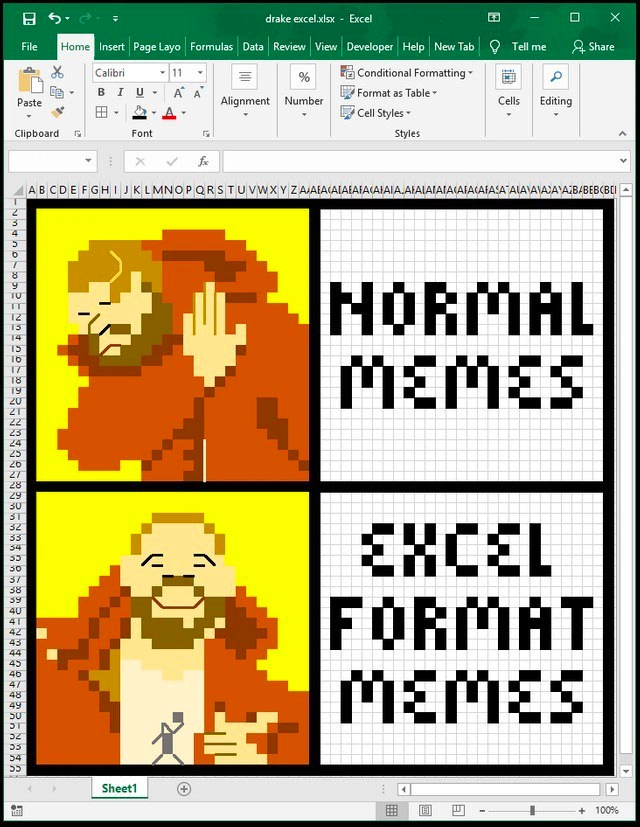
A meta-meme created entirely within a Microsoft Excel spreadsheet, using colored cells to form pixel art. The image is a screenshot of an Excel file named 'drake excel.xlsx'. It recreates the popular two-panel 'Drake Hotline Bling' meme format. In the top panel, a pixel art version of Drake is shown with a rejecting gesture next to the block-letter text 'NORMAL MEMES'. In the bottom panel, a smiling and approving pixel art Drake points towards the text 'EXCEL FORMAT MEMES'. The entire creation, including the characters and text, is rendered by filling in the grid cells with different colors. The humor is derived from the creative and absurd use of a spreadsheet program, which is designed for data analysis, as a tool for creating visual art and memes. For developers, this resonates with the culture of using tools in unconventional ways and the patience required for such a tedious, manual process
Comments

8
Anonymous ★ Top Pick Someone spent hours turning Excel into a pixel art canvas. Meanwhile, a business analyst somewhere just discovered its VLOOKUP function and thinks they're a code wizard. It's all about perspective
  1. Anonymous ★ Top Pick

    Someone spent hours turning Excel into a pixel art canvas. Meanwhile, a business analyst somewhere just discovered its VLOOKUP function and thinks they're a code wizard. It's all about perspective

  2. Anonymous

    Normal memes are fine, but Excel-format memes let me tuck the punchline behind a volatile INDIRECT - exactly how finance smuggled half our billing logic into that sacred spreadsheet nobody dares to refactor

  3. Anonymous

    When you've spent 20 years optimizing database queries but your most impressive technical achievement is getting conditional formatting to render Drake at 60 FPS during quarterly budget reviews

  4. Anonymous

    Excel: doubles as a database, a game engine, and now a meme renderer - everything except a tool people use within spec

  5. Anonymous

    When your PM asks why the sprint velocity dropped, but you spent three days implementing a custom rendering engine in Excel using conditional formatting and VLOOKUP formulas to achieve O(n²) pixel manipulation - because sometimes the real technical debt is the art we made along the way

  6. Anonymous

    Normal memes get blocked by the proxy; Excel-format memes reach prod because in enterprises, anything rendered by VLOOKUP and conditional formatting is considered reporting middleware

  7. Anonymous

    Excel memes scale to a million rows without dynamic array regrets - normal memes just crash on legacy renderers

  8. Anonymous

    Normal memes are fine, but in enterprise land the only guaranteed runtime is .xlsx - render Drake with conditional formatting and suddenly Legal can approve it, Finance can pivot it, and IT can ship it

Use J and K for navigation