Skip to content
DevMeme
710 of 7435
The Django-Docker Shipping Union
Containerization Post #806, on Nov 11, 2019 in TG

The Django-Docker Shipping Union

Why is this Containerization meme funny?

Level 1: Packing Up Your App

Imagine you built a cool LEGO castle at home, and you want to take it to school to show your friends. Instead of breaking apart the castle and just carrying a bunch of loose LEGO pieces (which might get lost or not fit together right at school), you carefully put the whole built castle into a sturdy box. Now the castle can be carried anywhere, and when you open the box, it’s still perfectly assembled just like at home. In this story, your LEGO castle is like a Django project – it’s something you created that has a lot of pieces working together. The box is like Docker – a container that keeps everything in place so it works the same wherever you take it.

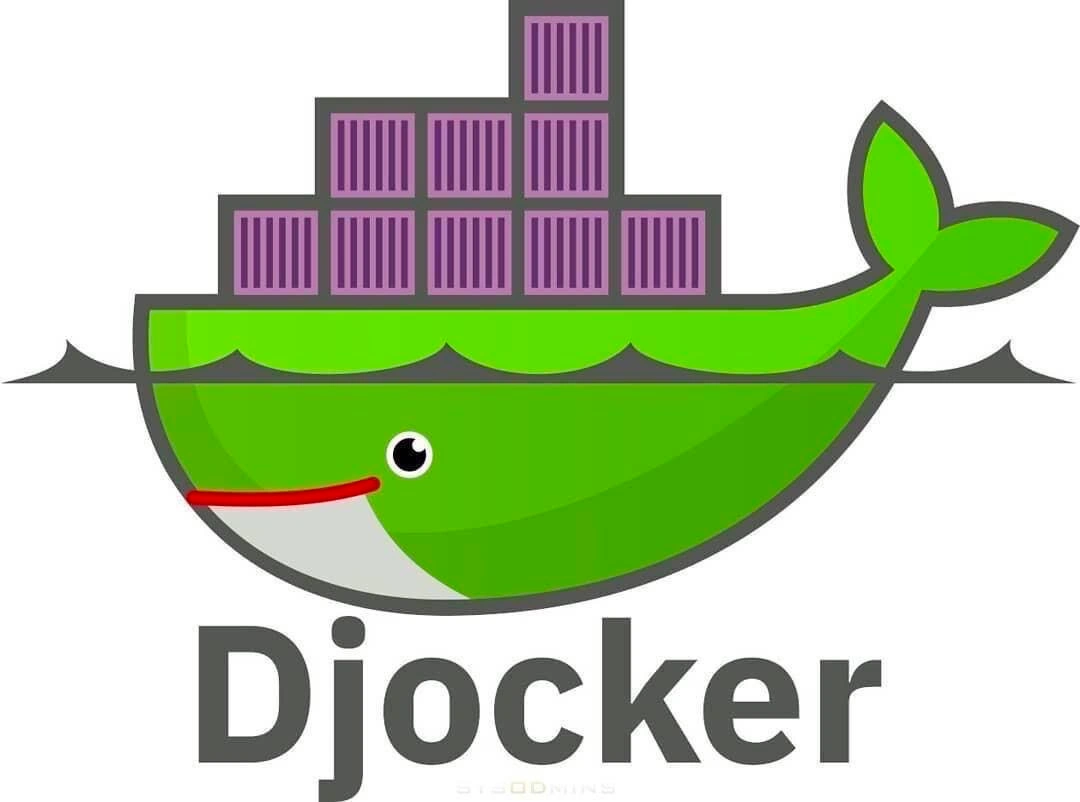
The funny picture with a green whale and boxes is showing a similar idea with a bit of humor. The whale is carrying big boxes on its back, kind of like a cargo ship carries shipping containers full of goods. Here the goods are a Django web app, and the whale (Docker) is helping carry it to whatever computer or server needs it. They even mixed the names Django and Docker into “Djocker” – just like combining two favorite superheroes into one. It’s cute and silly, and it makes tech folks laugh because it’s a friendly way to show how we often take a program we wrote (in Django) and put it inside a special box (Docker) so we can easily share it or move it anywhere. Even if you don’t know Django or Docker yet, the idea of a happy whale delivering your project safely in boxes is a fun image – it basically says, “We packed everything up nice and neat, and now our project can swim to wherever it needs to go!”

Level 2: Django in a Box

Let’s break down the basics of this meme for a newer developer. Django is a popular high-level web framework for Python – basically a collection of tools and libraries that makes it easier to build web applications (think of things like handling database access, user logins, and page templates). It’s known for helping developers build secure, robust websites quickly. On the other hand, Docker is a tool for containerization – which means packaging an application along with everything it needs (like specific Python versions, libraries, system tools) into a single unit called a container. You can think of a Docker container as a lightweight, portable environment or box that ensures the app runs the same everywhere, whether on your local machine, a testing server, or in production.

Now, the meme shows an image that parodies the official Docker logo. The real Docker logo has a big friendly blue whale carrying a stack of shipping containers on its back (because Docker’s whole theme is about shipping software in containers, much like goods shipped in real cargo containers on a ship). In this parody, the whale is colored bright Django green instead of blue, and it’s smiling with a red stripe as a mouth. It’s carrying purple shipping containers. Underneath, instead of the word “Docker,” it says “Djocker.” This is a pun: a play on words mixing “Django” and “Docker” together. The caption “when your Django project swims straight into Docker waters” drives home the joke – it’s saying your Django app has dived into Docker, so much that Docker and Django have merged into one concept, symbolized by this hybrid logo.

Why is that funny or noteworthy? In the developer world, it’s become incredibly common to deploy Django applications using Docker. When you finish writing a Django app, you often dockerize it (i.e., put it in a Docker container) so that deploying it on a server is easy and consistent. This combination – Django running on Docker – is so standard that the meme imagines, “What if Docker itself turned Django-colored or got rebranded due to how often we pair them?” It’s humorous because it’s true: virtually every Django developer eventually has to learn how to write a Dockerfile (a recipe file for building a Docker image of the app) and use commands like docker build and docker run to test or deploy their project.

So, what does each part mean? The whale represents Docker (the container platform). The green color represents Django (since Django’s logo and website use green, and sometimes even a stylized python snake icon). The stack of purple boxes on the whale’s back are the shipping containers – in this context each “container” could be thought of as an instance of your packaged Django app or its components. In practice, when deploying a Django site, you might have one container for the Django app itself, another container for a database (like a PostgreSQL container), etc., all managed by Docker. The word “Djocker” is just a fun mashup name – implying a fusion of the two technologies.

For a junior developer, it helps to know: Docker solves the “it works on my machine” problem by ensuring you ship the exact environment your code needs. Django provides the structure and components to build the web app. Using them together has become a best practice. The meme is basically a lighthearted way of saying, “Using Django? You’ll be using Docker too!” It’s filed under Containerization and Frameworks because it’s about the intersection of a software container system (Docker) with a web framework (Django). It’s also tagged as DevOps humor and tech humor since it jokes about a development operations task: deploying code. The tag Wordplay is for the pun in “Djocker”. In short, the image is a visual joke that assumes you know these two tools are often paired. It’s the kind of thing you chuckle at once you’ve gone through the process of containerizing your first Django app and remember how everything from documentation to tutorials encourages you to “Dockerize” it. The next time you see the official Docker whale logo, you might even jokingly imagine it painted green and think “Djocker!” because of this meme.

Level 3: Containerize All the Things

This meme mashes up Django and Docker, playfully christening the green whale “Djocker.” To a seasoned developer, it’s a tongue-in-cheek nod to how containerization has become the default deployment strategy for modern web apps. The classic Docker logo – a blue whale with shipping containers on its back – is reimagined here in Django’s signature green, complete with a friendly eye and a red smile. The purple container blocks aboard the whale? Those represent your Django app’s code and dependencies neatly packaged into Docker images. It’s a DevOps humor cocktail: take a beloved Python web framework (Django) and package it into a Docker container, something many of us have done so often it feels like a rite of passage.

Behind the joke is an industry truth: these days, putting your app in a container is practically required. Why is that funny? Because it’s so common that even the Docker whale has “gone Django.” We’ve reached a point where every new backend project “swims straight into Docker waters,” just as the caption says. Seasoned engineers remember deploying Django the old way – setting up Python on a server, wrestling with virtualenvs, system packages, maybe even dealing with works-on-my-machine nightmares. Now, Docker offers a consistent environment: “Works on my machine? Cool, let’s ship your whole machine!” The whale carrying your app implies “ship it anywhere” reliability. It lampoons the ubiquity of this practice: your Django project isn’t special – onto the whale with it, like everything else!

The wordplay “Djocker” itself is amusing to any techie who’s typed both docker-compose and django-admin commands. It’s a fusion of names reflecting a framework–container crossover that is utterly mundane now. In fact, many Django tutorials and deployment guides quickly dive into writing a Dockerfile and using docker run to fire up a Django + gunicorn server combo. The meme has a friendly tone (that green whale is positively cheerful) which mirrors how we wish the process felt: smooth sailing on calm seas. But ask any veteran, and they’ll chuckle remembering the not-so-cheerful parts – tweaking Dockerfile directives, slimming image sizes, or debugging why their app can’t see the database container at 3 AM. It’s relatable tech humor: after wrestling with YAML and container logs, seeing a whale proudly renamed “Djocker” is a lighthearted reward.

To a senior dev, the visual pun also nods to how Docker fundamentally changed deployment culture. We went from manual setups or heavy VMs to lightweight, portable containers. The whale became an icon of modern DevOps, and here Django climbs aboard. There’s a hint of “if you can’t beat ‘em, join ‘em” history: Django predates Docker’s rise, but now even classic frameworks ride the container wave. Underneath the levity, it reflects that in real projects, Docker + Django is almost a given – you version your code on GitHub, you containerize it with Docker, and off it goes to the cloud. The combination is so standard that merging their identities feels natural – hence the green whale. It’s a little insider wink saying, “Yup, another web app off to production in a container – shocker!”

And yes, the containers on the whale’s back are colored purple, perhaps just to stand out against green – aesthetic humor – but one could imagine they hint at something like a Postgres database or other services riding along. In any case, everything about this meme screams that containerization of a framework has become as unremarkable as a whale carrying cargo. The senior perspective appreciates this inevitability and finds the fun in it: after all, if you’re shipping yet another Django site, why not give the ole’ whale a Django paint job and a new name? It’s a gentle poke at our own habits in software deployment, packaged as a quick visual pun.

# A typical Dockerfile for a Django project
FROM python:3.8-slim  # Base image with Python 3.8 installed
WORKDIR /app          # Set working directory in the container
COPY requirements.txt .  
RUN pip install -r requirements.txt  # Install Django and other dependencies
COPY . .              # Copy Django project code into the container
CMD ["gunicorn", "myproject.wsgi:application", "--bind", "0.0.0.0:8000"]
# The CMD above runs Django with gunicorn as the server when the container starts.

Above: a miniature Dockerfile example that senior engineers know by heart. This is how you get your Django app onto the “Djocker” whale – you define an image with Python, install your requirements (Django, etc.), add your code, and specify a command (here using gunicorn to serve Django). The meme gets a nod of recognition because many of us have written files just like this, deploying Django in Docker so often that combining their logos feels apt. It’s a celebration of that common practice through wordplay: the Djocker whale says, “Hey, I’ve got your Django app all packed and ready to go!”

Description

This image is a clever visual pun combining the logos and names of two major technologies: Docker and Django. It features the well-known Docker logo, a whale carrying shipping containers on its back, but with a color scheme twist. The whale is green, the signature color of the Django web framework, and the containers it carries are purple. Below the modified logo, the word 'Djocker' is printed in a dark grey font, a portmanteau of 'Django' and 'Docker'. This meme represents the extremely common practice of developing Python web applications with the Django framework and then containerizing them with Docker for consistent development environments and streamlined deployment. There is a faint watermark for 'SYSADMINS' at the very bottom

Comments

7
Anonymous ★ Top Pick Djocker: The art of writing a 200-line Dockerfile to run a 10-line Python script, because reproducibility is more important than simplicity
  1. Anonymous ★ Top Pick

    Djocker: The art of writing a 200-line Dockerfile to run a 10-line Python script, because reproducibility is more important than simplicity

  2. Anonymous

    Finally, a container image that RUNs “python manage.py migrate” before it even swims into prod

  3. Anonymous

    After 15 years of wrestling with Django's settings.py across environments, you realize the real migration wasn't from South to Django's native migrations - it was from 'works on my machine' to 'works on everyone's machine, but now we debug YAML instead of Python'

  4. Anonymous

    When your Docker whale is carrying containers in production and someone asks 'but does it scale?' - well, at least the whale's back seems to have infinite vertical space for that Kubernetes migration you've been postponing. Just remember: every container on that whale's back represents another microservice that could've been a function call

  5. Anonymous

    Djocker: same OCI spec, but liveness probes are optional and every rollout asks, 'Why so stateful?'

  6. Anonymous

    Purple containers on a green whale? Classic sign of unpruned layers bloating your registry into Djojocker territory

  7. Anonymous

    Call it Djocker: because every 'stateless' Django eventually needs a Compose file, a Gunicorn container, an Nginx proxy, and a db-data volume you’re too scared to prune

Use J and K for navigation