Developers ranked by monitor setup in the D&D alignment chart
Why is this DeveloperExperience DX meme funny?
Level 1: Neat vs Messy Screens
Imagine you and your friends each set up your desks differently, and someone pretends those setups make you heroes or villains. One friend has three big computer screens all in a perfect row – like they lined up three shiny toys neatly on a shelf. That feels super organized, almost like a hero in a story who has everything in order. Another friend just uses one screen – simple, like having one book open, which is plain and normal (neither good nor bad). But then there’s another friend who has screens everywhere – six of them! – all different sizes and some turned sideways. It’s like they covered their desk with a crazy mix of toys scattered all over. It looks wild and chaotic, a bit like a villain’s secret lair in a cartoon. This meme jokes that the really neat setups are “good” and the really crazy, messy setups are “evil,” just like characters in a fairy tale. Of course, having lots of monitors or just one doesn’t actually make someone good or evil – it’s just a funny pretend game. We laugh because it’s silly to label desk setups in a moral way. It’s like saying, “If your desk is super tidy, you’re a noble knight, but if it’s crazy cluttered with screens, oh no, you’re the mischievous dragon!” 🐉😂 It’s a playful way to tease how differently people like to work, using good vs. evil as a make-believe way to describe something as simple as how our computer screens are arranged.
Level 2: D&D Alignment for Screens
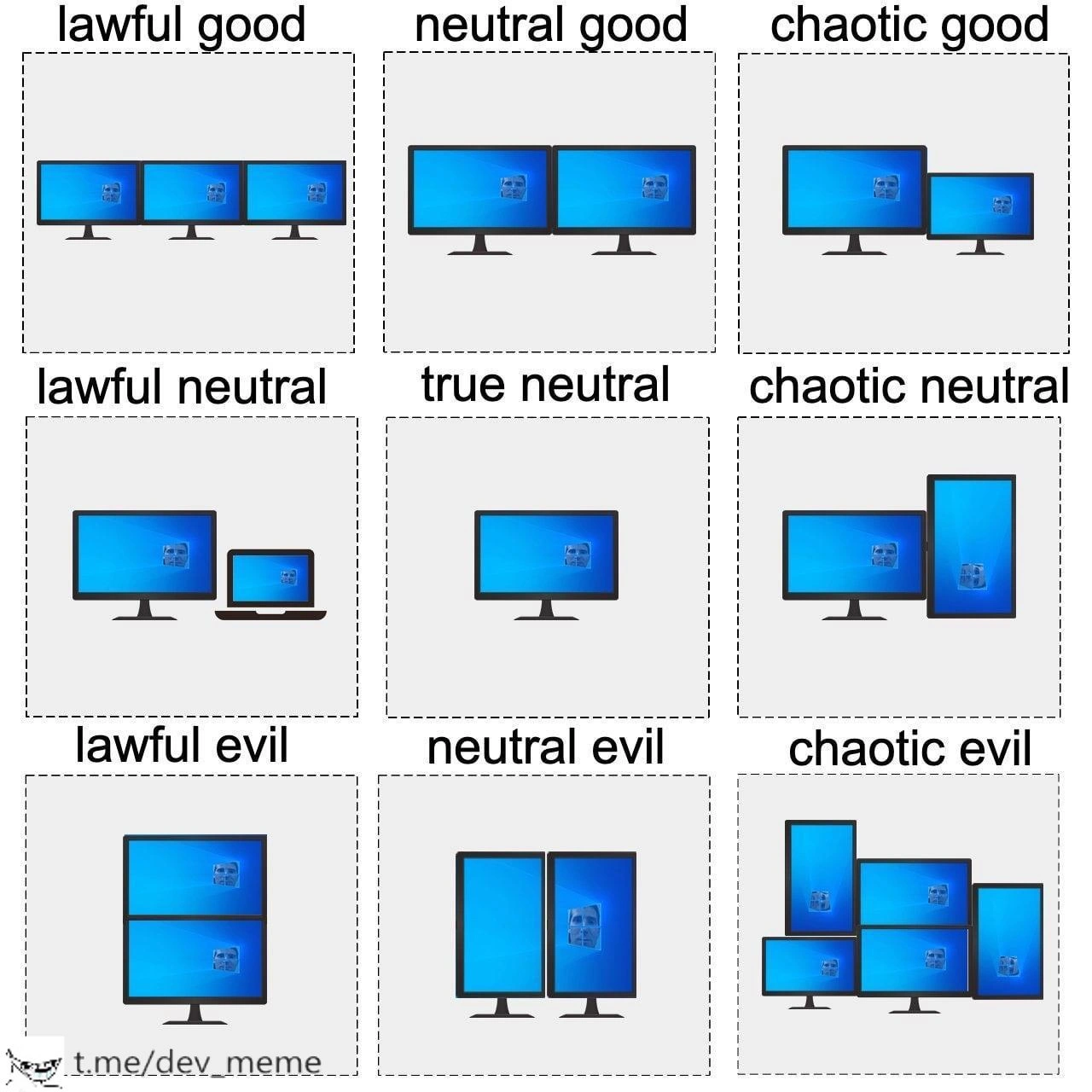
Let’s break down what’s going on in this alignment chart meme. In Dungeons & Dragons (D&D), characters are often described by two axes: lawful vs. chaotic (how orderly or unpredictable they are) and good vs. evil (their moral tendency). A dnd_alignment_chart is a 3x3 grid with each combination, popular in meme culture for humorously classifying all kinds of things – in this case, developer monitor setups! Each panel in the image shows a different monitor_setup, and they’re labeled like D&D alignments to exaggerate the style of each desk arrangement:
Lawful Good: Three identical monitors side by side in landscape orientation. Lawful means very organized and by-the-book – here all three screens are the same size and aligned perfectly. Good implies this is a positive, productivity-boosting setup. Indeed, having three monitors neatly arranged is a dream for many devs: you can maximize DeveloperProductivity by coding on one screen, testing on another, and maybe running Slack or logs on the third. It’s a tidy, efficient setup that most would agree is “objectively” great – hence lawful good.
Neutral Good: Two landscape monitors, evenly placed. This is a pretty normal dual-monitor configuration. Neutral (in terms of law/chaos) because it’s not extreme or highly quirky – it’s moderate. Good because dual monitors are widely seen as helpful for workflow (e.g., code on one screen, documentation or browser on the other). Many developers use exactly this two-monitor combo at work or in their HomeOfficeSetup, so it’s considered a positively effective arrangement without being radical.
Chaotic Good: One large monitor with a smaller second monitor offset to the side. This setup is a bit unusual or chaotic because the screens aren’t identical or symmetrically aligned; maybe the smaller one is a laptop or just a smaller auxiliary display. Still, it’s labeled good because it’s a net gain for productivity – you have extra screen real estate to do good work. It’s the kind of creative, uneven setup that might look odd but the developer swears by it (“It’s weird, but I get stuff done!”). Perhaps you have a giant 4K screen as your main, and a leftover old monitor as a secondary – not a balanced pair, yet definitely helpful.
Lawful Neutral: One regular desktop monitor plus a laptop screen underneath or beside it. This is the standard no-frills solution, especially in corporate or WorkFromHome contexts: plug your laptop into a dock and use an extra monitor. Lawful because it’s the common, company-approved way (very orderly, everyone in the office does it), and neutral because it’s neither exceptionally good nor bad, just average. If you’ve started a new developer job, you likely got exactly this setup by default – it gets the work done without calling attention to itself.
True Neutral: A single monitor. Plain and simple. In the alignment chart, true neutral is the dead center – neither leaning good nor evil, lawful nor chaotic. Here it represents someone who just uses one screen, the most straightforward workstation_preference. Many beginners or purists might work on one decent-sized monitor. It’s “neutral” because there’s nothing unusual or extreme about it – it’s the baseline. No extra screens to boost productivity, but also no weird configurations – just you and your one monitor, quietly in balance.
Chaotic Neutral: One landscape monitor next to one portrait-rotated monitor. Chaotic because mixing orientations (horizontal & vertical) is a quirky twist compared to standard setups. One screen is rotated vertical_monitor style (tall and skinny) which is not the norm but is popular for reading long code files or documentation. The other remains horizontal. This arrangement is somewhat unconventional, reflecting a free-spirited choice (hence chaotic), but it’s neutral in moral alignment – it’s not really “bad” for productivity. In fact, many developers like having a portrait_mode_monitor to see more code at once (more lines of code vertically). It just looks a bit unconventional to the uninitiated. People might joke about it, but it’s a harmless personal preference that can be effective.
Lawful Evil: Two portrait (vertical) monitors stacked on top of each other. This is a very orderly (lawful) arrangement – the monitors are identical in orientation and directly aligned vertically, which requires a special stand or mount. It looks intentionally designed, almost rigid. But why evil? Possibly because it’s a tad extreme or impractical for many tasks: two tall screens might be fantastic for reading hundreds of lines of code or log files, but it can be awkward for anything wide like spreadsheets, diagrams, or watching videos. Also, a vertical stack might force you to tilt your neck up and down regularly, which could be a literal pain (an ergonomic faux pas, hence evil for your neck!). The meme jokingly casts this strict-yet-imposing setup as something a villainous perfectionist would choose. It’s like saying, “This developer follows their own ruthless efficiency rules, even if it’s intimidating or uncomfortable.”
Neutral Evil: Two portrait monitors side-by-side (both rotated vertically). This one is interesting: it’s neutral on the lawful/chaotic scale because the two monitors are the same size and placed sensibly next to each other – a balanced layout. But it’s evil because, again, exclusively vertical monitors is a niche power move that can hinder usual tasks (imagine trying to watch a YouTube tutorial on a vertical screen with huge black bars on top and bottom!). It suggests the user chose an unconventional orientation not out of whimsy (it’s quite methodical actually) but maybe to serve some dark purpose (perhaps an obsession with seeing entire files at once, or they just don’t care if anyone else finds it odd). It’s humorously dubbed “evil” because it’s an uncommon and arguably excessive commitment to vertical-only workspace.
Chaotic Evil: A cluster of six mismatched screens in all sorts of orientations. This is the ultimate “OMG what is going on?!” setup – absolutely chaotic. Different sizes, some landscape, some portrait, possibly different resolutions, all jumbled together like a control center from a sci-fi movie. It’s so over-the-top that it’s labeled evil in a joking way, as if only a villain (or a very DevOps heavy engineer monitoring tons of dashboards) would require such an insane setup. It reminds developers of exaggerated stereotypes: think of a hacker cave with screens everywhere, or an obsessed stock trader with a screen wall. In reality, managing six monitors is tough – your GPU, desk space, and neck would all be challenged! It’s likely counter-productive for actual coding because your attention gets split everywhere. But as a meme, it perfectly fits the chaotic evil slot – no rhyme or reason, just an extravaganza of screens for the sake of it.
Throughout these, the meme touches on DeveloperExperience_DX elements: how your physical setup (especially monitors) can affect your daily comfort and productivity. Developers often discuss and playfully argue about these ergonomic_workstation_choices – some swear by multiple screens to maximize multi_screen_productivity, while others find too many displays distracting. It’s become a bit of folklore in developer culture (e.g., “I added a second monitor and my productivity went +50% like it was an RPG stat boost!” vs. “Having six monitors is just for show-off.”). This image taps into that culture and mixes it with memeCulture: using the D&D alignment grid, which many geeks find entertaining, to categorize something technical and personal like monitor setups. The result is a comedic chart that lets people identify and laugh at their own setup. Are you the sensible dual-monitor Neutral Good, or the crazy six-screen Chaotic Evil? There’s no actual judgment here – it’s all in good fun – but because developers hold opinions on the “right” setup, the meme resonates. It essentially says, “How you arrange your screens is almost like a personality trait!” and exaggerates it to the point of labeling it good or evil. That mix of nerdy reference (D&D alignments), relatable tech habit (monitor arrangements), and absurd moral labeling makes it a hit in DeveloperHumor and TechHumor circles.
Level 3: Monitor Morality Matrix
At first glance, this meme hilariously maps developer monitor setups onto a classic Dungeons & Dragons alignment chart, treating screen arrangements as if they have moral alignments. The top row (lawful good to chaotic good) shows orderly multi-monitor setups deemed "good," the middle row shows moderate setups labeled "neutral," and the bottom row shows eccentric multi-monitor rigs cast as "evil." This tongue-in-cheek alignment of screens strikes a chord with seasoned developers because it satirizes our strong opinions on workstation preferences and ergonomic workstation choices.
In real dev life, multiple monitors are practically a status symbol and a running joke about developer productivity. We've all met that lawful good developer who uses three perfectly aligned identical monitors – perhaps one for coding, one for documentation, one for debugging – a multi_monitor paradise that screams productivity powerhouse. It's so organized and symmetrical that it feels “lawful” (following the rules of efficiency) and “good” (beneficial to work). Contrast that with the chaotic evil concoction in the bottom-right: six mismatched screens thrown together at weird angles like some cursed tech altar. This is the sort of setup you’d expect a mad scientist of IT or a Hollywood “hacker” villain to have – absolutely chaotic in layout, possibly overkill for actual coding, and humorously “evil” because no sane, DeveloperErgonomics expert would recommend that neck-twisting battle station.
Between those extremes, the meme cleverly assigns meaning to each alignment: the lawful neutral developer sticks to the standard issue – one external monitor plus the trusty laptop screen. It’s the default office setup at many companies, neither excessive nor minimalist (truly neutral in moral terms, just following the lawful corporate norm). The chaotic neutral dev is the quirky one who rotates a monitor into portrait_mode_monitor orientation next to their regular horizontal screen – a configuration beloved by coders who want to see a tall stack of code. To colleagues, that vertical screen might look unconventional or “chaotic,” but it’s not really hurting anyone (hence neutral). Lawful evil, with two portrait monitors stacked neatly, implies a sinister twist on order – it’s impeccably tidy (lawful), yet one can imagine the neck strain and oddly villainous vibe of towering vertical screens (evil to your comfort). The humor here comes from shared experience: developers love to argue about the “right” monitor setup as if it were a moral imperative. By casting these habits onto a D&D alignment_meme, the comic dramatizes our mundane desk setup decisions as if they’re heroic virtues or villainous vices. Seasoned devs chuckle because they recognize the hyperbole and maybe see a bit of themselves: are you the neutral_good pragmatist with two screens, or the chaotic_good rebel who mixes screen sizes? Either way, the meme playfully suggests that even something as banal as arranging monitors can be an epic saga of order vs. chaos, good vs. evil in the developer realm.
Description
The image is a nine-panel Dungeons & Dragons alignment chart captioned (left-to-right, top-to-bottom) “lawful good”, “neutral good”, “chaotic good”, “lawful neutral”, “true neutral”, “chaotic neutral”, “lawful evil”, “neutral evil”, and “chaotic evil”. Each panel shows a stylized Windows-blue desktop on different arrangements: three identical landscape monitors (lawful good), two landscape monitors (neutral good), one large with a smaller offset landscape monitor (chaotic good); one desktop monitor plus a laptop screen (lawful neutral), a single monitor (true neutral), one landscape next to a portrait-rotated monitor (chaotic neutral); two portrait monitors stacked vertically (lawful evil), two portrait monitors side-by-side (neutral evil), and a chaotic cluster of six mismatched screens in mixed orientations (chaotic evil). The drawings sit on a light gray background with dashed borders, and a small “t.me/dev_meme” watermark appears at the bottom left. By mapping tidy versus eccentric multi-monitor workstations onto the classic alignment grid, the meme pokes fun at developer ergonomics debates and productivity folklore

Comments
13Comment deleted
Conway’s Law on your desk: the monolith team ships from three identical landscape screens, but the microservices crew ends up with the six-screen portrait-landscape hydra - when you split an app into 47 services, you need one monitor per dashboard just to know which one’s paging
The real alignment chart is how many monitors you need before admitting that the problem isn't screen real estate - it's that legacy codebase with 47 layers of abstraction and a build system held together by bash scripts written by someone who left in 2014
The 'true neutral' single monitor developer is either a minimalist zen master who's transcended the need for screen real estate, or they're still waiting for their hardware budget approval from three quarters ago. Meanwhile, the 'chaotic evil' six-monitor setup is what happens when you tell a senior engineer 'just expense whatever you need' without setting a dollar limit - they've essentially built a mission control center to debug a React component
The true alignment test is mixed‑DPI portrait/landscape at 125% - chaotic evil is when Windows teleports your cursor while Teams asks to share “Screen 4” that doesn’t exist
Chaotic evil isn’t six screens - it’s a 4K portrait beside a 1080p landscape: per‑monitor DPI is the distributed transaction your window manager will never commit
Lawful Good: monitors aligned like your IaC templates. Chaotic Evil: stacked higher than prod incidents on New Year's Eve
Chaotic neutral is for those who use VS Code Comment deleted
I am chaotic good / lawful neutral / true neutral by this test Comment deleted
I am true neutral and lawful evil, depends on the location I am working from Comment deleted
I am lawful neutral as I use laptop with secondary screen but in lawful evil setup :p Comment deleted
I'm true neutral. Comment deleted
I'm gay Comment deleted
Windows - evil Comment deleted