The Original Rastafarian Cable Management System
Why is this Hardware meme funny?
Level 1: Hanging Wires on a Picture
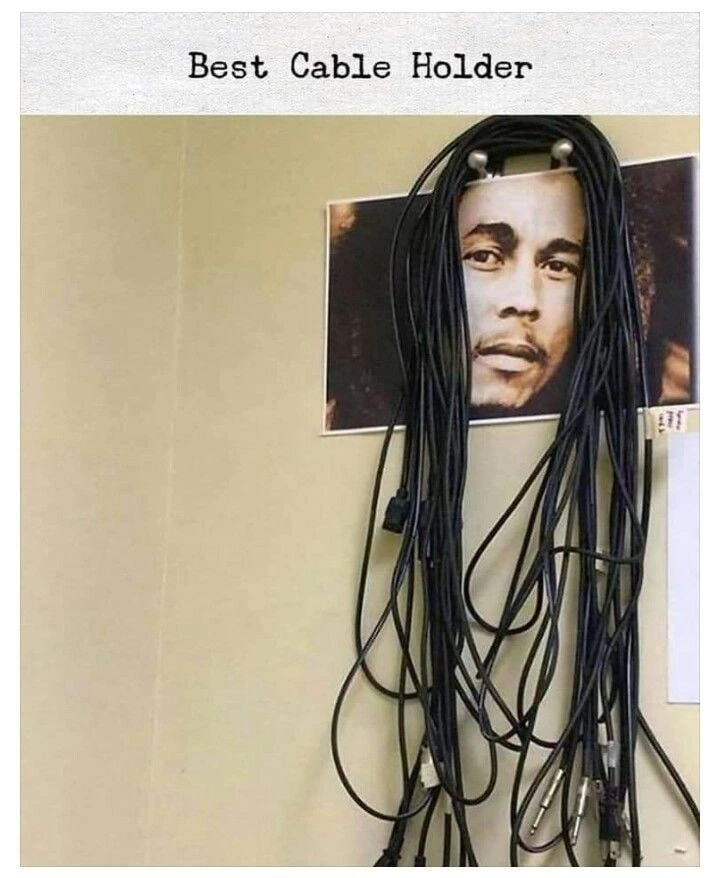
Imagine you have a bunch of long wires or cords in your room that keep getting tangled and are all over the floor. Maybe they’re charger cables, ropes, or gaming wires. It’s a big mess, and you just want to get them out of the way. Now, also imagine there’s a poster of a person’s face on your wall, and that poster is held up by two push-pins at the top. In this silly scene, someone decided to use those push-pins like little hooks to hang the messy wires looped over them. So all the wires are now hanging from the top of the poster, kind of like the person in the poster magically grew a bunch of hair made of wires! It looks pretty funny – the cables dangle down over the face on the poster like thick, tangled hair. This is happening because whoever put those wires there didn’t have a proper place to hang the cables, so they just used the first thing they saw that could hold some weight. It’s like if you didn’t have a coat rack and decided to hang your jackets on a painting frame – the wall art turns into a storage spot by accident. The reason people laugh at this is because it’s a very clever but goofy fix. On one hand, the messy wires aren’t on the floor anymore (so, problem solved a bit!), but on the other hand, it’s clearly not how you’re supposed to do it. It’s an unexpected solution: turning a nice picture on the wall into a make-believe wire hanger. Even a kid can see it looks out of place and silly. The heart of the joke is that sometimes, when you have a problem and no proper tools, you just use whatever is around – and the result might work, but also might make everyone giggle. Here, the “best cable holder” turned out to be a poster’s push-pins, and the poor person in the poster ended up with a wild hairstyle of black cables! It’s funny and a little bit like something you might do in your own room when you’re feeling inventive (or lazy).
Level 2: Wall Art Lifehack
This meme spotlights a classic sysadmin improvisation when it comes to cable management. Cable management is just a fancy term for keeping all your cords and wires organized, tidy, and labeled so you know what’s what. In professional setups – like server rooms, network closets, or even a well-organized home office – you’re supposed to use things like cable trays, hooks, zip ties, or Velcro wraps to bundle cables neatly. The goal is to avoid that nightmare jumble often nicknamed “spaghetti cables” (because a pile of tangled cables can look like a big plate of spaghetti noodles). Every junior IT person learns pretty quickly why this matters: neat cables make it easier to trace a connection, swap out devices, or troubleshoot problems without accidentally yanking the wrong cord. Plus, a mess of cables can cause practical issues – it might block airflow (overheating your gear) or cause someone to trip. SysadminPainPoints often include inheriting a mess of unlabeled wires and having to sort them out, which is about as fun as detangling a box of holiday lights.
In this image, rather than using a proper cable rack or even basic cable ties, someone has done a wall_art_lifehack – they’ve taken a piece of wall art (a poster) and literally turned it into a cable holder. Here’s how: the poster is attached to the wall with push-pins or tacks at the top corners (you can see two shiny pins holding it up). Normally, those pins just keep the poster on the wall. But some clever (or desperate) person realized those pins stick out a bit, making two little pegs. So they gathered up a big bundle of stray cables and looped them over the push-pins, effectively hanging the cables on the wall. The result is that the poster isn’t really visible (it’s blurred in the meme image except for what looks like a face peeking behind), but it has become an impromptu cable hook. The caption “Best Cable Holder” is written in a typewriter-style font at the top, clearly joking that this accidental solution outperforms fancy store-bought cable organizers. It’s poking fun at the idea that a random poster on the wall ended up being the most useful thing in the room for handling the cable clutter. The improvised_cable_hook turned a decorative item into a functional tool. That’s a classic example of an IT lifehack: repurposing everyday objects to solve a problem quickly.
Let’s break down the cables we see, which many tech folks will recognize: there are thick black power cables, likely the standard IEC power cords used for PCs and monitors (those are the ones with a boxy connector on one end that goes into a PSU or monitor, and a plug on the other end for the wall outlet). Then there are some thinner cables – one looks like an HDMI cable (used to connect video output from a computer to a monitor or TV) and possibly some USB cables (for peripherals like printers, or connecting devices to a computer). The ones with metal ends could be TRS audio cables (the kind you use for music equipment or speakers, with a tip-ring-sleeve connector, often 1/4-inch or 1/8-inch jacks). In a well-kept lab, you’d store each type separately and maybe use hooks or a panel to wrap them nicely. But here everything – from audio cords to power leads – is hanging together in one big bunch. That’s why the meme tags call it tangled_connector_spaghetti. It really is a mix of various connectors all entangled.
For someone new to IT or hardware setup, the takeaway here is: cable management often gets neglected, and people come up with on-the-spot fixes. It’s funny to people in IT because we know we’re supposed to do better (like use labeled hooks or at least some cable ties), but we’ve all had moments where we just draped a cable over whatever was handy. Maybe you’ve even done something similar at home – like running a long charging cord over a doorknob or looping your headphones over a lamp because you didn’t have a proper hook. The difference is, in an office or server room, that quick fix tends to stay that way for a long time and multiply. One cable becomes five, and soon you have a wall of wires that’s as much decor as the actual poster. The term “physical layer” is sometimes used (half-jokingly) to refer to these very tangible, real-world parts of networking – basically Layer 1 of the network is all about cables, plugs, and signals. And maintaining the physical layer is a very hands-on, often unglamorous job. This meme highlights with humor that even though we work in high-tech environments, sometimes the solutions are very low-tech – like using thumbtacks and a Bob Marley poster to organize cables. It’s a bit embarrassing and very relatable. For junior folks, it’s a gentle warning: try not to let things get to this point! But if you do find a scene like this, know that it’s a common SysadminHumor moment. Real IT work isn’t all pristine data centers; a lot of times it’s messy, scrappy, and about making do with what you have. And hey, if a poster on the wall ends up holding your cables, embrace the creativity (just maybe fix it later when you have proper tools!).
Level 3: No Rack, No Cry
For anyone who’s spent time in a server room or network closet, this image hits home hard. It’s a snapshot of pure SysadminHumor: when faced with mounting Hardware chaos and zero budget (or time) for proper fixtures, a resourceful tech will turn anything into a tool. In this case, wall art became an impromptu cable rack. The top of the poster – notably a portrait that looks an awful lot like Bob Marley – has two push-pins, and those have been co-opted as cable hooks. The result? Bob Marley’s famous dreadlocks are now being portrayed by an array of black cables dangling over his forehead. It’s equal parts ingenious and ridiculous. The meme’s caption, “Best Cable Holder,” drips with sarcasm: clearly this is not an official solution, but in that moment, it must have felt like a top-tier lifehack to whoever set it up. Sysadmins often joke that their job is 50% knowing fancy systems and 50% knowing how to jury-rig a solution with duct tape, zip ties, or – in this case – thumb tacks. Improvised_cable_hook situations like this are born out of real-world pressures. Maybe the proper cable management bar was full, or the team ran out of cable ties during a late-night maintenance window. So what do you do with that coil of spare cables or the bundle of connector leads you just disconnected? You look around the room, you see those sturdy push-pins on the wall holding up a poster, and think, “Hey, that’ll do for now.” Voila: wall_art_lifehack achieved.
What makes seasoned engineers smirk (and maybe groan) here is the sheer relatability. CableManagement is the bane and butt of countless ServerRoomStories. No matter how many times we swear we’ll keep things tidy, reality intervenes – a rushed swap of equipment, a new server added in a hurry, an urgent need to trace a cable at 3 AM – and suddenly the pristine cable runs turn into a rat’s nest. Over time, that nest only grows. We’ve all opened a network cabinet or peered behind an office desk to find an intimidating tangle of mystery cables – some possibly not even connected to anything, legacies of hardware past. This state of affairs is so common it spawned the term “spaghetti wiring.” In software we talk about spaghetti code (a tangled, unstructured mess of logic), and in IT we end up with the physical counterpart: spaghetti cabling, where wires crisscross in chaotic loops just like a bowl of pasta. The meme’s photo literally shows tangled connector spaghetti hanging down, a mix of thick power cables, thinner USB cords, and even some audio cables with TRS plugs – all coiled together in indiscriminate fashion. To a veteran sysadmin, this looks painfully familiar. The humor is slightly dark: “Yep, that’s exactly what our ‘cable management’ sometimes degrades into. And of course someone’s calling it the best cable holder, ha!” – because if we don’t laugh, we might cry. Hence the cheeky subtitle reference: No Rack, No Cry. In other words, if you don’t have a proper cable rack, just don’t fret – repurpose something, have a laugh, and keep going. It’s a nod to Bob Marley’s famous lyric “No Woman, No Cry,” twisted here to “No rack, no cry” – implying that lacking the right equipment is just an everyday struggle in IT, not worth shedding tears over when you can hack your way out.
There’s also a visual pun that tech folks love: the cables draped over the poster resemble dreadlocks cascading from the figure’s head. If that is a Bob Marley poster (as it appears to be), the meme-maker has scored a double hit – merging a pop culture reference with a sysadmin inside joke. Bob Marley was known for his long, tangled dreadlocks; now he’s inadvertently depicted with actual dreadlocks made of power cords and HDMI cables. The absurdity is golden. Even without recognizing Marley, the sight of a face on the wall “wearing” a wig of black cables is funny in a slapstick way. It’s as if the wall art has been drafted into the IT support team: “Hold these wires for me, would you?” This kind of SysadminPainPoints humor resonates because it’s based on true behavior. When you’re neck-deep in infrastructure problems, aesthetic concerns like how silly the wall looks are an afterthought. A weary sysadmin might quip, “Hey, it’s not stupid if it works!” This phrase is practically an IT motto when dealing with emergencies or kludges. Sure, using push-pins and a Bob Marley poster as a cable hanger isn’t in the Network+ certification handbook, and no BICSI cable installation class would endorse it. But in the trenches of daily operations, improvisation often trumps ideal methodology. The victory of getting those cables off the ground and out of the way, even temporarily, feels like a win – especially at 2 A.M. when you just want to prevent anyone from tripping over cables or mixing up which cord goes where.
Of course, every senior tech also knows there’s a cost to these shortcuts. Today’s quick fix can become tomorrow’s headache. Those cables will only accumulate more brethren, and before long, your “cable holder” push-pins are supporting a heaping mass of cords that you’re afraid to touch. Untangling that later (likely when an urgent hardware swap is needed) will be a nightmare of its own making. Plus, there’s the looming specter of technical debt, but in physical form: call it hardware debt. Much like sloppy code that eventually requires a big refactor, sloppy cable management can eventually demand a “cable refactoring day” where the whole system has to be powered down just so you can detangle and trace everything properly. Seasoned admins schedule those kinds of cleanup days about as often as developers schedule big refactors – which is to say, not nearly as often as they should. And when they do, they often discover redundant cables that go nowhere, or find a cable that everyone was afraid to unplug (so it just stayed there, maybe that random coax line or an old phone cable, hanging like a forgotten vine). This meme perfectly captures the pragmatic procrastination that leads to such scenarios. It’s funny because it’s true: nobody sets out with a grand plan to use wall art as infrastructure, but given enough time in a chaotic environment, these strange solutions just… happen. We laugh, perhaps a bit guiltily, because many of us have at one point said, “I’ll clean this up later, but for now let me just loop these cables here…” and later never came.
In summary, engineering humor like this lands so well with IT professionals because it pokes fun at our own corners-cut and sins-of-omission. It’s a gentle roast of the serverRoomStories we’ve all accumulated. We see the push-pins and cables and think: Well, I’ve done worse. And we have! Perhaps somewhere, an even more cursed setup exists – like network switches literally hanging by their cables (yes, I’ve seen that) or power strips suspended mid-air. In that light, using a poster’s push-pins as a cable holder isn’t the worst sin; in fact, it’s almost clever. Almost. The Best Cable Holder meme winks at us and says: “We know this is absurd, but also, you know you love it when a dumb idea actually works.” And every experienced sysadmin chuckles and nods, remembering that one time they used a binder clip, a zip-tie, and a prayer to solve a cable routing issue. Sysadmin life in a nutshell: improvise, adapt, overcome, then joke about it later.
Level 4: Entropy at Layer 1
At the physical layer of a network (OSI Layer 1), chaos is the default state. Cables naturally drift toward disorder much like molecules in a closed system tend toward maximum entropy. In a server room or hardware lab, if you don't constantly impose order (with trays, ties, labels, and planning), the cabling will inevitably devolve into a tangled mess. This meme scene is a textbook case of physical_layer_entropy: the bundle of cables hanging loosely is essentially high entropy made visible. Ironically, the two push-pins anchoring the poster have introduced a tiny pocket of order – a local entropy reduction – by clustering the cables up and off the floor. It's a slapdash defiance of the Second Law of Thermodynamics (in spirit, at least): someone invested a bit of energy to sling the cables over those pins, temporarily decreasing the disorder in that corner of the room. But make no mistake, the overall entropy of the system is still pretty high – the cascading tangled connector spaghetti at the bottom attests to that. Without further intervention, those cables will continue to coil, knot, and intertwine, because the number of microstates (possible tangled configurations) far exceeds the neat ones. In fact, researchers have studied how a jostled string tends to form knots spontaneously – the longer and looser your cables, the greater the probability they'll tie themselves in Gordian knots. In layman's terms (or rather, in sysadmin terms): entropy always wins in cable management, unless you're constantly fighting it.
Structured cabling standards (like TIA/EIA guidelines) were invented to battle this very tendency toward chaos. Data centers invest in cable trays, patch panels, and Velcro ties as weapons against cable entropy, aiming to keep every run of cable neatly parallel, bundled, and labeled. These practices inject negative entropy (i.e., organization and information) into the system, making it easier to trace connections and reducing the risk of accidental unplugs or crosstalk interference. By contrast, our meme's ad-hoc cable drapery is the antithesis of structured cabling – it's a spontaneous, almost emergent solution that happened because the system was left to its own devices for too long. We see different cable types (USB, HDMI, TRS audio, IEC power cords) all globbed together, violating the official recommendation of separating power cables from signal cables to avoid electromagnetic interference. The Best Cable Holder caption is tongue-in-cheek: a couple of shiny push-pins have usurped the role of a proper cable rack. This MacGyver-esque solution exploits basic physics (friction and gravity): the weight of the cable coil creates tension that mostly keeps it looped over the pins – essentially a crude cantilever system where the poster's pins bear the load. However, from an engineering standpoint, it's living on borrowed time. The shear strength of two small pins in drywall is limited; too many cables, and the whole contraption could rip out of the wall like a failed load test. In reliability terms, this is a single point of failure – one brittle anchor that could send the entire cable bundle slithering to the floor if it gives way.
This absurd setup underscores a deeper truth in systems administration: even the most sophisticated software stack ultimately relies on electricity moving through physical cables. And those cables obey the laws of physics and probability, not our neat architectural diagrams. No distributed consensus algorithm or self-healing software can reconnect a cable that's fallen out of a server port because it was dangling without strain relief. In practice, the real-world infrastructure often demands a humbling amount of low-tech upkeep. The meme hilariously contrasts the ideal (a “top-tier” cable management system, which we’d imagine as pristine and orderly) with the real (an improvised poster-peg solution that a jaded sysadmin threw together on a Friday at 6 PM). It’s a reminder that, at the end of the day, even high-tech environments sometimes run on duct-tape solutions and hopeful physics. The physical_layer is unforgiving: ignore it, and you'll find your neat network literally hanging by a couple of pins and a portrait’s goodwill.
Description
A photograph displays a creative and humorous solution for organizing cables. A picture of the musician Bob Marley is tacked to a plain wall. Two silver hooks have been placed at the top of the picture, and a large, tangled bundle of black electrical and audio cables is hung from them. The mass of cables drapes down over the image, perfectly mimicking Bob Marley's iconic dreadlocks. Above the photo, a caption reads, 'Best Cable Holder'. The humor stems from the visual pun, combining a common IT problem (cable spaghetti) with a pop culture reference. It's a low-tech, DIY 'life hack' that would be appreciated in any office or server room for its ingenuity and humor

Comments
7Comment deleted
Finally, a rack where the spaghetti cabling is considered a feature, not a P1 incident waiting to happen
Proof that Layer 0 of the OSI model is "whatever was within arm’s reach when the cables hit the floor."
Finally, a cable management solution with better documentation than our microservices architecture and more consistent naming conventions than our git branches
When your cable management strategy is 'out of sight, out of mind' but the portrait frame becomes a load-bearing structure for your entire I/O infrastructure - at least it's better than the rat's nest behind the monitor, and you can finally justify that 'decorative' purchase to your partner as 'critical infrastructure.'
Enterprise-grade cable orchestration: two coat hooks, zero observability, eventual consistency via gravity - the monolith ops refuses to decompose
Using two wall knobs as a cable holder is the DevOps equivalent of a global singleton - fast to ship, impossible to reason about when you’re paged to trace the HDMI at 2am
Dreadlock architecture: because spaghetti cables don't scale