Skip to content
DevMeme
5420 of 7435
A Brutally Honest Cheat Sheet for Computer Components
Hardware Post #5942, on Mar 26, 2024 in TG

A Brutally Honest Cheat Sheet for Computer Components

Why is this Hardware meme funny?

Level 1: Just No

Imagine a computer as a bunch of little helpers, each with a very particular job (and personality). One helper is really good at basic counting – give them whole apples to add or subtract, and they’ll do it perfectly every time. Another helper handles more complicated math with pieces of apples (fractions); they try their best but often end up a teeny bit off, like when you cut a pie and the slices don’t fit back exactly into a whole pie. There’s also an artful helper who only knows how to draw using triangles, making all the pretty pictures on your screen out of countless tiny triangle shapes. Then we have our note-keepers: one is like a quiet electronic notepad that safely keeps all your stories and numbers even when the power is off – it remembers everything silently. Another is like an older filing cabinet that also keeps your stuff but makes a lot of noise rummaging through folders whenever you ask for something. And there’s a scratch pad on the desk that’s super fast to write on for quick notes, but if the lights go out or you leave the room, everything on that scratch pad disappears (oops!). Now, to get information in and out of the computer, we’ve got a magical scanner friend who can look at a sheet of paper and read all the words or pictures into the computer – as if by magic, whatever was on paper becomes digital data. And for the reverse, there’s a laser printer buddy who uses a tiny laser beam like a superhero to zap words and images onto paper (kind of like burning the text onto the page, but in a controlled way so it looks nice). Finally, in the corner, there’s an inkjet printer – but honestly, that one’s like a grumpy troll. Ask it to do its job (print something) and more often than not it just shakes its head and says “No.” 🙅‍♂️ In other words, this meme is joking that even though computers are high-tech and amazing, each part has a simple role and funny quirks, almost like a cartoon team of characters: the perfect counter, the clumsy fraction math guy, the triangle artist, the quiet memory box, the noisy memory box, the forgetful note, the paper reader, the laser engraver, and the unhelpful printer that just won’t cooperate. That’s why it’s funny – it turns each component into a silly character we can all recognize!

Level 2: Numbers, Noise & Paper

Let’s break down what each of these computer components actually does in reality, and why the meme gives them such cheeky descriptions:

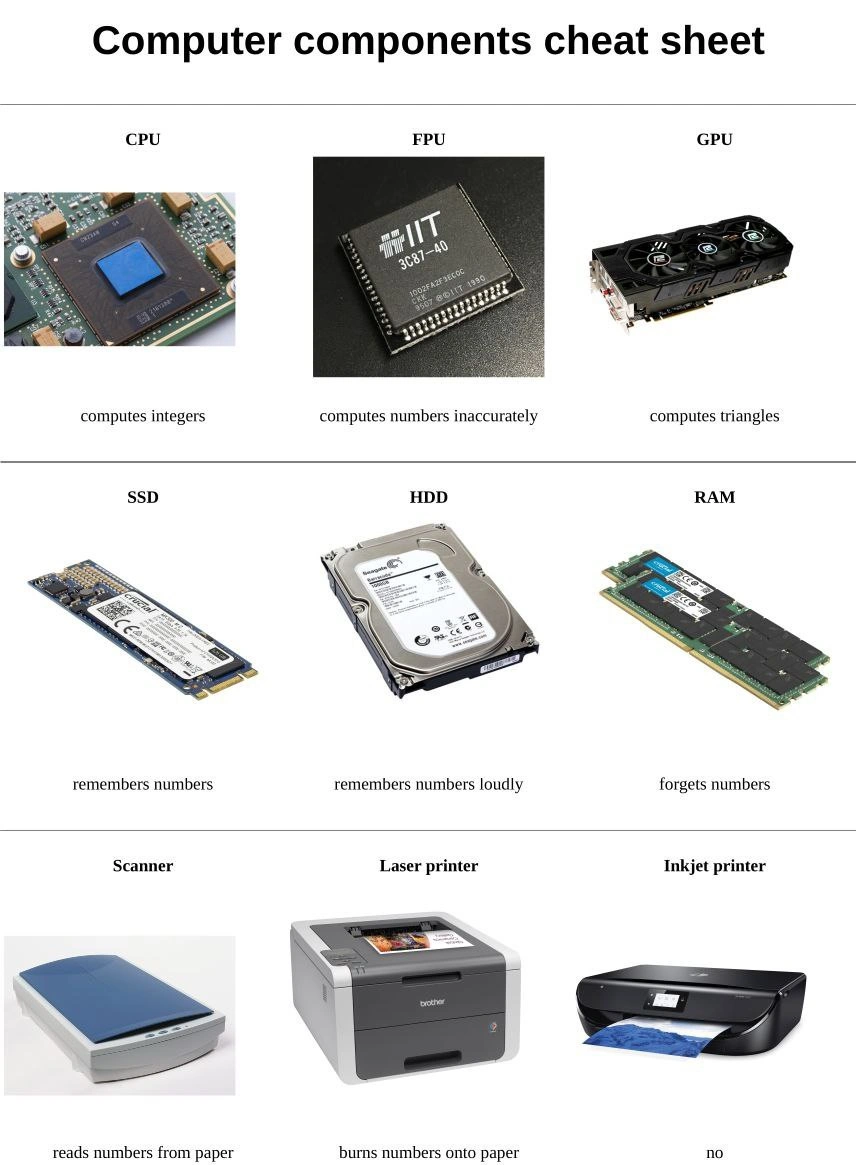
  • CPU (“computes integers”): The CPU, or Central Processing Unit, is essentially the brain of the computer. It executes instructions and performs calculations. CPUs can do all sorts of math and logic, but one of the simplest tasks they handle is adding, subtracting, and comparing integers (whole numbers). The meme jokes that the CPU only “computes integers” because historically CPUs handled integer math natively, and they delegated decimal (floating-point) math to a separate unit. Of course, modern CPUs do much more (they manage everything from running your operating system to crunching complex algorithms), but it’s funny to reduce the poor CPU to just an integer calculator. If you’ve ever written a simple program like sum = 2 + 2, that calculation was done instantly by the CPU’s arithmetic logic unit. The caption makes it sound trivial, which is the joke – the CPU is incredibly powerful, yet here it’s portrayed as a basic counter of whole numbers.

  • FPU (“computes numbers inaccurately”): The FPU stands for Floating Point Unit, a part of the processor (or a co-processor in older computers) dedicated to handling floating-point numbers – in other words, numbers with decimal points. Why call it inaccurate? Because of something called floating-point math inaccuracy. Computers have to approximate decimals in binary, so not all numbers come out exact. For instance, 0.1 and 0.2 can’t be represented precisely in binary, so when you add them, you get a tiny rounding error:

    print(0.1 + 0.2)
    # prints 0.30000000000000004 
    

    The FPU is the part doing that calculation. It isn’t “dumb” – it’s following the IEEE 754 standard – but the meme pokes fun at this quirk by saying it “computes numbers inaccurately.” If you’ve ever seen a weird result like 0.30000000000000004 when you expected 0.3, that’s the FPU’s doing. Early in your coding journey, discovering that computers can mess up simple decimals is mind-blowing (and a little funny). The cheat sheet jokingly blames the FPU, as if it’s a person with sloppy math habits.

  • GPU (“computes triangles”): The GPU, or Graphics Processing Unit, is a specialized processor for handling graphics and parallel computations. The meme says it “computes triangles” because in 3D graphics, everything you see on screen (in a video game or 3D app) is made of countless tiny triangles. GPUs are extremely good at doing the math to draw and shade these triangles super fast. Think of characters and scenes in a game – they’re built from meshes of triangles, and the GPU calculates how to color them, where to draw them, etc. If you’ve played a modern video game or used a 3D modeling program, your GPU was working hard calculating triangles to display the image. The caption humorously reduces the sophisticated GPU to a triangle calculator, which isn’t too far from the truth! Early-career developers might remember learning that a cube in 3D is actually made of two triangles per face (12 triangles total) or messing around with OpenGL/DirectX where you literally feed triangles to the GPU. So saying GPUs “compute triangles” is a lighthearted way to describe their main job in simple terms.

  • SSD (“remembers numbers”): An SSD is a Solid State Drive, a type of storage device for your data. “Remembers numbers” means it stores data (numbers, files, all information) and retains it even when the power is off. SSDs use flash memory (chips) to store data, which makes them very fast and completely silent – there are no moving parts. To a computer, everything stored – documents, photos, music – is ultimately numbers (binary data). So the SSD remembering numbers is just saying it keeps your data safe and sound. If you have a newer laptop, the fact that it boots quickly and doesn’t make a scratching noise when loading files is thanks to an SSD. For a junior developer, the first time you upgrade from an HDD to an SSD, it feels almost magical how much faster and quieter things are. The meme’s description sounds silly simple, but that’s literally what storage is: remembering numbers for later.

  • HDD (“remembers numbers loudly”): An HDD is a Hard Disk Drive, the older style storage device that uses mechanical spinning disks and read/write heads. It also stores data permanently, but it does it with moving parts – kind of like a record player but for digital data. The phrase “remembers numbers loudly” jokes about the fact that HDDs make noise when they work. If you’ve ever heard your computer whirr or click when opening a big program or file, that was likely the HDD spinning up and the head seeking data. Especially on older desktops, you can hear a scratching or buzzing sound during heavy disk usage. Some of us recall the grinding noises during disk defragmentation or game loading screens – that’s the HDD in action. So, the cheat sheet gives HDDs a hard time by implying, “Yeah, it will remember your data, but you’ll hear it doing so.” It’s a playful way to highlight the contrast with silent SSDs. As a newcomer, it’s easy to notice: an HDD-equipped PC sounds like an old garage door opening when under load, whereas an SSD system is nearly mute. The loudness doesn’t affect the data, of course, but it’s a charming annoyance we remember (some folks even find it reassuring to hear a hard drive working, because silence could mean it’s stuck!).

  • RAM (“forgets numbers”): RAM stands for Random Access Memory, and it’s basically the computer’s short-term memory. It’s fast but volatile, meaning it only holds onto data while the computer is powered on. The moment you restart or shut down, everything in RAM disappears (it forgets). The meme calls this out in plain terms: RAM “forgets numbers.” Have you ever typed a document or played a level of a game and then the computer crashed or lost power, and you lost your progress because you hadn’t saved? That’s because whatever you were working on was in RAM and hadn’t been written to permanent storage yet. For a beginner, it’s a lesson learned quickly: always save your work to disk (SSD/HDD) because RAM won’t remember it once power is gone. RAM is where data and programs live only temporarily while in use. It’s very quick to read/write, which is why computers use it for active tasks, but that speed comes at the cost of memory that gets wiped clean on reboot. The cheat sheet phrase is funny because it personifies RAM as that forgetful friend who can’t remember anything long-term. In reality, RAM doesn’t “decide” to forget – it’s just how the hardware is built – but describing it this way is an easy analogy that even a non-techie can understand.

  • Scanner (“reads numbers from paper”): A scanner is a device that digitizes paper documents or images. When you scan a sheet of paper, the scanner is essentially reading the text or picture and turning it into digital data (pixels or recognized characters). The meme describes this as reading numbers from paper, which is a simple way to say “taking information off a physical page and converting it to electronic form.” Imagine you have a printed photo – the scanner shines light on it and measures the reflected light to create a digital image composed of pixels (each pixel is represented by numbers). Or if you scan a printed text page, the computer can interpret the shapes of letters and encode them as ASCII or Unicode numbers. Early on, you might have scanned your homework or a signed document – it feels almost like magic that the paper’s content becomes a file on your screen. Internally, the computer indeed just gets a bunch of numerical data from the scanner (color values, etc.). The cheat sheet’s phrasing makes it sound like the scanner is literally looking at numbers on a page and reading them aloud as digits to the computer – a humorous oversimplification that, in a roundabout way, gets the idea across.

  • Laser printer (“burns numbers onto paper”): A laser printer is a printer that uses lasers and toner to print text/images on paper. “Burns numbers onto paper” refers to the process: it uses a laser beam to form the image of your page (which is basically digital data, or numbers, from the computer) onto a drum by electrostatically charging it. Then toner (ink powder) sticks to those charged areas and is literally fused to the paper with heat. From a distance, it’s like the printer is using a laser beam to burn the data onto the page. Of course, it’s not actually burning the paper (ideally!), but it is using heat and light in a precise way to put your digital information into a physical form. If you’ve ever opened a laser printer right after printing, the paper comes out warm – that’s from the fuser “burning” the toner onto it. For someone new to this, a laser printer might just be a magic box that quickly spits out printed pages. Knowing there’s a laser inside drawing your document in heat-fused plastic toner is pretty cool. The meme’s description makes us picture some high-intensity sci-fi laser etching ones and zeros onto a page. It’s a fun exaggeration of the tech behind a mundane office tool.

  • Inkjet printer (“no”): Ah, the infamous inkjet. Inkjet printers spray tiny droplets of ink onto paper to form text and images. They’re common as home printers. So why does the cheat sheet simply say “no”? This is a tongue-in-cheek way to say that inkjet printers often fail or refuse to work just when you need them. It’s a nod to every frustrating experience people have had with these devices: ink running out at the worst time, cartridges drying up, the printer head clogging, alignment going off, paper jams, endless error lights… the list goes on. For many of us, an inkjet printer feels like a temperamental pet – sometimes it prints just fine, but other times it won’t print at all, no good reason given. The meme encapsulates that exasperation in a single, savage syllable: “no.” It’s as if the inkjet itself looked at your print request and just said “Nope, not today.” As a new developer or computer user, you might not immediately get why that’s funny – until the first time you urgently need to print your report and the inkjet won’t cooperate. Then you’ll understand why tech folks joke that the simplest description of an inkjet is simply “does not work (when you really need it)”. This final panel is the meme’s mic-drop moment – even without technical knowledge, anyone who’s fought with a printer can relate, and it ties the whole cheat sheet together with a laugh.

Level 3: Triangulating the Truth

The meme’s “Computer components cheat sheet” delivers brutal honesty about hardware in a way that makes seasoned engineers smirk. Each component is reduced to a single biting line, exposing a core quirk or design truth behind it. For example, the CPU being labeled “computes integers” riffs on the fact that CPUs excel at integer arithmetic and general-purpose tasks. Historically, early CPUs mainly handled integer math in their arithmetic logic unit, while floating-point math was offloaded to a separate co-processor. Enter the FPU, tagged “computes numbers inaccurately”. This line jabs at the well-known floating-point inaccuracy issues in computing: FPUs handle real numbers (decimals) but use binary approximations that often introduce tiny rounding errors. (Any programmer who’s seen 0.1 + 0.2 result in 0.30000000000000004 understands this all too well.) The cheat sheet’s sarcasm is that the FPU “inaccurately” computes numbers — a nod to how even advanced hardware has precision limits due to the IEEE 754 standard and binary math. Meanwhile, the GPU labeled “computes triangles” highlights how Graphics Processing Units primarily churn through triangles to render 3D images. In graphics programming (and ComputerHardwareEngineering for graphics), every complex 3D model is broken into thousands of tiny triangles. GPUs are massively parallel number-crunchers optimized for linear algebra on vertices and pixels, but from a cheeky angle, all that fancy tech boils down to drawing triangles really, really fast. Seasoned devs chuckle because it’s geek humor distilling complex roles (integer math, floating-point math, 3D vector math) into plain absurdity.

In the second row, the cheat sheet tackles memory and storage with equal snark. An SSD is captioned “remembers numbers”, and an HDD “remembers numbers loudly”. Both are non-volatile storage that remember data (persistent memory), but the loudness points to the old-school mechanical nature of hard disk drives. SSDs (Solid State Drives) use silent flash memory chips — no moving parts — so they remember your files in eerie quiet. HDDs (Hard Disk Drives), however, contain spinning magnetic platters and moving heads, which produce that characteristic scratchy ticking or humming noise when seeking data. The phrase “remembers numbers loudly” perfectly personifies an HDD: it’ll store your data, but not without the grind and whirr of spinning metal. (Many veteran developers can identify an HDD working hard by sound alone — a sort of computer ASMR or, in worst cases, the click of death indicating a failing drive.) This contrast also hints at performance and technology differences: SSDs retrieve data much faster (flash memory) whereas HDDs have latency from mechanical movement. Then there’s RAM, labeled “forgets numbers”. RAM (Random Access Memory) is volatile memory; it only holds data while powered on. The meme quip “forgets numbers” is a humorous way to say that anything in RAM vanishes when the power is cut or the system is rebooted. It’s poking fun at the ephemeral nature of RAM: no matter how “memorized” your data seems, this memory will forget everything the moment you pull the plug. Every engineer knows the pain of losing unsaved work because it was only in RAM. By exaggerating it as simply forgetfulness, the cheat sheet turns a fundamental hardware behavior into a relatable human flaw.

Finally, the third row shifts from internal components to peripherals that bridge the digital and physical. The Scanner is described as “reads numbers from paper”, implying it takes a physical document and converts it into digital data (which, ultimately, is a bunch of numbers to the computer). This is a tongue-in-cheek way to describe scanning: the scanner’s sensor reads tiny dots (pixels) across the page and outputs numeric values for color or brightness, effectively digitizing the paper. It’s a literal interpretation of how a scanner sees the world: everything on paper becomes streams of 0s and 1s. The Laser printer entry, “burns numbers onto paper”, is a hilarious oversimplification of how laser printers work. A laser printer uses a laser beam to charge a drum and fuse toner powder onto paper with heat — essentially burning text and images (which are stored as digital numbers) onto a physical page. The meme plays with that imagery by phrasing it as if the printer is just searing numbers into the paper. It’s not actually charring the page, but to a cynical hardware geek, it sure sounds like it’s etching your document in with a laser beam. Then we hit the Inkjet printer, simply labeled “no”. This one is the punchline: anyone who has dealt with a home inkjet printer finds this painfully accurate. In tech circles, inkjet printers are infamous for jams, clogged nozzles, expensive ink cartridges, mysterious errors — in short, saying an inkjet does nothing (“no”) feels hilariously true. It’s as if the cheat sheet author gave up on even describing it: just no. This captures the collective frustration of decades of users screaming at stubborn inkjets. It’s classic HardwareHumor to anthropomorphize the printer as a defiant, uncooperative device. That one-word caption “no” turns a piece of office equipment into a comedic villain. Experienced developers appreciate how each caption boils down years of tech experience (and annoyance) into a few witty words. The meme strikes a chord because it’s unfiltered truth under the guise of a GeekHumor joke — a bit of technical satire that says: “Forget the marketing, here’s what these parts really do.” It’s both educational and cathartic, revealing the reality behind each component with a knowing wink.

Description

A nine-panel grid titled 'Computer components cheat sheet'. Each panel contains a high-quality photo of a piece of computer hardware followed by a short, humorous, and oversimplified description of its function. For example, a CPU 'computes integers,' an FPU 'computes numbers inaccurately,' a GPU 'computes triangles,' an SSD 'remembers numbers,' an HDD 'remembers numbers loudly,' and RAM 'forgets numbers.' The final row covers peripherals: a scanner 'reads numbers from paper,' a laser printer 'burns numbers onto paper,' and an inkjet printer, whose description is simply the word 'no.' The meme derives its humor from these sarcastic but relatable reductions of complex technology, especially the final punchline about the notorious unreliability of inkjet printers


Comments

14
Anonymous ★ Top Pick This cheat sheet is great for interns. The only thing missing is the motherboard, which is the component that primarily 'generates cryptic beep codes at 3 AM'
  1. Anonymous ★ Top Pick

    This cheat sheet is great for interns. The only thing missing is the motherboard, which is the component that primarily 'generates cryptic beep codes at 3 AM'

  2. Anonymous

    CPU does real math, FPU just rounds until it looks right, GPU draws triangles all day, SSD hoards state quietly while HDD shakes maracas, RAM is a cache with commitment issues, the scanner is our legacy ETL nobody dares touch, the laser printer is the write-only log sink, and the inkjet is the microservice that’s been “temporarily” down since 2017

  3. Anonymous

    After 20 years in tech, I've learned that the most accurate part of this cheat sheet is the inkjet printer description - though 'no' is actually being generous considering how often they pretend your cyan is empty when you're trying to print black and white documents

  4. Anonymous

    This cheat sheet perfectly captures the essence of hardware architecture: CPUs doing the boring integer math while GPUs get all the glory rendering triangles, FPUs quietly introducing floating-point errors that'll haunt your financial calculations, and RAM being that unreliable friend who forgets everything the moment you stop paying attention. The real accuracy here is 'HDD: remembers numbers loudly' - any senior engineer who's debugged in a data center at 3 AM knows that mechanical drives are basically screaming metal platters announcing their imminent failure

  5. Anonymous

    This cheat sheet explains everything: finance uses int64 because floats lie, ML runs on a triangle accelerator, and printing the invoice remains the hardest part of the pipeline

  6. Anonymous

    FPU 'computes numbers inaccurately' - finally, a cheat sheet admitting floating-point is the original tech debt we all inherit

  7. Anonymous

    Proof hardware mirrors our architecture: IEEE‑754 lies a little, GPUs worship triangles, spinning‑rust provides acoustic logging, RAM is the cache that forgets, auditors require a laser‑printer for write‑once logs, and the inkjet is that microservice whose health check simply returns “no.”

  8. @anilakar 2y

    Someone does not know how laser printers work

  9. @ZgGPuo8dZef58K6hxxGVj3Z2 2y

    "no"

  10. @dzkiwi 2y

    * canon/HP inkject printer

  11. @jaaaaded 2y

    *squirts numbers*

  12. @Dark_Lord_of_Debian 2y

    I completely lost it at "remembers numbers loudly"

    1. @theodolu 2y

      Remembers a lot of numbers, sometimes death

    2. @cometomyrise 2y

      The same lmao

Use J and K for navigation