A wild Windows XP wallpaper appears
Why is this TechHistory meme funny?
Level 1: Trip Down Memory Lane
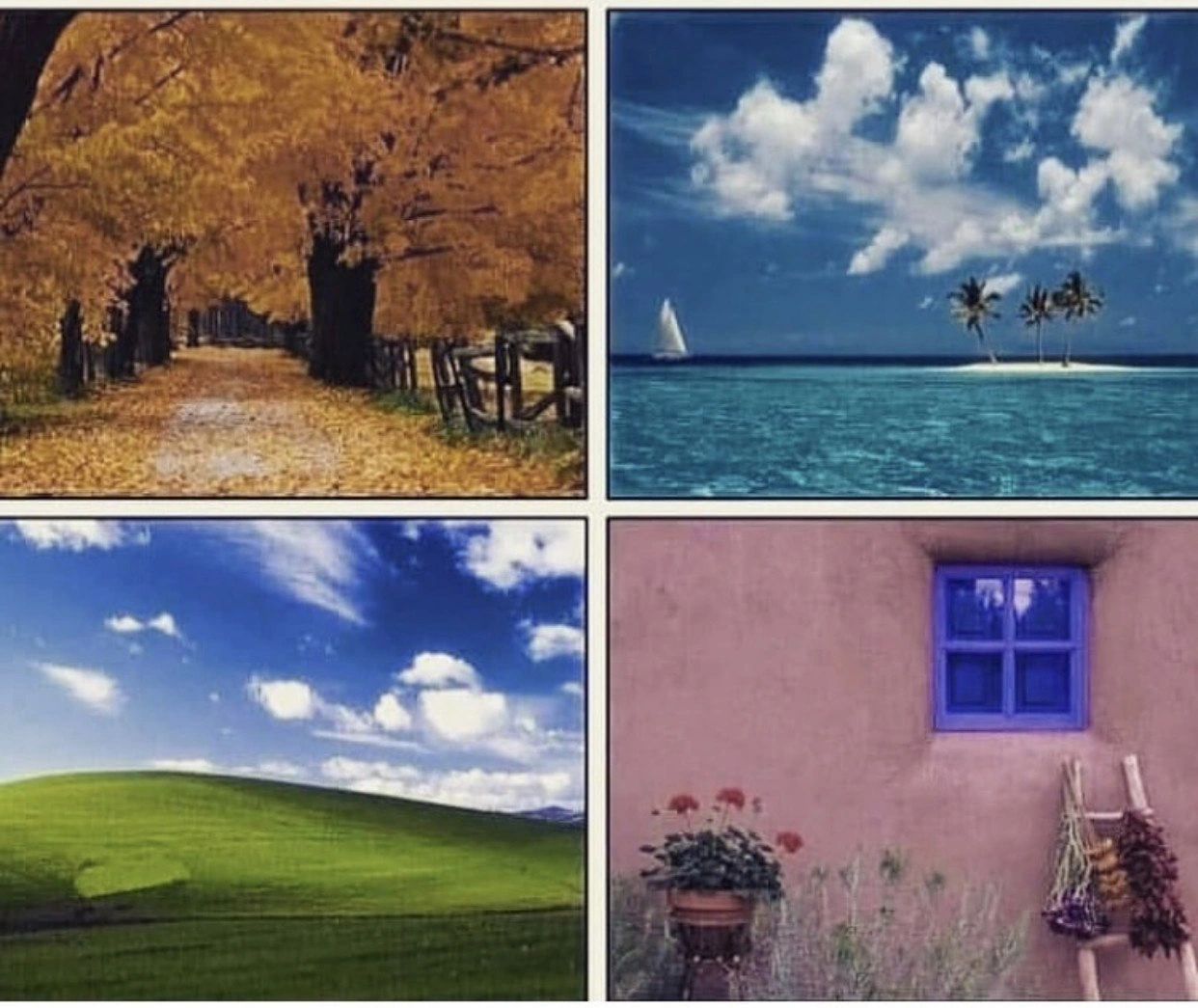
Imagine you find an old photo of your first day at school or a drawing you made when you were little. Just looking at it makes a bunch of memories and feelings rush back, right? That’s what these four computer pictures do for grown-up tech folks. They’re like pictures from a “computer childhood.” Each of these scenes – a quiet path with autumn leaves, a sunny tropical island, a green hill under a blue sky, and a colorful little house window – were on almost everyone’s computer screens back in the day. Seeing them now is like opening a door to the past. It makes the people who used those old computers feel warm and happy, remembering a time when things were new and exciting for them. In simple terms, these images are comforting old memories – just like a favorite old cartoon or a beloved bedtime story that instantly takes you back to the good old days.
Level 2: Default Wallpapers 101
Let’s break down why these images matter to programmers and what they actually are. In the early 2000s, Windows XP was the new shiny operating system from Microsoft (released in 2001). An operating system is the main software that runs on a computer and manages all the hardware and other programs – like a big boss for your PC. Windows XP was a huge deal because it was more stable and friendly than the versions before it. It introduced a colorful interface (called the Luna theme) and came with some built-in pictures that users could set as their desktop background (the image or wallpaper behind your application windows). Those pictures in the meme are exactly those default wallpapers (also known as sample pictures) that shipped with XP.
Each panel in the image collage is one of the famous XP wallpapers:
- Top-left (Autumn): A photograph of a country lane covered in golden autumn leaves, with trees arching overhead. In XP’s files this was known simply as “Autumn”. It was one of the sample pictures in the “My Pictures” folder, showcasing warm fall colors. Many people might have used it as a calming desktop background.
- Top-right (Azul): A bright blue tropical ocean with three palm trees on a tiny island and a white sailboat in the distance. This one was titled “Azul” (Spanish for “blue”). It looked like a mini paradise and on a dreary workday it could make you daydream about vacations.
- Bottom-left (Bliss): Perhaps the most iconic of them all, this is the rolling green hill under a vibrant blue sky with cotton clouds. This photo is famously called “Bliss.” It was the default desktop background for Windows XP, meaning if you didn’t change any settings, this was the image you’d see on your screen. Almost every XP user remembers this serene landscape – it’s practically a symbol of Windows XP.
- Bottom-right: A pinkish adobe wall with a bright blue framed window, a potted geranium plant, and a ladder with dried flowers hanging. This is another sample picture from XP, often referred to by its Spanish name “Azul” as well (or sometimes just the “Adobe wall” picture). It added an artsy, rustic vibe to the collection. (Yes, two different images had similar names – it was a bit confusing!)
Now, why do these nostalgic desktop backgrounds “teleport devs back to 2001”? Because any developer or IT person who used computers in that era saw these images all the time. Windows XP was extremely popular – it ran on most home and office machines. So imagine being a young programmer in the early 2000s: you turn on your bulky beige PC tower every morning, and before you start coding, you see that Bliss hill on your screen. You might take a break from writing code, minimize your program, and there’s the Autumn path reminding you of a peaceful walk. These images became tied to the memory of using the computer itself, including all the early coding projects, school assignments, or LAN party gaming sessions people had back then.
Some key terms and context from that time: Windows XP was a 32-bit operating system (meaning it could handle memory and data in 32-bit chunks, which was standard then). Today most systems are 64-bit, which handle much more memory and bigger chunks of data at once. Back in 2001, we were just starting to transition to 64-bit, so XP was the pinnacle of 32-bit systems. XP also coincided with the rise of the .NET Framework – Microsoft’s new programming platform that introduced languages like C# and VB.NET. Many developers were experimenting with early .NET on Windows XP, building their first graphical programs or web apps on this OS. So, in a way, these wallpapers formed the backdrop (quite literally) to a lot of developers’ first big coding experiences. It’s like having a familiar poster on the wall during your learning years – seeing it brings back memories of what you were doing at that time.
OperatingSystems often have a visual style and default assets (images, sounds, icons) that define the user’s experience. In XP’s case, the whole look was bright, friendly, and trustworthy – a big change from the grey, boxy windows of older versions like Windows 98. The sample wallpapers were part of that welcoming vibe. They showed off color, clarity, and the fact that XP could easily handle digital photos (remember, digital cameras were just becoming mainstream then). These images lived on your computer by default, so even if you didn’t have other pictures to use, you could decorate your desktop with the ones Microsoft provided. And many people did just that, leaving the defaults in place. That’s why they’re so recognizable.
Now, nearly two decades later, Windows XP is considered a LegacySystem. That means it’s an old platform that’s mostly outdated, though a few old machines or special systems might still run it (some kiosks, lab equipment or ATMs held onto XP for a long time!). But for most of today’s purposes, XP is retired. However, when an experienced developer suddenly sees these default XP wallpapers, all the memories of working on that old system come rushing back. It’s a powerful feeling of TechNostalgia – nostalgia specifically for technology from our past. Even younger devs who maybe started on Windows 7 or 10 can sense the “retro” vibe of these images, because they’ve heard war stories from older colleagues or they remember seeing these pictures on family computers when they were kids.
In summary, this meme shows four simple pictures that represent Windows XP’s identity. To a junior developer or someone new to tech, they might just look like pretty photos. But once you know the context – that these were the sample wallpapers on millions of PCs – you understand why older devs grin (or even get a tiny lump in the throat) when they see them. It’s like showing a gamer the start screen of the original Mario – instant recognition. These images are shorthand for “the early 2000s computing experience,” and that’s why they have almost magical nostalgic power in the developer community.
Level 3: Blissful Time Warp
For veteran developers, this four-panel collage is like finding a time capsule buried in code. Each image is a default Windows XP wallpaper (or sample picture) that instantly triggers TechNostalgia. We’re talking about Operating Systems history here – specifically the golden age of Windows XP around 2001, when CRT monitors flickered on desktops and the world was transitioning to 32-bit computing. These serene scenes – the leaf-strewn Autumn path, the tropical Azul island oasis, the iconic green hill of Bliss, and the adobe Azul window with red geraniums – were more than pretty pictures. They were part of the visual identity of an OS that defined an era of RetroComputing. Just seeing them flashes developers back to long hours in Visual Studio .NET 2002, Internet Explorer 6 windows, and the cheerful Luna theme UI of XP. It’s a TechHistory lesson wrapped in warm fuzzies: a reminder of when Microsoft’s new NT kernel finally made its way to home PCs, unifying the messy Windows 9x line into a stable, modern platform.
Back then, Windows XP felt like a revolution. It was the first consumer Windows built on the NT architecture (so long, DOS underbelly!) and it showed – fewer Blue Screens, more security (at least after Service Pack 2), and a shiny new interface. The OS shipped with these default_os_ui_assets – sample wallpapers in the “My Pictures/Sample Pictures” folder – as a sort of demo of XP’s imaging capabilities. Little did Microsoft know they were also searing images into the collective memory of a generation of devs. The Bliss wallpaper (that luminous green hill under a blue sky) might be the most viewed photograph in history thanks to Windows XP’s ubiquity. Seeing it now is like a Proustian madeleine for programmers: suddenly you remember the exact look of the Start menu, the clunky sound of the dial-up modem connecting, and the feel of writing early C# code on the .NET Framework 1.0. In an instant, you’re back in the early 2000s, using Visual Studio 6 or experimenting with brand-new C# on a single core Pentium 4, with one of these wallpapers peeking out behind your editor windows.
This meme hits home because it satirizes the TechHistory embedded in something as innocent as sample images. It’s funny and heart-tugging at the same time: we rarely think of operating system design choices as cultural artifacts, yet here we are, decades later, collectively reminiscing about default JPEGs. The humor comes from that instant teleportation of the mind. One glance at these files and you can smell the dust on that Dell tower PC, feel the heat of the space heater CRT monitor warming your cubicle, and hear MSN Messenger’s bloop logging you in. It’s absurd in a wonderful way – technology moves so fast that an OS from 20 years ago is practically ancient history, and something as trivial as its wallpaper can trigger deep nostalgia.
Let’s unpack why these particular images amplify the nostalgia for devs:
- Universality: Windows XP was everywhere – at home, at work, in school labs. Its default wallpapers were the backdrop to millions of computing experiences. Everyone who coded or gamed on XP saw these pictures (often daily). They’re a shared cultural reference for an entire generation of developers.
- Context Switch: In 2001-2005, if you were debugging a tricky .NET issue or writing Java applets, you might minimize your IDE and be greeted by the Bliss hill or that tranquil Azul beach. Those images became the visual “pause screens” of development life. Seeing them now subconsciously brings back the feeling of being an early-career dev – when stack overflow was just a C error and Google was a new friend.
- A Simpler Tech Stack: The meme also winks at how much the dev world has changed since XP. Back then, deploying a web app often meant copying files over FTP, not orchestrating Kubernetes clusters. The LegacySystems vibe is strong – Windows XP represents a simpler (if less powerful) time, so these wallpapers symbolize respite from today’s complex, distributed, always-on-call realities. The humor is in that contrast: the idyllic simplicity of those images versus the chaotic cloud-native world we navigate now.
- Persistence in Memory: Many of us haven’t actually used XP in years (support officially ended in 2014), yet these default wallpapers stick in memory with crystal clarity. It’s like muscle memory for the eyes. There’s irony in how some default_os_ui_assets outlast in memory the actual OS – a wink at the fact that while we upgrade our tech constantly, our brains still run some pretty old packages.
In short, this meme lands because it taps into collective memory. It’s lovingly poking fun at how something as mundane as default OS wallpapers can make hardened engineers go “aww, those were the days.” Windows XP’s sample pictures have basically become the Pokémon cards or classic rock of the developer world – instantly recognizable and capable of sparking a conversation that starts with “Remember when…?”. The cynical truth is, yes, we’ve come far (modern OperatingSystems and frameworks are light-years ahead), but part of us misses when our biggest problem was a missing DLL on Windows XP and our screen was graced by rolling hills and tropical dreams. This four-panel nostalgia bomb humorously underscores that even in tech, we cherish our RetroComputing roots – blissfully remembering an OS that felt like paradise, bugs and all.
Description
A four-panel image displays three generic, aesthetically pleasing stock photos and one iconic piece of tech history. The top-left panel shows a beautiful autumnal scene with a path covered in golden leaves. The top-right panel features a serene tropical island with a sailboat. The bottom-right panel depicts a rustic scene with a blue window on a terracotta wall. The bottom-left panel, however, is the instantly recognizable default wallpaper from Windows XP, named 'Bliss,' showing a rolling green hill under a blue sky with fluffy white clouds. The humor comes from the unexpected inclusion of this digital landscape among natural ones, acting as a cultural touchstone for anyone who used computers in the early 2000s. For developers and IT professionals, it's a nostalgic reminder of a dominant era in operating systems, a shared experience that transcends the typical stock photo

Comments
22Comment deleted
Three of these images are just stock photos. The fourth one is the reason you know how to disable autorun and manually edit the registry
Those XP sample wallpapers remind me of our 2002 “cloud”: Bliss, Azul, and Autumn were just the hostnames of three beige Dell towers under Dave’s desk - stateful, single-AZ, and still more stable than half our Kubernetes clusters
The only wallpaper that's aged better than your legacy codebase is Bliss - and at least Bliss had the decency to retire gracefully instead of requiring quarterly security patches
Ah yes, the four stages of a developer's career: the golden autumn of youthful optimism, the tropical island of promised work-life balance, the Windows XP Bliss of actually shipping production code, and finally the rustic reality of maintaining legacy systems behind that blue window. The Bliss wallpaper remains the most viewed photograph in human history - not because we chose it, but because corporate IT departments chose it for us, and we were too busy debugging to change it for the next decade
An enterprise portfolio in four wallpapers: Bliss - the last greenfield we saw; the golden path - pure slideware; the microservice island - marooned behind three proxies; and a literal window - the only Windows Ops can support without a reboot
Greenfield project? In 2003 I shipped one to 10,000 users - Bliss.jpg via Group Policy
The last true greenfield project: XP's Bliss hill, blissfully free of tech debt and merge conflicts
I have 4K versions of the bottom two 😁 Comment deleted
Send em bud Comment deleted
I was mistaken about exactly which I have Comment deleted
Oh well, thanks for the effort. Comment deleted
NP! I'll send her if I ever find it Comment deleted
Alright. Comment deleted
Thanks for the bliss one! Comment deleted
💜💜💜 you're welcome! Comment deleted
Я был там, Джонни Comment deleted
Memories Comment deleted
Глючное говно, недостойное ностальгии Comment deleted
XP was NT 5.1, not the 6 (Vista), so this one would be more appropriate Comment deleted
Why is that more appropriate? :o Comment deleted
It's one of Vista's included wallpapers Comment deleted
the Antediluvian epoch 😢. Comment deleted