Skip to content
DevMeme
4061 of 7435
Salesman slaps HDD promising capacity; drive answers with death-click soundtrack
Hardware Post #4428, on Jun 8, 2022 in TG

Salesman slaps HDD promising capacity; drive answers with death-click soundtrack

Why is this Hardware meme funny?

Level 1: He Brags, It Breaks

Imagine a toy box seller proudly pats a big toy box and says, “This box can hold so many toys…” But as soon as he says that, the box falls apart and all the toys fall out with a loud CLANK CLACK. 😮 The scene is funny because the seller was bragging about how great the box is, and then the box instantly broke and made a ridiculous noise. It’s like someone saying their car is super reliable and cool, and at that exact moment the car makes a terrible grinding sound and stops working. In this meme, the computer’s hard drive was the “box” for data. The salesman bragged it could hold lots of stuff, but the hard drive answered by making a bad clicking noise – basically saying “I’m broken!” We find it humorous because the big promise is immediately undone by an unexpected failure, which is silly and ironic. Even if you don’t know about hard drives, it’s like a cartoon moment where a character talks big, then immediately gets proven wrong in a comical way. The lesson is simple: sometimes people promise more than things can actually do, and reality (or a broken box!) has the last laugh.

Level 2: Backup Before Breakdown

Let’s break down the meme and the tech references for a newer developer. In the image, we have two panels:

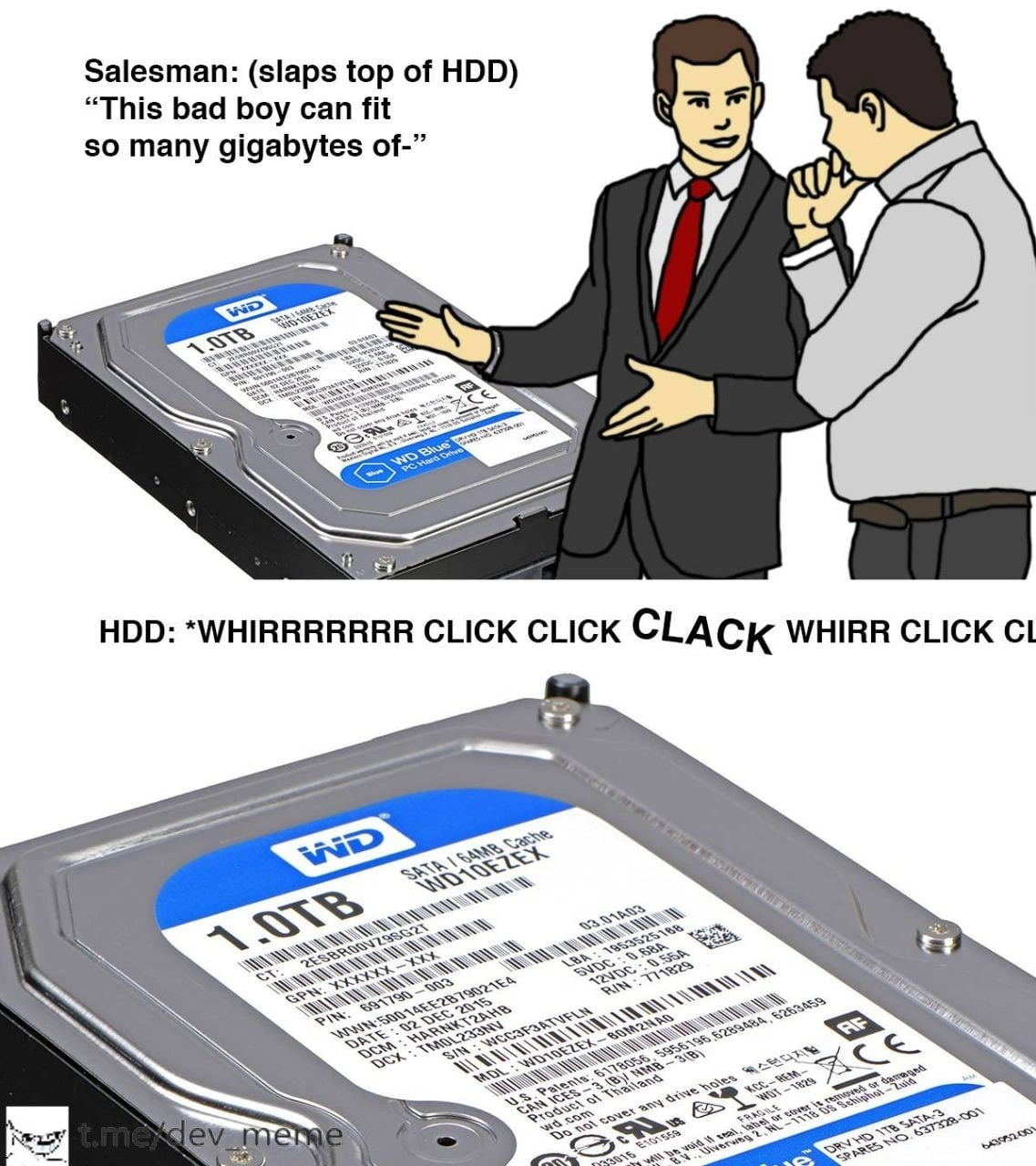
  • Top Panel: A cartoon salesman is confidently slapping the top of a hard drive on a table. He says: “This bad boy can fit so many gigabytes of–” This setup is a twist on a well-known meme format where a car salesman slaps the car’s roof and boasts about its capacity or features. Here the car is replaced with an HDD (hard disk drive), and he’s bragging about storage capacity (gigabytes). The joke is setting up that the drive has a huge amount of DiskSpace for data.

  • Bottom Panel: A close-up of the 1TB Western Digital Blue hard drive. Instead of dialogue, we see sound effects written out: “WHIRRRRRR CLICK CLICK CLACK WHIRR CLICK CLICK.” These are the noises the drive is making. To anyone who has used older hard drives, this sounds exactly like an HDD that’s malfunctioning or dying. It’s the device’s not-so-friendly way of saying “I’m broken.” Essentially, the drive is answering the salesman’s claim with a noisy failure sound. The salesman’s sentence gets cut off, implying he didn’t even finish talking before the thing started failing.

Now, some context on the hardware: a 1.0 TB SATA HDD like the WD Blue shown is a common consumer hard drive. 1 TB (terabyte) means about 1,000 gigabytes – a lot of storage for files, code, photos, etc. SATA refers to the interface (Serial ATA), a standard way to connect hard drives to a PC’s motherboard. The label also mentions 64MB Cache – that’s a small amount of memory inside the drive that helps speed up frequent read/write operations (kind of like a tiny RAM for the disk). A Western Digital (WD) Blue drive is a general-purpose drive often used in desktops for regular storage needs. It’s known to be affordable and decent for everyday use, but it’s not the toughest or fastest drive out there (WD has other color-coded models like Black for performance or Red for NAS reliability).

Hard Disk Drives are sometimes nicknamed “spinning rust” because inside that metal case there are one or more spinning metal disks coated with magnetic material (not actual rust, but the platter’s surface is magnetic and sometimes brownish). An HDD uses a magnetic head on an arm (like a tiny record player) to read and write data on those spinning platters. Because there are physical moving parts – a motor to spin the disks and an actuator arm moving back and forth – HDDs are mechanical devices. This means they can make noise when operating (a light whir or clicking is normal when reading/writing data). However, loud, repetitive clicking is not normal; it’s usually a bad sign.

The meme specifically exaggerates a scenario known to many tech folks: the click_of_death. That phrase describes the distinctive clicking sound a failing drive makes when it keeps trying and failing to read data. In real life, if you hear constant loud clicks from a hard drive and it can’t access data, it often means the drive is about to die or is already dead. The sound in the text "WHIRR CLICK CLICK CLACK..." is the drive’s internals basically stuttering. WHIRR = the platter trying to spin up. CLICK CLICK CLACK = the head repeatedly hitting its stop or resetting because it can’t find what it’s looking for. It’s like the drive is coughing or sputtering instead of running smoothly.

So why is this funny? It’s the contrast and irony. The salesman is like a hype-man, saying “This device can store so much data, it’s amazing!” – that’s the marketing claim. But the hard drive’s response (making death noises) is the harsh reality: “Actually, I’m not even working properly.” Essentially, the meme highlights that having a huge capacity (“fit so many gigabytes”) is pointless if the drive fails and you can’t use it. It’s a wink to anyone who has ever been promised something great by a salesperson or advertisement, only to experience a failure or flaw immediately after. The fact that the salesman physically slaps the HDD is a direct reference to the meme template, but it’s extra funny here because hitting a hard drive in real life is a terrible idea – it might literally cause damage.

For a junior developer or someone new to hardware, a takeaway here is: hardware can and will fail, so always be prepared. The meme’s subtext is a reminder about Backup and Recovery. “Backup” means keeping copies of your important data somewhere else safe. For example, you might back up your code to an external drive or a cloud service. The reason we emphasize backups in IT is exactly because of scenarios like the one in the meme: a drive that was supposed to hold all your stuff can suddenly stop working (whether through mechanical failure, power surge, accident, etc.). If that happens, all the data on it could be lost or extremely hard to recover. Hearing an HDD start clicking is often the moment you think, “Oh no… when was my last backup?”

The meme is RelatableHumor to developers because many of us have had something like this happen: maybe our personal computer’s hard disk started clicking and failed, wiping out some files, or a server’s disk died causing downtime. We learn pretty quickly that you shouldn’t trust a single device with the only copy of important data. It’s also relatable in that salespeople (or product specs) often highlight the best features (like big capacity) but might not mention the limitations (like probability of failure, or the need to replace disks after some years). So there’s an element of “truth in advertising” missing – the meme fills that gap humorously by showing the drive’s perspective.

To connect the dots with the tags: BlockStorage refers to devices like HDDs or SSDs that store data in fixed-size chunks (blocks). A hard drive is a classic block storage device – your operating system reads and writes blocks of 512 bytes or 4KB, etc., on it. The user doesn’t see those details, we just see files, but under the hood the OS is using block storage operations. DiskSpace is just the capacity or size of the storage (like 1TB). BackupAndRecovery is what you do when you prepare for or respond to failures (making backups beforehand, and possibly using recovery tools or services if a disk dies without a backup). This meme clearly advocates for backups by showing what can happen if you only have one drive and it fails.

Also, a bit about the “salesman slaps top” meme in general: It became popular on the internet as a format where the salesman says, “This bad boy can fit so much [X] in it,” with X being something humorous or exaggerated. It started with cars (joking about how much you can fit in the trunk, etc.), but people apply it to all sorts of things for laughs. Here X = “gigabytes” because we’re talking about storage drives. But instead of completing that sentence, the meme immediately cuts to the drive’s reaction (the failure noise), which creates a comedic timing effect. You expect him to say “gigabytes of data” or something, but you get a CLACK CLACK sound instead. It’s a bit like a punchline without words – the hardware itself delivers the joke by failing.

In summary, the meme is a humorous caution: Even if a hard drive has a large capacity, it can fail at any time. The scene is funny because the boast and the failure happen almost simultaneously – a classic case of expectations vs. reality. For a junior dev, it’s a lighthearted introduction to the idea that you shouldn’t take tech specs at face value, and you should always plan for hardware to fail eventually. And yes, if you ever hear a loud repeated clicking from a drive, that’s your cue to stop what you’re doing and save whatever data you can – that drive is in trouble!

Level 3: The Click of Death

Slapstick storage meets reality. The meme riffs on the classic “salesman slaps roof of car” format, but instead of a car we have a 3.5-inch Hard Disk Drive (HDD) and an unfortunate twist. In the top panel, a slick salesman confidently pats a WD Blue 1TB SATA drive, bragging "This bad boy can fit so many gigabytes of–". It’s a bold marketing promise about capacity. But the bottom panel delivers the punchline: the drive itself responds with a mechanical death rattle — "WHIRRRR CLICK CLICK CLACK WHIRR CLICK". That onomatopoeic text is instantly recognizable to seasoned engineers as the dreaded “click of death.” It’s the sound a spinning-rust hard drive makes when it’s on its last legs, failing spectacularly.

Why is this funny to an experienced developer? Because it perfectly captures the dark humor of HardwareHumor: the disconnect between sales promises and real-world hardware failure modes. The salesman’s boast about DiskSpace (“so many gigabytes!”) is painfully undermined by the drive’s block storage reality: an ominous clicking soundtrack indicating imminent failure. In other words, sure it can store 1,000 GB — but only until it dies, which might be right about now. This hits close to home for anyone who’s dealt with storage_failure at 3 AM. We’ve all seen a BackupAndRecovery plan go from optional to absolutely critical in the instant a drive starts making that forlorn click-click sound.

Technically, that sound isn’t just for comic effect – it’s the drive’s read/write head assembly repeatedly seeking and failing. Inside an HDD, data lives on spinning magnetic platters (the “spinning rust”). A tiny actuator arm moves the heads to read data from tracks on those platters. When something goes wrong – say a head crash, platter damage, or firmware fault – the drive often retries the seek repeatedly. Each failure triggers a distinctive click as the head resets to its parking position or hits a stop. The WHIRR is the spindle motor spinning up the disk, and the CLACK is the desperate retry of the head assembly. In engineer parlance, the drive is recalibrating or attempting to re-read sectors, but failing so badly that it just loops in a noisy cycle. This is why the meme’s second panel is essentially the HDD saying “NOPE” in machine language. It’s the storage equivalent of a car engine backfiring and dying right after the salesman’s hype.

From a senior perspective, this meme also pokes at RelatableHumor in IT culture. There’s a long history of marketing pushing capacity (“1 TB of storage!”) while glossing over reliability. Veterans know that all storage devices have a finite lifespan. The WD Blue series drive shown is a solid consumer-grade disk, but it’s not enterprise hardware – it’s not rated for constant operation or heavy server workloads. If you treat a cheap desktop drive like a data center workhorse, don’t be surprised when it starts singing the blues (pun intended). MTBF (Mean Time Between Failures) numbers and SMART stats might look reassuring on spec sheets, but the real rule is: all drives eventually fail. It’s not if, it’s when. The humor here is that “when” happens exactly at the moment of the boast. Seasoned devs have seen this ironic timing in real life: the demo that crashes only when the client watches, the disk that dies right after the salesman says “trust me.”

This meme encourages a healthy skepticism. It’s essentially saying: “Don’t trust marketing blindly – trust physics and backup your data.” Magnetic hard drives have moving parts and thus plenty of failure modes: mechanical wear, heat issues, controller faults, you name it. The click_of_death is famous because once you hear it, your drive is likely toast. In tech folklore, there’s even gallows-humor advice like, “If an HDD starts clicking, backup whatever you can immediately, then plan its funeral.” The meme’s exaggerated scenario of a salesman’s slap instantly causing the failure is a wink to all the times a spinning_rust drive has died at the worst possible moment.

For those of us who’ve administered servers or built PCs, that “WHIRR CLICK” can trigger PTSD. It’s the soundtrack of lost weekends and emergency data recovery attempts. When a drive in a RAID array or a production server dies, you might literally hear it clicking from the rack. (If you’re really unlucky, multiple drives might fail, and then you’re in full disaster recovery mode.) The textual sound effects in the image immediately conjure that scenario. It’s equal parts funny and horrifying because we’ve been there: the sales guy promised the new storage would solve all our problems, but he didn’t mention needing a spare drive and a backup on standby for when it inevitably breaks.

In fact, the slap in the meme is poetic. Physically slapping an HDD in real life is a terrible idea – a hard enough knock can cause the head to literally collide with the platter (a head crash), gouging the magnetic coating and permanently destroying data. The meme exaggerates this as if the salesman’s smack itself induces the failure (a case of instant karma for tech overconfidence). It’s a clever nod: hardware engineers know that shock and vibration are enemies of spinning disks. Ever notice those warnings to handle drives gently? There’s a reason. In datacenters, drives are mounted on vibration-dampening rails; dropping one can kill it. So the meme’s joke is layered: boastful slap + fragile device = click “oops.” It’s slapstick comedy for the sysadmin crowd – literally slap-stick.

Finally, beyond the humor, there’s a cautionary tale: BackupAndRecovery isn’t optional. If that HDD was storing important data, the “WHIRRRR CLICK” means you’re now praying you copied those files elsewhere. This meme resonates because any experienced dev or IT pro has had that “uh-oh” moment when hardware that was “perfectly fine” seconds ago starts making noises like a dying robot. It’s a rite of passage in tech to lose a disk and (hopefully) learn to keep backups religiously. As the saying goes, any data not backed up is data you’re willing to lose. The salesman’s pitch about fitting gigabytes is meaningless when your drive can’t even spit out a single byte without choking.

In summary, the meme blends a popular joke template with a painfully true tech scenario. It lampoons the optimistic sales fluff (lots of GBs!) by juxtaposing it with the harsh mechanical truth (lots of clicks!). Engineers laugh (perhaps a bit bitterly) because they’re intimately familiar with the storage_failure sound showcased. It’s a comic reminder that in technology, reality (and physics) will assert itself no matter what the brochure says. And when reality sounds like CLICK CLACK WHIRR, it’s already too late — hope you had those backups!

Subtle nod: Next time a salesperson boasts about a “bad boy” drive, you might jokingly ask: “Does it come with the free click-click soundtrack, or is that sold separately?” 😈

Description

Meme in two stacked panels. Top panel: cartoon salesman in suit and red tie confidently slaps the top of a 3.5-inch Western Digital Blue hard-disk drive on a display table while another person listens; caption reads, “Salesman: (slaps top of HDD) ‘This bad boy can fit so many gigabytes of-’”. Bottom panel shows a close-up stock photo of the same 1 TB WD Blue SATA drive; overlaid on the white space above it is onomatopoeic text imitating failure sounds: “HDD: *WHIRRRRRR CLICK CLICK CLACK WHIRR CLICK CLICK*”. The joke riffs on the classic “slaps roof of car” meme, contrasting marketing bravado with the mechanical clicking that seasoned engineers recognize as a dying spinning-rust disk. Technically, it lampoons magnetic storage reliability issues, encouraging backups and highlighting the gap between advertised capacity and real-world hardware failure modes


Comments

20
Anonymous ★ Top Pick Nothing like a WD Blue breaking into its WHIRR-CLICK solo to remind the PM that “1 TB for cheap” and “RPO < 5 min” can’t live on the same spindle
  1. Anonymous ★ Top Pick

    Nothing like a WD Blue breaking into its WHIRR-CLICK solo to remind the PM that “1 TB for cheap” and “RPO < 5 min” can’t live on the same spindle

  2. Anonymous

    The same energy as a vendor demoing their "battle-tested" database solution right before it corrupts the entire demo dataset in front of the CTO

  3. Anonymous

    The HDD's mechanical symphony mid-pitch perfectly encapsulates every architect's internal monologue when a PM suggests 'just use spinning rust for the database cluster' in 2024 - sure, it's cheap per terabyte, but that IOPS ceiling and seek latency will haunt your on-call rotation faster than you can say 'RAID rebuild time.' Meanwhile, your SSD-backed competitors are already serving their third million transactions while your actuator arm is still seeking block 47 of the B-tree index

  4. Anonymous

    “Slaps HDD” “This bad boy can fit so many gigabytes” - SMART replies in WHIRR-CLACK Morse: you optimized for $/TB, not durability; RAID isn’t backup - see you at 3am

  5. Anonymous

    Spinning rust: terabytes today, terabytes of 'where's my backup?' tomorrow

  6. Anonymous

    Spinning rust: the only component that throws audible exceptions - S.M.A.R.T. says “OK,” your RPO says “see you last Tuesday.”

  7. @SpYvy 4y

    LinusDropTips

  8. @N1KD1 4y

    This HDD is so BADdie

  9. @anatoli26 4y

    🤔 what’s wrong with this HDD?

    1. @SamsonovAnton 4y

      WD Blue and especially WD Green drives are notoriously self-destructing by constantly trying to go to sleep and park their heads - each 30 or 8 seconds, respectively, - only to wake up again on next write of system log files. With only 300'000 parking cycles guaranteed, it may take just some months to kill an otherwise healthy disk drive.

      1. @RiedleroD 4y

        and that's why everyone who's not running a massive storage server should only use SSDs

  10. @anatoli26 4y

    Explanations team please

  11. @RiedleroD 4y

    hard disks are especially vulnerable to physical damage, so it's not a good idea to slap one

  12. @anatoli26 4y

    Hmm what sort of a slap could cause it a failure? A Hulk’s one?

    1. @RiedleroD 4y

      any slap could cause a reading arm to scratch a disc, which would cause data loss

      1. @RiedleroD 4y

        and since HDDs are usually equipped to deal with that without intervention from the OS, it furiously starts spinning up and clicking around (clicking means a reading arm hits either the inside wall or the axle, which is a fast way to stop the arm when speed is crucial) as it reads and writes data to try and recover as much data as possible (ofc only light damage can be circumvented this way)

      2. @anatoli26 4y

        I guess there’s some level of shockproof that won’t cause it any damage at all nor any issue with operation. If it’s on a hard surface or well mounted.. imo no issue at all 🤷‍♂️

        1. @RiedleroD 4y

          some cheaper discs are quite resilient, yes. But the more storage there is (less wiggle room between reading arm and discs) and the faster it spins (more damage if it scratches), the easier a HDD breaks.

          1. @RiedleroD 4y

            also I think seaGate ones are famously easy to break but don't quote me on that

            1. @NevermindExpress 4y

              they are good and crap at the same time

Use J and K for navigation