Autofill Answers The Wrong Question
Why is this DeveloperExperience DX meme funny?
Level 1: Helpful, But Not Really
This is like asking someone to hand you a pencil, and they proudly give you a pineapple because both words start with p. They smile like they saved the day, but now you still need the pencil and also have to deal with the pineapple. The funny part is that the computer helper acts very sure of itself while being obviously unhelpful.
Level 2: Symbol Soup
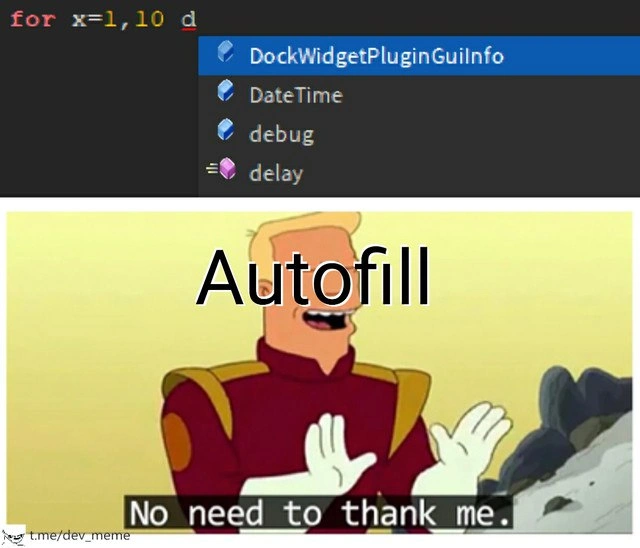
Autocomplete is the feature that pops up possible completions while you type code. In a good setup, it can suggest function names, variables, methods, keywords, imports, or snippets. In the image, the editor sees the typed d and offers several choices that begin with or relate to that letter.
The problem is that programming depends on context. A suggestion can be technically valid and still not be useful. For example, DateTime might be a real type, debug might be a function, and delay might be a callable utility, but none of them obviously complete the loop-like text shown in the editor.
This is a common early-career frustration. You start trusting the editor because it often knows more APIs than you do. Then one day it confidently inserts the wrong thing, imports the wrong package, or completes a name that compiles but changes the meaning of the code. The lesson is that autocomplete is a guide, not a driver. It can save typing, but it cannot always understand what you meant.
Level 3: Confidently Wrong Completion
The top half shows a developer typing:
for x=1,10 d
and the editor responds with suggestions like:
DockWidgetPluginGuiInfoDateTimedebugdelay
The lower half labels Zapp Brannigan as:
Autofill
with the subtitle:
No need to thank me.
That is the joke: the tool interrupts with the energy of a heroic assistant while solving the wrong problem. In a code editor, autocomplete is supposed to compress intent. It should notice the surrounding syntax, language grammar, imported APIs, scope, and common patterns, then offer something that makes the next keystroke cheaper. Here it looks as if the editor saw a single d and proudly dumped nearby identifiers from the symbol table. Technically available, semantically useless. Classic.
The senior pain is not that suggestions exist; good completion is one of the great quality-of-life upgrades in modern IDEs and text editors. The pain is ranking. A completion engine that treats every visible symbol as equally plausible becomes a tiny slot machine attached to your cursor. The more frameworks, plugins, generated APIs, and global names a project has, the more the suggestion list fills with things that are valid somewhere but wrong here.
The Zapp Brannigan panel lands because he is performing confidence without competence. That mirrors bad developer tooling: the UI claims to be helping, takes focus, covers code, captures keyboard input, and then offers DockWidgetPluginGuiInfo when the programmer probably wanted a loop keyword or block opener. The result is not just a bad suggestion; it is tooling friction. The developer must pause, reject the popup, recover the line of thought, and keep typing while the assistant waits nearby, ready to help again in the same way a fire alarm helps a nap.
Description
The top panel shows a dark code editor where the programmer has typed "for x=1,10 d" and an autocomplete menu is open. The suggestions shown are "DockWidgetPluginGuiInfo," "DateTime," "debug," and "delay," none of which obviously complete the intended loop structure. The lower panel shows the Futurama character Zapp Brannigan with the large overlay text "Autofill" and the subtitle "No need to thank me." The joke is that IDE completion can confidently interrupt with syntactically available but semantically useless guesses, adding friction instead of developer experience polish.
Comments
1Comment deleted
Autocomplete is useful right up until the symbol table proves it knows every API except the one you were mentally compiling.