The most resource-intensive feature of Android Studio
Why is this IDEs Editors meme funny?
Level 1: A Hot Laptop
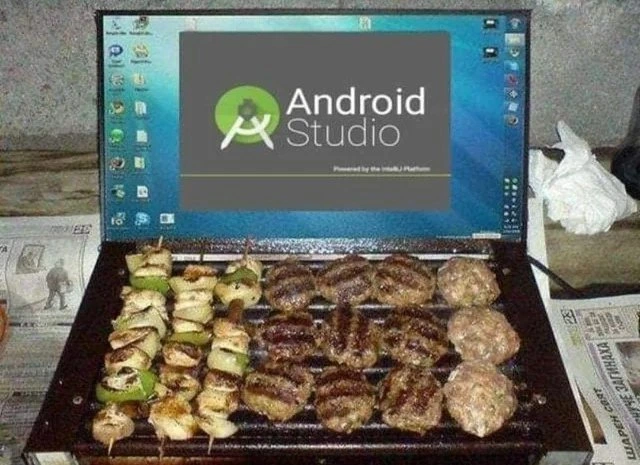
Imagine you have a computer on your lap, and you’re doing something that makes it work really hard – maybe playing a big game or running a heavy program. The computer starts to get warm, then really hot, almost like when a car’s engine has been running for a long time or when you’ve been running around on a sunny day. Now, think of how we cook food on a stove or a grill by using heat. This joke picture shows a laptop that got so hot, someone is using it like a grill to cook chicken and burgers! It’s a silly pretend scenario that makes us laugh.
Of course, in real life, people don’t cook food on their computers. But sometimes laptops do get very warm if they’re working super hard. The joke is funny because it takes that real feeling (“Wow, my laptop is as hot as a grill!”) and shows it in an over-the-top, cartoonish way. It’s like saying, “My computer is literally cooking!” which is something you don’t expect to hear. This surprise and exaggeration make it humorous. Anyone who’s ever felt a hot laptop or a warm phone can giggle at the idea that it could double as a cooking device. In the end, the meme is using a playful picture to say, “This program makes my computer really, really hot,” in a way that even someone who isn’t into computers can understand and find funny.
Level 2: Too Hot to Handle
Android Studio is an example of an IDE, which stands for Integrated Development Environment. That’s a fancy way of saying it’s an all-in-one program where developers write code, debug, and build their apps. It’s the main official tool for making apps on Android phones (hence the name). When you open Android Studio, you see that gray loading screen with the green Android logo (just like in the meme image) – that’s called a splash screen, and it shows up while the IDE is starting up all its parts. Underneath, it says “Powered by the IntelliJ Platform,” which means Android Studio is built on top of another software platform (IntelliJ IDEA) known for lots of powerful coding features.
IDEs like Android Studio are super handy because they provide everything a developer needs in one place: a code editor with syntax highlighting (colorful code), visual layout designers, simulators, and build tools. However, all those features make the program heavy – it uses a lot of your computer’s resources. Think of it like a multitool or a Swiss Army knife: it can do so many things at once, but if you try to use all the tools simultaneously, it’s a bit unwieldy. When Android Studio runs, it’s not just showing text that you type; it’s constantly checking your code for errors, suggesting autocompletions, indexing files for quick search, and more. On top of that, when you press “Run” to test your app, Android Studio triggers Gradle (the build system) to compile the app, which involves a series of complex steps. Doing all this work uses a lot of CPU (the computer’s brain) and memory (RAM).
Now, when a computer’s CPU works hard, it draws more electrical power and gets hot – just like how a car engine heats up when you drive fast, or how you get warm and sweaty when running around. Laptops and desktops have cooling systems (fans, vents, sometimes liquid cooling) to keep the temperature in check. In a laptop, space is limited, so usually there are small fans and metal heat sinks. If an application is using nearly 100% of the CPU, the cooling system will be running at full blast to dissipate that heat. You might have noticed this if you’ve ever played a 3D game or watched high-definition videos on a computer: the device becomes warm and the fans get louder. With Android Studio, especially on an average laptop, it’s common to hear the fan whirring loudly soon after you start working, because the computer is effectively working overtime. The top of the keyboard and the bottom of the laptop might become quite warm to touch. This is essentially the machine saying, “Whoa, I’m doing a lot of stuff right now!” It’s generally safe (computers are designed to handle heat up to a point), but it can be a bit alarming if you’re new to it.
For someone just starting out, this can be surprising or even worrisome. Let’s say you’re a beginner trying Android Studio for the first time to write a “Hello World” app. You install it, open it up, and suddenly your laptop’s fan sounds like a tiny vacuum cleaner. The mouse might lag a bit, and the whole system feels sluggish while it’s setting up the project. Touching the laptop, you notice it’s hot near the vents. You might wonder, “Did I do something wrong? Why is this program so intense?” But in reality, nothing’s wrong – this is normal for such a large application, especially on a modest computer. Android Studio is doing a lot in the background (setting up the project structure, indexing files, etc.), and that just takes a lot of computation. This is a common early experience in MobileDevelopment: realizing that the tools can be as demanding as the apps or games you use. It’s part of learning that some developer tools are heavyweight.
The meme takes this scenario and plays with it. The picture literally shows a laptop being used as a grill, cooking skewers and burgers. Of course, that’s just a joke – you shouldn’t cook food on your laptop! But it’s funny because it’s a wild exaggeration of a feeling many developers have had. The phrase “turns your laptop into a portable BBQ grill” is a humorous way to say “my laptop is uncomfortably hot right now.” People often make jokes like this to cope with frustrating situations. In tech, we call this developer humor – making light of our everyday tech problems. So, the meme is basically saying: Android Studio can make your computer so hot, it feels like you could fry an egg (or grill a burger) on it. It’s relatable if you’ve been there, and it’s easy to understand even if you haven’t, because everyone knows what a hot grill is like. The visual of seeing actual food on the laptop drives the point home immediately.
In simpler terms, Android Studio is a powerful but resource-hungry application. It’s great for building Android apps, but when it runs, it pushes your computer’s performance to its limits, which in turn makes the computer generate a lot of heat. This can lead to the machine feeling like a little oven. The meme exaggerates that to the point of absurdity (actual BBQ on the keyboard) to get a laugh. It’s a kind of techie joke, but you don’t need to know coding to chuckle at the idea. Anyone who’s had a hot laptop on their lap can imagine it. For a junior dev or someone just learning, the takeaway is: if your laptop gets hot and fans spin loud when running heavy tools like Android Studio, don’t worry – that’s normal. Just maybe don’t try to actually cook with it, no matter how tempting the meme makes it look!
Level 3: Gradle Grill Mode
For seasoned Android developers, this meme hits close to home. Android Studio – the official IDE for Android app development – is famous (or infamous) for pushing laptops to their limits. The moment you open a big project, you can practically hear the fans spin up as if you just launched a AAA video game. The splash screen in the image (“Powered by the IntelliJ Platform”) is a friendly reminder that under that slick gray loading window, there’s a whole lot of heavy lifting happening. And heavy lifting in computing means high CPU usage, which in turn means heat. It’s a perfect example of DeveloperHumor around PerformanceIssues: exaggerating a common frustration (a slow, hot machine) by turning it into a literal hardware joke. The meme’s author jokingly treats Android Studio as a built-in grilling feature on a laptop – a tongue-in-cheek way to say, “This IDE runs so hot, it could cook my lunch.”
But why does Android Studio draw so much power and generate so much heat? It’s a perfect storm of demanding tasks running simultaneously in the name of MobileDevelopment productivity. Here’s what’s going on when you hit that green “A” logo:
- Indexing & Code Analysis: As soon as a project loads, Android Studio (built on the IntelliJ IDEA platform) starts scanning every file – source code, libraries, resources – to provide smart suggestions, error checking, and refactoring tools. This involves reading thousands of files and analyzing code structures. The IDE spawns multiple threads to do this in parallel, gobbling up CPU and disk I/O. Your laptop’s processor cores all jump to ~100% usage as the IDE combs through the project. It’s like a librarian instantly indexing a whole library each time you walk in – super useful for fast searches later, but very intensive upfront. All those background threads effectively burn CPU cycles nonstop until indexing is done.
- Gradle Builds: Android apps aren’t compiled with a simple one-step process; they use Gradle, a build automation system. When you click “Run” or build your APK, Gradle kicks off a series of tasks: compiling Java/Kotlin source code into bytecode, transforming that into DEX bytecode (the format for Android executables), merging resources (images, layouts), and possibly running tools like R8/ProGuard to shrink and optimize the app. Each of these steps is CPU-intensive. The Gradle build often uses all available CPU cores to speed things up, which ironically means your laptop is literally running at full throttle. It’s not nicknamed the “Gradle daemon” for nothing – when it awakens, it’s like a little demon gnawing on your processor. During this, you’ll commonly see your computer lag and hear fans whoosh. The device is working so hard that performance in other apps might stutter.
- Emulator & Preview: Many Android developers also run an Android emulator, which is a virtual phone on your computer for testing apps. The emulator simulates an entire smartphone CPU, memory, and even GPU graphics – effectively running a second operating system (Android OS) on top of your own. This, as you can guess, takes a bunch of processing power and often uses hardware acceleration features of your CPU/GPU. If you have the emulator open alongside Android Studio’s layout preview (which renders your app’s UI in real time), your machine is juggling a full Android OS, real-time graphics rendering, and the IDE itself all at once. It’s the equivalent of doing surgery while running a marathon – the computer is multitasking at an extreme level. No surprise it gets warm.
All these tasks running together turn your laptop into a workshop furnace. The combined effect is your machine working overtime, drawing lots of electricity and expelling lots of heat. Many developers joke about their rig becoming a space heater or a jet engine during an Android Studio session. Ever felt a searing sensation on your legs because you actually had your laptop on your lap? That’s the kind of moment this meme exaggerates. The image literally replaces the keyboard with a metal grill, complete with sizzling skewers and burger patties, implying that Android Studio will get your machine so hot, you might as well cook dinner on it. They even set the laptop on newspapers – a cheeky detail mimicking what you’d do with a real charcoal grill to catch grease or protect the table from heat. That absurd realism (desktop icons around the grill, the actual Android Studio splash on screen, the newspaper underneath) makes the joke even funnier and instantly recognizable to anyone who’s waited out a long Gradle build with a fan roaring in the background. It’s visual hyperbole for the very real frustration of a laptop overheating due to a heavy IDE.
Seasoned devs have all been there: you start a build and whoosh, the fans kick in. You joke with your co-workers that you’re "rendering the hamburger menu in real life" or that your IDE came with a free sauna. It’s classic hardware humor born from shared experience. There’s even a running gag among programmers: “Works on my machine – and my machine works as a grill!” In other words, “Hey, my app runs (on my now-very-hot laptop), so I guess it’s all good!” This kind of quip turns a pain point into a punchline. And beyond the jokes, it highlights a truth in modern development: our tools have become so powerful and feature-rich that they can stress even decent hardware. We’ve essentially traded the lighter editors of the past for these all-in-one powerhouses. Remember the old Android development days with Eclipse ADT? It was simpler (and less demanding) than Android Studio, but far less convenient – now we have a toolchain that does everything and makes our machines sweat. The meme is a playful take on this trade-off. It captures the pain of the mobile dev toolchain: sure, we get an amazing development experience with Android Studio, but only after our poor laptop survives a figurative campfire session. And as frustrating as slow builds or laggy performance can be, we cope by laughing about the ridiculous idea of literally barbecuing on our computers. After all, if you can’t fix it in the moment, poke fun at it!
Level 4: Silicon Sear & Thermal Throttling
Under the hood of that seemingly innocuous Android Studio splash screen, some serious physics is happening. Modern laptop CPUs contain billions of transistors switching billions of times per second; every switch releases a tiny bit of heat (thanks to good old Joule heating in the silicon). Fire up a heavy-duty application like Android Studio, and you’re effectively asking those transistors to throw an electrical dance party. The energy cost of all those code indexing threads, background Gradle daemons, and UI render processes ultimately turns into heat – a direct translation of electrical power into thermal energy. In fact, a high-end laptop chip consuming ~45W under load will dump roughly that much heat, akin to running a small incandescent bulb inside your machine. No wonder the bottom of your laptop starts feeling like a frying pan during a long build! This scenario even exemplifies Wirth's Law – as hardware got faster, software (like our feature-packed IDEs) got even more demanding, bringing us right back to maxed-out CPUs and boiling-hot chassis despite modern processors.
Laptops, unlike desktops, have minimal cooling headroom – a slim chassis means heat builds up quickly. To protect itself, your CPU employs thermal throttling: at high temperatures (often around 90–100 °C), it automatically slows down its clock speed to reduce heat output. Essentially, the CPU says, “I’m too hot, I need to slow down,” much like a runner pacing themselves on a scorching day. The system will ramp up fans to full blast (turning your quiet dev room into a mini server farm) and may even momentarily pause processor cores to prevent damage. That Android Studio “BBQ mode” isn’t just a joke – it’s the real battle between software demands and hardware limits. Consider that 95 °C is nearly the boiling point of water; at those temps silicon is searing. On some systems you can literally read a temperature sensor, for example:
$ cat /sys/class/thermal/thermal_zone0/temp
95000 # value in millidegrees => 95.0°C, time to flip the burgers?
At 95 °C (203 °F), your CPU is approaching a point where it could singe something – not quite a steak, but definitely your lap. A quick script might even joke about it:
temperature_c = 95 # degrees Celsius from sensor
if temperature_c > 90:
print(f"CPU at {temperature_c}°C: time to flip the burgers!")
# Output: CPU at 95°C: time to flip the burgers!
This little snippet humorously ties the technical threshold to the meme: when the CPU crosses ~90 °C, it’s as if your laptop yelled “We’re grilling now!” In summary, the meme’s wild premise has a kernel of truth grounded in physics and computer architecture – intensive computation turns electricity into heat, and a laptop’s limited cooling will struggle, leading to thermal throttling (the CPU tapping the brakes) to avoid a total meltdown. It’s a high-tech tug-of-war that every engineer who has watched their IDE send temperatures soaring can appreciate.
Description
A humorous photograph depicting a laptop being used as a makeshift barbecue grill. The laptop's screen is open and displays the Android Studio splash screen, which is the official IDE for Android app development. The keyboard and trackpad area of the laptop has been replaced or covered with a grill grate, upon which skewers of vegetables and several meat patties are being cooked. The scene is set in a rustic or industrial-looking environment. This meme is a classic exaggeration of a long-standing complaint within the developer community: Android Studio, and its underlying build system Gradle, are notoriously resource-intensive. They consume a large amount of CPU and RAM, causing laptops to heat up significantly, especially during compilation or builds. The joke is that the heat generated is so intense, it can be repurposed for cooking

Comments
10Comment deleted
That's not a bug, it's a feature. The Gradle daemon now includes a 'thermo-culinary' plugin
Triggered a clean Gradle build in Android Studio - by the time it jetified the 400th transitive artifact, the kebabs hit medium-rare. Continuous Integration, meet Continuous Infrared
Finally found a use case where Gradle's 8-minute build times add value: perfectly medium-rare every time
When the product manager asks why your Android Studio build takes 45 minutes and your laptop sounds like a jet engine, just show them this image and explain you've simply optimized for multi-purpose hardware utilization. After all, if Gradle is going to consume 16GB of RAM and max out all CPU cores during a clean build, you might as well get lunch out of it. The real innovation here is achieving thermal equilibrium between the JVM heap and perfectly seared kebabs - a feat that requires the same level of careful tuning as getting ProGuard rules to work correctly on the first try
Kick off gradle assembleDebug and watch the daemons turn your laptop’s TDP into a barbecue - kapt, Dagger, and the emulator teaming up to give Android Studio the only literal “hot reload.”
Android Studio: the only IDE where 'warming up the Gradle daemon' is measured in BTUs
Android Studio: the only IDE where 'hot reload' means charring your CPU at 400°F
Just some old classic Comment deleted
Intel Inside Comment deleted
yeah Comment deleted