Skip to content
DevMeme
3288 of 7435
The Sweet, Hollow Victory of a Successful Compile with 13,424 Warnings
Compilers Post #3612, on Aug 29, 2021 in TG

The Sweet, Hollow Victory of a Successful Compile with 13,424 Warnings

Why is this Compilers meme funny?

Level 1: Barely Passed but Proud

Think of it like taking a school test. You turn in your exam and when it comes back, it’s covered in red pen marks and comments pointing out mistakes everywhere – but at the top, the teacher wrote “Pass.” You scored just above the minimum to not fail. You’re so relieved and happy that you passed that you practically ignore all those red marks. In your mind, a pass is a pass. That’s exactly the situation here. The programmer’s code is like that exam: it had lots of issues noted (the computer’s warnings were like the teacher’s red corrections), but in the end it still got a passing grade – it compiled. The developer is overjoyed that the program runs at all, focusing on the “Yay, it worked!” and brushing off the pile of warnings. It’s funny because they’re celebrating the bare minimum success. It’s as if they’re saying, “Hey, a win is a win – my program runs, so I’m happy,” just like a student feeling proud for barely passing a tough test despite all the mistakes.

Level 2: All Warnings, No Errors

Let’s break down what’s happening in simpler terms. Compiling code means taking the program you wrote (in a language like C++, Java, etc.) and translating it into something the computer can run (machine code or bytecode). When you compile, the compiler will stop you cold if it hits an error – for example, if you misspelled a command or forgot a semicolon somewhere, that’s a deal-breaker and the build fails. But a warning is different: it’s the compiler’s way of saying “Hmm, this doesn’t look quite right, but I can still continue.” Warnings don’t stop the show; they just notify you of potential issues. The code still turns into an executable or running program, which is why you can have zero errors but lots of warnings. In the meme’s scenario, the code finished compiling with 13,424 warnings but no errors at all. That’s an unusually gigantic number of warnings – likely the result of a very large program or many small issues repeated throughout. Still, the key point is: the computer said “Okay, I built your program and it’s ready to run,” and only then lists out those 13k warnings as side notes.

For a newer developer, seeing “Build succeeded” is a big deal – it’s exciting to finally get past all those error messages and have the program compile. You might even do a little happy dance when your program compiles on the first try. The meme captures that exact moment of joy. The top text “When your code has 13,424 warnings but it compiles” sets up the situation, and the bottom text “I see this as an absolute win!” is the developer’s exuberant reaction. In other words: It ran! I don’t care if the compiler is complaining about a thousand things, at least it ran. Many of us have been there, especially early on. Maybe you’re building a school project or a little game, and you get some warnings like “variable ‘x’ was set but never used.” As a beginner, you might think, “Well, the program still works, so that warning must not be important, right?”

However, as you gain experience, you learn that warnings are usually trying to help you. They point out parts of your code that could cause bugs or that aren’t following best practices (CodeQuality concerns). For instance, a warning might tell you “Hey, you created this variable but never used it – maybe you don’t need it,” or “This function you’re calling is outdated and might cause problems.” Ignoring these hints from the compiler or a linter (those helpful tools that analyze your code) might be okay in the short run – your program will likely still run fine for now – but it can lead to problems later. Picture having 13,424 such hints unaddressed: that suggests there might be a lot of messy or risky code under the hood. In a professional setting, leaving warnings unfixed is generally discouraged, because it’s like knowingly leaving lots of little mistakes in your work. That’s why some teams configure their build tools to treat warnings as errors, meaning even one warning would stop the compile process, forcing developers to fix it.

But not every project is that strict. Sometimes, especially in older projects, there are just too many warnings and not enough time to fix them all. If the software works and a deadline is looming, people might say “We’ll clean it up later” and just live with the noisy build output for now. So when this meme shows someone celebrating a successful compile despite 13k warnings, it’s exaggerating a real situation: developers often prioritize getting the program to run at all over making the code perfectly clean. It’s funny because we know the warnings should be taken seriously, but at that moment, getting a running program feels so good that we act like everything’s fine. After all, a program that runs (even if it’s a bit sloppy under the hood) can feel like an “absolute win” when you’ve been stuck on errors and just want to see it work.

Level 3: Green Build, Red Flags

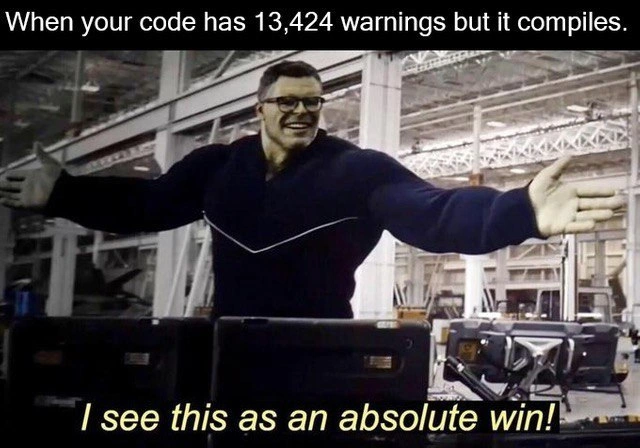
In the world of build pipelines, a green build (no errors, build passes) is often the ultimate goal. Here we have a developer practically doing a victory lap because the code compiled successfully on the first try (the proverbial “first try compiles” achievement) — never mind that the compiler spewed out enough warnings to fill a log file the size of War and Peace. The meme shows a triumphant pose (borrowed from the Hulk scene where he exclaims “I see this as an absolute win!”) which perfectly captures that feeling. It’s poking fun at our tendency to celebrate when the code finally runs, even if the compiler’s trying to get our attention with a blizzard of cautionary messages. There’s an old tongue-in-cheek mantra among programmers: “It compiles? Ship it!” This is the attitude on display. After struggling through errors that stopped the build, seeing “Build succeeded” pop up – even alongside 13,424 warnings – feels like a huge relief. The developer is essentially saying, "Hey, zero errors! We’re good to go," treating those warnings as wins out of sheer desperation or fatigue. It’s classic CodingHumor born from shared experience: sometimes you’re just so done with fighting the compiler that any successful compile, however messy, feels like victory.

Seasoned developers, though, will be smirking (or cringing) at the subtext: those warnings are red flags signaling an alarming amount of potential problems or long-term technical debt. Imagine opening a project and seeing thousands of lines of yellow warning text scrolling by – any veteran engineer knows that’s a sign of a codebase that’s been neglecting its CodeQuality for a long time. Each warning is a little whisper of "this might end badly later" – maybe an unchecked null, a deprecated API call, or a million “unused variable” notes indicating sloppy leftovers in the code. Having 13,424 of them is like having a car dashboard light up with every single warning indicator at once. A senior dev’s first reaction might be, "We really ought to fix those... someday." But often, teams just get used to it. They start ignoring linter messages and compiler warnings habitually, especially if they’ve inherited a legacy monstrosity where cleaning up that many issues seems impossible without breaking everything. It’s a case of “if it ain’t broke (in the sense of outright failing), don’t fix it.” The code compiles with warnings and that’s enough for now. This is how TechnicalDebt accumulates: the build stays green, so the business or project managers consider it an “absolute win,” while under the hood the code is crying for refactoring.

In continuous integration environments, there’s often debate about making the build fail on warnings. Many strict projects use settings or compiler flags to treat warnings as errors precisely to avoid this scenario. But here, clearly, that safety net is off. Why? Perhaps the project is so behind schedule that there’s no time to address warnings; or maybe turning on -Werror was attempted once and immediately unearthed a thousand legacy issues that nobody dared to touch. So the team compromises: keep the build pipeline green (the CI/CD status stays passing) and live with the noisy warnings. It’s a bit of a dirty secret in software development that plenty of real-world codebases are far from clean. Deadlines, new features, and firefighting production issues often take priority over tidying up compiler complaints. As a result, you get this absurd situation: a developer celebrating a build that technically succeeded by the narrowest definition (no errors), even though the quality of that build is highly questionable.

The meme’s humor lands because every developer can see a bit of themselves in it. We’ve all had that project where we sighed at an endless scroll of warnings and thought, “not today... I just need this to compile.” That emotional rollercoaster – frustration at errors, then the rush of relief when the program finally runs, then willful blindness to the warning list – is captured perfectly in the image. The muscular hero with arms outstretched in triumph is basically us flexing after conquering the compiler, even if we had to step over a minefield of warning messages to do it. It’s a tongue-in-cheek celebration of a partial victory. In that glorious moment of “Build Success” euphoria, we’re willing to ignore the glaring issues and treat the mere fact that it runs as, well, an absolute win. Deep down we know those warnings are still there, lurking like a swarm of little future bugs, but that’s a problem for another day.

Level 4: Compiling Under Protest

Inside the guts of a compiler, there’s a clear separation between errors and warnings. Errors indicate conditions that violate the language rules or would make generating an executable impossible – things like a missing semicolon in C or a type mismatch in Java that cannot be reconciled. The moment an error is encountered, the compiler halts (or that translation unit fails), refusing to produce an output. Warnings, on the other hand, live in a limbo: they flag suspicious or non-ideal code without outright breaking the build. The compiler’s static analysis is effectively saying, “This looks fishy, but it’s not illegal, so I’ll keep going.” In a complex project, warnings might arise from using deprecated functions, variables declared but never used, implicit type conversions that could truncate data, or other code smells that aren’t dire enough to be fatal.

In the context of the meme, seeing 13,424 compiler warnings in the build output means the compiler detected thousands of these non-fatal issues while parsing and analyzing the code. Yet, because none of them crossed into "error" territory, the compiler still proceeds to generate the machine code or bytecode. Modern compilers (like gcc, clang, or javac) have entire subsystems dedicated to diagnostics – they collect potential issues during various phases (parsing, semantic analysis, optimization) and classify them by severity. For example, the semantic analysis phase might notice an unused variable (generating a warning [-Wunused-variable] in GCC), or detect that a variable may not have been initialized before use. Each time, the compiler raises a cautionary flag in the form of a warning, but crucially it does not stop. The build finishes with an exit code indicating success, because from the compiler’s strict perspective, the source code adheres to the formal language specification despite those questionable bits.

Historically, compilers weren’t always so chatty. Early C compilers would quietly compile code that, in hindsight, harbored risky constructs. The famous Unix tool lint was introduced in the late 1970s specifically to catch suspicious C code that the compiler proper would overlook. Over time, the distinction between compiler and linter blurred – now mainstream compilers incorporate many lint-like checks as warnings. However, out of respect for backward compatibility and developer autonomy, these remain warnings by default. The philosophy is that the compiler should not police style or potential logic mistakes too harshly; it should inform the programmer and leave the final decision to them. Mandating all warnings as errors by default could render perfectly working legacy code uncompilable, so compiler designers must strike a balance. They provide flags like -Wall (enable all common warnings) and treat-warnings-as-errors settings like -Werror for projects that choose stricter discipline. In an ideal world, serious teams turn on those flags in their build systems (especially in Continuous Integration) so that any new warning halts the build. But evidently, in the scenario described by the meme, either that gate was never in place or it’s been consciously left open.

The result is a kind of Pyrrhic victory in engineering terms: the code compiles successfully, meaning we get a binary or an artifact to run – the holy grail of a passing build. Yet, the warning log is essentially a novel of “things that might be wrong.” It’s akin to a safety inspector saying, “Your building is up, but I found 13,424 code violations in it.” The compiler has done its job, issuing all those diagnostic messages (perhaps with a weary sigh, if it could sigh) and then handing over the executable. From a purely technical vantage, the developer has achieved a zero-errors build (no outright showstoppers), which is why the system reports success. The humor is rooted in this absurd imbalance: the bar for “success” in a compile is so low that even code triggering tens of thousands of warnings still counts as a win. In the cold logic of compilers, if it builds, it ships, regardless of how many yellow flags were raised along the way.

Description

This meme uses the popular 'I see this as an absolute win!' format from the movie Avengers: Endgame, featuring the character Professor Hulk. The top text sets up the scenario: 'When your code has 13,424 warnings but it compiles.' The image below shows a smiling Professor Hulk with his arms outstretched in a gesture of triumphant presentation. The bottom text, a direct quote from the movie, serves as the punchline: 'I see this as an absolute win!'. The humor comes from the developer's willful ignorance and lowered standards. While the code does compile - the bare minimum for it to run - the massive number of warnings indicates significant issues, such as poor code quality, potential bugs, deprecated function usage, and future maintenance problems. For senior engineers, this is a deeply relatable (and slightly painful) joke about the kind of technical debt inherited in legacy projects or the questionable victories celebrated when just trying to get something, anything, to work under pressure
Comments

11
Anonymous ★ Top Pick Zero warnings is a myth created by compiler engineers to sell more `-Werror` flags. Real production code is held together by thousands of warnings and one developer's fierce denial
  1. Anonymous ★ Top Pick

    Zero warnings is a myth created by compiler engineers to sell more `-Werror` flags. Real production code is held together by thousands of warnings and one developer's fierce denial

  2. Anonymous

    13,424 compiler warnings? Relax - it’s just our new micro-warning architecture: each one is harmless in isolation and somebody else’s problem in production

  3. Anonymous

    This is the same energy as deploying on Friday at 4:59 PM with 'git push --force' after commenting out all the unit tests - technically it works, but the on-call engineer's pager is about to become a percussion instrument

  4. Anonymous

    Ah yes, the classic '-Wno-everything' approach to software engineering. At 13,424 warnings, you've essentially achieved what we call 'warning bankruptcy' - the point where the sheer volume makes individual triage impossible, so you just declare victory and move on. It's like running a static analyzer, getting a CVE-worthy report, and responding with 'but does it segfault?' Bonus points if half of those are 'unused variable' warnings from that logging framework you swore you'd clean up three sprints ago, and the other half are implicit conversions that'll definitely cause a production incident at 3 AM when someone passes a 64-bit timestamp to your 32-bit function. But hey, green CI pipeline means ship it, right? The real engineering wisdom here is knowing that 'compiles' and 'works correctly' exist in entirely different probability spaces

  5. Anonymous

    Architects approve: warnings are non-functional requirements deferred to the next unlucky maintainer

  6. Anonymous

    13,424 warnings but it still builds? Perfect - commit a clang-tidy baseline and we can report “zero new issues” all quarter

  7. Anonymous

    We run -Wall in CI, but -Werror is a Q4 epic

  8. @ZgGPuo8dZef58K6hxxGVj3Z2 4y

    Lol thats me a few years ago

    1. @sylfn 4y

      now you have 100500 times more warnings?

      1. @ZgGPuo8dZef58K6hxxGVj3Z2 4y

        Now I have none or atleast very minimal compared to the size of the code

        1. @Supuhstar 4y

          Same here! Every new project, one of the first things I do is enable "treat earnings as errors" for everything

Use J and K for navigation