
Python Integer Interning Meme Explained
The meme shows a=256; b=256; a is b printing True, then the same with 257 printing False. The dive explains CPython’s small-integer cache (−5 to 256) and why you should compare numbers with ==, not is.
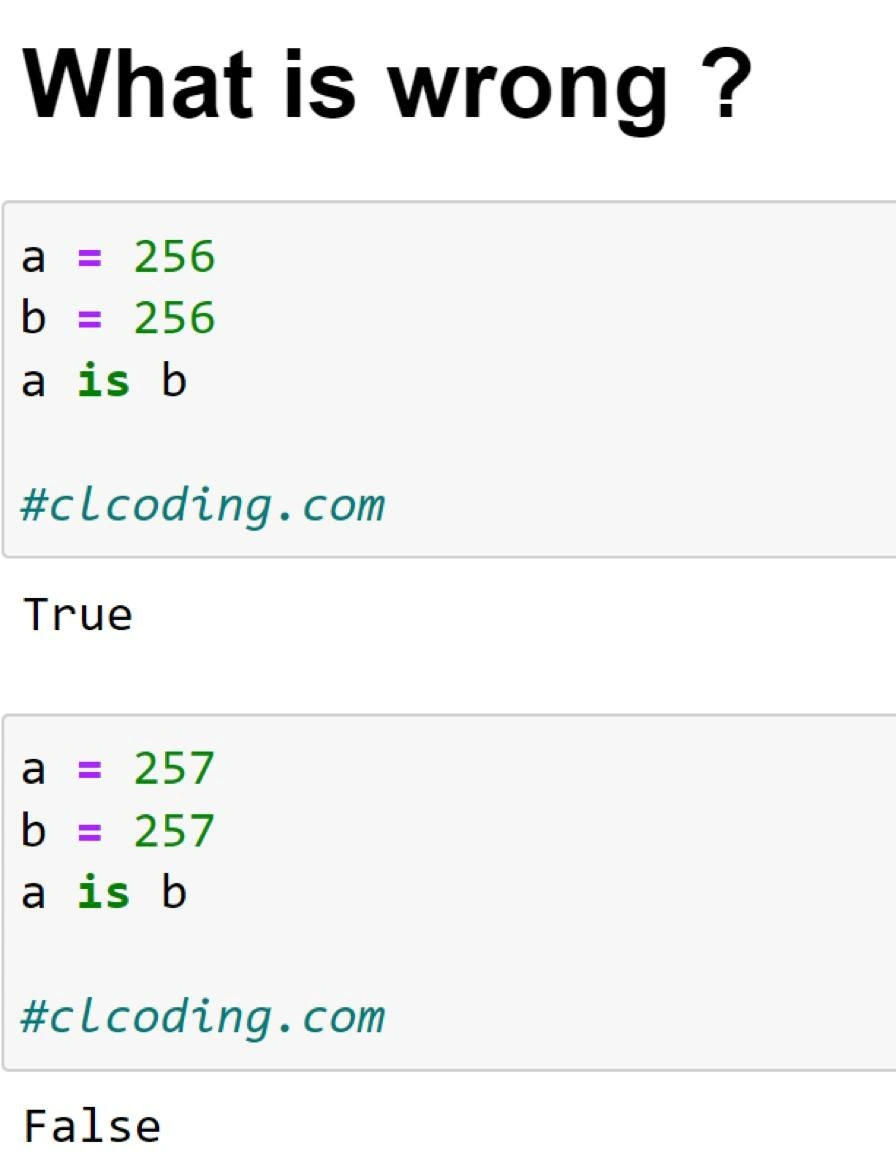
Level 1: One Toy or Two?
Imagine a teacher has a box of special toys numbered 1 up to 256. There’s only one toy for each number in that box. So if one child asks for toy number 256 and another child also asks for toy 256, the teacher gives them the same exact toy from the box. Later, the kids realize they literally had the same toy (one shared item). Now, if the kids ask for toy number 257, the teacher doesn’t have that one pre-made in the box. She makes a new toy 257 for the first child, and when another child asks for 257, she makes another separate toy 257 just for that child. Those two toys both have “257” written on them and look identical, but they are actually two different physical toys. Each kid is holding their own copy. So when they compare, they say, “these aren’t the same object, just two copies that look the same.”
The joke here is that Python behaves like that teacher. For certain small numbers, everyone gets one shared object (so it really is the exact same thing each time), and for bigger numbers, each request gets a brand-new object (so you end up with duplicates that are only superficially the same). It’s funny because you wouldn’t expect the rules to suddenly change after a particular number — that little surprise makes us laugh at how the computer handles things behind the scenes.
Level 2: Identity vs Equality
For a newer Python developer, the key lesson here is understanding identity versus equality. The operator == checks if two values are the same in value, but is checks if they are actually the same object. Think of each object in Python having a unique ID or address in memory. So a is b will only be True if a and b are literally references to the exact same thing internally.
In the meme’s code example:
a = 256
b = 256
print(a is b)   # True

a = 257
b = 257
print(a is b)   # False
The result is surprising at first. Why does 256 give True for a is b but 257 gives False? It turns out Python has a little optimization: it interns (reuses) some integers. Integers from -5 up to 256 are kept in a special cache inside the Python interpreter. So when you do a = 256 and b = 256, Python doesn’t create two separate 256 objects in memory. It gives both a and b a reference to the exact same pre-existing 256 object. They genuinely are the same object, hence a is b evaluates to True.
However, 257 is not in that pre-made cache. So a = 257 creates a new integer object for 257, and b = 257 creates another new integer object. Now a and b hold two different objects that happen to have the same numeric value. They look equal (a == b would be True because 257 equals 257), but they are not the very same object. That’s why a is b comes out False for 257 – each variable has its own 257 object.
The important takeaway is that in Python, you should use == to compare values in most cases, especially for numbers. The is operator is a special tool that checks identity, which is only useful when you actually want to know if two references are to the one single object (for example, checking if x is None: is correct, because there’s only one None object). The meme is a playful demonstration of what can happen if you mix these up. Python’s small integer caching is a behind-the-scenes feature to make number handling faster, but if you weren’t aware of it, seeing True then False like this can be pretty confusing!
Level 3: Ghosted by 257
From a seasoned Python developer’s perspective, this meme is poking fun at a classic gotcha: using the Python is operator where == should be used. The code snippet in the image looks innocent — just two variables holding the same number — yet it prints True for 256 and False for 257. Why the inconsistency? It’s highlighting Python’s small integer interning in a tongue-in-cheek way.
In Python, is checks object identity (think: are these the exact same object in memory?), while == checks value equality (do the objects have the same value?). Ideally, you wouldn’t use is to compare plain numbers at all, but here someone did, and the results are weird. For 256, Python’s small integer singleton cache kicks in, so a and b actually reference one shared object. It’s as if the number 256 is a single common instance. Thus a is b unexpectedly returns True, leading you to believe everything is fine. But for 257, Python creates two distinct int objects, so a is b comes back False — surprise! The second 257 is not the same object as the first one, essentially "ghosting" any assumption of identity.
This humor resonates with experienced devs because we’ve seen it in real code. It’s that sneaky language quirk where someone writes something like:
status_code = 200
if status_code is 200:
    print("OK")
It works by accident (200 is interned, so it passes the is check), but if they later change the code to:
status_code = 500
if status_code is 500:
    print("Error")
nothing prints – the check fails even though status_code == 500. That’s a head-scratcher if you don’t know about the interned ints! The meme’s text “What is wrong?” perfectly captures that perplexity. It’s the kind of bug that sneaks into codebases when a developer mistakenly uses is for integers or strings instead of ==. Seasoned Pythonistas know to compare numbers with == (and reserve is for special cases like checking against None or other singletons).
The punchline in the title, “Python’s interned ints: why 256 is ‘is’, but 257 ghosts you,” plays on the idea that Python promises to be simple and explicit, yet here it has a hidden optimization that can trip you up. It’s not a bug in Python itself – it’s a deliberate performance feature – but it can manifest as a bug in your code if you’re not careful. For a senior dev, this meme is both funny and a gentle reminder: even in a clean high-level language, under-the-hood details (like object caching) can lead to spooky surprises.
Level 4: Cache Miss at 257
Deep inside CPython (the standard Python interpreter) there’s a cunning performance trick at play. Python represents every integer as an object (PyLongObject in C), which normally means each time you create an integer, you allocate a new chunk of memory. However, creating and destroying tons of small numbers (like loop counters, array indices, etc.) would be inefficient. So CPython uses a small integer cache (a form of interning, inspired by the flyweight pattern): it pre-allocates all integers in the range -5 to 256 at startup and keeps them around for reuse.
This means whenever your code needs an integer in that range, Python doesn’t create a new object – it hands you a reference to an existing one. For example, when you do a = 256 and then b = 256, under the hood both a and b point to the exact same PyLongObject in that cache. They have the same memory address (you can verify with id(a) and id(b)), so a is b rightly returns True. The is operator in Python is essentially a pointer comparison: it checks if two references are to the same object in memory. Here, they are.
But if you assign a = 257 and b = 257, Python goes down the normal path: 257 is outside the cached range, so a brand new integer object is created for each assignment. Now a and b refer to two different objects that just happen to both represent the numeric value 257. Their id() values are different, so a is b comes out False. In other words, the second 257 doesn’t reuse the first one – there’s no interned object to grab – and the two 257s have distinct identities (the first 257 is left hanging, effectively ghosting you when you check identity).
The choice of caching -5 through 256 is an implementation detail of CPython (historically chosen to cover common small numbers; 256 is 2^8, a nice round binary boundary). It’s a trade-off: caching a wider range would consume more memory for diminishing speed returns. Other Python interpreters (PyPy, Jython, etc.) may intern differently, but this range has been a long-standing default. Importantly, this behavior is a CPython performance feature, not a guaranteed language rule. Code that relies on it can become confusing. The meme cleverly exploits this quirk: what seems like identical assignments produce different outcomes for is because of Python’s hidden caching mechanism. This deep dive into Python’s memory management explains exactly why 256 is special here – and why 257 behaves like a completely separate ghost each time.



The Zen of Python says 'There should be one-- and preferably only one --obvious way to do it.' CPython's integer cache then whispers, '...unless the number is bigger than 256.'
256 gets the VIP singleton pass in CPython’s small-int pool; 257 shows up and your ‘is’ test fails harder than your promised five-nines SLA
After 15 years of Python, you still explain to juniors that 'is' checks if two variables are the same person at a party, while '==' checks if they're wearing the same outfit. Then CPython's integer caching from -5 to 256 shows up like that one friend who insists on being a singleton at every gathering
Ah yes, the classic 'is' vs '==' interview trap that separates those who've read CPython source from those who just write Python. Nothing says 'senior engineer' quite like knowing that -5 to 256 live in a special VIP lounge while 257 has to wait outside like a peasant. It's Python's way of teaching us that identity is just a social construct... until you hit production and wonder why your cache key comparison works in dev but fails with real data. Pro tip: if your code's correctness depends on whether integers are the same object in memory, you're not writing Python - you're writing a very expensive philosophy dissertation on the nature of sameness
If your dedup logic uses 'a is b', congratulations - your correctness now depends on CPython’s small-int cache; your SLA is fine until a customer orders item 257
Python's small int cache: the singleton pattern 256 lives for, but 257 has to rent its own object - talk about class discrimination
Relying on CPython’s small‑int cache for correctness is how ‘is’ becomes a portability bug - works on your laptop, detonates on PyPy
wtf?
maybe 256 is byte and integer size of a byte is stored as value?
i think it has to do with the id of values
Caching, I guess. Numbers up to 256 are cached and returned as a single data type. 257 is not cached, so it is two data types in memory. At least that's how it works in Java
This is on the same level as JavaScript fuckery
from 0 to i guess 256 each number has it's own id
also not from 0
but from -5
is is used in comparisons to check whether the variables refer to the same address in memory. As the numbers up to 256 are cached in memory, it produces this counterintuitive result.
"We cache -4"
the only reason you want to use is operator is when you want to check variable for nullability (if x is None:) I dunno is there any other scenario when you really need to test variables by their memory references
https://ideone.com/EgC18t
My opinion may be biased due to me working with that thing on a daily basis and having gotten used to the black magic.