
Blank Project Bloat Meme Explained
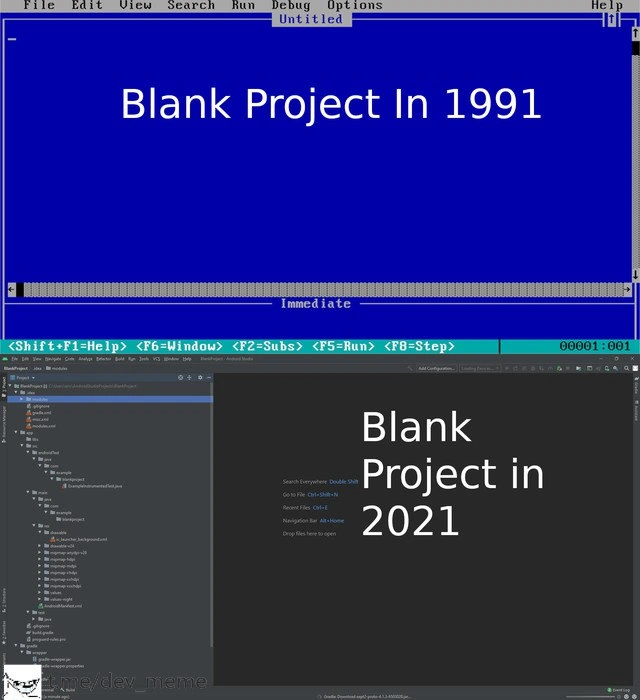
The meme stacks a spartan QuickBASIC screen against a modern JetBrains IDE full of generated folders and Gradle scripts. The deep dive explains software bloat, project scaffolding, and how “blank” projects stopped meaning empty.
Level 1: When Blank Isn’t Blank
Imagine you have a blank sheet of paper in front of you to draw a picture. In the old days (like the top picture from 1991), a blank project was just like that blank paper – nothing on it except maybe a title at the top. You could start drawing (coding) right away with your single pencil and eraser. Now imagine today’s scenario (the bottom picture, 2021): you ask for a blank sheet, and instead you get a big art kit dropped on your desk. The paper comes with pre-drawn boxes on it, and around it are dozens of crayons, markers, rulers, and stencils, plus a little instruction booklet that says “Here’s how to find your colors (press this, click that).” It’s as if someone assumed you were eventually going to draw a full detailed comic book and gave you all the tools upfront. It’s helpful if you really do need all that – you can make something very fancy – but it can also feel overwhelming for a simple doodle. This meme is funny because it’s pointing out that something called “blank” today isn’t truly empty at all. The old blank was just you and the basics; the new “blank” comes with a whole workshop of stuff. It’s like wanting to play with one toy and having an entire toy store dumped in your room! The feeling is a mix of wow, cool and uhh, that’s a bit much, which is exactly why developers find this contrast amusing.
Level 2: From QuickBASIC to JetBrains
Let’s break down what’s happening in each panel, and why it looks so different. In 1991, the “Blank Project” screenshot is from an old-school IDE (Integrated Development Environment) that resembles Microsoft QuickBASIC. QuickBASIC was a simple editor and compiler for the BASIC programming language. The interface is text-based (that bright blue background with menus at the top) because early PCs often ran in DOS or very simple graphical modes. IDE_Minimalism was not a trend back then – it was a necessity! Computers had very limited power. A typical PC in 1991 might have had a 16 MHz CPU and 2-4 MB of RAM. An environment like QuickBASIC had to be extremely lightweight. So what do we see?
- Minimal UI: Just a menu bar with items like File, Edit, Run, Debug. There’s a status bar at the bottom showing handy function keys (e.g.,
F5=Run,F8=Step). This hints that even though it was simple, you could still run your code and step through it to debug – core features of an IDE, just without fancy graphics. - Blank editing area: The big empty blue rectangle is literally where you’d type your code. At this point, it’s completely empty – a true blank project. No code has been written, and importantly, the IDE hasn’t created any extra files or folders on disk. If you hit “New Project” (or equivalent) in 1991, you’d likely just get an Untitled file ready for you to start typing BASIC code.
- No external dependencies: In that era, most programs were either self-contained or used a few standard libraries that came with the language. When you started a blank project, you didn’t have an Internet full of packages to download. In fact, there was probably no network connection at all. So a blank project didn’t need any build scripts or dependency declarations. You might just write something as straightforward as
PRINT "Hello, World!"and hit F5 to run it. The compiled program (if you chose to make an EXE) would include whatever it needed from the BASIC runtime, but the developer didn’t have to manage that explicitly for a simple program.
Now fast-forward to 2021. The bottom panel is a modern JetBrains IDE (most likely IntelliJ IDEA or its cousin Android Studio). The text “Blank Project in 2021” and the visible UI elements give us clues: there’s mention of Gradle (that’s a build automation system), and a bunch of folders like manifests, java, res, plus hints like “Search Everywhere: Double Shift”. This is characteristic of starting a new Android app project in Android Studio (which is based on JetBrains IntelliJ). Let’s unpack the elements:
- Project structure out-of-the-box: On the left, the IDE is showing the Project Explorer with a hierarchy of folders. Even though we (the developer) haven’t written anything yet, the IDE has already created a whole directory structure. For an Android app, this typically includes a
manifestfile (which describes app metadata), ajavaorkotlinfolder for source code, aresfolder for resources (like images and layout XMLs), and Gradle build scripts. The meme specifically shows a section named “Gradle Scripts” – these are configuration files (build.gradlefiles) that define how to build the project and what dependencies to pull in. So, unlike 1991 where “new project” meant one blank file, in 2021 “new project” means the IDE has generated perhaps dozens of files and lines of code for you. - Dependencies and build tools: Gradle is prominently mentioned because modern projects manage libraries through such tools. For example, a blank Android project will include Gradle instructions to include the Android SDK libraries, support libraries, testing frameworks, etc. This means from the very start, your project is “dependent” on external modules that Gradle will fetch (often from the internet) for you. In 1991, there was no equivalent concept – you either had the library on your machine or you didn’t, and there wasn’t an automated way to include code from elsewhere on a blank project.
- Feature-rich IDE interface: Notice all the panels, icons, and text in the 2021 IDE screenshot. There’s a lot going on: top toolbars with run configurations, a navigation bar, and the center showing tips (“Go to File: Ctrl+Shift+N”, etc.) because the environment is so powerful and complex that it provides keyboard shortcuts for navigation and encourages you to use search to find files or actions. Modern IDEs come with integrated code search, refactoring tools, intelligent code completion, debuggers, UI designers, version control integration (Git), and more. All these features make the interface more crowded compared to the spartan QuickBASIC window. The “Search Everywhere” hint implies you can press double Shift to search for any file or command in the project, which is super useful when projects have many files – something unimaginable in the QuickBASIC days for a small program.
- Performance and overhead: Starting a blank project in 2021 might trigger a lot of background activity. For instance, Android Studio will run a “Gradle sync” to set up the project, which can take a while as it possibly downloads dependencies and sets up the build. The IDE might also begin “indexing” all the files (even the ones it just created) to provide fast search and code intelligence. This can use significant CPU and memory. In contrast, starting QuickBASIC was almost instant and the memory footprint was tiny by today’s standards (the whole program and any code you wrote had to fit in maybe a few megabytes). Modern IDEs can easily consume hundreds of megabytes or even a few gigabytes of RAM, just sitting idle with a blank project open.
So, what’s the big difference? A lot of it comes down to how much automation and support the environment provides. The 1991 approach is manual but straightforward – you get a blank canvas and you, the programmer, will write every piece of the program yourself, including deciding on any structure or extra files. The 2021 approach is automatic and structured – the IDE assumes the type of project (say, a Java app or Android app) and creates a standardized scaffold. That scaffold is there to help you follow best practices (e.g., separation of code and resources, ready-made configuration for builds and tests) from the very beginning. It’s extremely helpful for large or complex applications because it sets you up with the correct architecture. But for someone expecting “blank means blank,” it feels like overkill. There’s even a bit of cultural adjustment: a newcomer in 2021 might actually find comfort in the IDE providing so much guidance (“Look at all these hints and files, I know where to put my code and resources”), whereas an old-timer might feel a bit constrained or bewildered (“Why do I need five folders and two build scripts just to print Hello World?”).
To put it plainly, the meme contrasts legacy vs modern developer experiences. It’s illustrating how an empty starting point in programming has transformed from something very simple to something very elaborate. This isn’t to say one is strictly better than the other – they reflect the eras they come from. In 1991, you might spend a lot of time setting up things by hand (because the tools couldn’t do it for you), but you also had total control and a clear view of what’s there (since nothing extra was hidden behind the scenes). In 2021, a lot is done for you (which saves time in big projects and enforces consistency), but it means even the simplest project comes with a lot of baggage from the start. The humor and frustration captured here is something like, “for all the advancements in tooling, sometimes we yearn for the simplicity of the past.”
Let’s compare the two scenarios side by side for clarity:
| Blank Project 1991 (QuickBASIC) | Blank Project 2021 (Modern IDE) |
|---|---|
| Environment Setup: Runs on MS-DOS, entire IDE fits on a floppy disk or two. Opens instantly. | Environment Setup: Runs on Windows/Mac/Linux, IDE installer is hundreds of MB (or more). May take a while to launch and initialize. |
| Starting Point: One empty file in an editor. No files on disk until you decide to save/write code. | Starting Point: Multiple files and folders auto-generated (e.g., src directories, config files, build scripts, resource folders) the moment the project is created. |
| Dependencies: None by default except the language’s runtime (which is built-in). You might add code by literally typing or copying it in. | Dependencies: Several are included or referenced right away. Build tools like Gradle will pull in standard libraries (internet connectivity assumed). The project template might include links to external frameworks (for example, a blank Android app includes the Android SDK libraries). |
| Features of the IDE: Basic text editing, syntax highlighting (maybe minimal), run and debug via function keys. All actions are visible in simple menus. | Features of the IDE: Advanced editing with IntelliSense (code autocomplete), on-the-fly error checking, graphical designers, integrated debugger, Git integration, etc. So many features that the IDE provides search shortcuts to navigate them (like “Search Everywhere”). |
| Memory/CPU usage: Tiny footprint. The whole program and your code run in a few MB of RAM. Even a large BASIC program is limited by the system constraints (which were low). | Memory/CPU usage: Heavy. The IDE might use a few hundred MB of RAM just idling. Background tasks (indexing, syncing) can spike CPU. Essentially, the tool uses resources equivalent to an entire OS from the ’90s just to get started. |
| Developer Experience: You focus on writing code immediately. You manually manage structure and any additional files. Simpler, but you have to do more by yourself. | Developer Experience: You often spend time understanding or configuring the generated setup first. You can start coding, but the environment encourages a particular structure. There’s guidance and automation, which helps in the long run, but introduces complexity upfront. |
This table highlights the Modern vs Legacy gap in tooling. A junior developer who started coding in recent years might be used to the 2021 style – it’s normal that creating a new app means some waiting and lots of files appearing. Concepts like “project scaffolding” and “dependency management” are taught as part of starting with frameworks (e.g., you learn that to start a web app you run a generator that produces a bunch of boilerplate). On the other hand, someone who learned with older systems (or low-level languages in a simple editor) often emphasizes understanding every part of the codebase, and might be shocked at how much is pre-made in a template. Tooling frustration can occur for both: new folks might be overwhelmed by the complexity, and old folks might be frustrated by the lack of simplicity.
In conclusion for this level: the meme isn’t just about aesthetics (blue screen vs dark theme), it’s about how a “blank project” in name can be such a different reality across generations of tech. By explaining the elements (QuickBASIC’s barebones setup vs JetBrains’ feature-rich setup), we see clearly what changed and why developers find it funny. It’s essentially a nod to TechHistory: if you know how things were, you can’t help but chuckle at how they are now. And if you didn’t know the past, well, now you can appreciate why some colleagues joke about “back in my day, we started from scratch with just an editor and our wits”. The meme exaggerates to make a point, but it’s grounded in truth about the evolution of IDEs and text editors over time.
Level 3: The Bloat of Progress
In the early ’90s, a blank project truly meant an almost zero-overhead start. The meme’s top panel (QuickBASIC circa 1991) shows a cobalt-blue text-mode IDE with nothing but a blinking cursor – a stark contrast to the bottom panel’s JetBrains IDE (2021) awash with sidebars, auto-generated files, and dependency managers. This humorously highlights software bloat and over-engineering in modern tooling. Tech nostalgia hits hard here: back then you could fit your entire development environment on a couple of floppy disks, whereas today a “minimal” project can pull in hundreds of megabytes of frameworks and libraries before you’ve even written a line of code. It’s a classic case of “Hello World” inflation: what was once a single-file exercise in BASIC has become a multi-folder scaffold with build scripts (build.gradle), configuration files, and boilerplate code.
Why does this happen? Over 30 years, our industry’s idea of a blank project evolved. In 1991, hardware limitations enforced simplicity – you had 640 KB of memory (if you were lucky) and no space for fluff. An IDE like QuickBASIC (the blue-screen editor in the meme) had to be lean and efficient. It provided just enough to write and run code, reflecting a time when integrated development environments were minimalistic by necessity. Jump to 2021, and hardware (per Moore’s Law) is thousands of times more powerful. Paradoxically, as machines grew stronger, software grew even more complex (cue Wirth’s law: software bloat is a constant that outpaces hardware gains). Modern IDEs like IntelliJ IDEA or Android Studio (shown in the bottom panel) take advantage of abundant resources to include every conceivable feature: code completion, real-time error checking, GUI designers, version control integration, test runners, you name it. The result? A “blank” project template that’s anything but blank. It’s pre-loaded with structure and tools to handle eventual complexity – whether you need them or not at the start. This is a form of over-engineering baked right into our tools. The meme exaggerates this contrast for comedic effect, but any senior developer will recall a simpler past and chuckle (or groan) at how a modern “hello world” feels like using a sledgehammer to crack a nut.
There’s shared pain and laughter in this for experienced devs. We’ve collectively seen “tooling frustration” grow over the years: remember when an IDE booted instantly? Now a blank project might trigger a Gradle synchronization or index thousands of files. The bottom image explicitly shows hints like “Search Everywhere: Double Shift” – a tongue-in-cheek indicator that modern IDEs are so feature-rich and packed with panels that you literally need a search function to navigate them. (In the top image’s world, you didn’t need a global search for IDE features – there were only a handful of menus and you pretty much knew what everything did.) The left sidebar in 2021’s IDE lists things like Gradle Scripts, External Libraries, and multiple nested folders for an app, even though no real code has been written yet. Seasoned developers recognize this scenario: you create a new project and are immediately staring at a scaffolding overkill – dozens of files and directories (manifest, MainActivity.java or .kt, resources, test stubs, build files) all auto-generated. It’s simultaneously impressive and absurd. The humor comes from that modern vs legacy dissonance: the 1991 setup looks primitive but focused, while the 2021 setup looks powerful but overwhelming.
Ironically, this complexity arose from good intentions. We introduced robust frameworks and dependency management to solve real problems (like modularity, reuse, scale). Over time, however, the default “starter kit” grew bulky. A blank project in 2021 tries to anticipate everything a developer might eventually need – unit tests, UI resources, configuration management – front-loading the project with structure. It’s convenient in a large enterprise setting or when building a serious app, but it can feel ridiculously heavy for a toy example. This industry pattern – tools accumulating features upon features – is often satirized as the “rocket ship for a bicycle ride” problem. Everyone knows a simple text editor or a lightweight scripting language could achieve a small task with less fuss, yet here we are, opening a full-featured IDE that spends minutes indexing just so we can maybe print “Hello, World.” The meme resonates because it’s too real: Modern tooling can feel like having to drive a bulldozer to plant a flower. Developers share these stories of “blank” projects taking ages to load or requiring a cascade of updates and package downloads at creation. It’s a tongue-in-cheek critique of our own practices: as an engineer, you appreciate the power and convenience of these new tools, but you also sometimes miss the days when starting a project meant… just starting to code immediately.
On a deeper level, this comparison hints at how developer experience has changed. In 1991, programming often meant being close to the machine and its limits – you managed memory, you manually included any library code (if at all), and the environment offered very little hand-holding beyond basic editing and a run button. Today, programming means standing on the shoulders of giant frameworks: the environment holds your hand by default, setting up a lot of ceremony from the get-go. It’s a shift from a minimalist philosophy to one of batteries-included. The meme’s humor taps into the collective astonishment and slight exasperation at how something as conceptually simple as an empty program has become ceremonious. Seasoned devs might joke that we’ve traded the immediacy of coding for high initial overhead – a sly reference to how big companies and modern practices sometimes complicate even trivial tasks ("Why do I need a containerized microservice just to say hello?!").
In summary, the top image (1991) represents spartan simplicity and directness – a nostalgia trigger for many in the TechHistory crowd – while the bottom image (2021) represents sophisticated complexity and the reality of SoftwareBloat. The meme is funny because it’s true: progress has given us amazing tools and IDEs that can do so much automatically, yet it’s hard not to reminisce about the era when blank meant blank. As the saying goes in developer humor circles, “Modern problems require modern solutions,” but sometimes those solutions come with an entire truckload of extras from day one. The over-engineering of a “blank” project is a perfect comedic example of how far we’ve come – for better or worse – in the evolution of programming tools.

In 1991, your first compile error was your own typo. In 2021, your first compile error is a transitive dependency conflict from the boilerplate
1991: New project hands you an empty .bas file; 2021: New project fires up Gradle, indexes 700 transitive deps, and quietly warns there’s already a log4j CVE in your HelloWorld
Back in '91, we complained about having to write our own linked lists. Now we spend three days configuring the toolchain before we can write 'Hello World' - and somehow we've convinced ourselves this is progress because at least the semicolons are automatically inserted
In 1991, 'blank project' meant you could start coding immediately. In 2021, 'blank project' means you've only run the scaffolding tool and now have 47 configuration files, 300MB of node_modules, and still haven't written a single line of business logic. Progress is when your 'Hello World' requires a CI/CD pipeline, three linters, a bundler, a transpiler, and a 12-step build process - but hey, at least it's type-safe and tree-shakeable
1991 blank project: one cursor, zero regrets. 2021: npm init spawns a dependency graph deeper than your call stack on prod OOM
In 1991 you pressed Run; in 2021 Run first builds the build system, resolves 1,200 transitive deps, and then reminds you there’s no main() yet
Blank project in ’91: a cursor. Blank project in 2021: a monorepo, Dockerfile, k8s YAMLs, a Gradle wrapper, and your first CVE before Hello World
OMG, The Antediluvian Era ❤️!!
Android)
i mean its still achievable, just use a text editor and a terminal. i honestly prefer that way
im talking about editing a file or two with a text editor, and compiling it with like make or something
C/C++ vs Android(Java/Kotlin)
Mmmm maven)))
also i don't think a build system can automatically write documentation
im trying to figure out how it's different then just putting the name of a test script after make run or something
you're making it sound like it's some insane effort
what??
then what are you on about lmao
if it's some haskell stuff, i have no experience with that
why would you need to link to other parts of the document?