
Skip to content
DevMeme
4986 of 7435
A 10-Megabyte Beast for Only $5995
TechHistory Post #5453, on Sep 15, 2023 in TG

A 10-Megabyte Beast for Only $5995

Why is this TechHistory meme funny?

Level 1: Tiny Box, Huge Price

Imagine paying the price of a car for a box that can barely hold a few of your photos or songs. That’s basically what was happening here – people in the late 70s bought a very expensive computer that only stored 10 MB of data, which is maybe 2 or 3 MP3 songs or a handful of pictures today. It sounds crazy now because we carry thousands of times that data on a phone in our pocket. But back then, 10 MB felt like an infinite closet for your files because most folks had never seen a computer with that much space. This meme is funny because it reminds us how something that once seemed huge and worth a fortune can become laughably small in hindsight – it’s like someone bragging in 1979, “I’ll never run out of space!”, and today that space wouldn’t even hold one modern app.

Level 2: Byte-Sized History Lesson

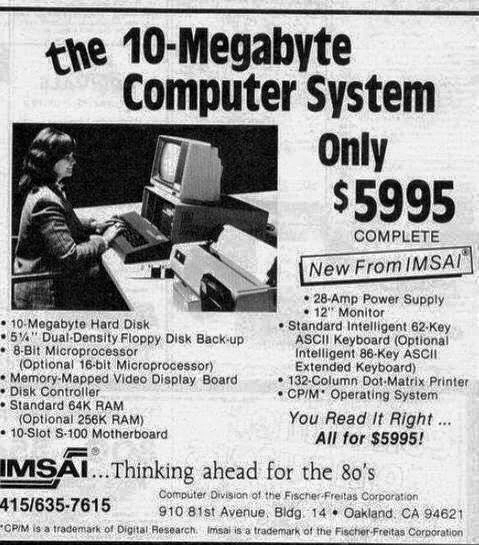
  • Price – $5995 (Complete): The ad’s price of $5995 was a huge amount in the late 1970s. That’s roughly equivalent to well over $20,000 in today’s money when you adjust for inflation. To put it in perspective, you could buy a new car for that kind of money back then. The advertisement says “Only $5995 COMPLETE” because they’re bundling everything – the computer, the monitor, the storage, the printer, and the operating system – into one package. In those days, many computers were sold as kits or just the main box, so offering a complete system (ready to run out-of-the-box) was a big selling point. It meant a small business or a serious hobbyist could make one purchase and have a fully operational setup.

  • 10-Megabyte Hard Disk: This is the computer’s main storage device, a box containing magnetic spinning disks to hold data permanently (unlike RAM which clears when power is off). 10 MB (ten megabytes) was the disk’s capacity. By modern standards 10 MB is tiny – for example, 10 MB might hold about two or three high-quality photos or a few seconds of HD video. But around 1980, having a hard disk at all in a personal computer was cutting-edge – many machines only had floppies or even just memory. 10 MB was a huge amount of storage for one person’s use at that time. It meant you could save many programs and files without constantly swapping disks. The hard disk in this IMSAI was likely a large, heavy device inside the chassis, with multiple metal platters and a magnetic head that moved to read/write data. It was much slower and far lower capacity than even a cheap USB flash drive today, but it was reliable mass storage for its era.

  • 5¼" Dual-Density Floppy Disk Backup: Floppy disks were the primary removable storage medium of the time. A 5¼-inch floppy is a flexible magnetic disk inside a square sleeve (literally floppy to the touch, unlike today’s stiff hard drives). “Dual-density” means it stored more data than the earliest floppies by using a finer magnetic recording. A typical dual-density 5.25" floppy could hold around 300-360 KB (kilobytes) of data. These floppies would be used to backup the hard disk’s content or to transfer data. For example, if you had important files on the 10MB hard drive, you’d copy them onto several floppies so that if the hard drive failed, you wouldn’t lose everything. Of course, copying 10 MB onto 360 KB floppies meant you’d need dozens of disks, and you’d have to feed them in one after another! Backing up was a more manual and time-consuming process than it is today. But at that time, floppies were the standard way to load software and save files externally.

  • 8-Bit Microprocessor (Optional 16-bit Microprocessor): The microprocessor is basically the CPU – the brain of the computer that executes instructions. “8-bit” and “16-bit” describe the width of data the CPU can handle in one go. An 8-bit CPU can work with 8 bits (1 byte) at a time, which also limits things like how much memory it can directly access. The standard CPU in this system was 8-bit (likely something like the Intel 8080 or Zilog Z80 running around a few MHz). That meant it could directly address up to 64 KB of memory. The ad mentions an optional 16-bit microprocessor, which would be an upgrade board you could buy to replace or supplement the 8-bit CPU. A 16-bit CPU (like the early Intel 8086 family) can handle 16-bit data and address much more memory (up to 1 MB or more). It’s also generally faster and more powerful. In simpler terms, the 8-bit processor is like a delivery truck with a smaller capacity and short range, while the 16-bit is a bigger truck that can carry more and go further. The inclusion of an optional 16-bit CPU was IMSAI’s way of saying the system could be future-proofed for the coming 1980s software, which would soon demand more than an 8-bit processor could offer.

  • Memory-Mapped Video Display Board: This component is essentially the computer’s video/graphics card. Video display in this era was usually text-based. “Memory-mapped” means the video board is designed such that the computer’s main processor can update the screen by writing data to specific memory addresses. For example, to show a character “A” on the screen, the CPU could write the letter’s code into a particular memory location that corresponds to the position on the screen, and the video board would then output that to the 12" monitor. This was a big deal because earlier computers often didn’t have a direct video output; you might have had to use an external terminal or a teletype. Here, the IMSAI system comes with an internal board that handles video, so you can plug in a monitor and get a cursor and text on your own screen. It basically allowed the computer to display a console (probably 80 columns by 24 lines of characters) for the user to interact with, which was very convenient for running the CP/M operating system and applications.

  • Disk Controller: This is a dedicated circuit board (card) that controls the hard disk and floppy drives. In a computer, the CPU doesn’t typically connect straight to a drive; it talks to a controller which manages the low-level reading/writing of data. The Disk Controller in this system likely occupied one of the S-100 slots and handled both the 10MB hard disk and the dual floppy drives. It would have its own firmware (small software) to manage the disk’s operations, like moving the disk heads to the right track and reading sectors of data, then transferring that data to the CPU over the bus. Essentially, it’s an interface that translates the CPU’s commands into actions on the drives. Modern PCs still have disk controllers, but they’re usually built into the motherboard or the drives themselves. Back then, you’d have a big separate card for this purpose.

  • Standard 64K RAM (Optional 256K RAM): RAM is the computer’s short-term working memory (Random Access Memory). 64K means 64 kilobytes of RAM, which is 65,536 bytes. That’s an incredibly small amount of memory by today’s standards – to illustrate, a single small JPEG image or a few seconds of MP3 audio can easily be larger than 64 KB. But at the time, 64K was the maximum that an 8-bit system like this could typically use, due to the 16-bit addressing limit. It was enough to run CP/M and applications, since programs were optimized to fit in that space. The ad also offers Optional 256K RAM, which means you could expand the memory to 256 kilobytes (0.25 MB) by adding more memory boards. Very few programs on CP/M could use that extra memory all at once (because of the OS limits), but it could be useful for running larger software if you had a 16-bit CPU upgrade or for setting up something like a RAM disk (using extra memory as if it were a fast disk). It also might have been preparing for newer operating systems that could use more memory. In short, 64K was standard because of technical limits, and 256K was a luxury upgrade to be “ahead of the curve”.

  • 10-Slot S-100 Motherboard: The S-100 bus was an early standard for connecting components in microcomputers. The “motherboard” here is basically a backplane board with 10 slots that follow the S-100 standard (named because it has 100 pins per slot). Each slot could accept a card (circuit board). For example, one slot would have the CPU card, others could have RAM cards, one for the disk controller, one for the video display board, etc. Think of it like a set of 10 LEGO brick connectors where each brick is a different part of the computer. The S-100 bus carries power to the cards and lets them communicate (it has lines for data and addresses so the CPU can talk to memory and peripherals). Nowadays, motherboards have integrated circuits and a few slots (like PCI Express slots) for specific add-ons. But in those days, the slots were where all the core components went. An S-100 system was very modular – you could upgrade or change the computer’s capabilities by swapping cards in these slots. Having 10 slots meant this IMSAI chassis could hold a pretty large configuration (some smaller S-100 systems had maybe 4 or 8 slots; 10 was quite expandable).

  • 28-Amp Power Supply: This number refers to how much current the power supply can provide to run all the components. 28 amps is a lot of current for a personal computer – it speaks to how power-hungry the components were. The power supply would have been providing various voltages (like +5V for digital circuits, +12V for disk drive motors, etc.), and in total it could supply up to 28 amps across the needed voltages. For comparison, a smartphone charger might provide 2 amps, and a modern desktop PC power supply might be rated for, say, 500 watts (which at 5V equates to about 100 amps, but that’s distributed across many components and mostly on higher-voltage lines). In the context of this IMSAI, 28A means it was prepared to feed all those 10 boards plus the drives reliably. It also implies the system likely consumed a few hundred watts of power and probably ran hot. The heavy current was partly due to the fact that a lot of early logic boards used inefficient linear regulators and lots of chips – nothing was low-power or mobile-optimized like today. So, this spec is highlighting “we’ve got a beefy power supply, it can handle whatever expansions you plug in.”

  • 12" Monitor: This refers to the included monitor with a 12-inch diagonal screen. It would have been a CRT (cathode ray tube) monitor, similar to a small television set but designed for displaying computer text/graphics. At 12 inches, it’s pretty small by modern standards (many of today’s laptop screens are larger), and it was likely monochrome – often either green or amber glowing text on a black background was typical for that period. This monitor probably could display text and simple block graphics, and it connected to the video display board. Including a monitor in the package was significant because some computer systems back then required you to supply your own display or use a TV with an adapter. Having a dedicated 12" display meant sharper text and a more professional setup for using the CP/M OS and software.

  • Standard Intelligent 62-Key ASCII Keyboard (Optional 86-Key Extended Keyboard): The keyboard is the primary input device. “62-key” means the basic keyboard had 62 keys – likely all the letters of the alphabet, numbers, and some punctuation and control keys (such as Enter, Space, Backspace, maybe Ctrl). It probably lacked things like function keys (F1–F10), arrow keys, or a numeric keypad – those would bump the count to 80+ keys. That’s why they mention an optional 86-key extended keyboard; that would include those additional keys and perhaps a separate number pad, screen editing keys (like Insert, Delete, arrows), etc., making it more like the keyboards we use today. They call it “ASCII” keyboard because each key press would send an ASCII code (the standard numerical code for characters) to the computer. The term “intelligent” suggests the keyboard had its own small microcontroller to handle the key scanning and debouncing (ensuring that each press or release of a key sends a clear signal). In simpler terms: the basic keyboard was somewhat minimal – good enough to type letters and commands – and the extended one was a larger, more full-featured keyboard if you needed it (like if you were doing a lot of word processing or coding, the extra keys would help).

  • 132-Column Dot-Matrix Printer: This is the printer included in the package. Dot-matrix printers create characters and images by striking pins against an ink ribbon to form patterns of dots on paper. A 132-column printer can print up to 132 characters per line, which means it can handle very wide paper (typically the paper was 14 inches wide with perforated edges and holes for tractor feeds). In the late 70s and 80s, this kind of wide printer was often used for printing out program listings (code), data tables, or business reports that had many columns. The printout would usually be all text or simple graphics made of ASCII characters or dot patterns. It’s called 132-column because if you use the standard 10-characters-per-inch text, you get 132 characters in 13.2 inches of printable width. For perspective, 80-column was the width of a typical punched card or a standard screen line, so 132-column printers could print a lot more text on each line. They were relatively slow and noisy – you’d hear a chattering sound as the print head moved and the pins fired. But they were reliable for office use. Including a printer in a computer bundle was a sign this system was meant for real work (like printing invoices, letters, or code listings) right out of the box.

  • CP/M Operating System: CP/M stands for Control Program for Microcomputers. This was the operating system software that came with the machine. An operating system (OS) is the core software that manages hardware resources and lets you run applications. CP/M was a very popular OS for 8-bit microcomputers in the late 1970s. It provided a command-line interface – that is, you interact by typing commands (there was no mouse or graphical interface). For example, you might type DIR to list files or ERA *.TXT to erase (delete) all .TXT files, or run programs by typing their names. It had a file system that allowed naming files (with an 8-character name + 3-character extension, like REPORT01.TXT). CP/M could run various software like text editors, programming language compilers, and early spreadsheet programs (like VisiCalc). By including CP/M, IMSAI ensured that users had a ready-to-go environment to use the computer for tasks like writing, calculating, or software development as soon as they got it. CP/M is historically important because a lot of its style and commands carried over to MS-DOS on the IBM PC. So if you know DOS commands (DIR, COPY, etc.), CP/M’s commands would feel very familiar. In the context of this system, CP/M would likely be stored on a floppy disk (or on the hard drive) and you’d boot the computer into CP/M to get the A> prompt (the CP/M equivalent of a C:> prompt in DOS). It was the de-facto OS for business computing on micros until the IBM PC’s rise in the early 1980s.

All these specs together paint a picture of a complete late-70s computer system. For a newcomer to tech, it might be surprising how modest the capabilities are compared to today’s machines. However, back then this was a high-end setup. The fact that it includes everything (storage, memory, video output, input devices, printer, and OS) means the buyer wouldn’t have to hunt for parts – it was a plug-and-play solution at a time when that was rare. The humor in the meme comes from seeing how far we’ve come: things we take for granted now (like gigabytes of storage, or having a high-resolution color display) were once expensive options or unheard of. It’s a reminder of the roots of personal computing, when 10 MB was immense, 64K was standard RAM, and a machine like this could change what an office was capable of.

To put it into a modern perspective, here’s a quick comparison:

Spec (circa 1980) Modern Equivalent
10 MB storage (~$600 per MB) 1 TB drive (~1,000,000 MB) for a few cents per MB (massive storage is cheap now)
64 KB RAM (0.064 MB) 8 GB RAM (~8,000 MB) in a budget laptop – over 100,000× more memory
8-bit CPU @ ~2 MHz 64-bit multi-core CPU @ ~3 GHz – literally thousands of times faster, plus parallel cores
12" monochrome monitor 24" or larger HD color display – millions of pixels in full color, not just text
132-column dot-matrix printer Modern inkjet/laser printer – quiet, fast, prints high-res images and text
Price $5995 (1980) Equivalent to $20k+ today – could buy several high-end PCs or dozens of smartphones now

As you can see, the scale of change is enormous. What was once top-of-the-line now looks quaint. This meme highlights that contrast in a fun way. It shows an old 80s tech ad claiming “thinking ahead for the 80’s” – which, at the time, it certainly was – and lets us marvel at how the foundations of RetroComputing have evolved into the powerful computers of today. For a junior developer or anyone new to tech, it’s a lighthearted history lesson in how rapid and dramatic computing advancement has been. The devices and specs you might never encounter now (like the S-100 bus or CP/M) were the building blocks that led to the modern world of technology.

Level 3: Mega Bucks for Megabytes

The humor of this meme hits you the moment you read “10-Megabyte Computer System – Only $5995 COMPLETE.” It’s that jaw-dropping contrast between storage then and now. Seasoned developers and tech historians can’t help but chuckle at the idea that 10 MB – an amount of data smaller than a single high-res Instagram photo – was once advertised as if it were a warehouse of infinite space. And at nearly six thousand 1980-dollars, no less! To put that price in perspective: in the late 70s, $5995 could buy you a decent used car or a sizeable chunk of a house down payment. Yet back then, enthusiasts and businesses were seriously considering paying that sum for this IMSAI system because it genuinely felt worth it. The meme’s tagline “When 10MB cost $5995 and still felt like infinite storage” perfectly captures that TechNostalgia. It’s poking fun at how our frame of reference in Storage has completely flipped. Today, we grumble if our phone doesn’t come with 128 GB or if a cloud drive gives “only” a few gigabytes for free, but in 1979 having 10 megabytes all to yourself was like owning a private data vault.

RetroComputing fans recognize this ad as an artifact of the Homebrew Computer Revolution. We’re looking at a snapshot of an era when HardwareEvolution was in overdrive. In just a few years, microcomputers went from hobbyist wire-and-switch kits to full-fledged systems with monitors and printers. This IMSAI advertisement appeared around the dawn of the 1980s tech boom, probably in magazines like Byte or Creative Computing. The black-and-white layout, the bold claims (“You Read It Right… All for $5995!”), and the detailed spec list reflect how vendors marketed to an audience that craved specs and numbers. For an experienced developer, there’s a warm, geeky humor in reading those bullet points because each item is both archaic and foundational. For example, “Standard 64K RAM (Optional 256K RAM)” – it reads like a joke today (what can you even do with 64 kilobytes?), but at the time 64KB was the maximum memory an 8-bit machine could directly use. That parenthetical “Optional 256K” was basically saying, if you’re crazy enough to want a quarter megabyte of RAM, we can accommodate, albeit with extra hardware tricks. It’s the precursor of modern upgrade paths, except nowadays an upgrade is going from 16 GB to 32 GB of RAM, not 64K to 256K! A veteran dev might chuckle remembering how Bill Gates was (apocryphally) attributed to say “640K is enough for anyone” about a decade after this – because indeed memory quantities were once counted in mere K.

The 8-bit microprocessor and the option for a 16-bit upgrade tell another story familiar to industry old-timers: the painful but inevitable transition to new architecture standards. In the span of a few years, the cutting-edge went from 8-bit CPUs like the Intel 8080/Z80 (which this system likely used) to 16-bit CPUs like the 8086/8088 (which would power the IBM PC). Those who’ve been around a while know that such transitions are never smooth. Software had to be rewritten, operating systems had to catch up – notice that this ad still touts CP/M, an OS designed for 8-bit machines. In fact, CP/M couldn’t even use that 256K of RAM if you installed it; it would just ignore anything beyond 64K. So here we have a classic case of LegacySystems and Modernization colliding: the hardware was leaping ahead (offering more bits and more bytes), but the software was lagging behind. People who lived through that time or studied it get the ironic humor: it’s like selling a sports car but saying “it comes with a free bicycle training manual.” The optional 16-bit CPU was the sports car engine, but CP/M was the bicycle training manual (it wasn’t built for that power). Eventually, of course, new 16-bit operating systems came (CP/M-86, MS-DOS, etc.), but early adopters of this IMSAI might have been in for some tinkering.

Then there are the delightfully old-school peripherals mentioned. A 132-column dot-matrix printer, for instance, is pure TechHistory gold. Old-timers can practically hear in their heads the screechy buzz of a dot-matrix printer head zipping back and forth. These printers were measured by how many fixed-width text columns they could print on wide paper – 132 columns was enough to print an entire spreadsheet in one go or lengthy COBOL code with all the indentations (no simple task on 80-column paper). The fact that the ad highlights it tells you the target buyer might have been a small business or a developer printing lots of code or data dumps. The inclusion is funny because today printers are almost an afterthought (and usually laser or inkjet, quiet and graphical), but here a noisy, slow dot-matrix was a selling point worthy of its own line item. Similarly, the dual 5¼" floppy drives for backup evoke memories (perhaps nightmares) of swapping disks in and out. Anyone who dealt with floppies knows the ritual: formatting them, labeling them, hoping they don’t get corrupted. The meme subtly reminds us of that pain: backing up a 10MB hard disk onto ~300KB floppies means on the order of 30 floppy disks for one full backup set! Imagine an on-call backup routine where you feed the machine floppy after floppy – it’s both comical and a reminder of how much easier backups have become. The HardwareHumor practically writes itself: “Don’t forget to set aside your afternoon if you plan to copy that drive!”

There’s also an implicit commentary on how user expectations have shifted. The photo in the ad shows a woman at a desk, presumably doing some office work on the computer, with all the hulking components around her. In the late 70s, that image was aspirational – personal computing in an office context was novel. The IMSAI system is decked out with a CRT monitor and a “standard intelligent” keyboard, meaning this isn’t a machine you program with toggle switches and LEDs (as you might have just a few years prior); instead, it’s interactive and relatively user-friendly. That was the future right there. But for someone looking at this meme now, the setup appears positively ancient. It’s grayscale, boxy, and we can almost imagine the sound of the fan and drives whirring. That big IMSAI chassis with 10 slots probably required constant cooling from noisy fans. The 12" monitor likely displayed green-on-black text at maybe 80 characters by 24 lines on the screen – basically a fraction of what a single Slack window or VS Code panel shows at once today. Yet, people back then were thrilled by it: this was a bona fide computer that could run OperatingSystems software to do real work, store months or years of data, and print results – all on your desk. To a modern software engineer, it’s funny to think that an entire company might have been run off a computer with specs that are dwarfed by today’s cheapest smartwatches.

Why do experienced devs find this so relatable and funny? Because it highlights the insane trajectory of technology. It’s a shared realization that “we’ve come a long way.” Many of us have our own “when I started, we had X” stories (be it dial-up modems, or shipping code on CDs, or IE6 debugging nightmares). This meme is a generation or two before many current devs’ time, but it still resonates as a kind of exaggerated prototype of all those war stories. It’s easy to imagine some veteran programmer chuckling, “Yup, I remember when a 10MB hard drive was a luxury. We had to optimize our code and data structures because we didn’t have space – kids these days have it so easy with gigabytes of RAM!” In that sense, the meme also gently mocks the modern developer habit of writing less efficient, memory-heavy applications – because when storage and RAM were scarce, you simply couldn’t get away with the bloat we have now. (The entire CP/M OS and BASIC interpreter together might have been smaller than today’s average JavaScript framework’s hello-world bundle.)

There’s irony too in the marketing language: “New from IMSAI,” “Complete,” “Thinking ahead for the 80’s.” At the time, IMSAI was indeed a big name from the first wave of micros (famous for the IMSAI 8080, an Altair clone that even made a cameo in the movie WarGames). They were trying to stay ahead of the curve by offering this all-in-one system for the new decade. But technology leapfrogged so quickly that by the mid-80s, IMSAI and the S-100 bus were essentially obsolete, overtaken by IBM’s PC and clones. So that slogan “thinking ahead for the 80’s” didn’t age well – by 1985 the 8-bit CP/M world was dead and buried. An experienced engineer sees that and appreciates the dark humor of tech fate: even companies at the cutting edge can miss how fast the landscape changes. It’s a bit like reading a brochure for the iPhone 3G today – revolutionary in 2008 (“fast 3G internet!”) but quaint now. Except here the timeframe is even tighter: the IMSAI was ahead of its time in 1979, and a dinosaur by 1984.

Ultimately, this meme tickles the part of a developer’s brain that loves both TechHistory and absurd contrast. The specific combination of elements – 10MB storage boasting, insanely high price, tiny RAM, a venerable OS (CP/M), and that whole clunky setup – creates a perfect storm of nostalgic humor. It reminds us that what’s “huge” or “fast” or “expensive” in tech is a moving target. Today’s legacy systems were once the hot new thing. And someday, the beefy 64-core, 256GB RAM servers we brag about now will look just as laughable to future engineers. If nothing else, this meme is a fun reality check: be humble, because in tech, today’s infinity is tomorrow’s footnote. In 1979, 10 MB felt like you’d never run out; in 2023, we accidentally download larger files without even noticing. The ad tried to wow its audience with that spec – and indeed it did at the time – but to us, it’s a reminder of how delightfully far we’ve come. Mega bytes cost mega bucks back then, and that shared astonishment is exactly why this throwback gets knowing laughs from the developer community.

Level 4: When 64KB Ruled

In the late 1970s, personal computing architecture was defined by hard physical limits and ingenious workarounds. Systems like this IMSAI machine were built on the S-100 bus, a backplane with 100 lines carrying address, data, power, and control signals across up to 10 plug-in boards. Unlike modern PCs where a single monolithic motherboard hosts the CPU, memory, and peripherals, an S-100 system spread these components across separate cards. Each card often included its own voltage regulators and logic, which is partly why the machine needed a beefy 28-amp power supply – early hardware was power-hungry and inefficient. The bus itself originated from the MITS Altair 8800 design and essentially exposed the 8-bit microprocessor’s signals on a passive motherboard. Timing was critical: a card with the CPU (often an Intel 8080 or Zilog Z80 in these IMSAI setups) had to coordinate with a memory board and a disk controller board over this shared bus. The standard CPU here was 8-bit, meaning its general-purpose registers and data paths handled one byte at a time, and it used a 16-bit address bus. That 16-bit addressing limited the machine to at most $2^{16} = 65,536$ memory locations – about 64 KB of RAM directly accessible. This is why 64K RAM is “Standard” in the ad: it’s not just a random small number, it’s the maximum addressable memory for an 8-bit processor like the 8080 without bank-switching. The mention of an optional 16-bit microprocessor hints at the dawn of a new era: chips like the Intel 8086 (a 16-bit CPU) were emerging, which had a 20-bit address bus (able to address up to 1 MB of memory, though via segmented addressing). With a 16-bit CPU board and the optional 256K RAM, this IMSAI could break past the 64KB memory barrier – though making full use of that extra RAM often required special memory managers or a different operating system because the popular CP/M OS itself was initially designed around the 64K limit.

Another key piece of this architecture is the Memory-Mapped Video Display Board listed. In modern terms, that’s a primitive GPU (or more accurately, a text display adapter). “Memory-mapped” means the video hardware shares a portion of system memory: writing a character byte to a specific RAM address would directly update the character on the 12" monochrome monitor. This was a big deal in the CP/M era, because earlier S-100 computers often had no native video output – they relied on external terminals or teletype machines. By inserting a video board, IMSAI essentially gave this system a direct display, allowing users to see a text interface on a CRT screen. The 62-key ASCII keyboard was another piece of the puzzle: it was “intelligent” meaning it likely had its own microcontroller to encode key presses into standard ASCII codes and maybe handle key repeat, etc. Early keyboards often varied; a 62-key keyboard sounds minimalist (perhaps no arrow keys or function keys), and the optional 86-key extended keyboard would have added those extra keys and a numeric keypad for more sophisticated input – very similar to how PC keyboards evolved in the following years. All these boards (CPU, memory, disk, video, I/O) needed to communicate cooperatively over the S-100 bus. The more boards you had, the more juice the backplane had to deliver: hence that 28A power supply capable of powering numerous cards and spinning up drives. In fact, a 10-slot S-100 motherboard fully populated with cards was like a mini data center on your desk, with each board potentially consuming a couple of amps of current. This entire design might sound quaint by today’s standards, but at the time it was an innovative open-architecture approach. It allowed hobbyists and early computer companies to mix and match components – for example, upgrade the processor card or add more RAM – years before standardized buses like ISA or modern PCIe came along.

Speaking of the 10-Megabyte Hard Disk, this was a crown jewel of the system. Early hard disks were electromechanical beasts: likely an 8-inch or 5.25-inch Winchester-style drive sealed against dust, with multiple platters inside. Such a drive would have a stepping motor moving read/write heads across the disk surfaces, and storing 10 MB was an achievement in density for the era. The drive’s controller (an S-100 card dedicated to interfacing with the disk) had to implement low-level logic to read sectors off the spinning platters and present them to the CPU – essentially an early IDE-like interface but often very vendor-specific. In 1979-1980, a 10MB hard disk was borderline luxurious; many microcomputers of that time used only floppies because hard drives were still extremely expensive and physically large. Here, IMSAI is boldly bundling one, advertising it like it’s infinite storage. In context, 10 megabytes could hold perhaps 30 times the data of a standard single-sided floppy disk (~320 KB for a double-density 5.25" floppy in CP/M format). This means a small business could store accounting data, documents, or software on the disk and not have to swap floppies constantly – a huge productivity gain. However, this “infinite” feeling came from the fact that typical data (text files, simple programs) were measured in bytes or kilobytes. For example, a word processing document might be just a few kilobytes, and the CP/M operating system itself was only about 7-12 KB in size. A 10MB disk could literally hold thousands of text files or database records, which for a single-user system in 1980 was effectively all you’d ever need. The irony is that from a modern perspective, 10 MB is laughably small – it’s less space than a single high-resolution photo or a few seconds of HD video – but back then, it was a leap into mass storage for personal computers.

The economics and technology behind that storage capacity are fascinating. In the late ’70s, memory and storage obeyed exponential improvement trends, but we were still near the bottom of those curves. Moore’s Law had only been in motion for a decade and chips were just crossing tens of thousands of transistors. Dynamic RAM was pricey – 64KB of RAM might use sixteen 16Kb (kilobit) chips, each chip itself a feat of engineering at the time. Hard disks followed a similar trajectory often dubbed Kryder’s Law (after engineer Mark Kryder) – the idea that magnetic storage density increases exponentially. But in 1980, Kryder’s curve was just getting started. The cost per megabyte of storage was measured in hundreds of dollars. Here we see $5995 for 10 MB, roughly about $600 per megabyte. This was actually an improvement over even earlier days: just 20 years prior, in the 1960s, $600 might have bought you only a few kilobytes on an IBM mainframe’s disk pack. And the first hard disk ever, IBM’s RAMAC in 1956, stored 5 MB total and was as large as two refrigerators (that’s $10,000+ per megabyte in mid-50s dollars!). So by the late 70s, having 10 MB in a box that fits on your desk was revolutionary – it’s no wonder the ad’s tone suggests this capacity felt boundless. Technically, to make such drives affordable, manufacturers had to innovate with thinner magnetic coatings, better error-correcting codes, and stepper motors precise enough to position heads on tracks only a few thousandths of an inch apart. The dual-density 5¼" floppy disk backup option also reflects a fundamental of that era’s data management: hard drives were still new and not 100% reliable, so backing up important data onto redundant media (floppies, which store a few hundred KB each) was advised. That likely meant feeding 20-30 floppy disks sequentially to copy the entire 10MB drive – a slow but necessary safety net in a time before cloud storage or even affordable tape drives for micros.

From an operating system standpoint, this system ran CP/M (Control Program for Microcomputers), which was the de facto OS for 8-bit business machines before MS-DOS. CP/M was a single-user, command-line OS without any graphical interface, and it assumed a fairly simple world: at most 16 logical drives (A:, B:, C:, etc.), no directories (just a flat list of files per drive), and file names limited to 8 characters plus a 3-character extension (the famous 8.3 filename format that DOS inherited). On a 10MB hard disk CP/M would typically partition the disk into multiple logical drives because early CP/M versions couldn’t handle a single volume that large; you might see the hard disk appear as drives C: through F: for example, each a couple of megabytes, to stay within CP/M’s file system limits. The OS and software were lean by necessity – with only 64K of RAM, you couldn’t load anything too bloated. Yet people managed to do serious work: word processors, spreadsheets (like early VisiCalc), and even programming languages (BASIC, Pascal, assembly) ran in that confined memory. It’s a testament to computing’s early constraints that programs had to be extremely optimized. For instance, a text editor might have only been 16KB in size. This also explains the “Optional 16-bit microprocessor” in the ad: to move into the 1980s, 16-bit CPUs and new OS like CP/M-86 or MP/M (a multi-user variant) would be needed to surpass those old limits. So IMSAI was offering an upgrade path – forward-thinking for a company “…thinking ahead for the 80’s,” as their slogan blares.

In summary, this ad reveals the state of personal computing at the crossroads of the 1970s and 1980s. It’s a snapshot of a transitional architecture where legacy 8-bit designs were straining to grow – more memory, more storage, more power – right before the jump to the 16-bit IBM PCs and beyond. The fundamental technical constraints (like that 64KB RAM ceiling or the high cost per byte of storage) might seem archaic now, but they were the key problems engineers grappled with in that era. The humor in retrospect comes from these very constraints: today’s developers worry about gigabytes and terabytes, whereas here we see megabytes being sold as if they were an infinite oasis. The technologies listed read like a prehistoric spec sheet – yet each item was cutting-edge for its time, built on the hard truths of physics and silicon of the day. This meme captures that almost unbelievable contrast: that there was a time not so long ago when 10 MB of storage and 64 KB of RAM were not only a serious workstation’s specs, they were downright exciting.

Description

A grainy, black-and-white reproduction of a vintage print advertisement for a computer system from the late 1970s or early 1980s. The headline in bold text reads: 'the 10-Megabyte Computer System'. A photo shows a woman operating a large, beige desktop computer with a CRT monitor and a dot-matrix printer. The price is prominently featured: 'Only $5995 COMPLETE'. The ad is from the company 'IMSAI' with the tagline '...Thinking ahead for the 80's'. The listed specifications, such as a '10-Megabyte Hard Disk', 'Standard 64K RAM', an '8-Bit Microprocessor', and the 'CP/M Operating System', are hilariously modest by today's standards. For modern developers, this ad is a striking illustration of Moore's Law, showing the exponential growth in computing power and the drastic reduction in cost over the past few decades. It's a nostalgic and amusing look at what was once considered cutting-edge technology


Comments

20
Anonymous ★ Top Pick That 10MB hard drive is perfect for storing your node_modules directory... if you're only using a single, very small dependency
  1. Anonymous ★ Top Pick

    That 10MB hard drive is perfect for storing your node_modules directory... if you're only using a single, very small dependency

  2. Anonymous

    Thirty years later, your ORM’s migration script generates a single index larger than this entire $5995 rig - good luck explaining THAT to 1980’s procurement

  3. Anonymous

    That 10MB hard disk cost $600 per megabyte in 1980, which means the Kubernetes YAML configs for your microservices cluster would've bankrupted a Fortune 500 company

  4. Anonymous

    When your entire production database today is larger than what this $6000 'enterprise system' could store, and you're still explaining to stakeholders why you need more storage budget. That 10MB hard disk wouldn't even hold a single modern npm node_modules folder - we've gone from 'thinking ahead for the 80s' to 'thinking about how we filled 10TB last quarter.'

  5. Anonymous

    10MB for $5,995 - back when architectural discipline was enforced by the CFO; today one microservice’s DEBUG logs eclipse that capacity before the standup ends

  6. Anonymous

    10MB HDD: When your entire monolith - including COBOL payroll - fit beside the OS, not sharded across petabytes

  7. Anonymous

    10MB for $5,995 with CP/M on an S-100 backplane - the original enterprise plan; today a fresh React app's node_modules is larger, and the S-100 bus still had clearer contracts than half our microservices

  8. 2y

    only🥲

    1. @Johnny_bit 2y

      Adjust for inflation and it's like $20000 Imagine a new PC being sold for "Only 20 000 USD" :)

      1. @AlexKart20129 2y

        Top-grade workstations can easily carry that price tag.

  9. @igkrolmao 2y

    "only"

  10. @arian_ahmidi 2y

    hey thats my pc

  11. @deerspangle 2y

    Never gonna need more storage than that

    1. @RiedleroD 2y

      idk, Linux has become quite bloated these days… I mean, 6MB for the kernel alone? smh my head

      1. @sylfn 2y

        wait till you learn about its .git size

        1. @RiedleroD 2y

          John Linux probably has like… 500MB storage space or something. crazy to think about

  12. @SamsonovAnton 2y

    🔥 10-slot motherboard! 🔥 Intelligent keyboard! 🔥 Bloat-free operating system! 💵 Just shut up and take my money!

  13. @ilia_esmaili 2y

    How much for a stupid keyboard?

    1. @SamsonovAnton 2y

      Sorry, out of stock. Only intelligence-friendly keyboards are available. 👁🕵️‍♂️

  14. @Robyedrian 2y

    In '96 i bought my first standard PC for about $2000 an intel 486dx, at that time $5000 was the price of a laptop

Use J and K for navigation
