The 'Serverless Server' Paradox
Why is this Cloud meme funny?
Level 1: No-Server Server
Imagine you’re told about a magical service that lets you run your code without any computer or server of your own – like baking cookies without an oven at home because a big factory does it for you. That’s what “serverless” means: you don’t see or take care of the oven (server), but cookies (your code) still get baked somewhere else. Now, picture walking into the kitchen and seeing a jar labeled “No Cookies Inside” that’s actually full of cookies. You’d giggle, right? The label says one thing, but inside it’s the opposite. That’s exactly why this is funny. The file name serverless-server.js is like a sign that says “no server here” while openly having a server in it. It’s a silly, tongue-in-cheek contradiction. Even if you’re not a tech expert, it’s like someone claiming they’re not doing something while they’re literally doing it. We find that amusing because it’s playful and a bit absurd – the code is basically playing “pretend” that there’s no server, but it gave itself away in the name!
Level 2: Naming Is Hard
Let’s break down the joke in simpler terms. The meme is pointing out a funny situation where a project that’s supposed to be serverless still has something clearly labeled like a server. First off, serverless architecture means a way of running applications where you don’t have to manage the physical server or even virtual machine yourself. For example, if you use AWS Lambda or Google Cloud Functions, you just write your code as small functions and upload it – the cloud provider handles launching it on a server when needed. From a developer’s point of view, it feels like “hey, I have no server to deal with!” because you’re not provisioning or maintaining any specific machine. However, “serverless” doesn’t literally mean there are no servers at all. It just means you don’t see or care about them. In reality, your code still runs on some computer in a data center (the cloud company’s servers). A popular way to explain it is: cloud serverless = running on someone else’s server. The provider does all the behind-the-scenes work like starting/stopping machines, scaling capacity, etc., so you can focus on code.
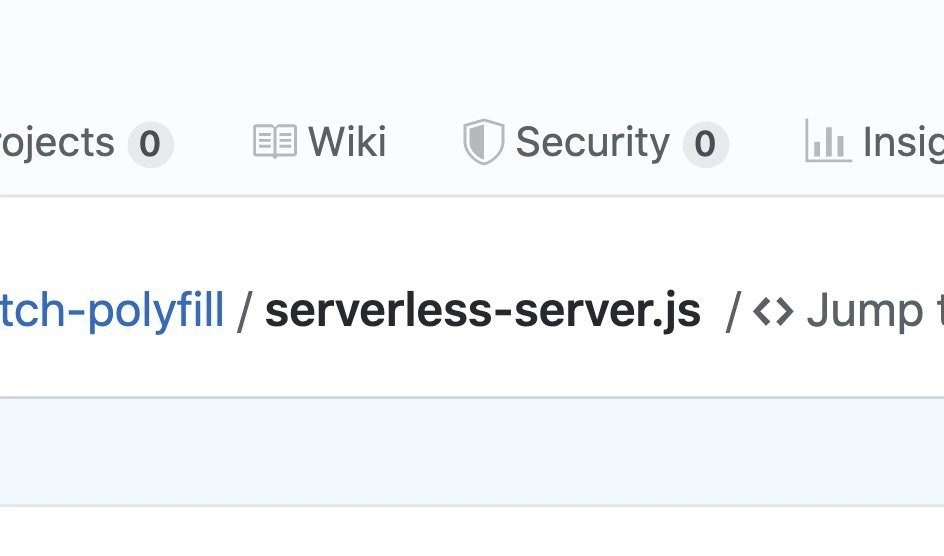
Now, the image from GitHub shows a file named serverless-server.js. This filename is inherently funny because it mixes two opposite ideas in one term. The word serverless implies “no server here!”, whereas server.js is a very common name for a file that starts a server (for instance, a Node.js web server often lives in a file called server.js). By calling it serverless-server.js, the developer combined both concepts into one name. It’s almost like they weren’t sure what to call it — maybe the code is meant for a serverless environment, but it behaves kind of like a server — so they just slapped both words together. This is a textbook example of a contradictory naming or an oxymoron. In everyday language, an oxymoron is like saying “bittersweet” or “jumbo shrimp” – two terms that normally wouldn’t go together. Here “serverless-server” is the tech equivalent of that. It immediately makes a programmer do a double-take and chuckle: Did we really just say “no-server server” in one breath? Yes, yes we did.
For a newer developer, let’s clarify a few things. Cloud platforms (AWS, Azure, GCP, etc.) provide CloudComputingServices that include serverless offerings. When you use them, you typically write a function and deploy it. You might never explicitly write http.createServer() in your code for those platforms because the cloud triggers your function for you (for example, when an HTTP request comes in, or a database event happens). So ideally, you wouldn’t have a file named server.js at all in a purely serverless project. That’s why seeing serverless-server.js stands out. It suggests that somewhere, somehow, this codebase is still explicitly dealing with server setup. Possibly the devs needed it for local testing or to polyfill behavior in a Node environment. (The breadcrumb “fetch-polyfill” in the screenshot hints they might be implementing web API behavior on Node.js; maybe this file runs a tiny server locally as part of that polyfill – which would explain the ironic name.) In any case, it’s a bit like catching someone saying one thing and doing another.
This brings us to the naming aspect. There’s a saying among programmers that “naming things is one of the hardest problems in software development.” It sounds funny, but it’s true: picking clear and correct names for files, variables, or functions is surprisingly tricky! If you name something wrong, it confuses everyone. Here the poor developer had to name a file that likely helps run a serverless function in some way. What do you even call that? If they named it just server.js, it feels wrong because in theory there’s no always-on server. If they named it serverless.js, that might be misleading because apparently it does involve a server process. So they ended up with serverless-server.js, basically saying “this is the server part of our serverless system.” It’s both logical in their head and absurd to read. We’ve all been in situations where we have a concept that doesn’t fit neatly into existing words. Early in your career, you might have ended up with filenames like newServer_final.js or temporaryWorkaround.py – names that aren’t ideal, but you shrug and use them because nothing better comes to mind under deadline. This file name looks like that kind of compromise (or maybe an intentional joke by the team).
For additional context, DevOps and SRE (Site Reliability Engineering) folks are the ones who bridge development and operations, ensuring that applications run smoothly in production. They often have a mantra: nothing is truly magic. From their viewpoint, serverless still runs on servers – just that the ops responsibility is shifted to the cloud provider. A DevOps engineer reading serverless-server.js might chuckle because it validates what they already know: you can’t escape the server, not even in name! In fact, a well-known humorous saying in these circles is “NoOps (no operations) still means someone is doing ops – it just isn’t you.” In the same way, serverless still means servers exist – you’re just not the one racking them. This meme and its tags (like ServerlessArchitecture and CloudHumor) play on that inside knowledge. It’s a lighthearted reminder that in tech, fancy terms can be misleading. You hear “serverless” and might imagine code running in the ether with no computer at all, but really it’s on real machines, managed by pros somewhere else. And sometimes, as this repository shows, developers themselves have to break the illusion – even if just in a filename – to get things working.
So if you’re new to this: don’t be puzzled if you find something named in a seemingly contradictory way. It’s often a practical decision or an inside joke. Here, the project likely is using serverless tech, but it needed a smidge of old-fashioned server code. The result? A hilariously named file that perfectly captures the awkward overlap of two worlds. Naming is hard, abstractions leak, but at least we get a laugh out of it when they do!
Level 3: The Serverless Paradox
This meme gets a knowing laugh from experienced cloud developers because it highlights a classic serverless architecture contradiction: even in a serverless stack, there’s often still a server lurking around. The screenshot shows a GitHub repository file named serverless-server.js – a comedic oxymoron that immediately triggers the veteran DevOps/SRE eye-roll. Why is it funny? Because serverless is supposed to mean "no servers to manage," yet here we have a file blatantly called server. It’s as if the code itself couldn’t keep up the charade. In cloud computing, we like to joke that “serverless” really means “there is a server, but someone else (the cloud provider) is running it.” In fact, there’s an old sysadmin meme:
“There is no cloud – it’s just someone else’s computer.”
This repository name is essentially shouting that truth. The file’s name smashes together two opposites, exposing the gap between the shiny promise of cloud abstraction and the gritty reality that yes, actual servers still do the work.
From a senior developer’s perspective, the humor runs deep. It’s common to see so-called serverless projects that still contain pieces of code acting like a traditional server. Maybe this serverless-server.js is spinning up a local Express.js instance for testing, or it’s a stub to handle requests in a serverless function environment. Perhaps the team migrated from a monolithic server app and this file is a leftover from refactoring – the code went “serverless” but some legacy habits (and filenames) didn’t get the memo. This juxtaposition of terms hints at an industry pattern: we rebrand old ideas with new buzzwords, yet under the hood not much changes. Cloud functions (like AWS Lambda, Azure Functions, etc.) still run on real machines; you just don’t provision them yourself. But here a developer literally named a file to admit “hey, we do have a server in our serverless setup.” It’s a tongue-in-cheek acknowledgement of how blurry the line can get.
There’s also the classic problem of NamingThings in software. As the joke goes: “There are only two hard things in Computer Science: cache invalidation, naming things, and off-by-one errors.” This serverless-server.js file is a case in point for that naming struggle. It reads like the author couldn’t decide what to call it – should it be server.js (since it behaves like a server)? Or something cloud-y like serverlessHandler.js? In the end they jammed both words together, creating a self-contradictory name that made it to production. Ironically, that confusion ends up communicating a deeper truth: the project calls itself serverless, but not even the code believes it. Naming is hard, and here it produced a gem of dark cloud humor. A seasoned engineer might chuckle and think, “Yep, been there – slapped a frank label on a hacky solution at 2 AM just so things work.” The file name almost implies an attitude: We’re serverless… except when we’re not.
On a more architectural level, this meme hints at how “serverless” doesn’t mean no servers at all, but rather no servers that you manage. The cloud provider still runs your code on an actual host machine (often a container or micro-VM under the hood). In fact, AWS Lambda famously runs on a slim virtualization technology (Firecracker micro-VMs), which means every “serverless function” call is actually handled by a tiny server instance spun up for you. Cold starts, warm containers, hidden load balancers – there’s a lot of invisible infrastructure involved. Seasoned DevOps folks know that even in a Function-as-a-Service model, concerns like HTTP handling, timeouts, and resource limits still exist. Often, developers write code in these functions that resemble a miniature server handling a request. The presence of a file literally named serverless-server.js could be a byproduct of that reality. It might contain code to handle an HTTP event or to run a local server for testing your cloud function. Here’s a playful imagining of what such a file might hold:
// serverless-server.js - ironically setting up an HTTP server in a "serverless" codebase
const http = require('http');
http.createServer((req, res) => {
res.end("Hello from the serverless server!");
}).listen(process.env.PORT || 3000);
Seeing something like this in a “serverless” repo is both hilarious and sobering. It’s like catching a magician backstage – the magic trick (no servers!) loses its illusion when you spot the wires and pulleys (a server script). The CloudHumor here draws from shared experience: every senior dev or SRE has encountered a situation where marketing buzzwords didn’t match the implementation. We’ve been sold on “NoOps” and “serverless” as if computers run themselves, only to discover we’re still writing scripts that start servers or debugging infrastructure at 3 AM. The meme’s irony resonates because it’s a gentle call-out: “Who are we kidding? There’s always a server somewhere.” In short, serverless-server.js encapsulates the paradox of modern cloud computing – you can abstract away the server, but you can’t eliminate it. For those of us battle-scarred by deployments, that’s both a funny and a painfully true realization.
Description
A close-up screenshot of a file path within a GitHub repository. The user interface shows typical GitHub elements like tabs for 'Projects', 'Wiki', 'Security', and 'Insights'. The focal point is the breadcrumb trail for a file, which reads: '...tch-polyfill / serverless-server.js'. The humor stems from the direct contradiction in the file name 'serverless-server.js'. Serverless architecture is, by definition, an approach that abstracts away the need for developers to manage servers. Therefore, having a file explicitly named 'server.js' within a 'serverless' context is a perfect example of the leaky abstractions and ironic naming conventions that are common in software development. For experienced engineers, this is a relatable and amusing observation about how technical jargon and marketing terms often clash with the underlying reality of implementation, where server-like logic is still very much present
Comments
7Comment deleted
The serverless server is in the same category as the stateless state machine and the lossless compression algorithm that makes files bigger
serverless-server.js: because nothing screams “modern” like an Express app zipped into a Lambda, fronted by API Gateway, running in a container that’s basically an EC2 you’re no longer allowed to SSH into
Next up: serverless-server-client.js for when your abstraction layer needs its own abstraction layer to talk to the thing that doesn't exist but definitely runs your code somewhere
Ah yes, 'serverless-server.js' - because nothing says 'we've abstracted away infrastructure complexity' quite like explicitly naming your entry point after the very thing you claim doesn't exist. It's the architectural equivalent of a vegan steakhouse or a silent alarm clock. Next up: 'stateless-database.js' and 'synchronous-async-await.js'. At least they're honest about the cognitive dissonance we all experience when explaining to stakeholders that 'serverless' still runs on servers, just someone else's servers that you have even less control over and somehow cost more at scale
serverless-server.js - because when your SLO is 50ms p99, “scale to zero” quietly becomes “scale to one, forever,” and marketing still calls it serverless
Serverless-server.js: because in the cloud-native era, the server never dies - it just gets polyfilled into your Lambdas
Nothing says “abstraction leak” like serverless-server.js - ops moved to the provider, but the cold‑start tax still shows up on your PR benchmarks