
DeveloperProductivity Post #7390 · source on Telegram
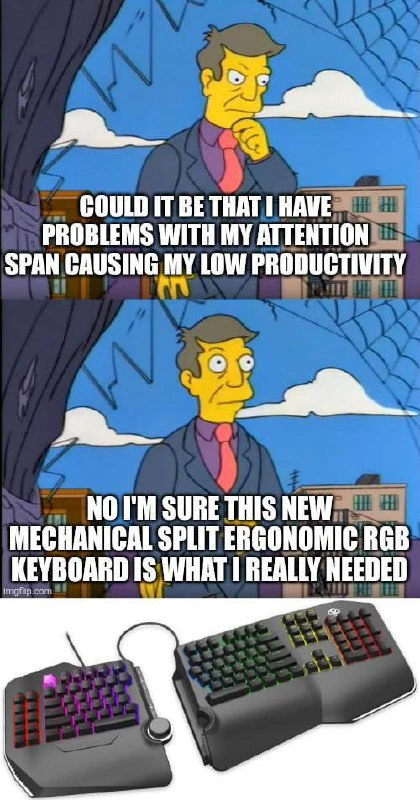
Blaming Productivity on Missing Ergonomic Keyboard Instead of Focus
Description
A two-panel meme using Principal Skinner from The Simpsons in the 'Pathetic' meme format. The top panel shows Skinner looking contemplative at a window with text 'COULD IT BE THAT I HAVE PROBLEMS WITH MY ATTENTION SPAN CAUSING MY LOW PRODUCTIVITY'. The bottom panel shows him looking at a split mechanical RGB keyboard with text 'NO I'M SURE THIS NEW MECHANICAL SPLIT ERGONOMIC RGB KEYBOARD IS WHAT I REALLY NEEDED'. Below is a photo of an actual split ergonomic mechanical keyboard with full RGB lighting. The imgflip.com watermark is visible. It mocks the developer tendency to buy new gear instead of addressing actual productivity issues
More like this
More like this in DeveloperProductivity →

Use J and K for navigation
Comments
92Comment deleted
My Jira velocity went up 300% after switching to a $400 split ortholinear keyboard. Just kidding, I spent the whole sprint configuring QMK layers
My focus isn't the problem, it's the unacceptable 10ms of latency between my neurons and the IDE. I'm confident that shaving 2ms off my keypress actuation time is the key to finally merging that feature branch from last quarter
That is NOT an ergonomic keyboard, its just a split one Comment deleted
Ты можешь настроить ее эргономик "под себя" Comment deleted
Elaborate pls Comment deleted
Afaik for a keyboard to qualify to be ergonomic it at least has to have parallel columns Comment deleted
I think the proper name for this is non staggered columns 🤓 Comment deleted
Type shit Comment deleted
Just received one yesterday Comment deleted
Damm.. this is cool Comment deleted
Please consult attached infographic Comment deleted
where is the femboy keyboard? Comment deleted
I don't agree, all of those are fine. You can place it anywhere and still be able to type. Comment deleted
all except TKL have f'd up layouts Comment deleted
I have to type numbers too regularly to ever ever ever give up my numpad, and am childish enough to enjoy videogames Comment deleted
no 40% mentioned, so i'm still okay Comment deleted
I get that many people don't like smaller ones but I'd argue 75% and above all are actual keyboards here, you still have all the keys except numpad, which is mostly used by people working with money Comment deleted
best advantage of <TKL keyboards is that you can buy a separate numpad and put it on the left Comment deleted
Haha why pay more if the entire right half can be configured to be the fn+num_key? Comment deleted
WHERE IT FUCKING BELONGS Comment deleted
where’s stenokeyboard Comment deleted
Thats a nice argument, however wooting 60he+ Comment deleted
press Ctrl+F3 using 2 fingers with it Comment deleted
easily done on mine Comment deleted
palm on ctrl, right spacebar is fn, 3 is f3 Comment deleted
6th finger? noice Comment deleted
not a finger. you specified fingers, i only used 2. Comment deleted
exactly Comment deleted
now press left arrow key with your index finger while not removing it from your home row Comment deleted
why would I ever need that? Comment deleted
because you want to immediately start moving your cursor after you have finished typing something, then start typing again, without flailing your arms all over the keyboard? Comment deleted
vim enjoyers have been doing that, but not everything has vim bindings Comment deleted
soy enjoyers, hjkl is the way Comment deleted
i'm more of an ijkl fan Comment deleted
this is my function layer Comment deleted
The problem with this is cursor keys are on the right side and I type with 2 hands Comment deleted
exactly Comment deleted
exactly where is the reason Comment deleted
home row with hjkl is being pressed by left hand or non-index fingers on the right Comment deleted
unlike Ctrl+F3 example that doesn't need explanation Comment deleted
why are your hands crossed Comment deleted
last time I've checked hjkl wasn't on the left side of keyboard Comment deleted
why does it have to be on the left Comment deleted
why are your hands crossed Comment deleted
yes. you implied you're pressing HJKL with your left hand, while they're clearly on the right Comment deleted
So you're coming up with something I haven't said I'm out of this entropy generating dialogue Comment deleted
ijkl is pressed by index finger, middle finger, ring finger of the right hand? Comment deleted
hjkl: by index finger, index finger, index finger, index finger; middle or ring if pressing lower keys ijkl is your own bugs I don't know what you're using Comment deleted
where the FUCK is your home row it's supposed to be J K L for index, middle, ring Comment deleted
J even has a notch on it to find it with your index finger Comment deleted
Right ctrl + fn (one finger for both) + 3 Comment deleted
that's a stretch (pun intended) Comment deleted
> 60% keyboard > 3 keys hotkeys with "fn" just to type single '~' > dedicated key to change RGB effect Comment deleted
Sofle v2 here 🎹 Comment deleted
Now you made me to go look for a new kb Comment deleted
Also like mod tap is a thing btw Comment deleted
home row doesn't start at 6 Comment deleted
home row is asdf left hand jkl; right hand Comment deleted
so if you're saying that, then it's not being pressed by left hand, at least not entirely, right hand presses hjkl, not left why write confusing Comment deleted
i'm more confused by hjkl being all index finger Comment deleted
I'm more confused of index finger for I in IJKL Comment deleted
thus nonsense answer for nonsense question Comment deleted
You said "home row with hjkl is being pressed by left hand", which is not true I then clarified that HJKL is being pressed by the fingers of of the right hand, actually, not left, unless i'm mistaken? You then replied with all index finger What was the point and how does this relate to my original request of pressing left arrow with your index finger without taking the hands off the home row Comment deleted
> home row with hjkl is being pressed by left hand > home row is asdf left hand 2+2 Comment deleted
hjkl is part of the home row, and it's NOT being pressed by left hand (usually) which is why i'm trying to understand how the hell are you even typing Comment deleted
Are we still talking about pressing left cursor key with index finger? Comment deleted
Ok, let's get back to it, idk what that was. So, how do you go about pressing left cursor key with an index finger, while not taking your hands off the home row? Comment deleted
We're so back! Why would I need to press left cursor key with index finger? Comment deleted
Same reply, because you want to immediately start moving your caret after you have finished typing something (to navigate the code, for example), then start typing again, then move the caret again. If your arrow keys are not on the home row, you're flailing your right hand back and forth between arrows and the home row, which is slow as fuck Comment deleted
Previously you've used vim as the reason, and another reminder that it doesn't require to use cursor keys at all Comment deleted
I said that "vim users have it, but the problem is that not everything supports vim, and so you're stuck flailing your hand again in everything that doesn't support vim bindings", like this telegram chat box Comment deleted
I use pinky for that Comment deleted
that's a stretch Comment deleted
as in, vim D? Comment deleted
A non-existing one, since I move index to K for that Comment deleted
but why move at all if you can just... not and you'll get all arrows under all fingers at the ready Comment deleted
... of using palms for Ctrl, yeah Comment deleted
i literally never pressed Ctrl+F3, but if that's a needed shortcut, i either use two hands (that are already on the keyboard), or bind it to something better, like fn+n so i can press it with one big finger Comment deleted
and my ctrl is on caps lock for ergonomics Comment deleted
If I'd pursuit ergonomics I won't use a keyboard that remotely resembles Model F/M. Comment deleted
Agree, but ctrl being the most often pressed modifier, it makes sense to put it on the home row it's really painful for me to stretch my pinky down past shift to where the actual ctrl is Comment deleted
The difficulty varies depending on inclination and size of keys, somewhat the same problem as with function keys that are being placed differently on pretty much any keyboard. Comment deleted
so where my hands are resting normally, it actually takes me 3 keys to press, but only one finger to move (big finger is already on right spacebar, which is fn, and my pinky is already on the caps lock, which is ctrl, at which point i only need to move my left hand index finger to hit the 3) Comment deleted
My example doesn't imply of using 2 fingers of one hand. The problem is that by removing function keys you have way more mess with layout from apps that DGAF. Ctrl+F1 would be the same problem and it's default Help shortcut in many things. Comment deleted
Idk, I never have issues with fn-related things, they speed me up My work keyboard does have F row, and I have to look every time to hit the correct key, especially if it's between F5-F9, while with my keyboard at home i don't, i just hold big finger of the right hand down and go for the numbers which are right there if modifiers are needed, they also get pressed right away Comment deleted
You know it's a skill issue /s the Ctrl+F* is a way to show that you have to think about 2 modifier keys that might not be near (I've seen crazy KBs without Alt and Fn as neighbors so Alt+F4 is a two-hand duty!). Comment deleted
and with that specific Wooting one it's actual brainwork Comment deleted
Yeah, the pinkyctrl and right-space-fn solve that for me just press them down, don't even have to search for them Comment deleted
And my D is in higher priority than index finger for this use case Comment deleted
Eeeh, remember optimus maximus..... https://www.artlebedev.com/optimus/maximus/ Comment deleted
Corne v3? Comment deleted
typeractive wireless corne choc Comment deleted