Skip to content
DevMeme
1669 of 7435
Portable Kubernetes Cluster in a Box
Containerization Post #1865, on Aug 6, 2020 in TG

Portable Kubernetes Cluster in a Box

Why is this Containerization meme funny?

Level 1: City in a Suitcase

Imagine you could build a tiny city inside a suitcase and carry it wherever you go. It has little buildings, roads, traffic lights, and everything a real city has, just miniaturized. This meme is funny for a similar reason: the person basically packed a whole mini world of computers into one box that they can lug around. Normally, companies have huge rooms or “cloud” data centers (which are really big buildings full of machines) to run the apps and websites we use. But this clever individual managed to squeeze all the important parts of that into a suitcase! It’s like having an entire playground or city that you can open up on a table.

Why is that amusing? Because it’s both silly and awesome. It’s silly in the way it surprises you — who would think to carry a bunch of computers in a case just to run stuff, right? — and awesome because it actually works! Tech folks find it funny because it’s an extreme DIY project: instead of just trusting the invisible cloud, this person said, “I’ll make my own cloud, and I can take it on vacation.” It’s the same delight a kid might have building a complex LEGO set and then showing it off: “Look, I made a whole town in my backpack!” Even if you’re not a tech expert, you can appreciate that all those blinking lights and cables in the photo mean this suitcase is doing a big job. It’s running websites/services, securely and everything, all self-contained. In essence, it’s like someone took something huge and abstract (the idea of internet servers and cloud) and turned it into a personal, portable toy. That mix of unexpectedness and ingenuity is what makes it both funny and cool – it’s a geeky kind of magic trick, fitting a “cloud” into a lunchbox just to show it can be done.

Level 2: Cloud in a Box

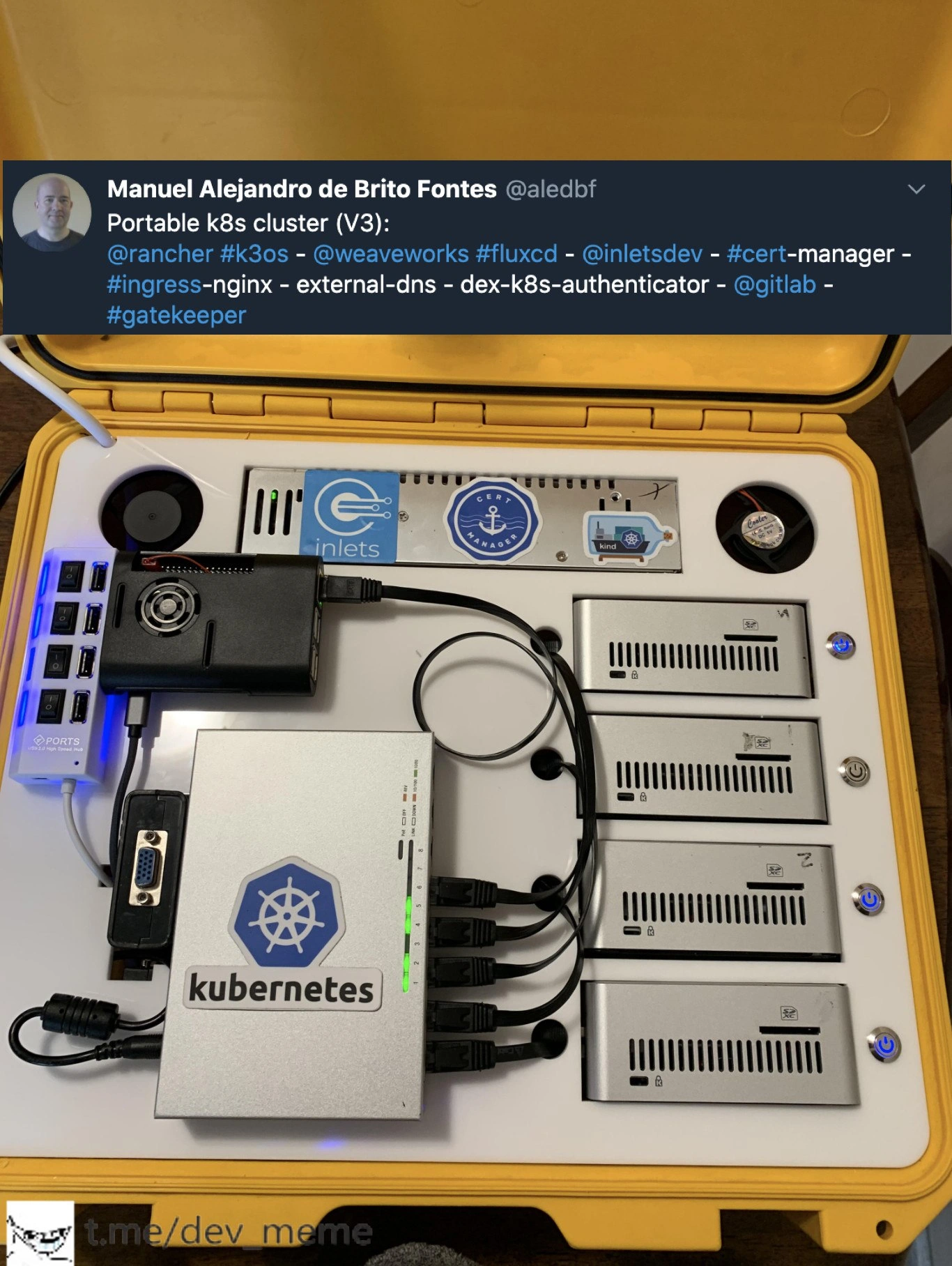
Let’s break down what’s actually going on in this meme in simpler terms. What you see is a DIY mini data center built inside a portable, hard-shell suitcase (a yellow Pelican case). This person literally made a “cloud in a box” – a small Kubernetes cluster that can be carried around. Kubernetes is a powerful system that tech companies use to run and manage containers (which are like little packaged apps) across many computers. Instead of using big server rooms or a cloud provider, this fellow set up four small computers in one case to run his own private cloud. Each of the four silver boxes on the right is a small computer (imagine a beefed-up Raspberry Pi or tiny PC) with its own CPU, memory, and storage, functioning as a node in the cluster. The box on the left with the Kubernetes sticker is actually a network switch – basically a device that lets all these computers talk to each other quickly, forming a local network. The black device and the white power strip provide electricity to everything. So, physically, it’s all the basic hardware you’d find in a server closet, just miniaturized and neatly packed together.

Now, the tweet text lists a bunch of specific software components that are set up on this little cluster. Each one is a tool usually used in cloud infrastructure. Here’s what they mean in down-to-earth terms:

  • k3OS (Rancher’s k3s OS): This is a minimal operating system designed just to run k3s, which is a slimmed-down version of Kubernetes. Think of k3OS as a tiny custom Linux that boots straight into running a Kubernetes server. It’s perfect for small devices because it has a low footprint but gives you a full Kubernetes experience.

  • FluxCD (by Weaveworks): FluxCD is a GitOps tool. That means it automatically deploys and updates the apps on your cluster based on files in a Git repository. In practice, instead of manually typing commands to update your apps, you push changes to a Git repo and FluxCD makes the cluster match those changes. It’s like having an autopilot for deployments – very handy for keeping configurations consistent, even in this mini-cluster.

  • inlets (by @inletsdev): inlets is a clever networking tool. Imagine you have this cluster running at home or on a private network, but you want people on the internet to reach the apps running on it. Normally, home networks are behind NAT/firewalls, so outside traffic can’t get in easily. inlets creates a secure tunnel from a machine on the internet (like a cheap cloud VM) back into your cluster. It’s often described as a reverse VPN or “cloud gateway”. In short, it lets your suitcase cluster appear on the internet as if it were a server in a data center. This way, your portable cluster’s websites or APIs can be accessed by others, despite being, say, on your desk or in your car.

  • cert-manager: When you run websites or services, you usually want them to be secure (HTTPS, the little lock icon in browsers). cert-manager is a Kubernetes add-on that automatically gets security certificates (like from Let’s Encrypt) for any service in the cluster that needs one, and keeps them renewed. Even in a tiny cluster, if you deploy a web app, cert-manager saves you the headache of configuring HTTPS by hand. It’s essentially an automatic certificate butler for your cluster.

  • Ingress-NGINX: In Kubernetes, an Ingress is like a door or entry point that routes external traffic into the correct service inside the cluster. NGINX is a popular web server/reverse proxy that this tool uses under the hood. So Ingress-NGINX is basically a Kubernetes-managed NGINX that takes incoming web requests (like http://your-cluster/foo) and directs them to the right application running among those nodes. It’s like a traffic director for all the web services in your box, ensuring each request goes to the correct container.

  • external-dns: This component watches for services in your cluster that should be exposed and then automatically creates or updates DNS records for them. For instance, if you want your cluster’s web app to be reachable at myapp.example.com, external-dns can talk to your DNS provider (like Cloudflare, AWS Route53, etc.) and make sure that name points to your cluster’s IP. It saves you from manually configuring DNS every time something changes. In the portable cluster scenario, external-dns combined with inlets means any service you run can still get a public web address and DNS entry, even though physically you might be on your home Wi-Fi or at a hackathon.

  • dex-k8s-authenticator (Dex): Dex is an open source identity service that lets you handle logins and authentication in a standardized way (it speaks OAuth2/OIDC, like how you log into apps with Google or GitHub accounts). The dex-k8s-authenticator likely means they set up Dex to manage access to the cluster’s dashboard or other internal apps. Essentially, even this little cluster has single sign-on/auth set up, so not just anyone can access it – you’d log in through Dex, which could be linked to, say, your Google account or a company login. It’s adding enterprise-grade login security to a personal cluster.

  • GitLab: GitLab is a platform for source code hosting, CI/CD pipelines, and more (similar to GitHub but you can self-host it). The tweet’s mention of @gitlab likely indicates they integrated their cluster with GitLab for things like CI/CD or GitOps. For example, they might be using GitLab’s repository to store the config that FluxCD reads, or even running a GitLab runner on the cluster to test and deploy code. It shows that even in a homebrew cluster, you can tie into professional workflows – pushing code and having pipelines deploy to your little on-the-go data center. (It’s also possible they self-hosted GitLab on the cluster, though that would be pretty heavy for such small hardware. More likely, it’s integration with the cloud GitLab service for automation.)

  • Gatekeeper: This is a policy enforcement tool for Kubernetes. It’s built on Open Policy Agent (OPA) and allows you to define rules that all deployments must follow. For example, you can require every container to come from a trusted registry or prevent anyone from creating a Service of type LoadBalancer (since maybe in this tiny cluster you don’t want that). If someone tries to apply a Kubernetes config that breaks a rule, Gatekeeper will reject it. Basically, it’s there to keep the cluster in compliance with rules, acting as a security guard or hall monitor for changes. Including Gatekeeper in a portable cluster setup means the person wanted the same kind of safety checks you’d have in big-company clusters, which is both impressive and a little amusing – it’s like having a strict librarian for a personal book collection.

In simpler terms, this enthusiast loaded the cluster with many of the standard DevOps tools you’d find in a large-scale deployment, just to see it all run on a small scale. It’s a showcase of containerization and infrastructure know-how. Each sticker on the inside of the case (Kubernetes, Inlets, cert-manager, Kind, CNCF, etc.) corresponds to these technologies, as a proud display. The entire rig demonstrates that with modern tech, you can create a self-contained environment that behaves just like the cloud or a big datacenter, yet is literally sitting on your desk. People new to this might wonder, “Why not just use the cloud?” But the point here is partly educational and partly for fun: by building it yourself, you learn how all the pieces fit together, and you get a cool gadget to show off. It’s like a tech hobby project that also proves a concept: edge cluster hardware for real, where “edge” in this case could be anywhere you carry the box. If you took this to a field research station or a hackathon, you’d have instant infrastructure without needing internet. And if something goes wrong, you can physically see the machines and cables, which is quite different from the opaque nature of cloud servers.

For a junior developer or someone just getting into DevOps, this meme is a crash course in thinking beyond just code. It’s about how all these services and tools work together in the real world. It shows that behind the scenes of cloud applications, there’s a lot of infrastructure (networking, security, automation) that can actually be built and understood at a small scale. Plus, it’s undeniably cool to see — a bit like seeing a scale model of a skyscraper, except it’s a scale model of an entire cloud stack. You might not ever need to build a suitcase cluster yourself, but understanding what each part does is great for grasping how modern apps are deployed and run.

Level 3: Datacenter To-Go

For seasoned DevOps engineers, this meme hits home as a mix of impressive engineering and tongue-in-cheek humor. We’re looking at a fully operational Kubernetes cluster packed into a yellow carry case — essentially a data center to-go. The tweet brags about a laundry list of cloud-native tools running on it: k3OS (Rancher’s Kubernetes OS), FluxCD for GitOps, inlets for networking magic, cert-manager for SSL, Ingress-NGINX for routing, external-dns for DNS automation, Dex for auth, Gatekeeper for policy enforcement, and even mentions GitLab. It reads like a who's-who of the Cloud Native Computing Foundation stack. This is the kind of setup you’d expect in a professional cluster in a big company — only here, it’s literally in a suitcase on someone’s desk. The humor isn’t just in the visual of a Pelican case datacenter, but in the DevOps extravagance: “Oh, you run Kubernetes in the cloud? That’s cute, I carry mine around with me.”

Why would someone do this? Partly for the challenge and geek cred. It’s like the modern equivalent of those old-timers who ran Linux on a toaster or carried a server tower to LAN parties. In the world of DevOps/SRE, there’s a shared understanding that we sometimes over-engineer things just because we can. Kubernetes’s promise is portability of workloads — “write once, run anywhere.” This project took that vibe literally, achieving infrastructure portability. Now your cluster itself can travel with you. It’s poking fun at how far the obsession with containers and microservices has gone: we’re not content with cloud diagrams, we’re building mini-clouds we can plug in at a coffee shop. An SRE might chuckle and also nod approvingly: this rig could be a reliable demo environment for edge computing, or a way to test chaos scenarios without risking production. And admit it, there’s something satisfying about solving the physical puzzle of neatly routing Ethernet cables and power supplies for four nodes — it appeals to that inner hardware tinkerer many software folks secretly are.

The image shows four passively-cooled silver compute blades (likely Intel NUCs or similar mini PCs) each with its blue LED power button lit, wired into a central Gigabit switch sporting a big Kubernetes logo. That switch is the cluster’s backbone, linking all nodes in a low-latency local network. It’s essentially a tiny cluster network. In front, we see a USB power strip feeding all components — one plug to rule them all. A veteran engineer will notice that single point of failure and smirk: in true enterprise setups, you’d have redundant power supplies and uplinks; here, one yank of the main cord and the whole mini-cloud goes dark. It’s a playful reminder that “the cloud is just someone else’s computer” — or in this case, your own computers in a box.

The tweet’s author (Manuel) calling this “Portable k8s cluster (V3)” implies this isn’t the first iteration. Experienced devs know that feeling: Version 1 was probably a tangle of wires and maybe Raspberry Pis; Version 2 got more polished; and V3 is slick enough to show off on Twitter. This resonates because iterative tinkering is how many of us learn and push limits. The inclusion of tools like FluxCD and Gatekeeper hints that he’s treating this seriously — it’s not just a toy, it’s enforcing real GitOps and policy-as-code, as if it were a production cluster. That’s hilarious and admirable at the same time. Essentially, the joke is DevOps extreme portability: we always talk about moving workloads from cloud to cloud; here someone said, “Forget cloud, I’ll take my entire cluster on the road.” It’s the ultimate home lab project flex, triggering equal parts nerd envy and amusement in anyone who’s ever maintained a server rack or deployed to “the cloud.”

To top it off, think about the practical absurdity: deploying a new microservice on this cluster might involve literally opening your suitcase on a table. Need to troubleshoot a network issue at 2 AM? Hope you brought your Pelican case to bed! It’s a fun reversal of roles — instead of the cloud being an abstract place, it becomes physical and personal. This speaks to infrastructure engineers’ shared experiences: we crave control and love to experiment. And as complicated as Kubernetes is, having it completely under your thumb (with blinking lights you can touch) is deeply satisfying. The meme is funny because it’s so extra: nobody actually needs a suitcase Kubernetes cluster… and yet, seeing one makes us think, “Wow, that’s cool — and kind of useful?” It tickles that part of us that remembers when running a single Linux server was exciting, and now we’ve escalated to running an entire cloud’s worth of services in a lunchbox. It’s absurd, it’s over-engineered, and it’s awesome.

# Even this tiny cluster thinks it's big:
$ kubectl get nodes
NAME           STATUS   ROLES               AGE   VERSION
case-master    Ready    control-plane       5m    v1.18.8+k3s
case-worker1   Ready    <none>              4m    v1.18.8+k3s
case-worker2   Ready    <none>              4m    v1.18.8+k3s
case-worker3   Ready    <none>              4m    v1.18.8+k3s

# It lists multiple nodes, as if it were a full-blown data center!

Level 4: Carry-On Consensus

In this portable Kubernetes cluster, the same hardcore distributed-systems machinery that powers cloud data centers is shrunken to a Pelican case datacenter. At its core, Kubernetes relies on a control plane store (usually etcd) which uses the Raft consensus algorithm to keep every node in agreement about the cluster’s state. Even in this suitcase scenario, if multiple control-plane nodes were used, they'd be performing leader election and state replication — essentially running a mini consensus-based democracy among the boards. Consensus ensures that when one node schedules a pod or updates a configuration, all nodes eventually see the change, despite network hiccups or node reboots. The irony here is delightful: RAFT was designed to handle servers across racks and regions, yet here it’s potentially keeping in sync servers mere inches apart, connected by a tiny 5-port switch.

The cluster-in-a-box also underscores theoretical limits like the CAP theorem in a comical way. Sure, this cluster might achieve consistency and availability under normal conditions, but partition tolerance gets a twist when all nodes share the same power strip inside one box. If the case’s single power source fails, every node drops at once — a correlated failure nightmare that no amount of consensus can save. In reliability terms, all the nodes are in one fault domain. Traditional Kubernetes clusters avoid that by spreading nodes across data centers or zones. Here, our intrepid builder has essentially put all his etcd quorum votes on one airplane carry-on. It’s a beautiful paradox: the cluster’s control algorithms assume independent failure modes, yet these four machines would likely all fail together if, say, the suitcase got unplugged or the whole thing overheats.

Networking wise, this mini-cluster likely uses an overlay network (Kubernetes’s CNI, perhaps Flannel or similar) to allow pods on different nodes to communicate seamlessly, even if each node is just a tiny fanless PC. But with a real Gigabit switch physically linking them, latency is so low it’s practically a LAN party for containers. The builder included inlets to tunnel services out to the wider internet — a clever hack leveraging tunneling protocols akin to a mini reverse VPN. From a packet perspective, it’s a cascade of encapsulations and NAT traversals: the cluster’s Service VIPs and cluster DNS all operate internally, while Inlets can expose a Service by creating an egress pathway to a cloud endpoint. It’s a sophisticated dance of networking stacks, usually confined to cloud VPCs, now mapped onto this little box.

Even container scheduling and orchestration theory make an appearance. The Kubernetes scheduler handles pod placement on these four nodes much like solving a bin-packing problem or a mini NP-hard puzzle, juggling CPU and memory constraints. With k3s (a lightweight Kubernetes distribution) under the hood, the control plane is slimmed down (k3s can even use an SQLite datastore for simplicity), but the fundamental abstractions — pods, deployments, ingress controllers, etc. — operate the same. There’s elegance in this: the declarative configs and controllers don’t care if they’re managing a thousand-node cloud or a four-node lunchbox cluster. This Pelican-case cluster might be tiny, but it exemplifies cloud-native design principles on a micro scale: desired state reconciliation, infrastructure-as-code, and even GitOps through FluxCD. It’s as if someone condensed a whole academic textbook on distributed orchestration into a travel-friendly kit, letting theory and practice collide in one very geeky piece of carry-on luggage.

Description

A high-angle shot of an open yellow briefcase revealing a custom-built portable server rack. Inside, there are several single-board computers (likely Raspberry Pis) in silver aluminum cases, a central network switch with a large blue Kubernetes logo sticker, a USB hub, and various cables neatly managed. Stickers for "inlets," "cert-manager," and "kind" are visible on the hardware. An overlay at the top shows a tweet from Manuel Alejandro de Brito Fontes (@aledbf) detailing the software stack used, including Rancher k3os, FluxCD, cert-manager, and more. The full text of the tweet reads: "Portable k8s cluster (V3): @rancher #k3os - @weaveworks #fluxcd - @inletsdev - #cert-manager - #ingress-nginx - external-dns - dex-k8s-authenticator - @gitlab - #gatekeeper". A watermark for "t.me/dev_meme" is at the bottom. This image showcases a DIY portable Kubernetes (k8s) cluster, a homelab project that demonstrates significant technical skill. It's a physical representation of a cloud-native environment, appealing to DevOps and SRE professionals. The tweet mentions a sophisticated stack, indicating a fully-featured, GitOps-ready cluster. For senior engineers, this is a "nerd-flex" - a cool, practical, and well-executed project that goes beyond typical software development into the realm of hardware and infrastructure engineering


Comments

7
Anonymous ★ Top Pick The only way to ensure 99.999% uptime is to literally handcuff the cluster to your wrist
  1. Anonymous ★ Top Pick

    The only way to ensure 99.999% uptime is to literally handcuff the cluster to your wrist

  2. Anonymous

    Cloud portability level unlocked: the whole k3s cluster fits in a carry-on, yet Gatekeeper still needs more time to clear a pod than TSA needs to clear the suitcase

  3. Anonymous

    Finally, a Kubernetes cluster with an actual disaster recovery plan that doesn't involve "just spin it up in another region" - though explaining to TSA why your carry-on needs ingress controllers might take longer than your typical pod restart

  4. Anonymous

    When your homelab needs TSA PreCheck: a fully orchestrated k8s cluster that fits in overhead storage. Complete with GitOps, service mesh, policy enforcement, and enough stickers to pass any conference security checkpoint. Because sometimes 'it works on my machine' needs to literally travel with you - though explaining to airport security why your luggage is pinging localhost might require a senior architect's diplomatic skills

  5. Anonymous

    RPi K8s: Fitting etcd quorum in a backpack, but good luck with thermal throttling mid-demo

  6. Anonymous

    Portable k8s cluster: multi‑region achieved by rolling a Pelican case between rooms; Flux keeps it in sync, Gatekeeper blocks the fix, and cert‑manager schedules the outage for day 90

  7. Anonymous

    At last, cloud‑native with a handle: FluxCD for consistency, OPA Gatekeeper for policy, and the DR plan is literally walking the box to another outlet

Use J and K for navigation