The Analog Approach to CSV Compression
Why is this DataFormats meme funny?
Level 1: Hiding It Elsewhere
Imagine you have a big pile of toys that you’re trying to fit into a toy box, but they don’t all fit. You ask, “What’s the best way to make all these toys take up less space in my toy box?” A mischievous friend answers: “Easy – take all your toys out of the box and put them in the closet, then shut the closet door. Now your toy box has zero toys in it, so it’s completely free of clutter! Later, if you want to play with your toys, you can go get them from the closet.”
You can probably see the problem, right? Sure, your toy box is empty (just like having zero bytes on a computer’s disk), but that’s only because you moved the toys somewhere else, not because you magically made them smaller. And when you do need them, you’ll have to dig through the closet to gather them all again, which is a lot more work than just opening a box. The suggestion solved the question in a super literal way but ignored what you really wanted – an easy way to store and retrieve your toys. That’s why it’s funny: it’s like a sneaky trick answer. It technically did what you asked (your toy box is empty now), but it’s obviously not a practical solution.
Level 2: Zero Disk via Paper
Let’s explain this in more straightforward terms. A CSV (Comma-Separated Values) file is a simple text format for storing tabular data, like you might see in spreadsheets. For example, a CSV might look like:
Name,Age,Country
Alice,30,USA
Bob,25,Canada
Each line has values separated by commas. CSVs can get very large if you have many rows of data (imagine a huge Excel sheet exported as CSV). Because CSVs are just text, one common issue in data engineering or general computing is that they take up a lot of disk space for big datasets. So people often ask how to compress them – meaning how to make the file smaller so it uses fewer bytes on your storage drive. Usually, “the best way to compress a CSV” would involve using a compression tool or algorithm (like zipping the file, or using gzip, etc.) or even converting the data into a more efficient format (for instance, using a binary DataFormat or a database).
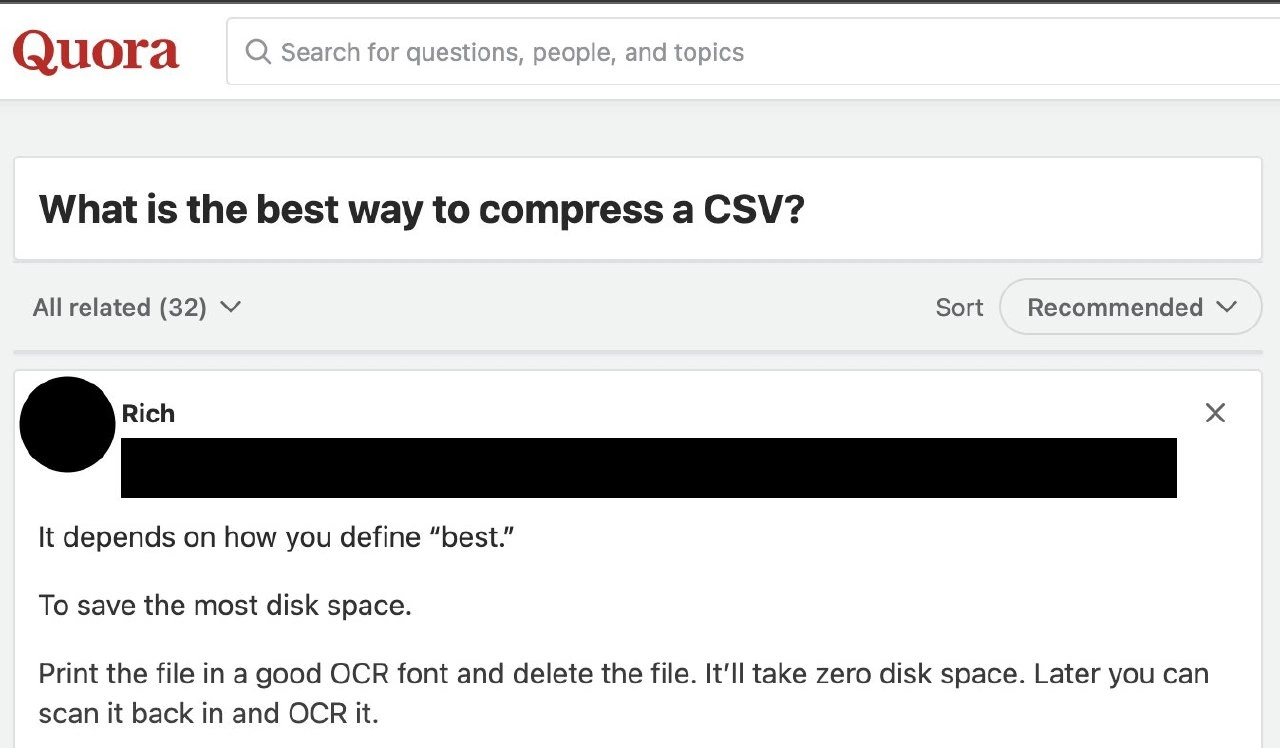
Now, on Quora (an online Q&A community), someone asked exactly that: “What is the best way to compress a CSV?” The answer featured in the meme is a joking answer by a user named Rich. He starts by hinting that “best” could mean different things: do you want the fastest compression? The most convenient? Or, in his interpretation, the absolute smallest file size. If your goal is purely to minimize disk usage, he suggests an outlandish strategy:
- Print the file out on paper, using a really clear OCR font (OCR stands for Optical Character Recognition – basically, a font that is easy for a computer to read back from a scanned image). There are specific fonts like
"OCR-A"that were designed to be read by early scanners, but broadly he means use a crisp, monospaced, easy-to-scan typeface. - Once you have the physical paper copy of all the data, delete the file from your computer. Now, on the computer, that CSV file is gone – which means it’s using 0 bytes of storage on your disk. You’ve achieved the ultimate compression in terms of disk space usage: nothing!
- Later, if you ever need that data again, you can scan the printed pages and run them through OCR software to turn the images back into text, recreating the CSV file.
This answer is sarcastic and not meant to be taken as actual advice. It’s highlighting a joke: if you only care about saving disk space, you could literally remove the data from your disk (by offloading it to paper). Of course, in reality, this is a terrible idea for a few reasons. For one, you might end up with hundreds of pages of paper (depending on the CSV’s size). Paper takes physical space and can be lost or damaged. Scanning everything back later is time-consuming and can introduce errors (OCR isn’t perfect; it might mis-read characters, especially if the print quality wasn’t great or the paper got smudged). Also, think about the effort: a real compression algorithm like .zip is automated and takes seconds to compress/decompress data. Printing and scanning is a manual, hours-long process for large files.
The humor here is a bit of developer humor where the answer is technically addressing the question but in such an extreme and literal way that it becomes a joke. It’s like answering “How do I make my computer run faster?” with “Throw it out and buy a faster one.” Sure, you achieved the goal literally, but it’s obviously not the intended solution. In the context of relatable developer experience, it’s common to see playful answers like this on forums after someone asks a very open-ended or naive question. The Quora community (and others like Stack Overflow, Reddit, etc.) often enjoy these tongue-in-cheek responses.
Let’s clarify some of the terms and context tags in simpler words:
- OCR (Optical Character Recognition): This is a technology that converts images of text (like a scanned printed page) back into actual text data that you can edit or search. The answer jokes about using an OCR-friendly font so that when you scan the paper, the OCR software can more accurately reconstruct the CSV content.
- Zero-byte storage / zero disk space: This means using no digital storage at all. By deleting the file, the computer shows 0 bytes used for that data. It’s “stored” off the computer (on paper).
- Paper backup strategy / physical-layer data storage: This refers to literally keeping information on physical media (paper, in this case) as a form of backup or storage, instead of on a computer or cloud. It’s not common for day-to-day data because it’s so inefficient, but for some critical archives (historical records, etc.), people do keep paper copies. Here it’s referenced humorously.
- Out-of-the-box thinking #OutOfTheBox: This hashtag in the post caption is acknowledging that the answer is a very unconventional, creative approach – basically thinking so far outside the usual solutions that it’s not practical, but it’s funny.
- #degradationMeme: Possibly refers to the fact that this kind of “compress -> print -> scan -> OCR” round-trip will degrade the quality of the data (much like repeatedly photocopying something makes the quality worse). It’s also just labeling the style of humor. Each transformation (digital to paper to digital) could introduce quirks, much like copying a copy of a copy degrades it. It’s highlighting the comedic “degradation” of the original question’s intent.
In essence, this meme is showcasing an answer that solves a problem in a very literal way, trading one kind of resource for another. It’s funny to developers because it reminds us not to take metrics or questions too literally, and it pokes fun at the idea of an ultimate compression algorithm by suggesting something absurd. If a newcomer to programming saw this, we’d clarify: No, nobody actually does this to compress files! It’s just a joke pointing out that if you remove the data from the computer entirely, you technically don’t use disk space – but you haven’t really made the data smaller or more convenient at all.
Level 3: Dead Tree Compression
For the seasoned engineers reading this, the humor hits right away: it’s a classic case of optimizing the wrong metric to a ridiculous extreme. The question asks for the "best" way to compress a CSV file. That’s a pretty common scenario in data engineering – CSV files (Comma-Separated Values) can get hefty, and we often compress them using tools like gzip or bzip2, or convert them to more efficient formats. A serious answer might mention colossal compression ratios or using a binary columnar format to save space. But here comes Rich on Quora, essentially saying: “Define best. If by best you mean uses the least disk space, just print it out and delete the original!” This is tongue-in-cheek genius. It exploits the literal interpretation of “save the most disk space” by achieving zero bytes on disk – which is technically the maximum compression (you can’t use less space than zero). It’s the same vibe as a senior dev joking during a performance meeting: “Oh, that query is slow? The fastest way to run it is not to run it at all.” 🙃
Why do experienced devs find this so relatable and funny? Because we’ve all seen scenarios where someone fixes a problem in a way that completely misses the point, just to satisfy a single metric or requirement. It’s satire on single-minded optimization. Sure, your disk usage is now nil, but at what cost? In this case, the cost is turning digital data into a stack of paper. We call printed documents "dead-tree format" for a reason – you’ve resurrected a primordial form of storage. Anyone who’s dealt with system design or KPIs knows the danger here: if you tell the team “disk usage must drop by 100%,” someone will joke (or seriously suggest!) “just delete the data.” This Quora answer is that joke in its purest form. It mocks the idea of chasing a number (disk space) while torching every other concern, like speed, reliability, and sanity.
Let's break down the real-world trade-offs being lampooned:
- Disk Space: ✅ Saved! The CSV file is gone, freeing up every byte. Mission accomplished on paper (literally).
- Physical Space: 🖨️ Consumed. Now you have inches or feet of paper lying around, depending on file size. You freed an SSD but filled a filing cabinet.
- Recovery Time: ⏳ Skyrockets. Instead of a quick
gzip -dto decompress in seconds, you must fetch the paper, scan each page, and run OCR software. Hope you didn’t print double-sided to save paper, or the scanner’s gonna jam! - Data Integrity: 🤞 At Risk. Real compression algorithms are designed to perfectly recover original bits. OCR from a crumpled coffee-stained printout? Expect some
'O'vs'0'confusion, maybe a smudge turning"Name"into"Nalne". Every page introduces the chance of a transcription error – a far cry from the checksums and error correction of proper digital storage. - Human Effort: 💪 High. True compression is autonomous math magic. This method involves manual labor: someone has to load paper into a printer and later babysit a scanner. It’s an out-of-the-box solution that likely keeps you out-of-the-office (and in the supply closet looking for more toner).
- Overall Sense: 🤔 Absurd. It’s obvious this is a facetious answer, meant to amuse and maybe slyly caution against tunnel vision.
In fact, this answer is a geeky form of satire on data storage strategies. It echoes the real practice of off-site backups and cold storage, but pushes it to the illogical extreme. Companies do move unused data to cheaper storage (tapes in a vault, glacier storage in the cloud, etc.) to save expensive disk space – that’s normal. However, printing a file to achieve zero-byte local storage is like a parody of the most aggressive archival policy ever. Seasoned devs and IT folks might even chuckle recalling that once upon a time, important data was stored on paper or microfilm as backups. Some might remember the era of line printers churning out stack after stack of code listings and data, just in case. Punch cards (early data format) were essentially CSV-on-cardboard, and losing one card could corrupt your program. We’ve come a long way to digital storage, which makes reverting to paper for “compression” all the more comical.
Another layer to the humor is the online community context. This is on Quora, a Q&A site where you’ll see both serious answers and clever witticisms. Developer forums and communities often sport this kind of dry humor. An earnest question like “How do I compress a file?” might get a straightforward answer on Stack Overflow, but on a more discussion-oriented platform like Quora or Reddit, you’re just as likely to get a funny reply that technically answers the question while obviously trolling a bit. The respondent even specifies using a “good OCR font,” which is a brilliant detail. It shows the answerer is play-acting as if this were a valid, thought-out solution: “Make sure you choose an OCR-friendly typeface for maximal recovery accuracy later!” That extra specificity is what draws a smirk from experienced readers — it’s parodying the pedantic tone of some tech answers. It’s as if someone wrote a serious how-to for this ludicrous idea, and that contrast is gold.
In summary, the scenario exaggerates a key insight every developer learns: definitions matter. Ask a vague question like “best way to do X,” and you might get an answer that’s technically correct for one interpretation of “best” while being practically insane. The meme gets an upvote from seasoned devs because it’s a perfect XKCD-style answer — making us laugh, then pause and think, “yeah, always clarify goals, or someone will take them to an extreme.” It’s #OutOfTheBox thinking taken so far out of the box that the box has been recycled into printer paper. 📄😅
Level 4: Cheating the Entropy Limit
At the theoretical extremes of data compression, this meme pokes fun at the immutable laws of information theory. Normally, a lossless compression algorithm can’t magically make data disappear without a trace — there's a hard floor defined by the data’s entropy (thank you, Claude Shannon!). The only way to get a file down to truly 0 bytes (while still being able to restore it later) is to offload its information content elsewhere. And that’s exactly the absurd “solution” here: move the data out of the digital realm entirely, onto paper. In a sense, this answer exploits a loophole outside the usual rules of compression by using the physical world as an external storage medium. It’s like temporarily handing your data to an oracle that lives off-disk. You haven’t really broken Shannon’s law – you’ve just punted the bits out of the computer!
From a Kolmogorov complexity perspective, the shortest possible description of a dataset is its most compressed form. A perfect compressor finds redundancies until it reaches a point where the data is algorithmically irreducible. For truly random or high-entropy content, no clever algorithm (Huffman coding, LZ77, etc.) can shrink it much further. Kolmogorov’s complexity even tells us that some files are incompressible except by including a complete copy of themselves in the "compressed" output. This cheeky Quora answer essentially sidesteps that by altering the medium: it outputs the data in human-readable form on paper, then deletes the digital copy. The “compression algorithm” in this thought experiment isn’t a piece of software at all – it’s a physical process: print, store paper, later scan and reconstruct via OCR. In theoretical terms, the environment (the printed pages and the OCR process) becomes part of the decompression machine. You’ve effectively turned the problem into: “Output = instructions for a human/scanner to painstakingly recover the original data.” The information still exists (encoded in ink on a page), but from the computer’s point of view, the file went from full size to nothing. Entropy offloaded.
Of course, this is a tongue-in-cheek violation of the usual boundaries we set in computing. In practice, such a scheme is rife with issues that theoretical CS doesn’t usually consider: physical storage limits, error rates in scanning, and the sheer latency of human-in-the-loop I/O. No real-world compression utility would ever consider “maybe print it out” as a step — but that’s the joke. It’s highlighting that if your metric is solely “disk usage,” you can optimize it to an absurd degree by moving the cost elsewhere. We often talk about time-space trade-offs in algorithms; here we’re looking at a space-space trade-off: digital space vs. physical space. You save bits on a disk by spending inches on a shelf. The notion of "zero-byte storage" via paper backup is a hilarious exaggeration of what happens in tiered storage systems (like archival to tape or off-site servers), taken to the next level. It’s as if someone read about cold storage in a data engineering context and decided the coldest storage is a locked filing cabinet in the basement.
Interestingly, this far-fetched idea isn’t entirely detached from reality’s playbook. Optical storage and analog backups have existed (think of old microfiche archives, punch cards, or even DNA data storage experiments). In theory, one could print a QR code or barcode of the data to compress binary into a high-density image, then scan it back – essentially a more tech-savvy version of this meme’s proposal. There’s even a whiff of the classic adage: “Never underestimate the bandwidth of a station wagon full of tapes.” Here it’s about capacity: never underestimate the storage of a warehouse full of paper printouts – though the throughput and access time will be abysmal! This Quora answer wryly demonstrates that by redefining the problem boundaries (i.e., allowing a human and paper in the loop), you can achieve an out-of-the-box result that normal CS theory would deem impossible (zero-byte backup!). It’s a comedic reminder that the real world — even the physical layer of data storage — can be roped into our computing problems if we interpret questions literally enough.
Description
This image is a screenshot of a post on the Q&A website Quora. A user has asked the question, 'What is the best way to compress a CSV?'. Below the question, an answer from a user named Rich is shown. Rich's response begins by clarifying the definition of 'best'. When the implied user specifies the goal is 'To save the most disk space', Rich provides a hilariously impractical and literal solution: 'Print the file in a good OCR font and delete the file. It'll take zero disk space. Later you can scan it back in and OCR it.' The humor stems from this absurdly 'out-of-the-box' thinking, which takes the request to its logical but useless extreme. Instead of suggesting a standard digital compression algorithm (like gzip or bzip2), the answer proposes a physical, analog storage method. This satirizes the kind of pedantic, 'technically correct' but unhelpful answers often found on technical forums, and the potential pitfalls of poorly defined requirements

Comments
31Comment deleted
Finally, a compression algorithm that's both stateless and has guaranteed physical-layer backups. The only downside is the OCR process introduces more data corruption than a failing hard drive
At last, a codec that out-performs zstd - the VOID format. Just remember: if your DR plan involves a printer, your RTO is now gated by toner delivery SLAs
This is the same energy as solving scalability issues by printing your database and hiring interns to manually query it with highlighters - technically correct, practically insane, and guaranteed to make your SRE team question their life choices
Ah yes, the classic O(paper) compression algorithm - infinite compression ratio with only a slight performance penalty of several hours per read operation. Bonus points: it's naturally air-gapped for security, though the disaster recovery plan requires a working scanner and hoping your OCR doesn't interpret that '1' as an 'l'. Still better latency than waiting for S3 Glacier Deep Archive to restore your data
Paper+OCR: the only codec with compression ratio practically infinite, throughput effectively zero, and an RPO determined by how fast an intern finds the scanner
Infinite compression ratio achieved: rm the bits, store in ink - OCR your eventual consistency nightmare
We replaced gzip with the Cellulose codec - zero disk usage, retrieval handled by Facilities via OCR with p99 latency measured in fiscal quarters
bro do be spitting the facts tho Comment deleted
screw digital we goin back to paper Comment deleted
not entirely a bad idea actually Comment deleted
Oh, just use SSD or tape, they are not a disk. Comment deleted
isn't ssd for "super speed disk"? Comment deleted
💀💀💀💀 Comment deleted
lmao i know "solid state drive" is the right answer Comment deleted
i know that you know Comment deleted
No, it stands for super strong dick. Comment deleted
super sussy disk Comment deleted
Disk is not the same as disc. The word "disk" may be synonymous to "volume" — that is, a block device with a file system on it. This is more of a logical construct rather than a physical storage hardware (which may consist of an entire RAID bundle). The word "disc", on the other hand, refers to the physical rotational medium, like in Compact Disc. Comment deleted
If that is so, then the paper medium can also be considered a "disk", right? Comment deleted
If you write a driver for it to be mounted as a disk volume (even read-only), then yes. 🤓 Comment deleted
just dump it all to qr codes Comment deleted
Just memorize it. Comment deleted
Along with some checksums just for good measure Comment deleted
Oh gosh. What an idea Comment deleted
data nerds are just built different Comment deleted
use an indexed dictionary of repeatative phrases and use those indices as pointers Comment deleted
Safe code💀💀 Comment deleted
red(); Comment deleted
Now we can use a laser engraver to convert this CSV file into a QR code. Comment deleted
isn't qr easier to scan Comment deleted
Remove all the commas! 🤪 Comment deleted