Skip to content
DevMeme
5274 of 7435
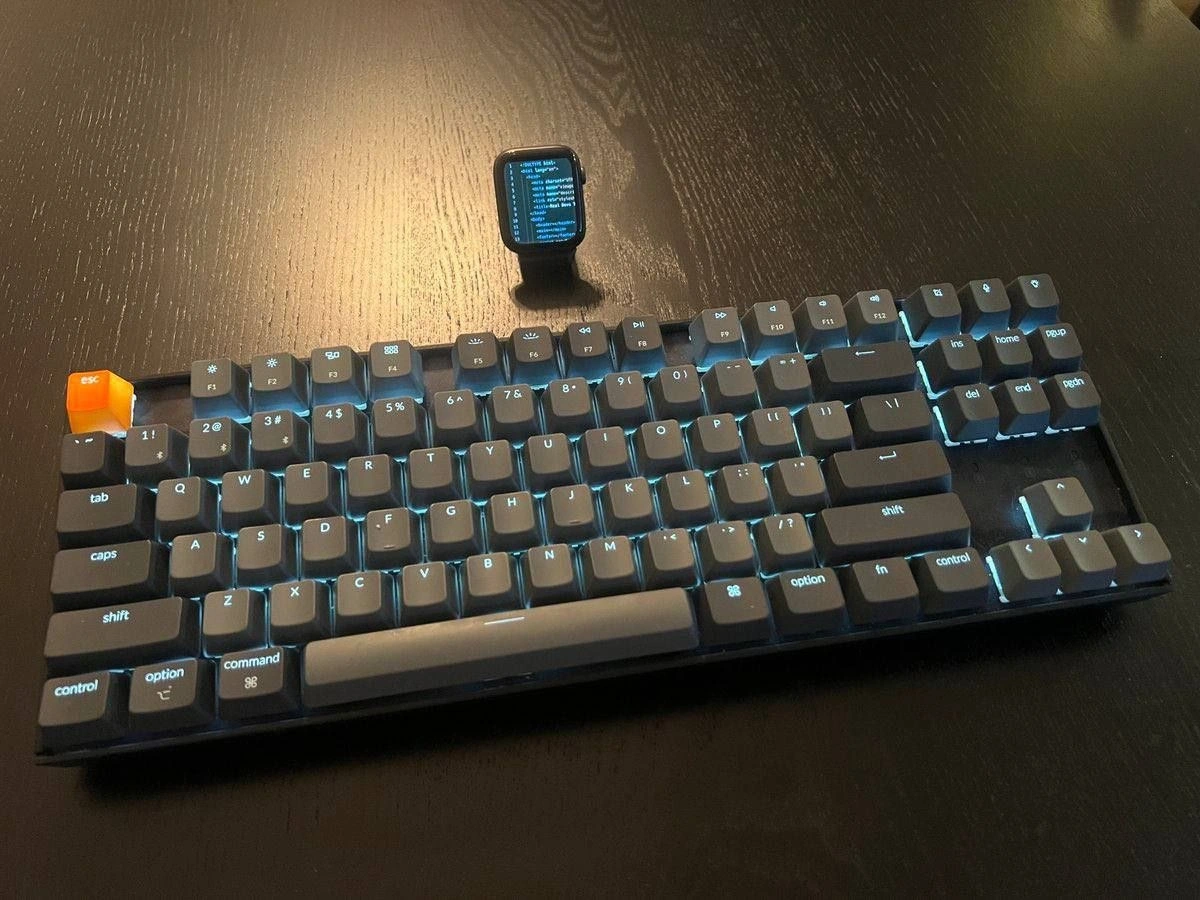
Developer desk flex: glowing keyboard with orange ESC and smartwatch task monitor
DeveloperExperience DX Post #5785, on Jan 8, 2024 in TG

Developer desk flex: glowing keyboard with orange ESC and smartwatch task monitor

Why is this DeveloperExperience DX meme funny?

Level 1: Fancy Tools for Work

Imagine a person who really loves their work setting up their desk almost like a fun control center. They have a shiny keyboard that lights up in the dark with a bunch of cool colors, and one special key (the “escape” key) is bright orange – kind of like a big red stop button, but orange, to make it stand out. It’s like when someone puts a colorful case on their phone or a sticker on their notebook to make it unique. Now, besides that keyboard, this person also uses their smartwatch (the little computer watch on their wrist) as a mini information screen on the desk. It’s as if they wrote their to-do list on a tiny notepad and propped it up next to them, so they can always see what to do next without even opening a notebook. In simple terms, this picture is funny because the developer is showing off how they turned their work desk into a high-tech cockpit. They have fancy tools that glow and a watch that shows tasks – all to make work a bit more fun and efficient. It’s like a chef with a customized bright-handled knife and a tiny recipe card taped to their wrist: a personal, playful way to be ready for anything. The joke is that most people don’t need their watch to act like a second computer screen, but this person is so into their work and gadgets that even their watch is part of the setup. It’s cool and a little over-the-top, and that’s why it makes tech folks smile.

Level 2: Bright Key, Busy Watch

At a glance, this meme shows a programmer’s desk with two eye-catching gadgets. First, the mechanical keyboard: unlike a regular cheap keyboard, a mechanical keyboard has individual physical switches under each key, which give a satisfying feel and sound when pressed. Many programmers love these because they’re more durable and create a tactile response for each keystroke (some say this helps them type more accurately or just makes typing more enjoyable). Here the keyboard is compact – it has all the letters, number row, and even the function keys (F1–F12) and arrow/navigation keys, but it’s smaller than a full desktop keyboard because it likely left out the numpad. All the keys are glowing with a soft cyan light from underneath. That glow comes from tiny LEDs under each keycap, a feature of a backlit_keyboard. The keys’ legends (the symbols like Q, W, E or 1, 2, 3, etc.) light up so you can see them in the dark. It’s not only practical for late-night coding, but also gives a cool high-tech look. One key in particular really stands out: the esc key at the top left is bright orange. This is a custom keycap – basically, the user popped off the normal escape keycap and replaced it with a special colored one. The escape key (short for “Escape”) is the key you press to exit or cancel things (for example, closing a dialog, stopping a program, or exiting an editing mode in vim). By making it orange and translucent, the developer turned it into a little highlight of the keyboard. It’s partly for fun style (showing personality – maybe orange is their favorite color or they want that emergency “get me out!” button to be visible), and partly an inside joke (we hit ESC a lot in coding, it’s a beloved key for vim users and for canceling mistakes). This whole keyboard setup is a reflection of developer ergonomics and taste: mechanical switches for comfort and speed, a compact layout for efficiency, and personalization to make the workspace feel enjoyable. When we talk about DeveloperExperience_DX, it includes these kinds of tools – a comfortable keyboard can actually make a coder’s day better the same way a good chair or nice monitor can. And yes, many developers working from home like to deck out their desk_setup with such gear since they spend so much time at the keyboard. It’s both a hobby (collecting keycaps, tuning the keyboard’s sound/feel) and a way to optimize their work environment.

The second gadget on the desk is that small screen propped up behind the keyboard – that’s an Apple Watch, a type of smartwatch. Normally, people wear it on their wrist to see notifications, health stats, or the time. Here, it’s placed on a stand so it behaves like a mini-monitor. The watch’s screen shows a “task list:” with bullet points. It’s very tiny, but it suggests the developer has set up their watch to display their current tasks or maybe the status of something like a build or deployment. This is a clever (if a bit humorous) example of integrating developer tools into everyday devices. Instead of checking a to-do app or a continuous integration dashboard on their computer, this person can just glance at their watch (sitting next to their keyboard) to see updates. It’s like having a personal dashboard always in view. For instance, they might have a list of coding tasks for the day or an app that lists whether the latest code tests passed or failed. By using the watch as an apple_watch_monitor, they’re effectively adding another screen to their workspace – and developers love extra screens! Even though the Apple Watch’s display is very small, tech enthusiasts enjoy making information available at a glance. It’s reminiscent of those live feed monitors some offices have on the wall, but shrunken down. This could be practical (no need to switch windows to check your to-do list, just look over at the watch), but it’s also a bit of a HardwareHumor moment because it’s a lot of effort to use such a tiny device for something your laptop could show you. It shows how devoted developers can be to Tooling and staying on top of things: even their watch becomes a part of the coding workflow.

All together, this setup is a bit of a showpiece of the DeveloperLifestyle especially in a WorkFromHome era. The dark wooden desk with the glowing keyboard and the watch makes for a cool, almost futuristic aesthetic. Other devs or techies seeing this will instantly recognize the developer_aesthetic: the mechanical keyboard (popular among coders for both function and fashion) and the creative repurposing of gadgets like the Apple Watch as auxiliary screens. It’s the kind of thing you might see shared on social media or developer forums under “battle stations” or workspace setup threads, where people bond over their customized equipment. For a junior developer or someone new to this world, the key takeaway is: developers really care about their tools and environment. The better and more personalized the setup, the more comfortable (and proud) they feel while working. A glowing keyboard with a fun orange escape key can make coding feel a bit more enjoyable (and it’s a great conversation starter: “Hey, where did you get that keycap?”). And having your task list on your smartwatch is about staying productive and on track in a novel way. It might even inspire you to think: what little improvements or personal touches can I add to my workspace to make it feel truly mine? Just as a gamer might use a special controller or a graphic designer might have a fancy pen tablet, a developer’s keyboard and tech gadgets are extensions of their work—and sometimes even their identity at work. This meme humorously showcases that by concentrating a bunch of DeveloperExperience upgrades in one photo. It says “I take my coding (and my setup) seriously, but I’m having fun with it too.”

Level 3: Keycaps and KPIs

This meme is a celebration of developer gadgetry: a tricked-out mechanical keyboard with a bright orange custom keycap on the esc key, plus an Apple Watch repurposed as a tiny task dashboard. For seasoned developers, it hits two beloved themes at once: the mechanical keyboard subculture and the obsession with real-time metrics. Let’s break that down. On the keyboard side, we see a compact layout (no numpad, likely a 75% board) sporting backlit keys glowing in cyan. Every key – from F1 to _home_ to cmd – is individually lit. This is more than just bling; in the mechanical keyboard world, per-key RGB backlighting is practically expected. It’s both functional (typing in the dark during a late-night coding session or on-call incident) and aesthetic (the developer_aesthetic of a neon-lit battlestation). The orange esc key stands out as an esc_key_highlight – a playful personal touch. Experienced devs know the ESCape key is our get-out-of-trouble button (whether it’s canceling a runaway script or exiting Vim without crying for help). Making it bright orange is half joke, half pride: it’s the flashy emergency exit sign of the keyboard. This kind of customization is pure HardwareHumor and hobbyist flex; it doesn’t make the code compile faster, but it sparks joy.

Under the hood, a mechanical keyboard like this likely uses Cherry MX-style switches or similar, each with a satisfying tactile or clicky feel. That tactile feedback is a big part of DeveloperErgonomics – long-time coders often invest in a quality keyboard to protect their wrists and enjoy typing, since we do it all day. There’s an entire ecosystem of DeveloperTools around keyboards: custom firmware like QMK that lets you program your own key macros and layouts, n-key rollover for flawless multi-key combos, and artisanal keycaps for every mood. In fact, swapping a keycap (like that orange escape) is an entry-level hardware hack: pop off the old key, press on the new – akin to changing the knob on a gear shift to feel like a race car driver. It’s about personalization and control. A senior dev might chuckle because they’ve seen this pattern: when you spend all day wrestling with abstract code, sometimes you reclaim a sense of control through tangible hardware tweaks. It’s a harmless outlet for creativity (and procrastination): customizing your tools becomes a mini-project itself. “I can’t fix that production bug right this second, but I can make my escape key bright orange.” Priorities, right?

Now, the second half of this HomeOfficeSetup flex is the Apple Watch standing upright behind the keyboard, acting as a miniature monitor. The watch screen says “task list:” with a bullet list so tiny you can barely read it – which is itself part of the joke. Only an extreme gadget enthusiast (or someone with eagle eyesight) would use a 1.5-inch screen as a status dashboard. But for veteran developers, there’s a ring of truth: we love having metrics everywhere. Continuous integration build statuses, server health, to-do tasks, incoming tickets – you name it, we’ve piped it to some dashboard. There are devs with dedicated wall-mounted screens showing Grafana graphs or Jenkins pipelines. Here, that impulse has been playfully shrunk to smartwatch size, literally squeezing productivity metrics onto every surface. It’s both absurd and admirable. Thanks to modern tooling, a watch can indeed display live data: maybe it’s showing a CI/CD pipeline status (green checkmarks vs. red fail icons), or a real-time checklist of coding tasks for the day. The apple_watch_monitor setup suggests this developer has integrated their workflow deeply – possibly using an app or custom script to feed updates to the watch. A senior engineer recognizes the tongue-in-cheek ambition: “Why stop at dual monitors when you can have a wrist monitor too?” It’s DevOps on-the-go, a WorkFromHome luxury where nobody is around to question why you have a Jira backlog on your wrist. And because this watch is propped up on a stand, it doubles as a tiny always-on display, like a mini standalone dashboard next to your main screen. The humor is that it’s overkill – checking your tasks could surely be done on your computer or a normal monitor – but the dedicated watch screen is a flex. It says, “I’m so on top of my workflow that even my watch is part of the setup.” It’s DeveloperLifestyle satire: the line between work and personal gadget is blurred in the quest for optimization.

Ultimately, experienced devs see both a bit of themselves and a bit of absurdity here. It’s cool – a desk_setup that’s clean, high-tech, and personalized – and it’s also a mild parody of the ultra-productive coder stereotype. We’ve got the custom_keycap highlighting the escape hatch (maybe an ironic reminder to take breaks or bail out of bad code), and a smartwatch performing duties far beyond telling time (because why not monitor your task_list_on_watch as you type?). In practice, implementing this might involve fiddling with integration APIs, configuring an Apple Watch app or complication to display your task feed – the kind of yak-shaving a seasoned dev finds both fun and hilariously unnecessary. The senior perspective nods knowingly at how developers love to optimize the experience of development itself: better tools, cooler gadgets, more screens (even 1.5-inch ones). It’s an expensive joke we justify as boosting productivity, but deep down it’s also about joy and pride in our craft. After all, if you’re going to spend hours debugging, you might as well do it on a glorious keyboard and have your watch cheer or jeer at you with every build. This post captures that ethos: a blend of genuine DeveloperExperience_DX improvement (quality keyboard, quick-glance task tracker) and humorous extravagance. It’s a reminder that sometimes the smallest comforts (the thock of a key press, a quick wrist glance instead of alt-tabbing) can keep us going through long coding sessions. And when seen by fellow devs, it’s an instant camaraderie moment – “Haha, I see your hardware flex. Nice one.”

Description

A dark wooden desk hosts a compact back-lit mechanical keyboard whose legends glow cyan. Every key is labeled, including the orange translucent “esc” key, the function row (f1 - f12), number row “1 !”, “2 @”, “3 #”, “4 $”, “5 %”, “6 ^”, “7 &”, “8 *”, “9 (”, “0 )”, navigation cluster “ins”, “home”, “pgup”, “del”, “end”, “pgdn”, and modifier keys “tab”, “caps”, “shift”, “control”, “option”, “command”, and “fn”. Letter keys “q w e r t y u i o p”, “a s d f g h j k l”, and “z x c v b n m” are also visible. Behind the board an Apple Watch stands upright, its tiny blue-on-black screen headed “task list:” followed by unreadably small bullet lines, implying a live dev checklist or CI status feed. The bright custom keycap and macOS-style legends nod to the mechanical-keyboard subculture and developer ergonomics, while the watch doubles as a miniature dashboard - an inside joke about squeezing productivity metrics onto every surface
Comments

32
Anonymous ★ Top Pick Achieved peak DevOps minimalism: swapped in an orange ESC for one-stroke rollback and compressed the entire Grafana board onto a 44 mm watch face - our SEV-1s are now literally too small to see
  1. Anonymous ★ Top Pick

    Achieved peak DevOps minimalism: swapped in an orange ESC for one-stroke rollback and compressed the entire Grafana board onto a 44 mm watch face - our SEV-1s are now literally too small to see

  2. Anonymous

    After 20 years of optimizing build times and reducing Docker images to mere kilobytes, you finally achieve peak efficiency: your entire development environment now fits on your wrist, but you still need a mechanical keyboard because let's face it, typing 'git push --force' on a 44mm screen would violate the Geneva Convention

  3. Anonymous

    When your Apple Watch has better syntax highlighting than your production monitoring dashboard, but at least you can debug on your wrist during standup meetings. The orange ESC key is perfectly positioned for those moments when you realize the 'quick fix' you deployed at 4 PM Friday is now paging you at 2 AM - though with that keyboard, you're probably already awake optimizing your keybindings anyway

  4. Anonymous

    Made ESC hi-vis because at 3 a.m. it’s the only idempotent API I trust - exits Vim, exits Zoom, exits that “low‑risk” kubectl apply while PagerDuty is buzzing on my wrist

  5. Anonymous

    The only code that fits on my watch: everything else accrues technical debt by the millisecond

  6. Anonymous

    Incident response optimized: tail -f on the smartwatch; Esc bound to ‘rollback --now’. MTTR is now measured in thumb travel

  7. @ZgGPuo8dZef58K6hxxGVj3Z2 2y

    When other devs are looking: I use wim on my 69 core 1TB RAM machine, with 5K ultra-wide monitor used in portrait mode Every developer when nobody is looking:

    1. @Diotost 2y

      Vim?

      1. @ZgGPuo8dZef58K6hxxGVj3Z2 2y

        Nah kim

  8. @leklaanc 2y

    Finally, Mini PC

  9. @sylfn 2y

    please use English in this chat

  10. @sylfn 2y

    https://t.me/dev_meme/3667 tr(ru>en) "Is this how development for watch looks like? I know nothing about this"

  11. @WaterCat73 2y

    I suppose, it's almost the same as android development — programm is written on a computer, launched on an emulator, but tested on the device

  12. @dwanford 2y

    Keychron K8?

    1. @etozhesoneika 2y

      seems so

  13. @callofvoid0 2y

    where are keypad alt and window keys?

    1. dev_meme 2y

      This is a TKL keyboard with mac layout, option = alt, cmd=win, google 60% keyboards, you'll be surprised. I personally love working on a 60% but it's always a question of preference.

  14. @c01dstee1 2y

    Why do you need a keypad? Are you an accountant?

    1. @Nefrace 2y

      Someone with 3D software actually might need that

    2. @alexandr_guluta 2y

      i have a bunch of keybinds on it

      1. @c01dstee1 2y

        So you do not use it as a keypad, i see...

        1. @SamsonovAnton 2y

          Numpad is the most ergonomic and error-free way to enter numbers. Not only accountants do that. ("Decimal numbers, mf, do you use them?") Not to mention that these keys are also very useful for gaming, even more so that they are placed regularly rather than staggered like letter keys.

          1. @Stepan_Poznyak 2y

            Left numpad would be much better. And not a lot of people really need it. Also, you can make numpad-layer under YUIHJKNM, and with orto keyboard it would be even more ergonomic than left numpad

            1. @SamsonovAnton 2y

              Left numpad would be much better. If you are left-handed, then yes, perhaps. Otherwise it will be nearly useless. You can make numpad-layer under YUIHJKNM, and with orto keyboard it would be even more ergonomic than left numpad. If you are fond of undersized laptop keyboards (and maybe tiny on-screen keys of cell phones) with their screwed layouts and Fn combos, then why don't you just use one and leave desktop keyboards in peace for those who are totally comfortable with them?

              1. @Stepan_Poznyak 2y

                No, if you are right-handed. You use mouse with main hand and using mouse, numpad and keyboard with one hand is very unoptimal.

                1. @SamsonovAnton 2y

                  When gaming — yeah, sure. But even then I need it to the right of cursor keys, not elsewhere. When entering numbers with numpad — nah, I use the right hand.

                  1. @Stepan_Poznyak 2y

                    For what? Left hand is not so useless. And about numpad-layer - if it is under letters, you dont need to move hand somewhere from keyboard and position it. Thats not about compactness, thats about ergonomic

                    1. @callofvoid0 2y

                      left hand for wasd eq shift ctrl alt tab right hand for numpad mouse enter home and others

                    2. @SamsonovAnton 2y

                      Are you a vim user? 😁

              2. @Stepan_Poznyak 2y

                No, laptop keyboards are very bad for me. But why do I need to use standart desktop keyboards if I can buy comfortable and ergonomic keybpard?

  15. @denis_klyuev 2y

    Rate my setup? ©️

  16. @GlassySundew 2y

    imagine coding using clock's on-screen keyboard

Use J and K for navigation