
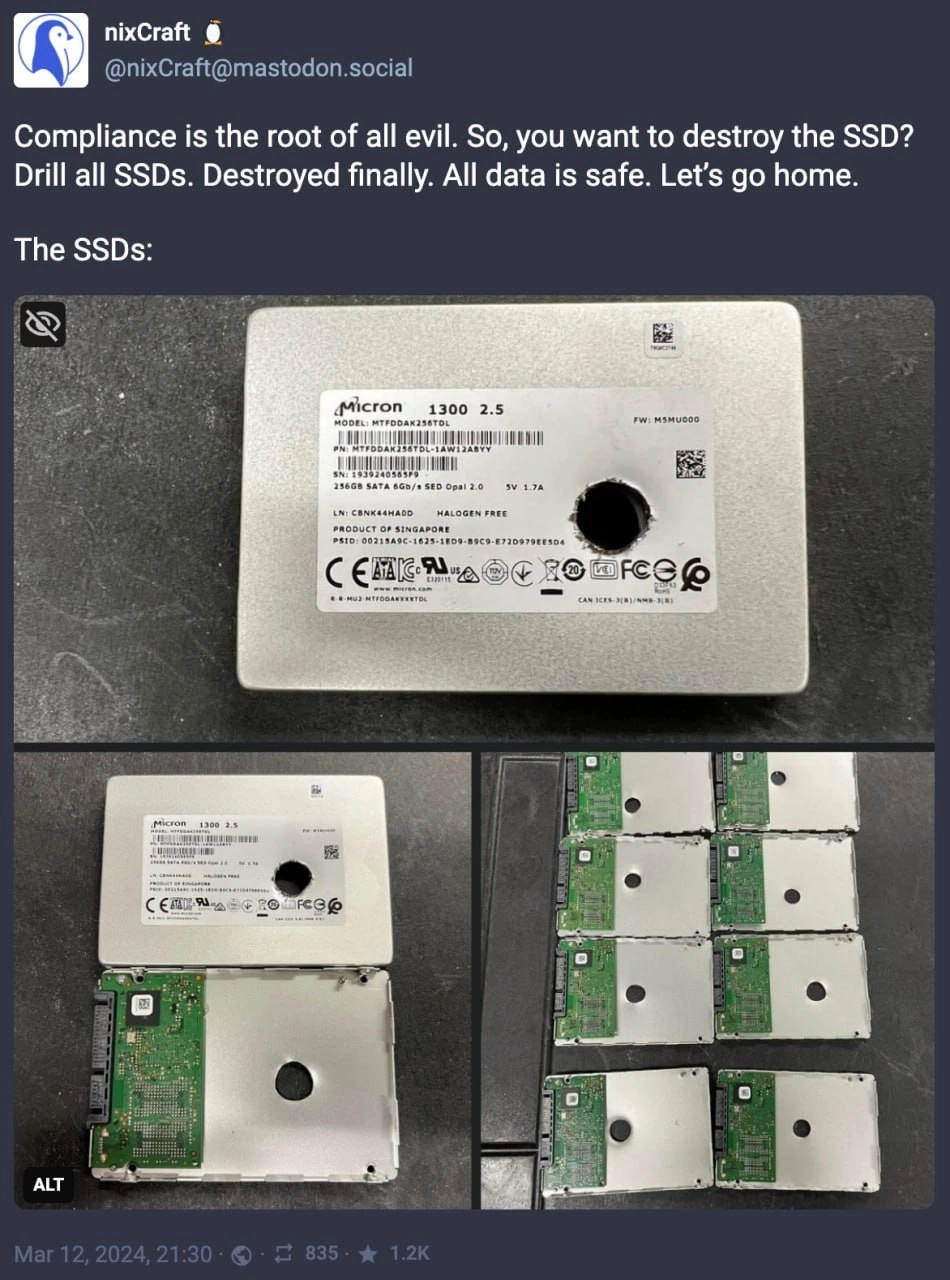
How to Securely Not Destroy Data on an SSD
Description
A screenshot of a Mastodon post from the account 'nixCraft'. The post's text humorously describes a data destruction process: 'Compliance is the root of all evil. So, you want to destroy the SSD? Drill all SSDs. Destroyed finally. All data is safe. Let's go home.' Below this text, a series of three images reveals the punchline. The first image shows a 2.5-inch Micron SSD with a clean hole drilled directly through its center. The second image shows the same type of SSD with its case opened, revealing that the drilled hole passed through an empty section of the enclosure, completely missing the green printed circuit board (PCB) where the actual data-storing NAND flash chips reside. The final image displays a pile of similarly 'destroyed' SSDs, all with holes in the same ineffective location. The technical joke is that this physical destruction method is completely useless, as the core storage components are untouched and the data remains fully recoverable. It's a classic example of someone following a procedure without understanding the underlying hardware, perfectly illustrating the concept of 'compliance theater' for a technical audience

Comments
48Comment deleted
This must be that new 'air-gapped storage' I've heard about. The data is perfectly safe, insulated from the drill bit by a pocket of incompetence
Compliance said “physical destruction trumps crypto-erase,” so Ops swapped a 2 ms key wipe for a 2-inch drill bit - auditor happy, NAND intact, and we’ve basically reinvented write-hole amplification
After 20 years in the industry, I've learned that drilling SSDs for compliance is like using a sledgehammer on a Rubik's cube - sure, it looks destroyed, but somewhere a forensic analyst with an electron microscope and too much coffee is already planning their conference talk on 'Recovering Data from Mechanically Damaged NAND Flash: A Case Study in Why Your Compliance Officer Should Have Called Engineering First'
Ah yes, the classic enterprise approach to data security: when your compliance officer discovers that 'secure erase' is just a TRIM command and decides the only trustworthy cryptographic algorithm is a 3/8" drill bit running at 2000 RPM. Because nothing says 'we take GDPR seriously' quite like turning your self-encrypting drives into Swiss cheese - ironically making the hardware-level AES-256 encryption completely moot. At least now you can confidently tell auditors that your data retention policy is 'physically impossible to violate.'
ATA Secure Erase? Compliance says 'cute,' grabs the drill for that enterprise-grade ventilation
Compliance asked us to destroy the SSDs, so we drilled the one spot with no NAND. Audit passed, electrons unchanged - security theater so good the FTL didn’t even remap
Opal SEDs can PSID‑revert in seconds, but the policy said “one hole per drive” - the security equivalent of 100% test coverage on mocks
Explain pls Comment deleted
ssd's are not harddrives, they are pretty small and might not be in a place where you drill a hole Comment deleted
to destroy hdd u just drilling disk, but with ssd - it's not that simple Comment deleted
Question is, how did they miss the fact that they've only drilled through thin metal? Comment deleted
cuz why would he give a fuck Comment deleted
Fair Comment deleted
That's the joke. Comment deleted
But it can destroy metadata which points to clusters Comment deleted
Lol, that's literaly my SSD. Comment deleted
I'd bet that most SATA SSDs are like that Comment deleted
It was 256 gb ssd from old and cheap laptop. Comment deleted
Makes sense. But really, it kinda is a shame that a lot (if not all, really) of SATA SSDs just have a lot of empty unused space Comment deleted
Even more shameful is that those drives lack proper cooling and overheat quickly, throttling themselves to near-zero speeds. Comment deleted
yeah, that kind of design does not accommodate the potential thermal issues, all the more reasons to not use SATA SSDs Comment deleted
... or use properly designed 2.5" SATA SSDs — with internal heat spreaders. Comment deleted
or that, yeah Comment deleted
safety by redundancy Comment deleted
I can't pick words to describe how much I hate that empty space on top Comment deleted
why Comment deleted
waste of materials Comment deleted
Just put it in the microwave lol Comment deleted
It's mean that I must use a powerful magnet to make it unreadable? Comment deleted
Like packaging from 80s-90s, lots of landfill for a tiny nugget Comment deleted
I am reminded of SIM cards Comment deleted
True, shitload of plastic for (currently) nano SIM Comment deleted
ATA Secure Erase? No, we do not do that. Comment deleted
Encrypt All The Sensitive Data Comment deleted
The drives are OPAL 2.0 compatible Comment deleted
"All" tends to be difficult. You need something to boot from etc. What I do though is to keep encryption keys / LUKS header on different device than the data. So one is useless without the other. Comment deleted
No, but it definitely raises the bar significantly. Like a lab with expensive SEM and many days of tedious work significantly. Comment deleted
So is your ESP / MBR encrypted? Have you flashed coreboot with built-in decryption keys to your mainboard? How do you protect those? :-] Comment deleted
actually there is enterprise disk shredder https://www.youtube.com/watch?v=4dR5lbF5-wo&t=239s Comment deleted
Serious question: DoD erasing is effective on SSD disks? Comment deleted
Since disks started doing bad block relocation (which is crucial for SSDs) you have no guarantee from any software erase that it can go through all the relevant blocks. Hence, encrypt stuff first before it hits the disk. Even if you didn't password protect it the specific block holding the master key would have to be preserved for any other data there to be of use. And you have much better chance of securely erasing 256 bits of a key information than 1TB which all may or may not be sensitive. Comment deleted
Actually there is no kind of soft method to absolutely entirely erase data on ssd and hdd. Comment deleted
No need to actually erase the data if you can just drop the encryption key. Self-encrypting drives with "Instant Secure Erase" function do just that. Comment deleted
Break the fragile silicon chip into fragment is much safer. Comment deleted
oh— @purplesyringa Comment deleted
@RiedleroD Comment deleted
Imagine using int data type for a transaction and using a separate bool to set its negativity which is called “isNew” Comment deleted
Week ruined Comment deleted