Skip to content
DevMeme
425 of 7435
A Developer's Definition of Success: 0 Errors, Many Warnings
Compilers Post #492, on Jul 25, 2019 in TG

A Developer's Definition of Success: 0 Errors, Many Warnings

Why is this Compilers meme funny?

Level 1: It Still Works!

Imagine you’re baking cookies with a friend. While the cookies are in the oven, the kitchen fills with some smoke and the oven lets out a few loud “beep! beep!” warnings. 🔔🚨 Your friend gets really worried – so much smoke and beeping must mean the cookies are burning, right? But then the timer dings, you open the oven, and guess what? The cookies are a little brown on the edges but totally okay and yummy. You’re relieved and happy – the cookies are done and edible! 🍪👍 There’s no disaster after all. You proudly say, “See? No problems, we have cookies!”

Your friend, coughing at the smoke, is baffled. “But the oven was warning us! There was smoke everywhere!” they exclaim. To them, all those warning signs meant the baking was going wrong. But to you, since the cookies came out fine in the end, those warnings were just “noise” – maybe the oven is a bit sensitive or the recipe always smokes a little. The important part: you got 0 burnt cookies.

In this story, you’re like the programmer who sees 0 errors (no burnt cookies 🍪), and your friend is like someone who doesn’t program, alarmed by the 64 warnings (the oven beeps and smoke). The programmer feels proud and satisfied because the program (cookies) turned out okay. The friend is worried because they saw a lot of warning signs along the way and thought it would all catch fire.

So why is this funny? It’s showing how developers sometimes celebrate “it works!” even if along the way the computer was hollering warnings. It’s like saying: “Phew, I got a passing grade!” even if the homework had a bunch of red pen marks all over it. The emotion at the core is relief and pride on the developer’s side, and confusion (or shock) on the friend’s side. One person is basically saying, “Hey, it’s all good, the result is fine!” while the other is saying, “But didn’t you see all those warning signs?!” This gap in perspective makes it comically clear how people who write code get used to a bit of mess or caution signs as long as the end result works out. In plain terms: if it ain’t completely broken, we’re happy. And that’s the playful punchline – the developer is as happy as a dragon who just found treasure, even though the journey had plenty of smoke and warnings, because ultimately, it still works!

Level 2: Green Light, Yellow Flags

Dropping down to a more straightforward explanation – let’s talk about what’s actually happening in this meme’s scenario. When we compile code (turn the human-readable source into machine code a computer can run), the compiler performs a series of checks. If it hits a compiler error – say a serious mistake in the code like a syntax error (e.g. missing a ; or using a variable that isn’t defined at all) – it will stop the build. Think of errors as show-stoppers: the compiler cannot produce an executable if even one error is present. In contrast, a compiler warning is more like a caution or heads-up: it means “Hmmm, this looks odd or risky, but technically I can still make the program.” Warnings do not stop the compilation. The code still turns into a running program, but the compiler is advising you that something might be improved or could lead to problems later.

In build outputs (the build logs), warnings are often highlighted differently – sometimes in yellow or prefaced with words like “warning:” – whereas errors are in red or say “error:”. Many development tools or IDEs even use 🚦 color coding: green means everything succeeded, yellow for warnings, and red for errors. So when the meme says “the exit code stays green,” it’s referencing the common practice that if a program compiles with only warnings, the final result is still success (often shown as green in a CI dashboard or with a message like “Build successful”). The exit code is a number the compiler program returns when it finishes: by convention, 0 means success (green), and any non-zero number means a failure (red). So, 64 warnings and 0 errors would result in an exit code of 0. It’s like the compiler saying: “I made your program, but I have 64 things to warn you about.” Yet, because that code is 0, automated build systems treat it as a pass.

To someone who’s not familiar with coding, seeing 64 warnings flash by would be scary – it’s like the computer is yelling “Warning! Warning!” repeatedly. A non-programmer friend might reasonably ask, “If there are dozens of warnings, how is this okay? Doesn’t warning mean something’s wrong?” In everyday language, yes, a warning sounds bad. But in programming, we distinguish levels of severity. Here’s a quick comparison for clarity:

Warning (🟡 Caution) Error (🔴 Stop)
Indicates a potential issue or bad practice, but not a definite show-stopper. Indicates a definite problem that violates the rules of the language or environment.
Does not halt the compile process. The compiler still produces an output (program is created). Does halt the compile. No runnable program is generated until this is fixed.
Example: “Unused variable” – you created a variable and never used it. The program runs, but that variable was pointless. Example: “Missing ;” – the code syntax is broken, so the compiler can’t understand the program until you fix it.
Generally safe to ignore temporarily for testing, but should be reviewed. The program might work fine, though there’s a chance of weird behavior or inefficiency. Cannot be ignored. The program won’t run at all until you resolve this. It’s a mandatory fix.
Often shown in yellow (or logged with the word warning). Many projects allow these and still consider the build successful. Shown in red (or logged with error). Even a single error makes the build fail (unsuccessful).

In the meme, the friend is essentially focusing on those 🟡 yellow flags (“64 warnings?! That sounds bad!”). The developer is focused on the absence of any 🔴 red flags (“0 errors! We’re good!”). This highlights a common scenario in the BuildProcess of large projects: you might have a bunch of warnings that developers deem “non-critical” at the moment. They might be things like: using a deprecated function (it still works, but there’s a newer recommended way), an unused import or variable, a variable that could potentially be null (but maybe you know it isn’t in practice), slight type mismatches that the compiler can auto-correct, etc. Each of those will trigger a warning message in the log. Individually, each warning is a suggestion: “Hey, maybe clean this up?” But when you have 64 of them, it can look pretty intense on screen – like a whole list of concerns.

Why would a developer not fix warnings immediately? Several reasons, especially in a big codebase:

  • Priorities: If the code compiled and passed basic tests, a team under time pressure might decide not to spend time on non-critical fixes. For example, if it’s 5 PM and the feature works, they might push it and plan to handle warnings later. (There’s even a joking phrase, “Ship it now, fix it later.”)
  • Known benign warnings: Developers often learn which warnings are relatively harmless. Maybe a library always causes a certain warning that doesn’t actually affect the program’s behavior. After seeing it 100 times, the team just collectively ignores it.
  • Lack of awareness: A junior dev or non-dev (like the friend in the meme) may not know the difference, but an experienced dev knows that some warnings are just the compiler being overly cautious. They might say, “Yeah, the compiler warns about X, but in our case that’s not an issue because of Y.”
  • Tools and settings: Some projects choose to enable lots of extra warnings (for thorough code quality checking), but they might not treat them as build errors. So you might intentionally allow warnings to surface as hints, but still let the build succeed. This is common when migrating old code – you turn on warnings to gradually improve things but can’t afford to break the build over them yet.

The result? It’s not unusual for a large program or a complicated project to compile with dozens of warnings. Developers get used to scanning the log quickly: they often scroll past the repetition of familiar warnings and just look for any error lines. They celebrate when they see “Build succeeded” or a green checkmark at the end, because it means the program compiled into something that can run. The exit code being green (zero) is literally the signal that “all is okay enough.” Many build systems and continuous integration tools (like Jenkins, Travis CI, etc.) will even highlight the build as green if there are only warnings. This fosters a bit of zero_errors_pride: the developer feels proud or relieved that nothing absolutely critical broke. Meanwhile, an observer like the friend might still be perplexed: “But those warnings…?”

To someone new to coding or outside of it, we often explain it like this: Errors are like a flat tire – you’re not going anywhere until you fix it. Warnings are like a “check engine” light – the car still runs, but you should check it out eventually. In code terms, as long as we get that green light (no errors), we have something to run and test. CompilerErrors must be dealt with immediately (they’re red stops), whereas compiler_warnings are advisory (yellow cautions). The meme perfectly captures this difference in perspective. One character sees the check-engine light and panics, the other is just happy the car is still moving. For better or worse, a lot of us developers sometimes drive with the check-engine light on 😅.

And about that number 64 – that’s a lot of warnings, and it’s intentionally over-the-top to amplify the joke. But to be honest, 64 warnings isn’t unheard of in real projects. Many of us have seen builds scroll thousands of lines of warnings. (At some point, you just tune it out, exactly like the dev in the meme.) Ideally, teams strive to reduce these over time – perhaps dedicating some days to clean-up – because fewer warnings do mean cleaner, more maintainable code. Some teams adopt a strict policy: treat warnings as errors (with flags like -Werror). That forces the build to fail if any warning appears, keeping the codebase super clean. But not every project is that strict, especially older ones. So it really depends.

In summary, the meme is showing: CompilingCode can produce warnings that look scary, but from a developer’s viewpoint, only errors truly signify failure. The friend (non-programmer) sees lots of “problems” in the log, but the developer sees a successful build (the green exit code or “0 errors”). It’s a classic case of “all that glitters isn’t gold” — or rather “all that screams isn’t a show-stopper.” The cultural gap is that developers have an internal filter: they differentiate between loud warnings and critical errors, whereas outsiders just see “a lot of scary text.” That difference is exactly what makes this meme funny and RelatableDevExperience for programmers. We chuckle because we’ve been the person saying “Don’t worry about the warnings, it’s fine!” while our friends or junior devs give us the exact face of that white dragon.

Level 3: It Compiles, Ship It

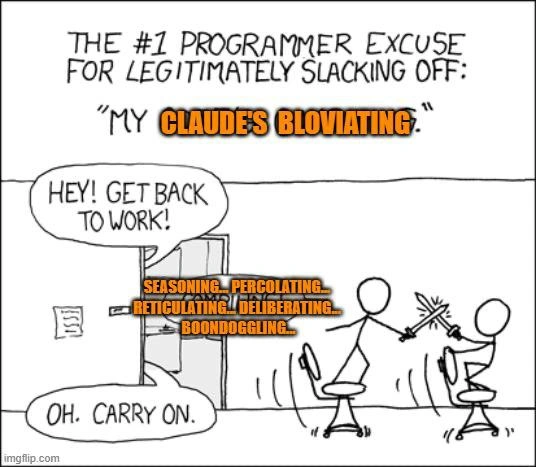
At the most seasoned developer level, this meme hits on a classic developer reality: as long as the code compiles with 0 errors, it's a victory – even if the compiler is screaming with dozens of warnings. The top panel shows Toothless, the black dragon from How to Train Your Dragon, joyfully representing “Me compiling a program”. This is the developer’s glee upon seeing a successful build. The bottom-left panel shows the Light Fury dragon, wide-eyed in horror as “Friend who’s not a programmer looking at 64 warnings”. To any non-coder (or even a junior dev), seeing 64 warning messages fly by in the build log is alarming – surely something’s wrong! But the experienced developer, depicted in the bottom-right lurking Hiccup image as “Me looking at 0 errors”, is totally unbothered. Why? Because the exit code is green (zero) – meaning the build didn’t fail. In developer terms, green means go: 🚦 the build passed, the compiler produced an executable, and thus life is good. The contrast is hilarious because it’s relatable dev experience: seasoned coders often develop a kind of warning blindness.

This blind spot comes from hard-earned experience in large, gnarly codebases. After working on a project that’s thousands or millions of lines long, you realize that fixating on every single compiler warning is a fast track to never shipping anything. Tight deadlines, legacy code, and third-party libraries all contribute to a wall of warning text that scrolls by during a build. Over time, developers start filtering out that noise. Those bright yellow or orange compiler_warnings in the log become like background music – you might nod along but not really hear it. The meme exaggerates this by showing 64 warnings (a notably high number – maybe one for each bit in a 64-bit system, ha!). The non-programmer friend’s face says, “Isn’t that bad??” Meanwhile the developer is just grinning from the bushes, basically saying, “No errors, no problem!” This dynamic captures the friend_vs_dev_perspective perfectly. One sees 64 problems, the other sees 0.

From a senior perspective, the humor also pokes at the perennial CodeQuality trade-off. We know we should strive for clean builds with no warnings – many style guides and CI pipelines encourage treating warnings as errors (using compiler flags like -Werror in GCC/Clang or MSVC’s /WX). In an ideal world, every warning would be addressed proactively: they often hint at real issues (like an unchecked null, a deprecated API, or an unused variable indicating a logic mistake). But in reality, teams often prioritize features and deadlines over pristine build logs. Warnings often accumulate over years because:

  • Technical debt: “We inherited 200 warnings from legacy modules. Fixing them might break something unexpectedly – better to leave them until a big refactor.”
  • New compiler versions: Each compiler update might introduce new warnings (e.g., stricter type checks). Instead of fixing all older code, teams sometimes just live with new warnings if functionality isn’t affected.
  • Third-party code: Your project might include open-source libraries that spit out warnings. You don’t always have control over those, so you either suppress those warnings or ignore them.
  • Time & resources: Fixing 64 warnings could take days of work and extensive testing for what might be “cosmetic” improvements. If the software works (no errors, passes tests), managers often prefer to ship now and maybe fix warnings later (which… often becomes never 😅).

So, developers become a bit jaded. The phrase “It compiles, ship it!” (half-joke, half-truth) reflects that feeling. We’ve all seen a continuous integration BuildProcess where the console log turns red with warnings but ends with a green checkmark indicating success. That green is what management cares about: it means the build succeeded and we can deliver the product. The build logs can “scream” all they want, but as long as they stay green, it’s full speed ahead. In fact, many of us have rejoiced at seeing “BUILD SUCCESS” after a long compile, accompanied by a sea of warning text we promptly scroll past. Zero_errors_pride is real – there’s a smug satisfaction in telling your team, “It built without errors!” and conveniently not mentioning how many things the compiler warned might be fishy.

The meme’s brilliance is how it uses the expressive dragon characters to embody this inside joke. Toothless’s goofy excited grin is the developer delighting in a CompilingCode moment that didn’t blow up. The friend’s dragon is practically recoiling at the chaos in the logs – reflecting how a layperson or a very conscientious newbie might react (“64 warnings!? That sounds terrible! Isn’t a warning a bad thing?!”). And then there’s the dev’s sneaky proud face in the shadows, like they just got away with something. It humorously frames the DeveloperHumor dichotomy: what looks like a code quality disaster to an outsider is business as usual to an experienced programmer who’s been hardened by years of messy builds. This kind of joke resonates in offices everywhere: the QA or a new hire might raise an eyebrow at all the yellow text in the build log, and the senior dev just pats them on the back saying, “Relax, it’s fine if it’s green.”

Yet, lurking beneath the laughter is a tiny bit of self-aware discomfort. Seasoned devs know that ignoring warnings is not a best practice. In a dark corner of our minds (much like Hiccup hiding in the bushes), we’re peeking out and hoping those warnings truly are benign. Sometimes a warning is indeed a harbinger of a real bug (maybe not enough to crash at compile time, but enough to bite at runtime). There’s that famous saying: “Today’s warnings are tomorrow’s errors.” But in the day-to-day hustle, we often silence that inner voice. The immediate gratification of a clean compile (zero errors) outweighs the abstract risk hinted by warnings. So the meme is also a wink at our guilty pleasure – the zero_errors_pride of seeing a green build, and the tacit agreement among devs to sometimes pretend the warnings aren’t screaming. In summary, the humor lands because it’s a RelatableDevExperience: building software is messy, and outsiders are often shocked to see how much “acceptable mess” goes into making something that works. As long as the final light is green, we developers are like Toothless: happy and ready to fly 🐉✨ – even if the takeoff was accompanied by a lot of warning alarms.

Description

A three-panel meme using scenes from the animated movie 'How to Train Your Dragon'. The top panel features the dragon Toothless looking proud and excited, with the caption 'Me compiling a program'. The bottom-left panel shows the Light Fury dragon with a confused and worried expression, captioned 'Friend who's not a programmer looking at 64 warnings'. The bottom-right panel shows the character Hiccup, hiding and giving a triumphant thumbs-up, with the caption 'Me looking at 0 errors'. The meme humorously illustrates the critical difference between compiler warnings and errors. To a non-programmer, a large number of warnings seems disastrous, but for a developer, achieving '0 errors' means the program has successfully compiled and is runnable, which is a moment of victory, even if the code isn't perfect
Comments

7
Anonymous ★ Top Pick Warnings are just the compiler's opinion. Errors are facts. And in production, we only deal with facts... and the occasional strongly-held opinion
  1. Anonymous ★ Top Pick

    Warnings are just the compiler's opinion. Errors are facts. And in production, we only deal with facts... and the occasional strongly-held opinion

  2. Anonymous

    Shipping with 64 warnings is fine - until the new intern flips on -Werror during Friday deploy and turns your "green" pipeline into a crime scene

  3. Anonymous

    Those 64 warnings are just the compiler's way of documenting why the next developer will need therapy - but hey, it ships today and that's tomorrow's architect's problem

  4. Anonymous

    The seasoned architect's mantra: 'Warnings are just the compiler's opinions, and I didn't ask for its opinion.' Meanwhile, the fresh-faced PM sees 64 warnings and schedules an emergency meeting to discuss 'critical system instability' - not realizing half of them are just deprecated API suggestions from dependencies we'll never upgrade anyway. Zero errors? Ship it. The warnings can ride along as undocumented features

  5. Anonymous

    64 warnings and 0 errors is the enterprise definition of done - enable -Wall/-Wextra/-Werror and watch your roadmap turn into a postmortem

  6. Anonymous

    A green build with 64 warnings is just CI without -Werror - a pre-approved change request for future incidents

  7. Anonymous

    'Treat warnings as errors'? That's for bootcamps - pros ship the binary and refactor in prod

Use J and K for navigation