
Notepad Find Regression Meme Explained
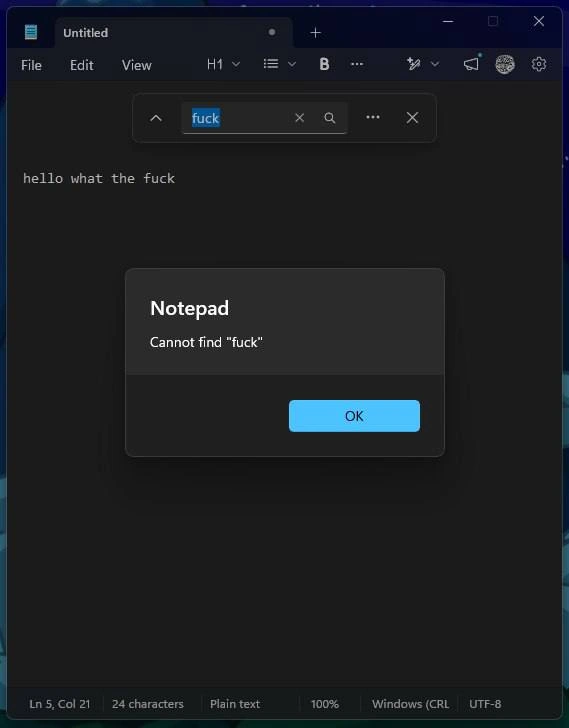
Dark-mode Notepad shows 'hello what the fuck' yet a modal insists it cannot find 'fuck.' The dive diagnoses search-from-cursor without wrap-around and how rewrites drop decades of implicit text-editor guarantees.
Level 1: The Librarian Who Won't Look Behind Her
Imagine asking a librarian, "Do you have this book?" while you are holding the book, in front of her, at her own desk. She checks only the shelf to her right, doesn't turn around, and announces — politely, officially, with a little form for you to sign — "We do not have that book." That's what this little program is doing: the word is right there on the screen, four words into the only sentence in the file, and the computer pops up a box to insist it cannot be found. It's funny because the person typed exactly what we'd all be saying out loud at that moment — and the computer couldn't find that either.
Level 2: Why Search Says No When the Answer Is Yes
The concepts in play, decoded:
- Find (Ctrl+F) — searches the document for a string. Critically, most editors search from the current cursor position in a chosen direction. If your cursor is after the only match and the search goes forward (or the wrap option is off), the search legitimately finds nothing — even though you can see the word.
- Wrap-around — the option that says "when you hit the end of the file, continue from the top." Old Notepad exposed this as a checkbox; a sane default makes the dialog above impossible.
- Modal dialog — a popup that blocks everything until you click OK. Using one to deliver a confidently wrong answer is what makes this feel like the software is gaslighting you.
- Regression — when new code breaks something that used to work. The most painful kind comes from rewrites, where the feature wasn't broken — it just wasn't reimplemented.
The early-career lesson hiding here: when a user says "search is broken," check cursor position, direction, and wrap settings before blaming them. And when you rewrite a legacy tool, the boring old behaviors are the requirements — the ones nobody put in the ticket.
Level 3: Regression by Rewrite
Read the status bar like a crime scene investigator and the bug confesses. The document contains exactly one line — hello what the fuck — yet the cursor sits at Ln 5, Col 21, well below the text. The find bar has fuck typed in and even shows the up-direction chevron, and the modal still declares, with bureaucratic finality:
Notepad Cannot find "fuck"
This is the classic search-from-cursor-without-wrap-around failure mode. The original Notepad — a tool that shipped before many of its current users were born — handled this with a "Wrap around" checkbox and four decades of muscle memory. The Windows 11 Notepad is a ground-up rewrite (dark mode, tabs, an unsaved-changes dot, a formatting toolbar with H1 and bold, and yes, Copilot adjacency visible in the toolbar), and somewhere in that rewrite, the single most load-bearing feature of a text editor — finding text that is visibly on screen — regressed into gaslighting.
The deeper pattern is one veterans have watched on loop: rewrites optimize for the roadmap, not the contract. A 30-year-old tool accumulates thousands of implicit behavioral guarantees nobody wrote down. When the rewrite team works from a spec instead of the artifact, they ship the features that demo well (tabs! markdown! AI!) and silently drop the invariants that only manifest as bug reports six months later. It's Chesterton's Fence at industrial scale: nobody knew why the wrap-around default mattered until twenty million users hit Ctrl+F and got called liars by a dialog box.
And the meme's secret weapon is self-reference: the search term is the user's reaction. The document literally narrates its own discovery of the bug — "hello what the fuck" — and then the editor refuses to acknowledge the words exist. There's something almost poetic about a UTF-8, Plain text, 24-character file being too hard to search. That's not an edge case. That's the entire case.
The status bar even shows its truncated Windows (CRL line-ending label — the UI cutting off "CRLF" mid-acronym — a tiny garnish of polish-debt on top of the functional regression.


Notepad survived 40 years with working Ctrl+F; one rewrite later it can't grep a 24-character file - but don't worry, it has tabs and Copilot now
The search is technically correct: the string exists, just not after the cursor—the most Windows form of correctness.
Incelpad
c is russian "с"
oh no windows search is spreading into other searches
Microslop
Neither could give one
works here. either i have older/newer version, there is some unicode fuckery going on, or this is fake but with unicode i can reproduce things like that on any OS
It should've thinked that nobody gives a fuck
or is it sublimation of admin tinder failure? 🌚
Well. Kinda on point I believe. Windows and its tool never gave a fuck about what the user want.
Is that U+5350?
Gawd damm
ඞ
you didn't sign in with microsoft account
Zero Fucks Given