
Unix Dotfiles Meme Explained
A tidy bedroom labeled ls versus the same room wrecked under ls -a maps how Unix hides dotfiles. The dive covers why config landed in $HOME, why XDG adoption stalled, and the cottage industry that manages the mess.
Level 1: Shoving Everything Under the Bed
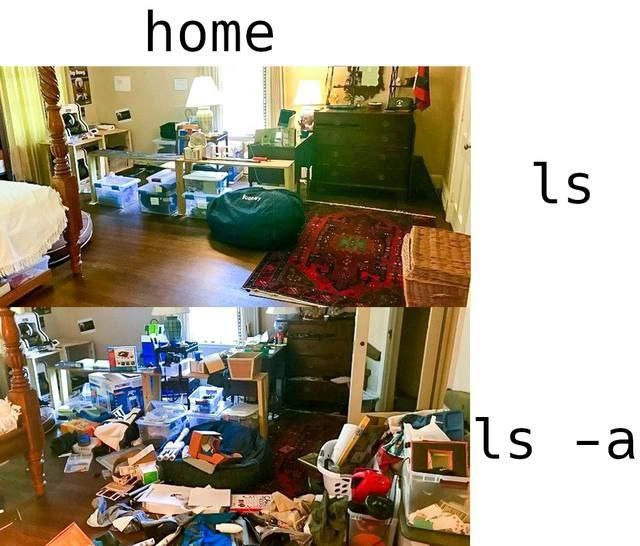
It's like a kid whose room looks spotless when their parents check — bed made, floor clear — because every toy, sock, and candy wrapper has been crammed under the bed and into the closet. Open those doors and the avalanche comes out. Your computer's personal folder does exactly the same trick: it shows you a tidy room by default, while every program quietly stuffs its junk just out of sight. The laugh is the relief of being caught: everyone's room is secretly the bottom picture.
Level 2: What the Dot Actually Does
lslists the contents of a directory. By default it omits any file or directory whose name begins with a dot (.), like.bashrcor.cache. These are called dotfiles or hidden files.ls -a(for all) reveals them. Nothing about them is secret or protected — the "hiding" is purely cosmetic, a display convention honored byls, file managers, and shell globbing.$HOME(or~) is your home directory — the personal folder where your shell starts and where applications, by long tradition, dump their settings, caches, command histories, and credentials as dotfiles.
So the meme's mapping is literal: the top photo is your home directory as ls shows it — just the documents and projects you knowingly put there. The bottom photo is the truth — every program you've ever launched left a .something on the floor. Try it yourself: run ls ~ and then ls -a ~, and count the entries you've never heard of. That moment of "wait, what is .dbus? when did I install that?" is a rite of passage, right alongside discovering your shell history lives in ~/.bash_history and that deleting a random dotfile can un-configure an app you use daily.
Level 3: The XDG Treaty Nobody Ratified
Two photographs of the same bedroom, captioned home in monospace: the top panel, labeled ls, shows a presentable room — made bed, oriental rug, beanbag, neatly stacked clear storage bins. The bottom panel, labeled ls -a, is the identical room with the floor buried under toys, papers, laundry baskets, and overflowing boxes. The joke lands because every Unix user has run ls -a in their home directory exactly once, recoiled, and never spoken of it again.
The mechanism is a 1970s accident that calcified into doctrine. Early Unix ls needed to suppress the . and .. directory entries, so it skipped anything starting with a dot — and an entire ecosystem promptly weaponized that display quirk as a convention for configuration storage. Fifty years later, ~/.bashrc, ~/.gitconfig, ~/.docker, ~/.npm, ~/.cargo, ~/.gradle, and a hundred siblings squat invisibly in $HOME, because hiding state from ls was cheaper than designing a real configuration hierarchy.
The XDG Base Directory Specification was supposed to fix this: config in ~/.config, caches in ~/.cache, data in ~/.local/share. It is the industry's most politely ignored standard. Adoption is a coordination failure straight out of game theory — every individual tool gains nothing by migrating (and risks breaking existing users' setups), so the commons stays polluted. Long-running GitHub issues titled some variant of "please support XDG" are a genre unto themselves, frequently closed with wontfix and a sigh. The bins in the top photo are the apps that did adopt XDG: the mess didn't disappear, it just got containerized into tidy labeled boxes.
There's also a real operational cost hiding in the bottom panel. Dotfile sprawl is why $HOME backups balloon with gigabytes of cache, why "just copy your home directory to the new machine" drags along years of stale state, and why dotfile-management repos, symlink farms, and tools like stow exist — an entire cottage industry built to manage clutter the filesystem was never supposed to show you in the first place.


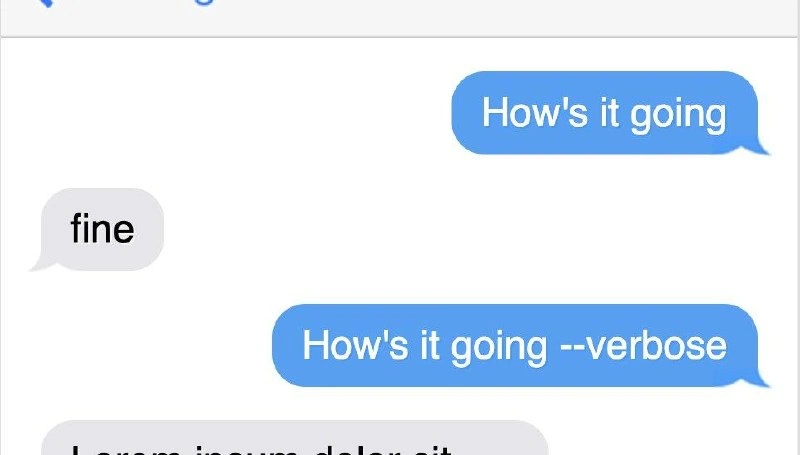
Every app swears it follows XDG, yet `ls -a ~` still looks like nobody's cleaned since 1993
Nothing is ever clean; `ls` just ships with plausible deniability.
git log master git branch
forgot to add /node_modules into .gitignore
Let them discover like in good ol' times
So maybe we fix birth rates
🤔
I love how one wrong reply made reply chain of an entirely different conversation bleed onto here. It also kinda fits this meme
-alh