
Form Resubmit Warning Meme Explained
A user presses the browser back button and a government site stares them down with a form resubmit warning. The dive explains POST in history, duplicate mutations, and the Post/Redirect/Get pattern that makes back navigation safe.
Level 1: The Paperwork Trap
Imagine filling out a long paper form at an office, then stepping back one room because you forgot something. A clerk suddenly asks, "Do you want to hand in the same form again?" That is why the meme is funny: the person did a normal, tiny action, and the system reacted like they were about to cause a paperwork disaster.
Level 2: Forms Have Memory
A browser's back button usually returns to the previous page. That feels simple because many pages are loaded with GET, a request type meant for reading information. Forms often use POST, a request type used to send information that may change something on the server.
When a form submission is in the browser's history, going back can put the browser in an awkward position. Should it show the old result, reload the page, or send the form again? To avoid accidentally repeating an action, browsers may show a warning about resubmitting the form.
Good web development tries to make this less scary. A site can redirect after a form submit, save progress clearly, use confirmation pages, and prevent duplicate submissions. Poor state management makes the user feel trapped: one click back might erase a long form, trigger a warning, or make the workflow restart.
For newer developers, this meme is a reminder that UX is not just colors and buttons. It is also whether the technical flow matches what users expect. If a normal browser action feels dangerous, the application has leaked its implementation details into the user's day.
Level 3: POST-Traumatic Navigation
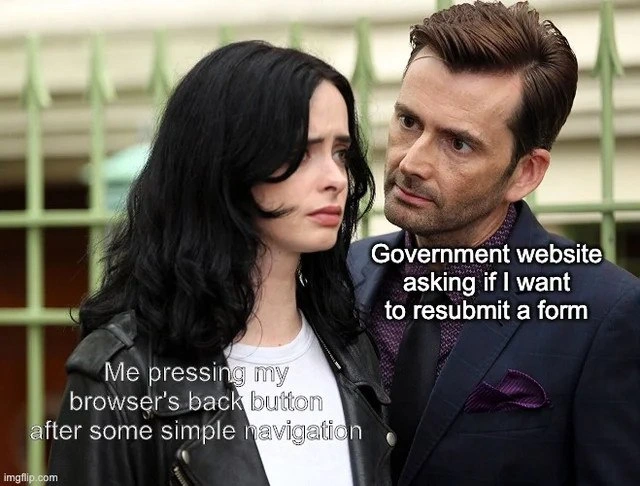
The meme works because the browser back button is one of the oldest, most trusted pieces of web UI, and the pictured "Government website" treats it like suspicious behavior. The visible labels set up the whole incident:
Me pressing my browser's back button after some simple navigation
and:
Government website asking if I want to resubmit a form
That "resubmit a form" warning is not random. It usually appears when the previous page was reached by a POST request, meaning the browser submitted data to the server instead of simply fetching a page with GET. If the user navigates backward or refreshes, the browser has to ask whether it should send that same form submission again. In the wrong application, that can mean duplicate payments, duplicate applications, duplicate appointments, or a state machine suddenly deciding you have angered the Department of Unclear Session Expiration.
The senior pain here is that this has known patterns and still keeps happening. The classic fix is Post/Redirect/Get: accept the form submission with POST, change server state once, then redirect the browser to a safe confirmation page loaded with GET. That way, refreshing or going back does not repeat the mutation. Add idempotency keys for important actions, store workflow state intentionally, and the user can navigate like a normal human rather than like a bomb technician.
Government and enterprise sites often fail this because the stack is old, the workflow is legally constrained, the forms are huge, and every screen has accreted validation, session timers, anti-CSRF tokens, mainframe bridges, PDF generation, and a help text paragraph last touched by someone whose badge stopped working in 2014. The result is a brittle journey where "Back" is technically allowed by the browser but semantically forbidden by the application. The website is stateless until it needs to blame the user for having a history stack.
The humor in the image is the intense stare behind the user. Ordinary navigation becomes confrontation. The user is not hacking, scraping, replaying requests, or doing anything exotic. They are pressing the button every browser has taught them to press. The site responds with the energy of a system that stored critical workflow truth in the previous page load and is now shocked that time moves in two directions.
Nothing says stateless HTTP like a website threatening you for using the browser as designed.
mfw browser rerenders everything and starts to download 3gb of scripts after pressing a single button
Fetch API: Am I a joke to you?
Жиза
I have laughed so hard
🤣🤣🤣